I understand correctly that this is a cloud integration that works through Petkit servers, right? And if I have internet problems, it won’t work for me? Thank you.
Now I have a feeder that works as a relay for the fountain.
In that configuration is possibile to control the fountain (re-adding it?) or I need to wait for a local ble support?
In that configuration you will have all information from fountain, but no control
1 Like
hi there, nice integration! just added my pet kit puramax 2 however am noticing the clean button is greyed out, any ideas why that is? Seems like a key core functionality to kick off a manual clean cycle

Hi @Sleinous yes something wrong. Can you contact me on discord channel? The link is in the GitHub repository. Thank you
ok I will join discord thanks 
 Massive Update: Petkit Integration v1.23.0 is here! Live Streaming & Real-time MQTT support!
Hi everyone!
I’m thrilled to announce the biggest update yet for the Petkit Home Assistant integration. We’ve been working hard to bring some of your most requested features to life, and v1.23.0 is finally ready! 
What’s new?
 Live Streaming: It’s finally here! You can now view the live feed for camera-enabled devices (Purobot series, YumShare Dual/Solo, etc.) directly in HA.
 Real-time Updates: No more waiting for polling. Thanks to Petkit MQTT integration, status changes are now detected instantly.
- And lot more…
All recent devices are supported : Purobot Crystal Duo, Purobot Ultra, Purobot Max Pro 1 & 2, YumShare Dual-hopper 1 & 2…
Enjoy !
3 Likes
Hey @Jezza34000 , do you have an interest in the native Bluetooth side of things for this integration, without using a relay device? Last night I reverse engineered much of the protocol for the Eversweet Solo 2, and most of the other fountains are the same.
I have a working python script that uses bleak to connect to the fountain, read all the settings and values from it and report them, and enough of the protocol to change most of the settings locally and reset filters etc.
The only caveat is it either a) needs to be factory reset and disconnected from the cloud to be able to auth (works for anyone), or b) needs an auth secret to be extracted from a phone that’s connected to it (can be extracted from a rooted android device, or an android emulator).
I would assume many of their other BLE only devices work with a very similar protocol if not identical, so the solution is probably very extensible as well.
Is that possible without cloud? I want to avoid any cloud connections from my setup.
That sounds great. I’m definitely interested in that script. Do you have it in a public repo that I could check out?
Hi !
@mr_ransel @cimm This work has already been done, and all the local Bluetooth functionality is already operational, maintaining the connection to the cloud. It’s just not yet integrated into my component. See: GitHub - slespersen/PetkitW5BLEMQTT: Effortlessly connect and control your Petkit W5 Water Fountains with this powerful Python library. Utilizing BLE and Python to expose device characteristics via MQTT, making integration with Home Assistant a breeze. Your smart home just got smarter! · GitHub
I planned to integrate native Bluetooth into my component, but as with everything else, lack of time is my main problem.
@thundergreen Join my Discord group, there’s a working group making progress on the “No-Cloud” part.
1 Like
~Ah, looks like that’s a private repo presumably, but I’ll take your word for it.~ Edit: No! It’s just missing a T at the end!
If anyone else is impatient, I’ll open source my script and BLE reverse engineering docs next time in have a minute on my laptop.
And yeah it works with or without the cloud, but I see the no-cloud dev channel is in full swing, so I’m sure we’ll end up there eventually for all the devices 
Hello. I have an Petkit Eversweet 2 fountain, and I was wondering about integrating it with my Home Assistant. Unfortunately its connectivity is bluetooth only, and I have nothing else from Petkit which could work as a relay. Seems this integration is moving along to support local bluetooth though - but bluetooth’s range is relatively limited, and the raspberry I’m running it on falls well outside that range.
Does anyone have any ideas perhaps on how I could use this integration still? Is it possible to maybe DIY a relay which I could place near the fountain and have it connect to that?
Hi
Local Bluetooth support for Bluetooth-only fountains like the Eversweet 2 is actively being worked on.
A contribution from a community member is currently under review and, once merged, feat: native local BLE support for water fountains (issue #31) by aavdberg · Pull Request #203 · Jezza34000/homeassistant_petkit · GitHub will allow the integration to communicate with your fountain directly via Bluetooth from the machine running Home Assistant.
Regarding the range limitation you mentioned with your Raspberry Pi: yes, Bluetooth range is typically limited to about 10 meters in open space, less through walls. The most practical DIY solution would be to use a Bluetooth proxy an ESP32 board running ESPHome’s Bluetooth proxy firmware, placed near your fountain, which extends Bluetooth coverage to Home Assistant over your WiFi network.
Home Assistant natively supports these proxies and they are very cheap to set up (~5$ for an ESP32 board).
1 Like
Oh, so there is a straightforward solution for the range issue? I’ll look into it but at a glance it looks perfect - I should even have one of those boards lying around that was meant for another project which fell through. Thank you!
Hi,
I have a Yumshare Dual-Hopper With Camera (D4SH). I recently updated the Petkit integration to 1.25.0 and I can now enable the editing of the scheduled feeding plan in the Dispenser Schedule Card, however the feeder is apparently not treated as a dual hopper as I only can edit the quantity as the sum of the 2 hoppers.
As far as I can tell, there is nothing in the raw_distribution_data string telling the card that there are 2 hoppers.
This is an example of the raw_distribution_data string:
0,2,0,3,1,1,8,0,4,1,2,14,0,3,7,3,20,0,4,1
and this is the regex pattern in the card:
(?[0-9]{1,2}),(?[0-9]{1,2}),(?[0-9]{1,2}),(?[0-9]{1,3}),(?[0-9]{1}),?
Amounts “3” and “4” are actually 2 from hopper1 + 1 from hopper2 and 2+2.
What should I do to have the schedule card show the two hoppers? What am I missing?
Hi,
Currently the map doesn’t support differentiating between the two hoppers.
The request to modify the card is in progress. Please wait until it’s released.
This update will also include support for fully modifying the distribution schedule.
Hey @Jezza34000 just opened a PR out of the blue, but switched over to your integration last week and finally got off of my butt to automate something that I've been meaning to do ever since I first connected my pura max 2 to HA--
I have two cats who generally have similar weights and Petkit often confuses them (no camera on mine). When I remembered to, I was checking my camera and updating the records in the app to ensure correct logging and weight histories, but as you can imagine that is a slog.
I also setup frigate classification this week to differentiate my cats and have a camera monitoring the litter box. So my idea was to marry the frigate classification of which cat was at the litter box around the time of the log record.
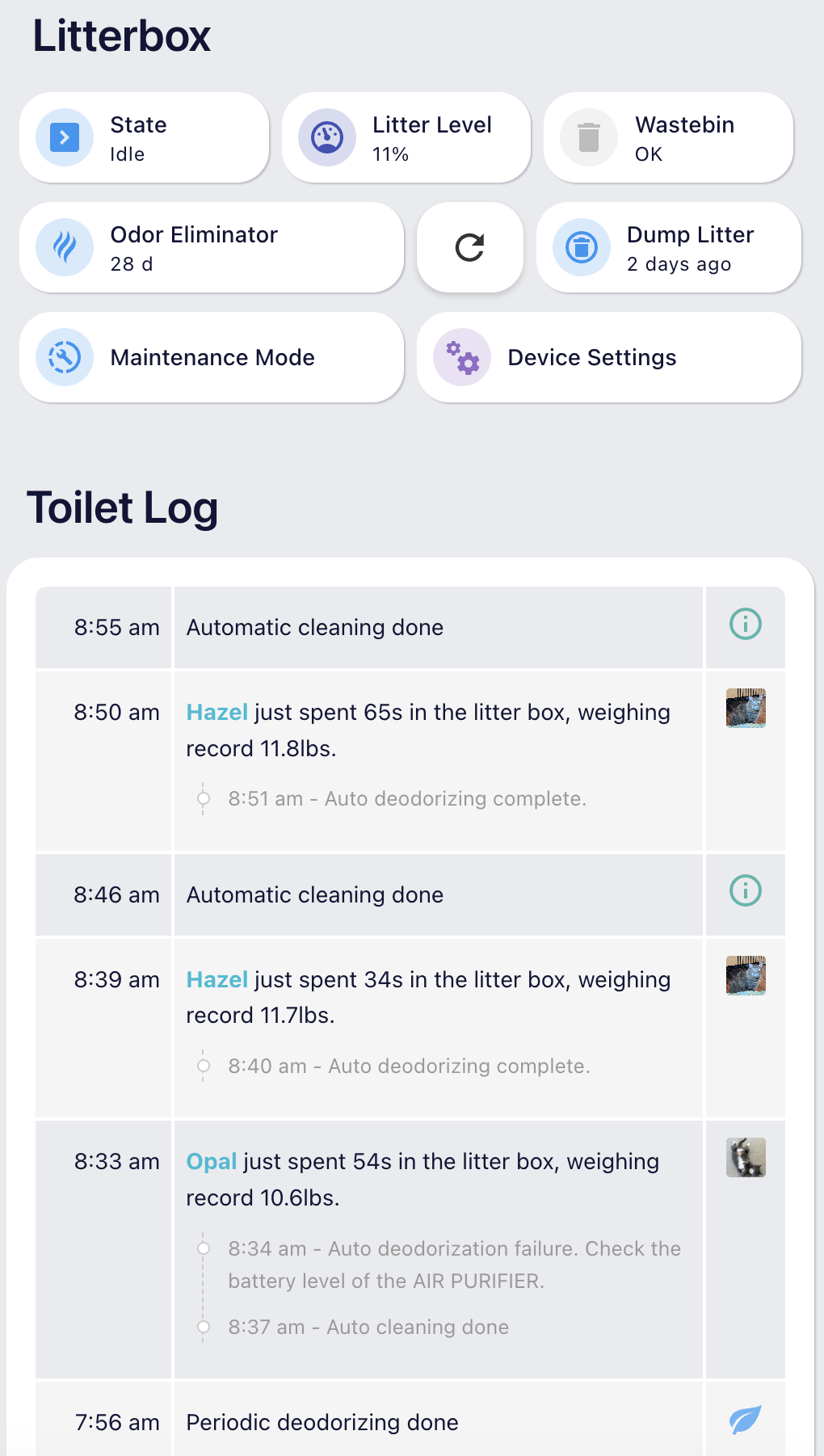
I saw that the integration didn't incorporate the device log yet, so added that as well as support for updating the records similar to the app. There's probably some improvement to the code I'm proposing, but the workflow is working for me currently. Even if folks don't need/want the frigate pet id verification/update, it is nice to have the action/usage log within HA.
Open questions/ideas:
- Not sure if you or anyone in this thread knows what the app is doing regarding the threshold for prompting if a pet's weight should also be updated, in addition to the pet-id update. My proposition is based on sniffing traffic, rather than a decompilation. Right now it will automatically update the weight if it has a delta of more than 500g, which was a guess on my part from vague memories of what the app was doing on my manual updates.
- Could probably move some stuff into blueprints as well, just saw the ones for the fountains
Quick screenshot of my dashboard with the log:
Hi @sovanyio
Thank you for your PR. I'm taking a look a it when i have some free time.
I encountered the same problem as you with my two cats, who weigh almost exactly 5kg, give or take 100g.
The solution I found was to set the lighter cat's profile to 4.7kg and the heavier one to 5.3kg, and most importantly, disable automatic weight updates.
But the other problem was that the PuraMax scale isn't very accurate.
I switched to the Purobot Max Pro with the camera, but even then it's not perfect because my cats are in completely different colors, and the AI makes mistakes 
I think frigate is the best alternative !
Hey, our friend phldgmn/ha-petkit-ble implemented direct BLE access, but I started using it and found quite a few bugs. I reworked it a bit, and it’s available here https://github.com/v1k70rk4/ha-petkit-ble
I hope the changes make it into the original project too.
1 Like