I think there might be an issue of discovering and therefore adding/integrating toothbrushes if not connected directly to the native bluetooth interface of Home Assistant.
In other words: if you use a (ESPhome based) Bluetooth Proxy, you won’t be able to integrate the toothbrush.
Is it worth to create an issue at Issues · esphome/issues · GitHub maybe? Up to now it’s not quite sure if the integration can’t handle Bluetooth Proxy or vice versa.
I assume it is more about the integration. Even directly next to my Pi (running HA) the sonicare is detected (mac address shown) but connection does not work.
Maybe it depends on the toothbrush. My daughters’ toothbrush (Sonycare4Kids) does work well with this integration as long as it as no proxy is used. Unfortunately, my daughter is not willing to brush her teeth in the hallway just for having a direct connection to Home Assistant…
I picked up a set of the Philips Sonicare DiamondClean (HX9912) toothbrushes at Costco, in hopes that I could get them to work with HA. They were not detected by my production instance of HA, so I installed GrumpyMeow’s HACS add-on on my non-prod. After it didn’t detect them either, I realized that I had bluetooth disabled. After enabling and turning on the new brush, it showed up as a detected device. I tried adding, but it failed several times. The last attempt, I moved the brush closer to my Pi and it added. It’s now tracking 10 entities from the brush. I’m a little concerned with how close the brush may need to be to the Pi. Also, not sure yet if it will work with my prod HA since I do have 3 ESPHome devices. From reading above, it seems that ESPHome may not work. Happy to update as I find more information, but thought I’d pass along some encouraging progress since others may be wondering if Sonicare will work in HA.
I wasn’t able to get grumpymeow’s Sonicare BLE HACS integration installed (doesn’t show up on the list in HACS and adding a custom repository tells me that it already exists in the directory).
So instead, I set up an ESP32 BLE Client and connected to the toothbrushes directly. I found the range to be excellent. While testing, the toothbrushes and ESP32 were on different floors.
Those are the same toothbrushes that I connect to.
I would think this method of using an ESPHome BLE Client would work for any Sonicare toothbrush. Some of the toothbrushes have more functionality than others, so service_uuid and characteristic_uuid may change but they can be determined using a bluetooth scanner like nRF Connect (on Android at least).
We just got these toothbrushes for Christmas so I hoping to get this connected like you’ve done. Forgive me if this is obvious, but how did you get the Mac address of the toothbrush?
If you wanna get the MAC using an ESP32, just add this to your device and flash it (wirelessly if fine):
esp32_ble_tracker:
  on_ble_advertise:
    - then:
        - lambda: |-
            // Stores MAC addresses of discovered Sonicare devices
            static std::vector<std::string> known_sonicare_addrs;

            // Check if device name starts with "Philips Sonicare"
            if (x.get_name().rfind("Philips Sonicare", 0) == 0) {
              const auto addr = x.address_str();

              // Skip if device already discovered
              if (std::find(known_sonicare_addrs.begin(),
                          known_sonicare_addrs.end(),
                          addr) != known_sonicare_addrs.end()) {
                return;
              }

              // Add new device to known addresses
              known_sonicare_addrs.push_back(addr);

              // Log discovery of new device
              ESP_LOGW("ble_adv", "New sonicare device");
              ESP_LOGW("ble_adv", "  MAC: %s", addr.c_str());
              ESP_LOGW("ble_adv", "  name: %s", x.get_name().c_str());

              // Build comma-separated list of all known MACs
              std::string mac_list;
              for (size_t i = 0; i < known_sonicare_addrs.size(); i++) {
                mac_list += "MAC" + std::to_string(i+1) + ": " +
                           known_sonicare_addrs[i];

                if (i < known_sonicare_addrs.size() - 1) {
                  mac_list += ", ";
                }
              }

              // Publish updated MAC address list
              id(sonicare_detected_addrs).publish_state(mac_list.c_str());
            }

text_sensor:
  - id: sonicare_detected_addrs
    name: Sonicare detected MAC
    platform: template
    # entity_category: config
    update_interval: never
    lambda: |-
      return {};
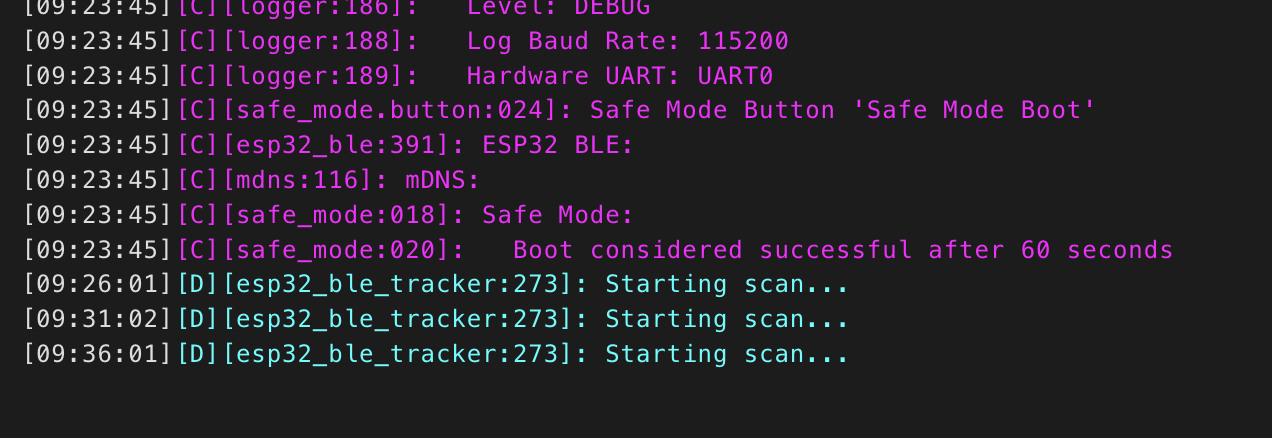
After booting up your device, keep your eyes on the logs and take your toothbrush from it’s base. In a few seconds it will report itself and your ESP32 will capture that into the logs.
Once you take notes of your MAC addresses, you can remove the code above entirely.
I’ve forked the GrumpyMeow’s addon and applied some fixes, but it still has some issues. Most notably, it seems to read battery state probably only shortly after the first connection, and then ignore it until HA restart. But it seems to work much better than the original addon: GitHub - v6ak/sonicare-ble-hacs: Sonicare BLE HACS integration
My main reason for the integration was smart charging that keeps around 50 % of charge. I’ve kind of succeeded – when I have no information about battery state, I blindly charge for some time (15 minutes, I think), otherwise, I decide based on the battery charge level. But still, the ESP32-based integration seems to be worth trying.
Thanks @EdwardTFN - quite to new to ESPs and ESPhome. (This is my second project!). Do I add that to the configuration YAML that @iamjosh provided or do I flash the ESP with that code separately?
Having trouble getting this going. @EdwardTFN I’ve added your code to the config file and flashed the device. It validates in ESPHome and installs great. It’s added to Home Assistant and I see the new MAC address sense.
But it simply does not see Toothbrushes. I’ve even tried to just do a simple vanilla bluetooth proxy device with the added code. again. seems to work but never discovers the tooth brushes.
The code I’ve shared will only help on discovering your toothbrush Mac address, not connecting to the toothbrush, which requires the code suggested by @iamjoshhere.
Got the MAC addresses with @EdwardTFN’s but changing the one line in the code. Thanks!
Now I’m onto installing @iamjosh’s config on the esp.
Unfortunately, I’m getting stuck with the following lines:
./esp32-bluetooth-proxy-e9289c.yaml: In lambda function:
./esp32-bluetooth-proxy-e9289c.yaml:145:11: error: 'LittleEse' was not declared in this scope
./esp32-bluetooth-proxy-e9289c.yaml:148:9: error: 'LittleEse' was not declared in this scope
Not sure if this is a typo? Or hyper-relevant to your setup @iamjosh?