 Piotras Value Bar
Clean and modern sensor value bars with color gradients, scale labels, and alarm indicators.
Designed for readability and flexibility — supports 3 bar orientations and 3 name/value layout modes.


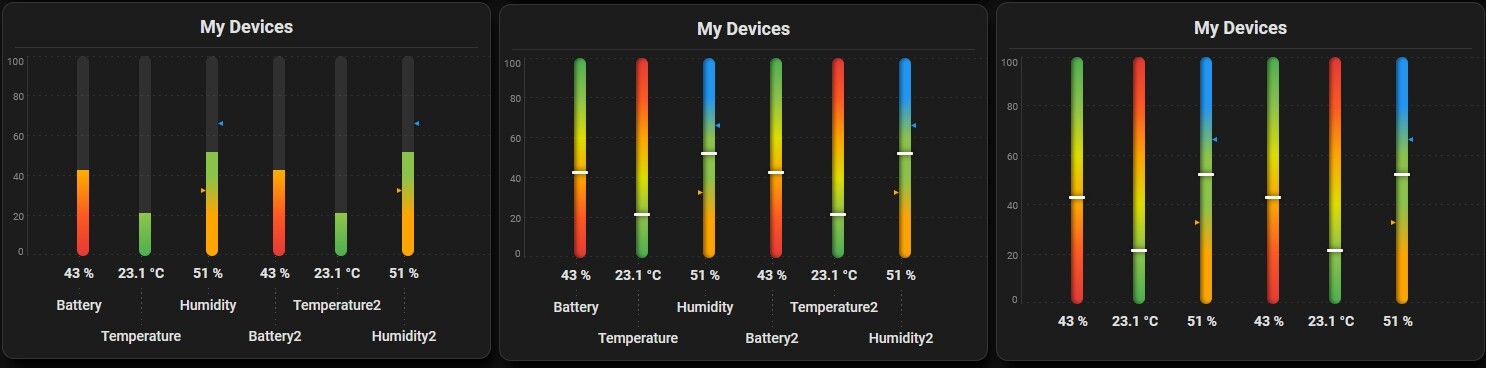

3 bar orientations (layout):
- Horizontal stepped — sharp color zones, ideal for battery levels and percentages
- Horizontal smooth — gradual color transition, ideal for temperature and continuous metrics
- Vertical — side-by-side columns with a shared scale, great for comparing multiple sensors at a glance
3 name/value placement modes (card_layout):
- Classic row — device name on the left, bar in the center, value on the right
- Name + value above bar — compact layout ideal for narrow columns
- Value inside bar — value rendered directly on the bar, works best with a taller bar
Key features:
- Fully customizable color gradient — up to 13 colors per bar, stepped or smooth
- Independent min/max range per device — mix units freely (%, °C, W, kWh)
- Scale labels below each bar (horizontal) or on a shared left column (vertical)
- Alarm indicators — animated arrows appear when a value crosses
alarm_minoralarm_max - White pin marker shows current value position, or switch to progress fill mode
- Click any row to open the entity detail in Home Assistant
- Responsive — automatically adapts to card width
- Horizontal Scroll Navigation
Visual Editor: Full GUI editor — add devices, set color gradients, adjust fonts and layout without touching YAML.
 Installation
Method 1: Via HACS (Recommended)
- Click the button below to automatically add the repository to your HACS:

- Click Add in the pop-up window.
- Once the repository page opens, click Download.
- After downloading, do a Hard reload of your browser.
Method 2: Manual Installation
- Download this repository as a ZIP file and extract it.
- Inside your Home Assistant
config/www/directory, create a new folder namedpiotras-value-bar. - Copy the compiled files (from
dist/folder) intoconfig/www/piotras-value-bar/. - Go to Settings → Dashboards → Resources.
- Click Add Resource and enter:
/local/piotras-value-bar/piotras-value-bar-loader.js?v=1.1.0
- Resource type: JavaScript Module
- Hard reload your browser (
Ctrl+Shift+R).