Podpoint Integration won't authenticate

My podpoint integration authorisation has expired

image

I’ve used the podpoint app on my phone to change my podpoint password as per the docs but still can’t authenticate. The new password logged me back into the ios podpoint app fine
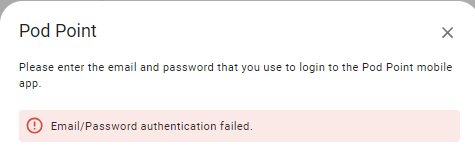
image

Anyone got any ideas? Thanks

I noticed that it is no longer possible to log into podpoint via the link in the docs to change password - they are restricting log-ins to their app only.

Could this be the problem? Another company switching off third party access? Just a thought

OK fixed. Updated the integration to the latest version and it authenticated OK

Wish there was some way to be reminded about updates to HACS components

I have just joined onto home assistant and have managed to get the podpoint intergration however it is not letting me sign up using my credentials. I have the most up to date update and have reset my password but it still wont let me add it. Help anyone on what I can do?

1 Like

Same problem

1 Like

Ditto - falls over on authenticate

Log details (ERROR)

This error originated from a custom integration.

Logger: podpointclient.helpers
Source: custom_components/pod_point/config_flow.py:128
integration: Pod Point (documentation, issues)
First occurred: 09:27:53 (4 occurrences)
Last logged: 09:33:07

  • Error updating access token. Auth Error (200) - Error processing access token response. ‘idToken’ not found in json.
  • Authentication error when creating auth or session. (<class ‘podpointclient.errors.AuthError’>)
  • Error updating access token. Auth Error (400) - { “error”: { “code”: 400, “message”: “INVALID_LOGIN_CREDENTIALS”, “errors”: [ { “message”: “INVALID_LOGIN_CREDENTIALS”, “domain”: “global”, “reason”: “invalid” } ] } }

Logger: homeassistant.util.loop
Source: util/loop.py:137
First occurred: 09:27:25 (1 occurrence)
Last logged: 09:27:25

Detected blocking call to import_module with args (‘custom_components.pod_point.config_flow’,) inside the event loop by integration ‘config’ at homeassistant/components/config/config_entries.py, line 195: return await super()._post_impl(request, data) (offender: /usr/src/homeassistant/homeassistant/loader.py, line 1295: return importlib.import_module(f"{self.pkg_path}.{platform_name}")), please create a bug report at GitHub · Where software is built For developers, please see Blocking operations with asyncio | Home Assistant Developer Docs Traceback (most recent call last): File “”, line 198, in _run_module_as_main File “”, line 88, in _run_code File “/usr/src/homeassistant/homeassistant/main.py”, line 229, in sys.exit(main()) File “/usr/src/homeassistant/homeassistant/main.py”, line 215, in main exit_code = runner.run(runtime_conf) File “/usr/src/homeassistant/homeassistant/runner.py”, line 289, in run return loop.run_until_complete(setup_and_run_hass(runtime_config)) File “/usr/local/lib/python3.13/asyncio/base_events.py”, line 712, in run_until_complete self.run_forever() File “/usr/local/lib/python3.13/asyncio/base_events.py”, line 683, in run_forever self._run_once() File “/usr/local/lib/python3.13/asyncio/base_events.py”, line 2050, in _run_once handle._run() File “/usr/local/lib/python3.13/asyncio/events.py”, line 89, in _run self._context.run(self._callback, *self._args) File “/usr/local/lib/python3.13/site-packages/aiohttp/web_protocol.py”, line 510, in _handle_request resp = await request_handler(request) File “/usr/local/lib/python3.13/site-packages/aiohttp/web_app.py”, line 569, in _handle return await handler(request) File “/usr/local/lib/python3.13/site-packages/aiohttp/web_middlewares.py”, line 117, in impl return await handler(request) File “/usr/src/homeassistant/homeassistant/components/http/security_filter.py”, line 92, in security_filter_middleware return await handler(request) File “/usr/src/homeassistant/homeassistant/components/http/forwarded.py”, line 87, in forwarded_middleware return await handler(request) File “/usr/src/homeassistant/homeassistant/components/http/request_context.py”, line 26, in request_context_middleware return await handler(request) File “/usr/src/homeassistant/homeassistant/components/http/ban.py”, line 86, in ban_middleware return await handler(request) File “/usr/src/homeassistant/homeassistant/components/http/auth.py”, line 242, in auth_middleware return await handler(request) File “/usr/src/homeassistant/homeassistant/components/http/headers.py”, line 41, in headers_middleware response = await handler(request) File “/usr/src/homeassistant/homeassistant/helpers/http.py”, line 73, in handle result = await handler(request, **request.match_info) File “/usr/src/homeassistant/homeassistant/components/http/decorators.py”, line 83, in with_admin return await func(self, request, *args, **kwargs) File “/usr/src/homeassistant/homeassistant/components/http/data_validator.py”, line 74, in wrapper return await method(view, request, data, *args, **kwargs) File “/usr/src/homeassistant/homeassistant/components/config/config_entries.py”, line 188, in post return await self._post_impl(request, data) File “/usr/src/homeassistant/homeassistant/components/config/config_entries.py”, line 195, in _post_impl return await super()._post_impl(request, data)

Hi, i have just tried this and still receiving the same issue. I have used the Pod point app to change password to try and prompt it but no luck. Pease advise

Please ignore. In order to work you must turn off 2 factor authentication within the Pod Point App to allow latest version to work.

Dumb question! Where in the app do you turn off 2FA. I’ve opened ‘account’ the ‘2-step verification’ but there’s no option there to turn it off.