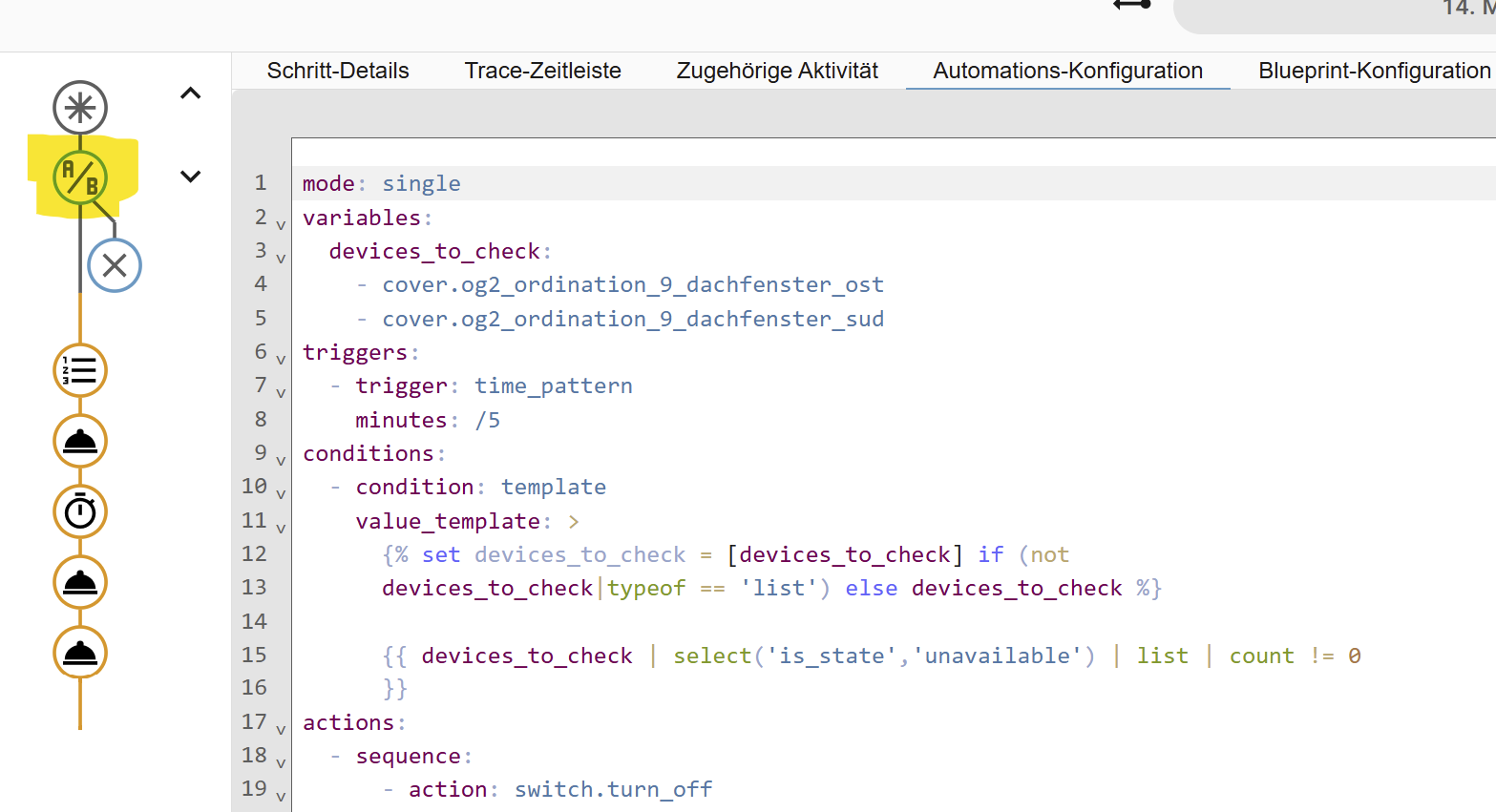
Hi,
just want to test a list of devices, if one of them is unavailable, I want to power cycle a box.
I wrote an automation, just testing one of 14 devices and this works fine.
I need this functionallity at thre different sites, so a blueprint would be nice.
Input is a list of devices to check and output is the switch to do power cycling.
Now I fail in formulating the condition.
Idea: Itterate through the list of devices and set a variable. After that, check variable and block rest of the automation if everything is fine and continue if power cycling is needed.
Thanks for helping out
blueprint:
  name: Velux Gateway Watchdog
  description: Power cycle the Velux gateway if some devices went offline
  domain: automation
  input:
    velux_devices:
      name: Velux Devices
      selector:
        entity:
          filter:
            domain: cover
          multiple: true
    gateway_power:
      name: Velux Gateway Power Switch
      selector:
        entity:
          multiple: false
          filter:
            domain: switch
mode: single

variables:
  devices_to_check: !input 'velux_devices'

triggers:
  - trigger: time_pattern
    minutes: /5

conditions:
  - condition: template
    value_template: ->
      {% set velux_total = namespace(state = "ok") %}
      {%   for dev in devices_to_check %}
      {%     if states(dev) == "unavailable" %}
      {%      set velux_total.state = "unavailable" %}
      {%     endif %}
      {%   endfor %}
      {% if velux_total.state != "ok" %}
        true
      {% else %}
        false
      {% endif %}

actions:
  - sequence:
      - action: switch.turn_off
        metadata: {}
        target:
          entity_id: !input gateway_power
        data: {}
      - delay:
          hours: 0
          minutes: 0
          seconds: 10
          milliseconds: 0
      - action: switch.turn_on
        metadata: {}
        target:
          entity_id: !input gateway_power
        data: {}
      - action: notify.email
        metadata: {}
        data:
          title: Ordi-Alarm (Velux Gateway Watchdog BP)
          message: Das Velux-Gateway musste neu gestartet werden.
I don't know whether it would cause it to fail, but the block-scalar style indicator usually precedes the chomping indicator i.e. value_template: >- not value_template: ->...
And, that template could be a lot shorter
# To pass on either 'unknown' or 'unavailable'
conditions:
  - alias: Check for non-zero count of unknown/unavailable entities.
    condition: template
    value_template: |
      {% set devices_to_check = [devices_to_check] if (not devices_to_check|typeof == 'list') else devices_to_check %}
      {{ devices_to_check | reject('has_value') | list | count != 0 }}


# To pass on only 'unavailable'
conditions:
  - alias: Check for non-zero count of unavailable entities.
    condition: template
    value_template:  |
      {% set devices_to_check = [devices_to_check] if (not devices_to_check|typeof == 'list') else devices_to_check %}
      {{ devices_to_check | select('is_state','unavailable') | list | count != 0 }}
As far as I understand, we built a set of all devices without 'has value'. Ok, hoping my devices will have this property. Than we create a list of all members of the set and if the count of the list is not zero, we have a problem.
Unfortunately, I get the same result: the condition is always true and I always reboot the box.
I have updated my original post... the first version did not account for device_to_check returning a single entity. That's one of the annoying things about some of the selector.
It is not an attribute, it is a function/test.
It is being used here as a test within a reject function to check the states of all the entities supplied to the reject. Any entity that passes has_value is rejected, then the remaining are counted. If the count is not 0, then the power cycle actions should be executed.
Sorry, didn't help.
I used two devices, so this can't be a problem for the simplee solution, now I updated the BP and reload everything, but still run through ...
Is there any chance to debug a BP, loo into the list, check by hand, steep by step?
The automation created by the blueprint will have a debug trace just like any other automation.
If you really need it step-by-step you'll want to breakout the parts of the template into variables, that way they will show up in the debug trace with their values.
I put this in Development Tools/ templates:
{{ ['cover.og2_ordination_9_dachfenster_sud', 'cover.og2_ordination_9_dachfenster_ost'] | select('is_state','unavailable') | list | count != 0 }}
and I set the state with Development Tools/States.
Testing the template that way is working for me. Are you sure you used the correct entity ID and spelled the state correctly... those would be the most likely causes. Also, try refreshing your browser just to be sure it's not a caching issue.
Are you manually triggering the automation...? That skips both the trigger and conditions, which would explain a lot, including the lack of color in the Trace.
Sometimes the juice isn't worth the squeeze. You (& 2 others who have been trying to help) have been at it for over 2 hours.
It would have taken you 10 minutes to copy over the working automation &/or to create a group helper for your other 2 instances rather than rely on a blueprint.
@Shadow first,
I am new to HA and I want to learn. This is my second BP. The syntax of BPs and all the quoating ... its like one of the 4GL in the 1980, hard to write and harder to understand ....
Part of that learning experience is to learn to cut your losses & use a simpler solution, even if it means revisiting later.
Hell, I've been using HA for close to 7 years & still remember blueprints being launched. I still haven't created a single blueprint since simple automations work identically & aren't worth the headache unless you intend to share something unique.
Especially for someone who's just starting out, the creation of blueprints requires a pretty advanced knowledge of HA. Your time might be better spent on learning the basics.
Walk before you run...
If that's what you have been doing, ever since you removed the single-quotes, then you have been testing it incorrectly.
Your original Template Condition was fine (longer than necessary but fine). The single-quotes were wrong. They converted the variable named velux_devices into a string. That means the variable devices_to_check was not assigned the correct value (and the Template Condition would fail).
I am glad to hear it works now. Please consider marking my post above with the Solution tag. It will help others find answers to similar questions.
I agree with you. I highly recommend anyone that creates automations/scripts/blueprints take a few minutes to read Troubleshooting automations. It will save them time later during testing.