Hi everyone!
I have a simple light control / dimmer circuit, with ESP32 and MOSFETs that controls 12 or 24V LED lights. It’s built into light fixture and beside using the “smart” way of switching the light on/off via app I wanted to keep the wall switch function. The switch detection circuit senses the voltage on the live wire from wall switch (230V AC/50Hz), limits the current, rectifies it and switches an optocoupler, from which the output connects to ESP32 GPIO.
Everything works as intended 99% of the time. Except… And here comes my problem: every day the light turns on without any reason couple of times. It seems like some voltage spike or some HF interference makes the AC detection circuit to switch on.
In older version of YAML I used a simple binary_sensor with delayed_off filter:
binary_sensor:
  - platform: gpio
    pin:
      number: GPIO13
      mode:
        input: true
        pullup: true
      inverted: True
    name: "Power sense 1"
    id: power_sense_1
    internal: True
    filters:
      - delayed_off: 50ms
    on_state:
      then:
        - if:
            condition:
              - binary_sensor.is_on: power_sense_1
            then:
               - script.stop: timer_off
               - light.turn_on:
                   id: light_mono1
                   brightness: 100%
I tried to increase the delay in filter up to 500ms, it didn’t help.
I thought the filter might have some bug, so I came with different, quite complicated approach. I’m checking the state of the power_sense GPIO every 5ms and if it’s ON, I increase the counter value (global variable). And every 30ms the value is decreased no matter what. When the counter reaches value of 100, the light is turned on.
The problem remains, the light turns on 3-5 times during the night. What’s interesting, it almost never happens during the day. It happens between 18:00 - 23:00 and then again early in the morning 5:00 - 8:00.
My suspicion was some other appliance might interfere, like well pump, but I am monitoring its cycle and it doesn’t match.
I have 3 of these dimmer circuits on different places, they all have this random turn on problem, but their times are different.
Does anyone have any clue, what causes these random turn-ons? Or what would be the best way to sense the wall switch state?
The circuit diagram is here, please ignore the triac dimmer part, it’s not used, the parts aren’t even on PCB.
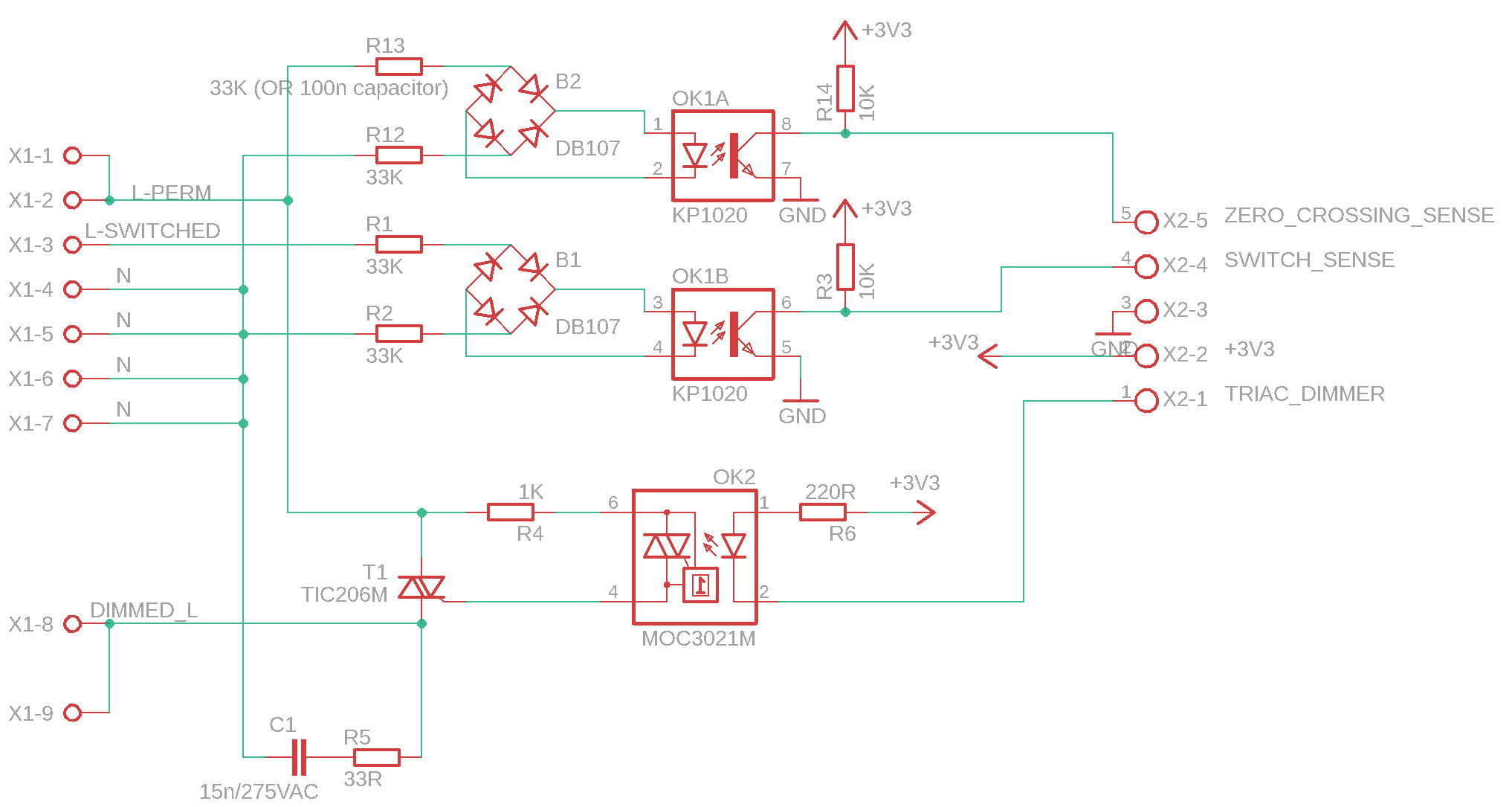
And here’s the complete YAML:
esphome:
  name: rgbccw-dimmer
  friendly_name: RGBCCW Dimmer

substitutions:
  devicename: RGBCCW Dimmer

esp32:
  board: esp32dev
  framework:
    type: arduino

# Enable logging
logger:

# Enable Home Assistant API
api:
  encryption:
    key: "xxxxxxxxxxxxxxxxxxxxx"

ota:
  - platform: esphome
    password: "xxxxxxxxxxxxxxxxxx"


wifi:
  ssid: !secret wifi_ssid
  password: !secret wifi_password

  ap:
    ssid: "Rgbccw-Dimmer Fallback Hotspot"
    password: "xxxxxxxxxxxx"

captive_portal:


globals:
  - id: ps_on_1
    type: int
    restore_value: False
    initial_value: "0"
  - id: light_on_1
    type: int
    restore_value: False
    initial_value: "0"
  - id: ps_on_2
    type: int
    restore_value: False
    initial_value: "0"
  - id: light_on_2
    type: int
    restore_value: False
    initial_value: "0"


  - id: counter_on
    type: int
    restore_value: false
    initial_value: "0"


# D16, D17 - relays
# D13 - power sense from wall switch
# D25, D26 - PWC outputs
# D23 - One wire
# D2 - builtin LED
# D33, D32 - free GPIOs


output:
  - platform: ledc
    pin: GPIO27
    id: ledc_output_w
    frequency: 9765Hz
  - platform: ledc
    pin: GPIO26
    id: ledc_output_r
    frequency: 9765Hz
  - platform: ledc
    pin: GPIO25
    id: ledc_output_b
    frequency: 9765Hz
  - platform: ledc
    pin: GPIO33
    id: ledc_output_g
    frequency: 9765Hz
  - platform: ledc
    pin: GPIO32
    id: ledc_output_c
    frequency: 9765Hz
  - platform: ledc
    pin: GPIO23
    id: ledc_output_mono1
    frequency: 9765Hz
  - platform: ledc
    pin: GPIO22
    id: ledc_output_mono2
    frequency: 9765Hz


light:
  - platform: rgbww
    id: light_1
    name: "RGBWW LED Strip"
    red: ledc_output_r
    green: ledc_output_g
    blue: ledc_output_b
    cold_white: ledc_output_c
    warm_white: ledc_output_w
    cold_white_color_temperature: 6536 K
    warm_white_color_temperature: 2000 K
    gamma_correct: 1.0
    default_transition_length: 2s

  - platform: monochromatic
    output: ledc_output_mono1
    id: light_mono1
    name: "White LED 1"
    default_transition_length: 2s
    gamma_correct: 1.2
    restore_mode: RESTORE_DEFAULT_OFF
  - platform: monochromatic
    output: ledc_output_mono2
    id: light_mono2
    name: "White LED 2"
    default_transition_length: 2s
    gamma_correct: 1.5
    restore_mode: RESTORE_DEFAULT_OFF

status_led:
  pin:
    number: GPIO2


button:
  - platform: restart
    name: "Restart"
  - platform: template
    name: "L1+"
    id: button_l1_plus
    on_press:
      - light.dim_relative:
          id: light_1
          relative_brightness: 1%
  - platform: template
    name: "L1-"
    id: button_l1_minus
    on_press:
      - light.dim_relative:
          id: light_1
          relative_brightness: -1%


interval:
  - interval: 5ms
    then:
      - if:
          condition:
            - binary_sensor.is_on: power_sense_1
          then:
            - lambda: |-
                if (id(ps_on_1) < 105) {
                  id(ps_on_1)++;
                }
                id(counter_on)++;
            - if:
                all:
                  - lambda: |-
                      return (id(ps_on_1) > 100);
                  - lambda: |-
                      return (id(light_on_1) == 0);
                then:
                  - lambda: 'id(light_on_1) = 1;'
                  - script.stop: timer1_off
                  - light.turn_on:
                      id: light_mono1
                      brightness: 100%

      - if:
          condition:
            - binary_sensor.is_on: power_sense_2
          then:
            - lambda: |-
                if (id(ps_on_2) < 105) {
                  id(ps_on_2)++;
                }
            - if:
                all:
                  - lambda: |-
                      return (id(ps_on_2) > 100);
                  - lambda: 'return id(light_on_2) == 0;'
                then:
                  - lambda: 'id(light_on_2) = 1;'
                  - script.stop: timer2_off
                  - light.turn_on:
                      id: light_mono2
                      brightness: 100%

  - interval: 30ms
    then:
      - if:
          condition:
            lambda: |-
              return (id(ps_on_1) > 0);
          then:
            - lambda: |-
                id(ps_on_1)--;
            - if:
                condition:
                  lambda: |-
                    return(id(ps_on_1) == 0);
                then:
                  - script.execute: timer1_off

      - if:
          condition:
            lambda: |-
              return (id(ps_on_2) > 0);
          then:
            - lambda: |-
                id(ps_on_2)--;
            - if:
                condition:
                  lambda: |-
                    return(id(ps_on_2) == 0);
                then:
                  - script.execute: timer2_off


binary_sensor:
  - platform: gpio
    pin:
      number: GPIO13
      mode:
        input: true
        pullup: true
      inverted: true
    name: "Power sense 1"
    id: power_sense_1
    internal: true

  - platform: gpio
    pin:
      number: GPIO14
      mode:
        input: true
        pullup: true
      inverted: true
    name: "Power sense 2"
    id: power_sense_2
    internal: true


one_wire:
  - platform: gpio
    pin: GPIO5

sensor:
  - platform: dallas_temp
    id: board_temp
    address: 0x330218606459ff28
    name: "Board temperature"
    update_interval: 60s

  - platform: dallas_temp
    id: ext_temp
    address: 0x4100000084eb3a28
    name: "External sensor temperature"
    update_interval: 60s

  - platform: template
    id: counter_on_sensor
    name: "Counter ON"
    update_interval: 10s
    lambda: |-
      return id(counter_on);

  - platform: wifi_signal
    name: ${devicename} wifi signal
    update_interval: 600s

  # human readable uptime sensor output to the text sensor above
  - platform: uptime
    name: ${devicename} Uptime in Days
    id: uptime_sensor_days
    update_interval: 60s
    on_raw_value:
      then:
        - text_sensor.template.publish:
            id: uptime_human
            state: !lambda |-
              int seconds = round(id(uptime_sensor_days).raw_state);
              int days = seconds / (24 * 3600);
              seconds = seconds % (24 * 3600);
              int hours = seconds / 3600;
              seconds = seconds % 3600;
              int minutes = seconds /  60;
              seconds = seconds % 60;
              return (
                (days ? String(days) + "d " : "") +
                (hours ? String(hours) + "h " : "") +
                (minutes ? String(minutes) + "m " : "") +
                (String(seconds) + "s")
              ).c_str();


# Text sensors with general information.
text_sensor:
  # Expose ESPHome version as sensor.
  - platform: version
    name: $devicename Version
  # Expose WiFi information as sensors.
  - platform: wifi_info
    ip_address:
      name: $devicename IP
    bssid:
      name: $devicename BSSID

  # human readable update text sensor from sensor:uptime
  - platform: template
    name: Uptime Human Readable
    id: uptime_human
    icon: mdi:clock-start


script:
  - id: timer1_off
    then:
      - light.turn_on:
          id: light_mono1
          brightness: 40%
      - delay: 15s
      - light.turn_on:
          id: light_mono1
          brightness: 10%
      - delay: 5s
      - light.turn_off: light_mono1
      - lambda: 'id(light_on_1) = 0;'

  - id: timer2_off
    then:
      - light.turn_on:
          id: light_mono2
          brightness: 40%
      - delay: 15s
      - light.turn_on:
          id: light_mono2
          brightness: 10%
      - delay: 5s
      - light.turn_off: light_mono2
      - lambda: 'id(light_on_2) = 0;'
 i did wrote (and meant) correctly that it’s delayed_ON correct one to use, not delayed_OFF.