I have a sensor which stores tomorrow’s sunrise time for further manipulation in other template sensors. Until yesterday, this all worked fine, but following the change to summer time, the template sensor converts the ‘+0100’ time to an ‘actual’ ‘+0000’ time, which creates issues down the line, as I need to keep the ‘+0100’.
In the template editor, when I copy and paste the ‘as_timestamp’ bit, the result is correct as ‘2026-03-30T06:44:14+0100’. However, in the same template editor, when I check states(‘sensor.sunrise_tomorrow’) I get ‘2026-03-30T05:44:14+00:00’.
Edit… misunderstood.
Thought you wanted the time to be correct.
But replacing the z part of the timestamp doesn’t make sense.
What are you using this for?
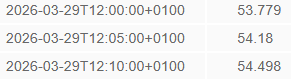
I am running an app which generates an array of figures like this:
What I do is extract the value at sunrise and at sunset from this array. I have a second sensor which rounds the sunrise and sunset times to the nearest five minutes so it matches the date/time entries in the array, at least, that was before the clocks changed .
If you want the time value to be the time for “+0100”, you would use the info from timetuple like Hellis81 showed, then just concatenate the tz value onto the datetime string instead of getting it from the datetime itself.
Thanks @Didgeridrew, but even when I use your “timetuple” code, the states(‘sensor.sunrise_tomorrow’) still returns ‘+0000’. My issue is that the array I’m extracting data from, uses ‘+0100’ since the clocks changed, so what I feed into it to perform the lookup has to match that. I’m thinking the best thing might be to manipulate the rounded date/time sensors at the point where I interrogate the array.
Thank you @Didgeridrew and @jan-tdy, the underlying issue was the device_class timestamp. As per the Gemini link: “When you define a sensor with device_class: timestamp, Home Assistant ignores your custom string formatting and internally converts the value to a Python datetime object in UTC”. When I removed the device_class from the rounded sunrise and sunset sensors, these remained as strings and worked fine for querying the array.
May I suggest using the sun2 integration instead.
Its better implemented, because it is not bound to the altitude in HA, and it has mutiple sensors for sunrise and sunset, so you will never get the issue with sunset before sunrise or vice versa.
Hi @WallyR, I do use the sun2 integration as well for other things. In this case, whether I use the built-in sun integration or the sun2 integration, I’d still need to use the attribute ‘tomorrow’, and I’d still need to round it to the nearest five minutes, so it wouldn’t make any difference.
 .
.