Does this support creating scripts and not just automations?
Not yet, but it’s on my todo list
1 Like
Frederico,
I’m observing the progress of the wonderful tool and have now installed V0.5.0.
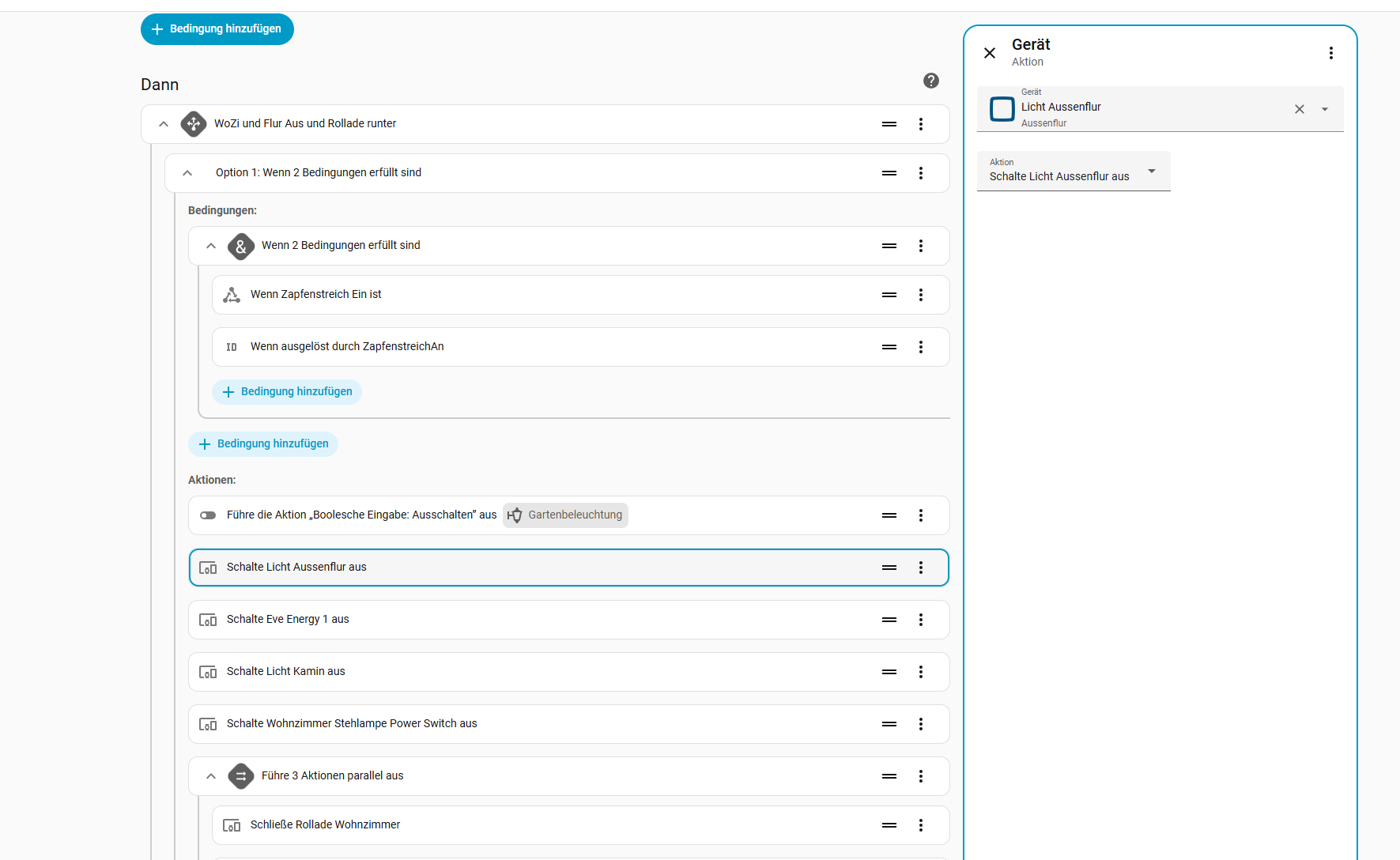
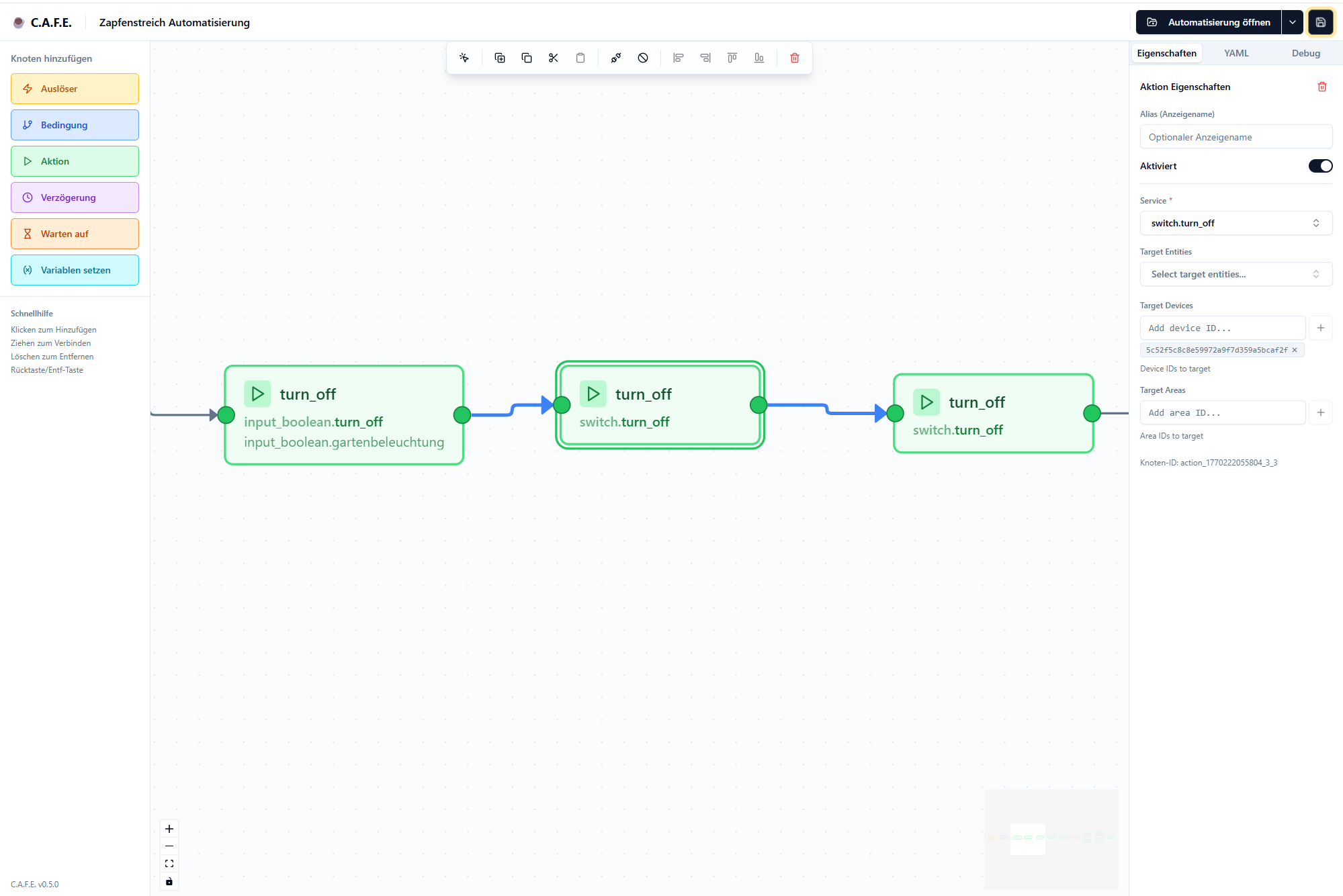
But I still do not see the entity names which are provided by other add-ons. In my case it is OPENCCU. I have attached a picture from the automation editior which shows the entity names correctly ilo. the same automation in C.A.F.E. which just shows an UUID. Of course this prohibits editing/expanding the automation as one can’t say which entitiy is behind the UUID.
The automation yaml code contains only the UUID , so I assume there is some kind of retrival function which resolves the UUID with a name.
Are there plans to address this?
Many thanks for your great work.
Rainer
alias: Zapfenstreich Automatisierung
description: ""
triggers:
  - entity_id:
      - input_boolean.zapfenstreich
    from: "off"
    to: "on"
    id: ZapfenstreichAn
    trigger: state
conditions: []
actions:
  - alias: WoZi und Flur Aus und Rollade runter
    choose:
      - conditions:
          - condition: and
            conditions:
              - condition: state
                entity_id: input_boolean.zapfenstreich
                state: "on"
              - condition: trigger
                id:
                  - ZapfenstreichAn
        sequence:
          - target:
              entity_id: input_boolean.gartenbeleuchtung
            data: {}
            action: input_boolean.turn_off
          - type: turn_off
            device_id: 5c52f5c8c8e59972a9f7d359a5bcaf2f
            entity_id: 4906302ad1fd63fb7a358ce3e30146e4
            domain: switch
          - type: turn_off
            device_id: ee8b0db24fc5d9ca7cf1e9ad4d406e45
            entity_id: 616e70061d2add8d6295bd2204b25f7d
            domain: switch
          - type: turn_off
            device_id: b8ac21757194c9fba5cac089fd8ede51
            entity_id: cace6d6a39ec897bc6560f945c7fc689
            domain: switch
          - type: turn_off
            device_id: 8255c85496be5b6962a278ebdd7411e8
            entity_id: 62f9263c0006b6f9acdf12a35139e095
            domain: switch
          - parallel:
              - device_id: ad7a2c892d7118cbfcdc89d2e2b3323d
                domain: cover
                entity_id: 63bff85b1243e4da6edf77f186725bc6
                type: close
                enabled: true
              - sequence:
                  - delay:
                      hours: 0
                      minutes: 0
                      seconds: 10
                      milliseconds: 0
                  - type: turn_off
                    device_id: e2a191a70faa1f7d07a4068b51b417fb
                    entity_id: fe1b6aecf59b3bdd146aec7d8e589496
                    domain: light
                  - target:
                      entity_id: input_boolean.zapfenstreich
                    data: {}
                    action: input_boolean.turn_off
                alias: Licht Esstisch nach x Sek ausschalten
              - action: input_boolean.turn_off
                metadata: {}
                data: {}
                target:
                  entity_id: input_boolean.gartenbeleuchtung
          - type: turn_off
            device_id: 38156e5e85c33bd4d2129e9c7a67c5af
            entity_id: f7cbd6770bbb3bb5276c3d8e991e9b4d
            domain: switch
mode: single
Thanks Bro. 10 out 10
i m gettting this error
Could not fetch configuration automatically. You can now create a new flow with the same name.
but he is the YAML
alias: My Phone Alarm about to go off
description: ""
triggers:
  - trigger: calendar
    entity_id: calendar.stephan_shift
    event: start
    offset: "0:0:0"
conditions:
  - condition: state
    entity_id: person.stephan
    state: home
actions:
  - data:
      entity_id: switch.kettle_power
    action: switch.turn_on
  - delay: "00:00:50"
  - choose:
      - conditions:
          - condition: state
            entity_id: person.stephan
            state: home
        sequence:
          - action: light.turn_on
            entity_id: light.his_side
  - choose:
      - conditions:
          - condition: state
            entity_id: sensor.day_night
            state: Night
        sequence:
          - action: light.turn_on
            entity_id: light.kitchen
  - delay: "00:15:00"
  - action: tts.google_say
    data:
      entity_id: media_player.living_room_display
      message: Hay.. Take some vitamin C Please
  - action: tts.google_say
    data:
      entity_id: media_player.living_room_display
      message: >
        {# Event Report #} {%- macro getReport() -%} {% set cc = 0 %}

          {% if states.sensor.recycling.state | int == 0 %}
            Looks like rubbish day again.. recycling bin the Yellow one.
              {% set cc = 2 %}
          {% else %}

          {% endif %}


          {% if states.sensor.landfill.state | int == 0 %}

            {% if cc | int == 2 %}
              and the landfill bin also  the Red one.
              {% set cc = 3 %}
            {% else %}
              Looks like rubbish day again.. landfill one the Red one.
            {% set cc = 3 %}
            {% endif %}


          {% else %}

          {% endif %}

          {% if states.sensor.glass.state | int == 0 %}
            {% if cc | int == 3 %}
              and the glass bin also the blue one.
            {% else %}
              Looks like rubbish day again.. glass bin  the blue one.
              {%endif %}
            {% set cc = 4 %}
          {% else %}

          {% endif %}
          I think you should take one up.


        {%- endmacro -%}


        {# a macro that removes all newline characters, empty spaces, and
        returns formatted text  #}
          {%- macro cleanup(data) -%}
            {%- for item in data.split("\n")  if item | trim != "" -%}
              {{ item | trim }} {% endfor -%}
        {%- endmacro -%}

        {# a macro to call all macros :)  #}
          {%- macro mother_of_all_macros() -%}
            {{ getReport() }}
          {%- endmacro -%}

          {# Call the macro  #}
          {{- cleanup(mother_of_all_macros()) -}}
  - delay: "00:10:00"
  - choose:
      - conditions:
          - condition: state
            entity_id: cover.garage_door
            state: closed
          - condition: state
            entity_id: person.stephan
            state: home
        sequence:
          - action: script.turn_on
            entity_id: script.reset_garage_door
          - action: timer.change
            metadata: {}
            data:
              duration: "00:30:00"
            target:
              entity_id: timer.garage_timer
          - action: tts.google_say
            data:
              entity_id: media_player.living_room_display
              message: Garage OPEN.
    default:
      - action: timer.change
        metadata: {}
        data:
          duration: "00:30:00"
        target:
          entity_id: timer.garage_timer
  - if:
      - condition: state
        entity_id: timer.garage_timer
        state: active
    then:
      - action: timer.change
        metadata: {}
        data:
          duration: "00:30:00"
        target:
          entity_id: timer.garage_timer
mode: single
This is fantastic! There are a few things I would like to see added though.
- I want more information in the boxes on the graph, so I don’t have to click on each one to see the details.
- I would like to see it support “choose”.
- It should recognize automations that use blueprints and at least inform the user why it can’t open them.
(also, another vote for scripts, which I see are on your roadmap)
Hi, this looks great. But as already requested please add “choose” support as this is heavily implemented in most of my automations. Thankyou very much.
Amazing project!
Trying this now but face some issues with condition.
Probably something that I do wrong?
Case:
Condition seems to not be saved.
Make a simple project in C.A.F.E
Graphical UI and YAML code in C.A.F.E reflects my condition, seems OK.
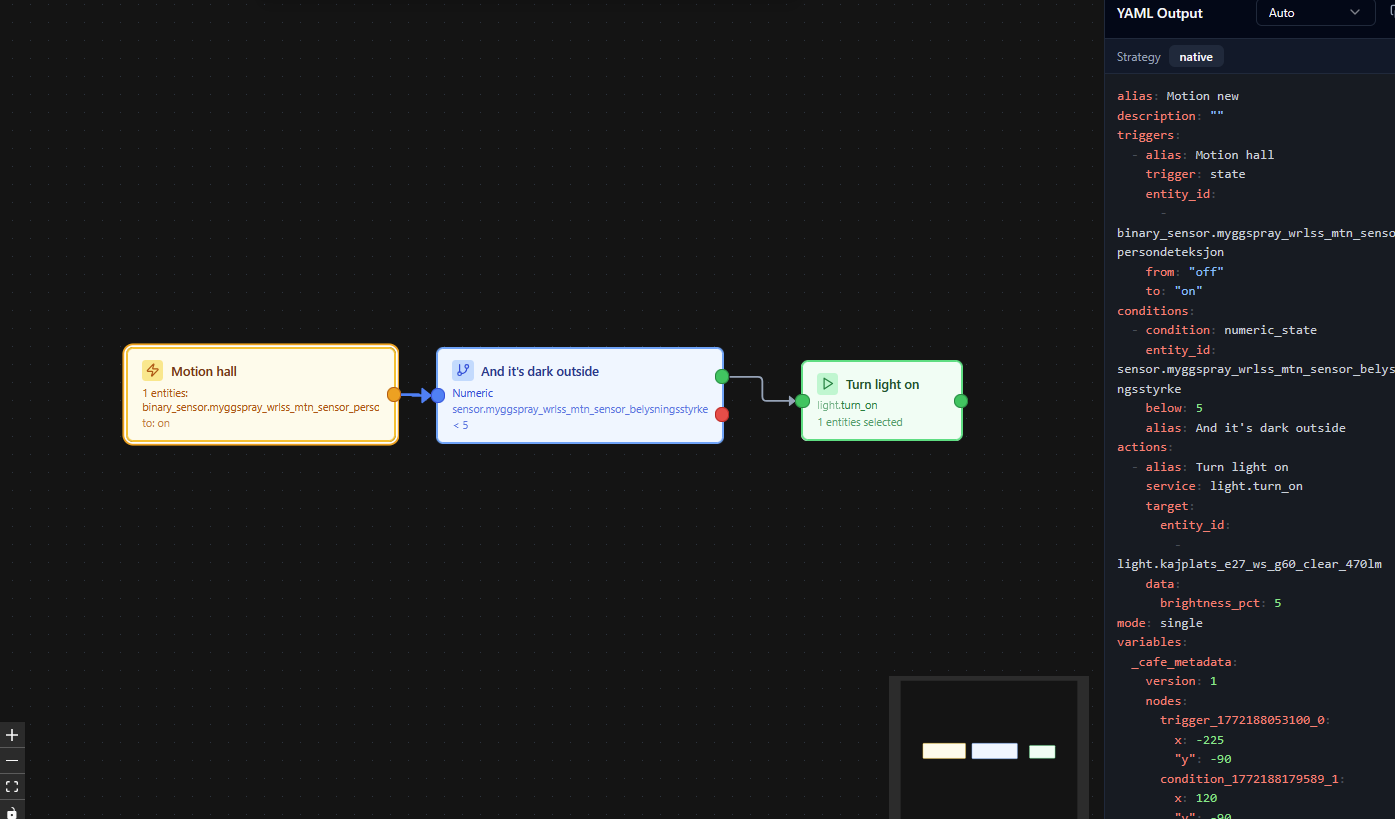
Save it and then open in HA/Automation & scenes:
No condition visible, not in HA YAML either.
Do I make some in the wrong way?
(I was only allowed to upload one photo)
Thanks!
Frederico,
I have the feeling, looking at the version releases and the latest github actions, that the software development is stalled or paused.
Is this right?
Can please you shed some light into the future plans?
/Rainer
Hey there. I am busy with work, life, and with other Home Assistant projects but I plan to resume development soon.
1 Like
I released 0.6.0 with fixes, improvements and new features. I’m going to release again soon with more improvements
4 Likes
Can you do Case or Switch statements with this? Trying to replace Node Red automations and finding this a bit basic and having to have complicated Yes/No logic only off a single trigger.
Also, I thought I read you could do call in’s/out’s with this? I’m not seeing any information on the documentation about that?
Love this "Third Way" - I hope it continues to be developed since it is the right and only way to move forward in my mind. 
It's a very good project, it's a pity that it's not developing anymore 