Google Icons for Android app: https://fonts.google.com/icons
SF Symbols for iOS app: SF Symbols - Apple Developer
Glad it got working!
Google Icons for Android app: https://fonts.google.com/icons
SF Symbols for iOS app: SF Symbols - Apple Developer
Glad it got working!
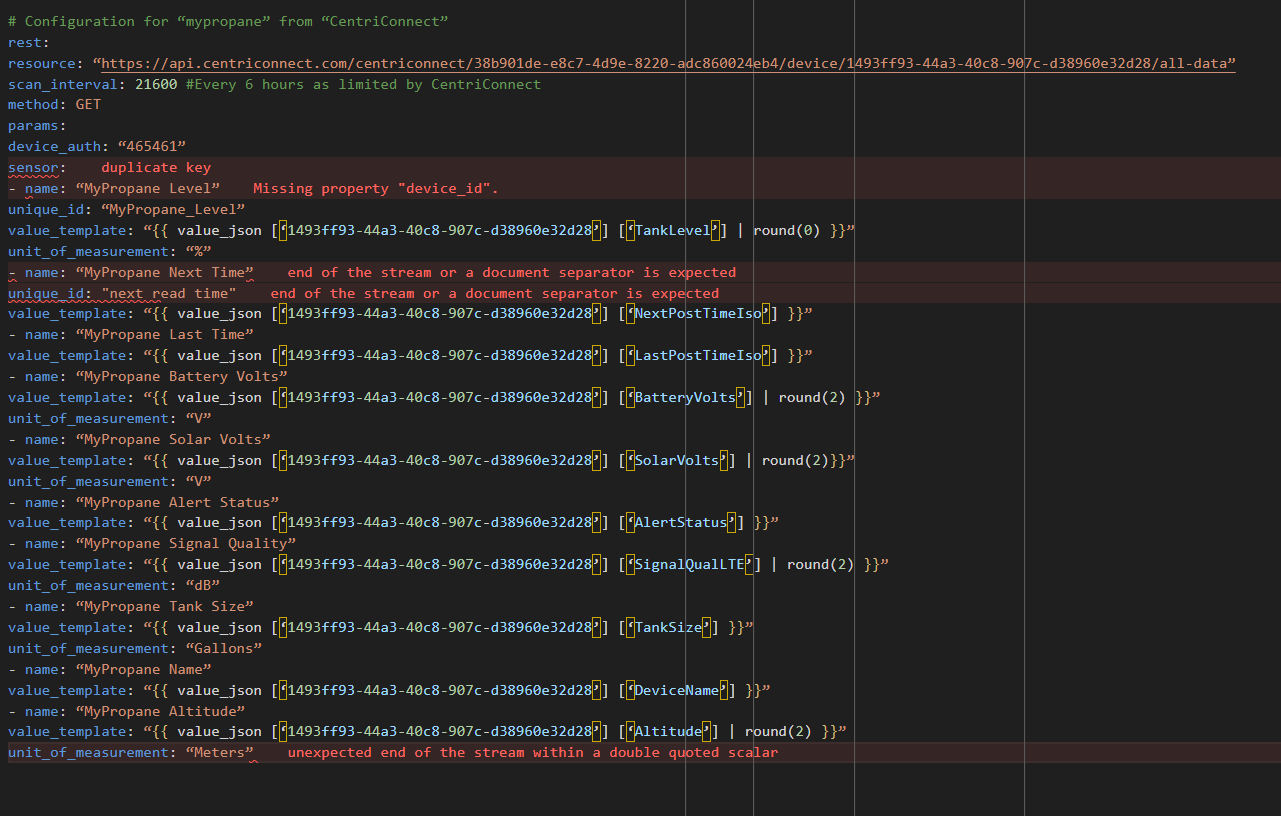
Soooo Close but…
I have everything ID wise correct, I can see the RESTful integration in devices and services, but when I select one of the items I receive the following.
This entity (‘sensor.centriconnect_sensor_tank_level’) does not have a unique ID, therefore its settings cannot be managed from the UI. See the documentation for more detail.
everything in the config.yaml looks identical to the yaml above, obviously with my own id information.
I am not sure what I am missing.
Thanks for the information on the icons.
See my reply to @philgrocks …still having issues.
Ah yes, I ran into that problem as well. I neglected to update when I fixed that problem… I’m soooo sorry!
So what is needed is to add unique id for each item. Here is the update code. See unique_id under each name.
Configuration for “mypropane” from “CentriConnect”
rest:
resource: “https://api.centriconnect.com/centriconnect/**user id goes here**/device/device id goes here/all-data”
scan_interval: 21600 #Every 6 hours as limited by CentriConnect
method: GET
params:
device_auth: “device auth goes here”
sensor:
- name: “MyPropane Level”
unique_id: “MyPropane_Level”
value_template: “{{ value_json [‘bf1b1b89-bba9-44f3-a337-2f2efe02a665’] [‘TankLevel’] | round(0) }}”
unit_of_measurement: “%”
- name: “MyPropane Next Time”
value_template: “{{ value_json [‘bf1b1b89-bba9-44f3-a337-2f2efe02a665’] [‘NextPostTimeIso’] }}”
- name: “MyPropane Last Time”
value_template: “{{ value_json [‘bf1b1b89-bba9-44f3-a337-2f2efe02a665’] [‘LastPostTimeIso’] }}”
- name: “MyPropane Battery Volts”
value_template: “{{ value_json [‘bf1b1b89-bba9-44f3-a337-2f2efe02a665’] [‘BatteryVolts’] | round(2) }}”
unit_of_measurement: “V”
- name: “MyPropane Solar Volts”
value_template: “{{ value_json [‘bf1b1b89-bba9-44f3-a337-2f2efe02a665’] [‘SolarVolts’] | round(2)}}”
unit_of_measurement: “V”
- name: “MyPropane Alert Status”
value_template: “{{ value_json [‘bf1b1b89-bba9-44f3-a337-2f2efe02a665’] [‘AlertStatus’] }}”
- name: “MyPropane Signal Quality”
value_template: “{{ value_json [‘bf1b1b89-bba9-44f3-a337-2f2efe02a665’] [‘SignalQualLTE’] | round(2) }}”
unit_of_measurement: “dB”
- name: “MyPropane Tank Size”
value_template: “{{ value_json [‘bf1b1b89-bba9-44f3-a337-2f2efe02a665’] [‘TankSize’] }}”
unit_of_measurement: “Gallons”
- name: “MyPropane Name”
value_template: “{{ value_json [‘bf1b1b89-bba9-44f3-a337-2f2efe02a665’] [‘DeviceName’] }}”
- name: “MyPropane Altitude”
value_template: “{{ value_json [‘bf1b1b89-bba9-44f3-a337-2f2efe02a665’] [‘Altitude’] | round(2) }}”
unit_of_measurement: “Meters”
ETA: OK , made some progress. with the help of an online editor I was able to get the formatting correct and after restarting everything I now have entities in the RESTful integration that are manageable!! of course I also have duplicate unmanageable entries too…not sure how to get rid of those. But a step in the right direction.
When creating a gauge card I am receiving the following

Am I correct in assuming this is because the data hasn’t been pulled from the unit yet? 
I need to walk away from this for a little bit. if you code above works, then something is getting lost in the copy and paste.
Here is what I am seeing in config.yaml, and every time I try to fix something another thing goes red. I try to add the unique ids and get more errors
My lack of understanding of with yaml is probably a contributor
I really appreciate the assist, but I think I am going to curl up in the corner now.
I have run into odd characters getting into the code when I would cut and paste. I suspect this has happened to you.
What I had to do (and it is a pain) is to retype each line and delete the code that was pasted.
Hey LiQuid COOled can you provide a list of prerequisites? I have Custom Button Card and Custom Mushroom Card, but cannot get your code to show me anything 
I am on vacation, but will assist you next week when I get back if you still need assistance.
hey @LiQuid_cOOled! If the info is here, I’ve missed it. How do you get the info from the Mopeka bridge into HA? Are you scraping a website or something more glamorous?
I think I missed something the script run but I am not getting data any time I add a Gauge I am getting “Entity is non-numeric: sensor.my_propane_level”
Fixed the errors…Fixed Used Chat GPT there was a typo with quotes
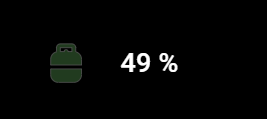
Could you share your icon somewhere?
Here is my card and code.
type: custom:mushroom-legacy-template-card
primary: >-
  {{ [0, [((states('sensor.propane_tank_tank_weight') | float - 17) / 21 * 100),
  100] | min] | max | round(0) }} %
secondary: ""
icon: mdi:propane-tank
entity: sensor.propane_tank_tank_weight
icon_color: |-
  {% set bl = states('sensor.propane_tank_tank_weight') | int %}

  {% if bl < 20 %} orange
  {% elif bl < 27 %} blue
  {% elif bl < 38 %} green
  {% elif bl == 38 %} green
  {% endif %}
card_mod:
  style:
    mushroom-shape-icon$: |
      .shape {
        --shape-color: none !important;
      }
    .: |
      ha-state-icon {
        animation: pulse 2s ease-in-out infinite;
        stroke: white;
            stroke-width: .4px;
      }
      ha-card {
      background: none !important;
      border: none !important;
      }
visibility:
  - condition: numeric_state
    entity: sensor.propane_tank_tank_weight
    below: 20
I think @LiQuid_cOOled helped me with animation. Thank you
Could you please share the icon image? I haven’t been able to do it here at all.
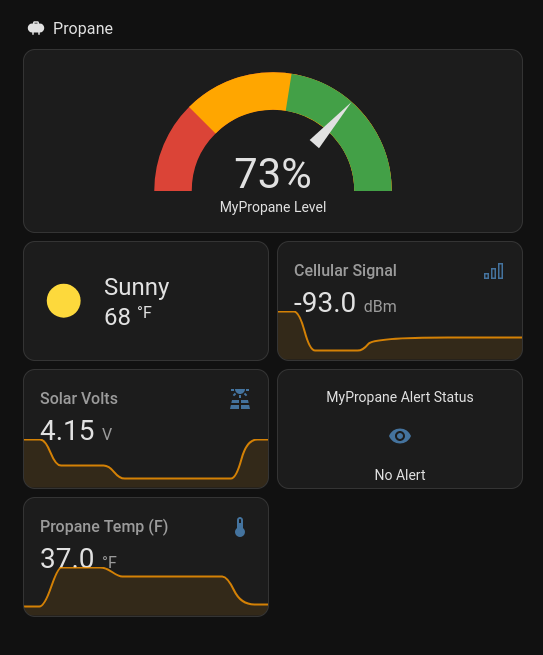
Super happy with this product so far. The base of the unit is magnetic but my tank is underground so I just attached some magnetic discs to the green plastic lid and it looks great. Here is my HA display. Simple but informative.
Configuration was super easy and Nick at Centri was very responsive.
A couple new sensors were recently added for tank temp in C and F (at bottom):
# configuration for "<ASSET_NAME>" from "CentriConnect"
rest:
  scan_interval: 21600  # Every 6 hours (CentriConnect limit)
  resource: "https://api.centriconnect.com/centriconnect/<ACCOUNT_UUID>/device/<DEVICE_UUID>/all-data"
  method: GET
  params:
    device_auth: "<DEVICE_AUTH_CODE>"
  sensor:
    - name: "<ASSET_NAME> Level"
      value_template: "{{ value_json['<DEVICE_UUID>']['TankLevel'] | round(0) }}"
      unit_of_measurement: "%"
      state_class: measurement

    - name: "<ASSET_NAME> Next Time"
      value_template: "{{ value_json['<DEVICE_UUID>']['NextPostTimeIso'] }}"
      device_class: timestamp

    - name: "<ASSET_NAME> Last Time"
      value_template: "{{ value_json['<DEVICE_UUID>']['LastPostTimeIso'] }}"
      device_class: timestamp

    - name: "<ASSET_NAME> Battery Volts"
      value_template: "{{ value_json['<DEVICE_UUID>']['BatteryVolts'] | round(2) }}"
      unit_of_measurement: "V"
      device_class: voltage
      state_class: measurement

    - name: "<ASSET_NAME> Solar Volts"
      value_template: "{{ value_json['<DEVICE_UUID>']['SolarVolts'] | round(2) }}"
      unit_of_measurement: "V"
      device_class: voltage
      state_class: measurement

    - name: "<ASSET_NAME> Alert Status"
      value_template: "{{ value_json['<DEVICE_UUID>']['AlertStatus'] }}"

    - name: "<ASSET_NAME> Signal Quality"
      value_template: "{{ value_json['<DEVICE_UUID>']['SignalQualLTE'] | round(2) }}"
      unit_of_measurement: "dBm"
      device_class: signal_strength
      state_class: measurement

    - name: "<ASSET_NAME> Tank Size"
      value_template: "{{ value_json['<DEVICE_UUID>']['TankSize'] }}"
      unit_of_measurement: "gal"
      state_class: measurement

    - name: "<ASSET_NAME> Name"
      value_template: "{{ value_json['<DEVICE_UUID>']['DeviceName'] }}"

    - name: "<ASSET_NAME> Altitude"
      value_template: "{{ value_json['<DEVICE_UUID>']['Altitude'] | round(2) }}"
      unit_of_measurement: "m"
      device_class: distance
      state_class: measurement

    - name: "<ASSET_NAME> Temperature (°C)"
      value_template: "{{ value_json['<DEVICE_UUID>']['DeviceTempCelsius'] | float | round(1) }}"
      unit_of_measurement: "°C"
      device_class: temperature
      state_class: measurement

    - name: "<ASSET_NAME> Temperature (°F)"
      value_template: "{{ value_json['<DEVICE_UUID>']['DeviceTempFahrenheit'] | float | round(1) }}"
      unit_of_measurement: "°F"
      device_class: temperature
      state_class: measurement
It’s a SVG so I’d have to email it to you. DM me if that is an option for you.
Here is the file as a PNG. You can use an online PNG to SVG converter like this
Has anyone using the Centri device worked out how to calculate consumption and store it in a way where it could be used on the energy dashboard?