Proxmox 9 + Home Assistant OS (HAOS) boot issues after OVA/QCOW2 import — tried OVMF/SeaBIOS, SATA/SCSI, still drops to UEFI shell or hangs

I’m trying to install Home Assistant OS (HAOS) 16.3 on Proxmox VE 9 and I’m stuck in a boot loop. I’d appreciate any guidance on the correct firmware/bus combination (or if there’s a known issue with the HAOS OVA/QCOW2 artifacts on PVE 9).

I have tried using the community script, gives me the exact same results. I rebuilt the proxmox environment from scratch again, but getting the same result as well.

Weird enough this is the only VM giving me trouble.

Environment

  • Proxmox VE: 9 (Debian-based)
  • QEMU: (Proxmox reports creation-qemu ~10.1.x in VM meta)
  • Storage: LVM-thin on local SSDs
  • VM: “home-assistant”, 2 cores, 4096 MB RAM, machine q35

Symptoms

Symptom A: UEFI Interactive Shell

When configured with OVMF/UEFI, VM boots into the UEFI Interactive Shell:

  • The shell shows a mapping table with only BLK0 and no FS0: .
  • Because there is no FS0:, there’s no visible EFI System Partition/bootloader to launch (no \EFI\BOOT\BOOTX64.EFI found).

Symptom B: SeaBIOS “Booting from Hard Disk…” hang

When configured with SeaBIOS (legacy BIOS), it prints:

Booting from Hard Disk…

…and then it never progresses.

What I’ve tried (overview)

1) Using the HAOS qcow2 (haos_ova-16.3.qcow2)

  • Verified the file is intact and readable:
    • qemu-img info haos_ova-16.3.qcow2 shows qcow2, virtual size 32G, disk size ~928MiB, no corruption.
  • Imported into Proxmox storage and attached as VM disk.

OVMF + EFI disk + Secure Boot disabled

  • bios: ovmf
  • Added efidisk0 with pre-enrolled-keys=0 (Secure Boot off)
  • Tried multiple buses:
    • VirtIO-SCSI (scsihw: virtio-scsi-single, disk on scsi0)
    • SATA (sata0)
  • Explicit boot order set each time (boot: order=scsi0 or boot: order=sata0, also set bootdisk accordingly)

Result: Always ends at UEFI Interactive Shell, mapping only BLK0, no FS0.

SeaBIOS

  • Switched firmware to bios: seabios
  • Removed efidisk0 when switching to SeaBIOS
  • Tried disk on SATA and SCSI

Result: Hangs at “Booting from Hard Disk…”

2) Using the HAOS OVA + qm importovf

I also tried the OVA workflow:

  • Downloaded haos_ova-16.3.ova
  • Imported using:
    • qm importovf haos_ova-16.3.ova
  • Then attempted boot under both:
    • OVMF + EFI disk
    • SeaBIOS

Result: Still either UEFI shell or SeaBIOS hang.

Current VM config example (one of the attempted configs)

Example config that ended in UEFI shell:

  • bios: ovmf
  • machine: q35
  • efidisk0: :vm--disk-1,pre-enrolled-keys=0,size=4M
  • Disk attached to either scsi0 or sata0
  • boot: order=scsi0 (or order=sata0)

Questions for the community

  1. For HAOS 16.3 on Proxmox VE 9, what is the known-good combination of:
  • firmware (OVMF vs SeaBIOS),
  • disk bus (virtio-scsi vs virtio-blk vs SATA),
  • and whether an EFI vars disk is required?
  1. Has anyone seen HAOS OVA/QCOW2 boot into UEFI shell with only BLK0 (no FS0)? Does that indicate missing ESP, or a bus/driver mismatch in OVMF?

Any recommended “golden path” steps (or known-working import method) would be greatly appreciated.
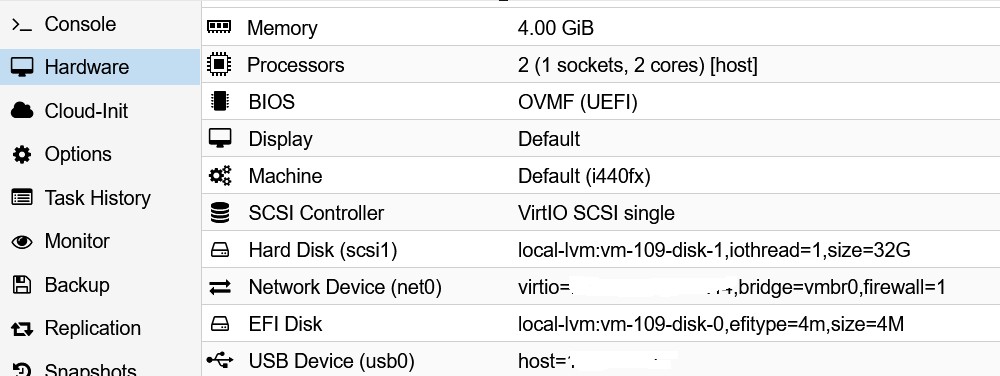
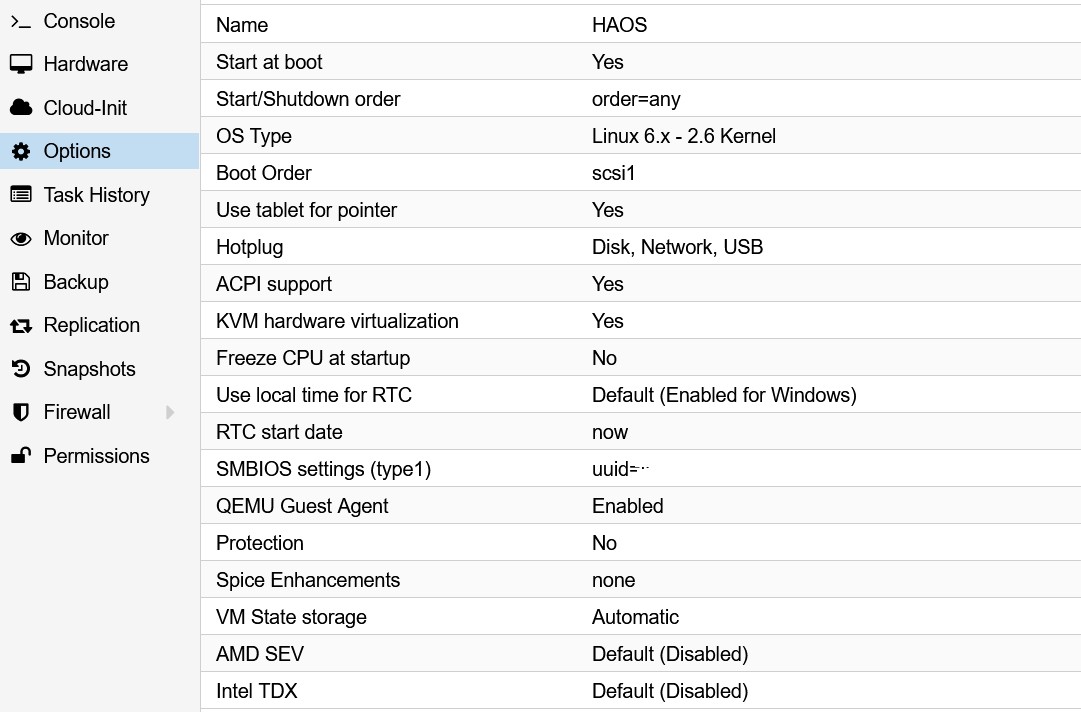
Try this guide. Guaranteed results.

https://portal.habitats.tech/Home+Assistant+(HA)/3.+HAOS+-+Install+VM

Hello Franksfin,

it worked like a charm for me in PVE 9 with this config

Nota Bene : don’t create a 32GB disk attached to your VM, the disk is in the image itself.

As far as I remember, I first push the OVA file to /root and then extracted it with a tar command such as : tar -xf HAOS.ova
once it’s done, you will have a vmdk file if I remember well.
Then you import the HAOS.vmdk file with the command

qm disk import 100 HAOS.vmdk local-lvm -format raw (100 is here an example for VM ID, adapt it with your value)

Once the 32GB disk is displayed in your VM, you must ADD it with the GUI, if not done, the disk will not be really attached to your VM.

Then you just have to modify your boot sequence and it should work.

the second screenshot about the config

Hi, welcome to the forum.
Have you tried the script from Proxmox VE Helper-Scripts ?

Was running into this problem for a long time, could not figure it out for the life of me. Finally got it working! It wasn’t about secure boot, preregistered keys, UEFI, disk controllers, etc.

The problem, for me, was silently happening in the qm disk import / qm importdisk step. This while reporting successful disk import. I don’t know why, but it must have been choking on the HAOS partition table. This happened every one of the ~dozen times I tried it, and the biggest clue was that it would sometimes completely mangle the partition table, whereas other times it would just throw CPU faults on VM startup.

I wasn’t catching those CPU faults at first, because from the main VM console, it looked like it was just hanging at boot. However, when I attached a serial device and connected the xterm.js console early enough during VM startup, I would see errors like this:

BdsDxe: loading Boot0002 "UEFI QEMU QEMU HARDDISK " from PciRoot(0x0)/Pci(0x5,0x0)/Pci(0x1,0x0)/Scsi(0x0,0x0)
BdsDxe: starting Boot0002 "UEFI QEMU QEMU HARDDISK " from PciRoot(0x0)/Pci(0x5,0x0)/Pci(0x1,0x0)/Scsi(0x0,0x0)
!!!! X64 Exception Type - 0D(#GP - General Protection)  CPU Apic ID - 00000000 !!!!
ExceptionData - 0000000000000000
RIP  - 00000000BD9E7F5B, CS  - 0000000000000038, RFLAGS - 0000000000010286
RAX  - 00000000BD9FCD20, RCX - 000000000000000D, RDX - 0000000000000008
RBX  - A6FAF5EC4E2B04C6, RSP - 00000000BFE8B630, RBP - 00000000BFE8B650
RSI  - 0000000000000174, RDI - 00000000BD9EF4D2
R8   - 0000000000000002, R9  - 00000000BD9E11D8, R10 - 00000000BD9EAE38
R11  - 0000000000000000, R12 - 00000000BD9EF4D2, R13 - 00000000BD9E9B54
R14  - 0000000000000174, R15 - 0000000000000002
DS   - 0000000000000030, ES  - 0000000000000030, FS  - 0000000000000030
GS   - 0000000000000030, SS  - 0000000000000030
CR0  - 0000000080010033, CR2 - 0000000000000000, CR3 - 00000000BFC01000
CR4  - 0000000000000668, CR8 - 0000000000000000
DR0  - 0000000000000000, DR1 - 0000000000000000, DR2 - 0000000000000000
DR3  - 0000000000000000, DR6 - 00000000FFFF0FF0, DR7 - 0000000000000400
GDTR - 00000000BF9DB000 0000000000000047, LDTR - 0000000000000000
IDTR - 00000000BF202018 0000000000000FFF,   TR - 0000000000000000
FXSAVE_STATE - 00000000BFE8B290
!!!! Find image based on IP(0xBD9E7F5B) (No PDB)  (ImageBase=00000000BD9E1000, EntryPoint=00000000BD9E2000) !!!! 

Other times, when qm disk import failed to copy the partition table at all (despite reporting success!), I would instead get output like this:

BdsDxe: failed to load Boot0003 "UEFI QEMU QEMU HARDDISK " from PciRoot(0x0)/Pci(0x1E,0x0)/Pci(0x1,0x0)/Pci(0x5,0x0)/Scsi(0x0,0x0): Not Found

Solution

Imaging the disk manually solved the problem:

wget <...>/haos_ova-<...>.qcow2.xz
unxz <file>.qcow2.xz
qemu-img info <file>.qcow2 # sanity check
qemu-img convert -f qcow2 -O raw <input>.qcow2 <output>.img
dd if=<file>.img of=<your vm disk> bs=4M status=progress conf=fsync
fdisk -l <your vm disk> # verify partition table

# for example:
wget https://github.com/home-assistant/operating-system/releases/download/17.0/haos_ova-17.0.qcow2.xz
unxz haos_ova-17.0.qcow2.xz
qemu-img info haos_ova-17.0.qcow2
qemu-img convert -f qcow2 -O raw haos_ova-17.0.qcow2 haos_ova-17.0.img
dd if=haos_ova-17.0.img of=/dev/mapper/StorageArray--vg-vm--105--disk--1 bs=4M status=progress conv=fsync
1 Like