TL;DR: The LD2450’s Bluetooth is on by default. Anyone nearby with a phone can
find it, install HLKRadarTool, connect without a PIN or password, and use filter
controls to effectively blind the sensor. If an LD2450 is used for security,
that is a critical issue: disable its Bluetooth, then secure the device’s other
interfaces too.
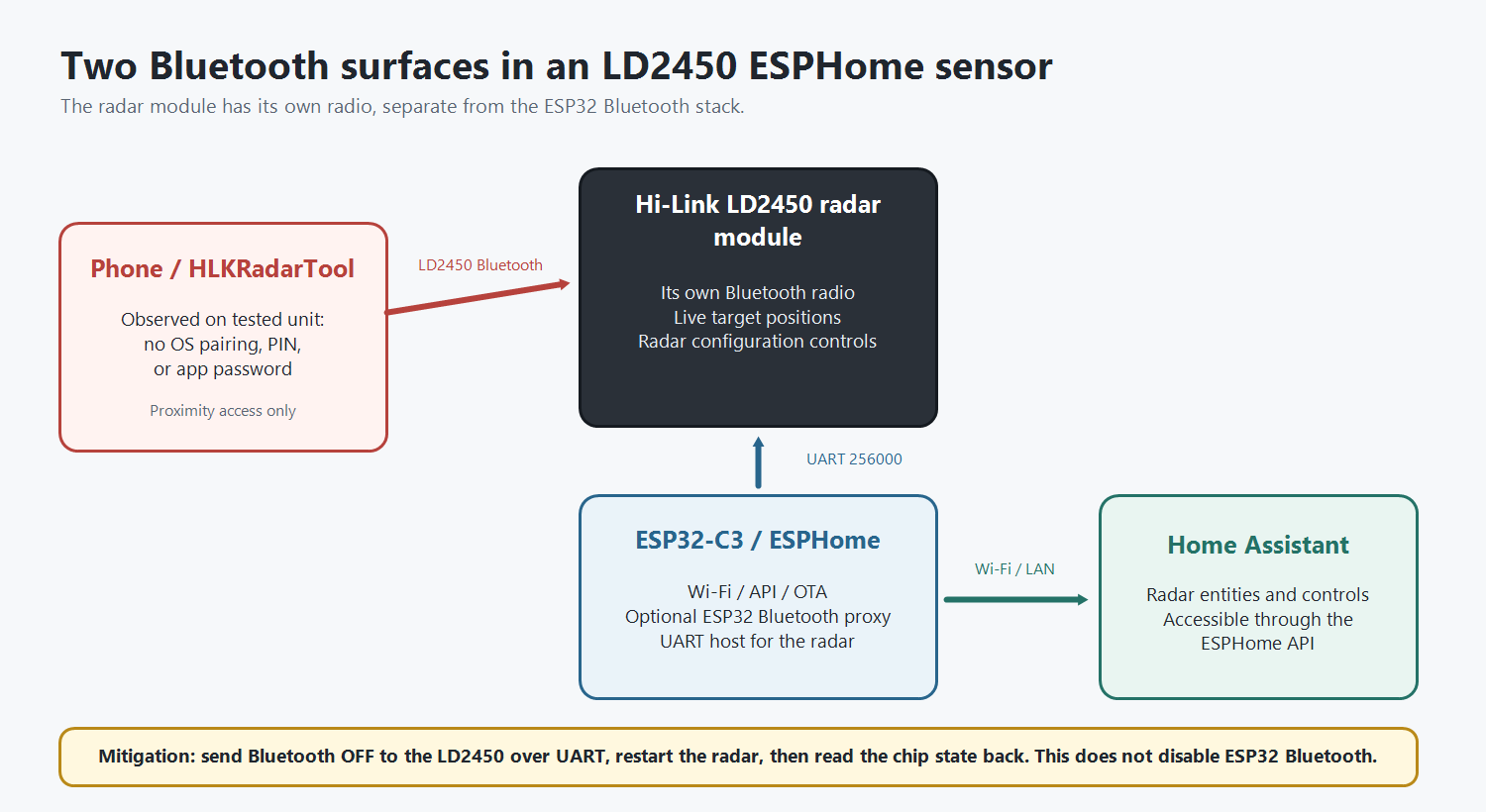
Finding and impact
On my unit, HLKRadarTool connected directly to the radar with no OS pairing, PIN,
or app password. It showed the live target map and writable configuration.
The LD2450’s documented Filter mode stops reporting targets inside configured
filter regions. Expanding filter coverage across the useful field can therefore
make dependent automations or alarms believe the area is empty. I did not perform
that destructive end-to-end test from an untrusted phone; the availability impact
follows from the writable region controls and documented filter behavior.
This is a proximity-limited privacy and availability issue, not an
Internet-reachable exploit or a claimed CVE. No real region coordinates or
coverage geometry need to be published.
Also note the two separate radios: the ESP32 may run Bluetooth Proxy or beacon
tracking, while the LD2450 has its own Bluetooth radio for HLKRadarTool. Disabling
one does not disable the other.
Check and disable it
Stand near your sensor and try connecting with HLKRadarTool without changing any
settings. Note whether it requests authentication, and check whether Home Assistant
exposes an entity specifically named something like LD2450 Bluetooth. Do not
publish the Bluetooth name suffix or MAC.
ESPHome’s native ld2450 component supports the required switch:
ld2450:
  id: ld2450_radar
  uart_id: uart_ld2450

switch:
  - platform: ld2450
    ld2450_id: ld2450_radar
    bluetooth:
      name: "LD2450 Bluetooth"
Compile and flash that configuration, then turn LD2450 Bluetooth off in Home
Assistant. ESPHome sends the chip command, restarts the radar, and reads its state
back. Verify that the switch returns off after restart and HLKRadarTool can no
longer connect. Keep UART recovery working because the phone app will be unavailable
until Bluetooth is re-enabled.
Documentation: LD2450 Sensor - ESPHome - Smart Home Made Simple
SCREEK 2A
SCREEK’s current stable 2A YAML uses a custom UART target-frame parser rather than
ESPHome’s native ld2450 component. It exposes no Bluetooth command or state.
The current source revision and requested stock-firmware fix are documented in
SCREEK issue #45: 2A: expose an LD2450 Bluetooth toggle and state read-back · Issue #45 · screekworkshop/screek-human-sensor · GitHub
A stock firmware update is safer than asking every user to reflash custom firmware.
For reference, my tested custom path enters config mode, sends 0xA4 off, restarts
with 0xA3, and queries 0xA5 for read-back. On LD2450 firmware
2.04.23101915, the off state survived a power cycle, ESP reboot, and later
ESPHome OTA flashes. An LD2450 factory reset is a reason to check it again.
Close the rest of the attack surface
Bluetooth-off is not complete hardening. Remove unnecessary interfaces and protect
the rest with unique per-device secrets:
api:
  encryption:
    key: !secret ld2450_api_encryption_key

ota:
  - platform: esphome
    password: !secret ld2450_ota_password

# Best: omit web_server entirely when you do not use it.
# If you retain it, authenticate it and disable normal web-interface OTA.
web_server:
  auth:
    username: !secret ld2450_web_username
    password: !secret ld2450_web_password
  ota: false
- use WPA2/WPA3 and a strong Wi-Fi password
- remove or password-protect fallback AP/captive portal recovery
- segment the device network, permit only required clients, and never port-forward
API, OTA, or web ports - disable unused ESP32 BLE, web server, captive portal, and other optional services
- protect USB/serial access and keep firmware current
Web-server authentication is still served over HTTP, so it is not a substitute for
network isolation. Also review ESPHome’s maintained “Security Best Practices”
guide before treating any node as hardened.
Scope and caveats
- I tested one SCREEK 2A and one LD2450 firmware version. Check your own hardware.
- Access is nearby and range varies. This does not address an Internet exploit.
- Custom firmware can break entities, calibration, Wi-Fi, or recovery.
- The command is public and already implemented by ESPHome; the contribution here
is the deployment/security implication, not protocol reverse-engineering.
Vendors should expose chip Bluetooth state/control, default it off after onboarding,
read state back after restart, warn about factory reset, and distinguish radar
Bluetooth from host-ESP Bluetooth.