☀️ PV Excess Control: Solar Excess Optimizer as a HACS Integration (successor of the pyscript blueprint)

Hi everybody,

Some of you may know my old PV Solar Excess Optimizer blueprint - a pyscript + blueprint combo that automatically switches your appliances on and off based on excess solar power.

After a long break I finally picked development back up and rebuilt the whole thing from the ground up as a proper HACS integration.

GitHub: GitHub - InventoCasa/PV-Excess-Control: Solar excess power appliance control for Home Assistant · GitHub

No more pyscript, no more copying files into config/, no more YAML wrangling. Everything is configured through a real config flow UI.


What it does

PV Excess Control is a comprehensive Home Assistant integration for intelligent solar excess power optimization and cheap grid tariff management. It looks at your live PV / battery / grid sensors, your solar forecast and your electricity tariff, and decides - every 30 seconds - which of your appliances should be on, off, or running at what current.

Think of it as the brain that sits between your inverter and your wallbox / heatpump / dishwasher / heat rod / pool pump / … and makes sure as much sun as possible goes into your devices instead of being exported for cents.


Highlights

  • :electric_plug: Priority-based appliance control - prioritize multiple appliances (1–1000), the optimizer allocates excess top-down

  • :high_voltage: Dynamic current control for EV chargers / wallboxes (6–32 A, 1- and 3-phase)

  • :battery: Battery-aware optimization with three strategies: Battery First, Appliance First, Balanced

  • :money_bag: Tariff integration - Tibber, Awattar, Nordpool, Octopus Energy and generic price sensors

  • :sun_behind_small_cloud: Solar forecast integration - Solcast, Forecast.Solar and generic forecast sensors

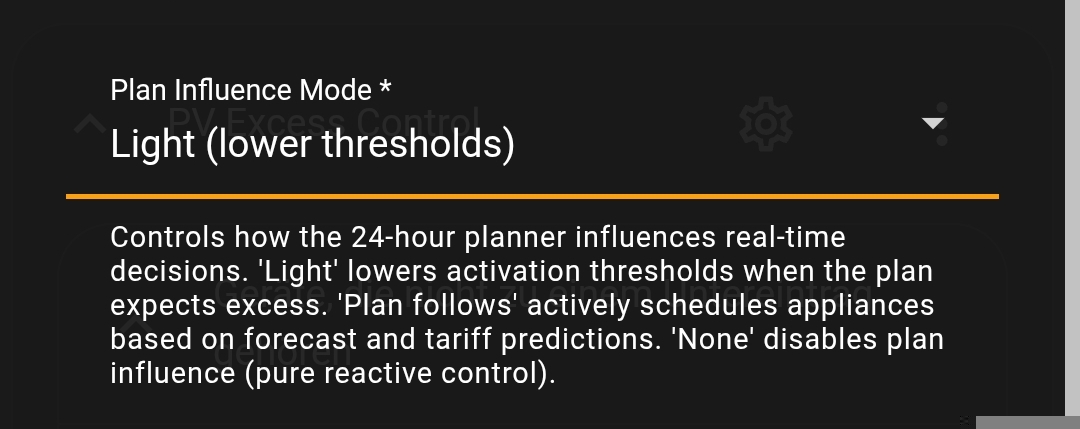
  • :brain: 24-hour forward-looking planner - weather-aware pre-planning with configurable plan influence (reactive, forecast-biased, or schedule-driven)

  • :prohibited: Export limit management - absorbs would-be-curtailed power when feed-in caps apply

  • :automobile: EV SoC-aware charging - considers EV battery level, connection status and “must be charged by” deadlines

  • :shield: Battery discharge protection - limits battery discharge when big consumers are running

  • :chart_increasing: Self-consumption analytics - savings, self-consumption ratio, daily / monthly statistics

  • :bell: Configurable notifications - per-event toggles for appliance changes, summaries, warnings

  • :desktop_computer: Extensive dashboard examples - ready-to-use YAML for Mushroom, ApexCharts, power-flow-card-plus and more

  • :raised_hand: Manual override, min/max runtime constraints, time windows, grid supplementation, appliance dependencies, per-appliance averaging window, minimum battery SoC protection … and more

Full feature list and docs in the README.


Requirements

  • Home Assistant 2025.8 or newer

  • A solar inverter with power sensors exposed to Home Assistant (standard or hybrid)

  • HACS for the recommended installation method


Installation

  1. Open HACS → three-dot menu → Custom repositories

  2. Add https://github.com/InventoCasa/PV-Excess-Control as an Integration

  3. Search for PV Excess Control and click Download

  4. Restart Home Assistant

  5. Settings → Devices & Services → Add Integration → PV Excess Control

That’s it. The config flow walks you through inverter type (standard / hybrid), sensor mapping, tariff provider, forecast provider, and then you start adding your appliances one by one.


Architecture (for the curious)

Under the hood, the integration uses a hybrid real-time + planning approach:

  • Real-time controller (every 30 s): reads live sensor data and applies optimizer decisions

  • Forward-looking planner (every 15 min): builds optimal 24-hour schedules from forecast + tariff data

  • Pure-logic optimizer: decision engine

The optimizer is structured around four phases: ASSESS (average excess from history buffer), ALLOCATE (assign excess to appliances by priority), SHED (turn off lowest-priority when excess is negative), and BATTERY DISCHARGE PROTECTION.


Feedback welcome

<<< Currently the integration is in beta state, so expect some bugs! >>>

If you find any bugs (or have some feature ideas), please create an issue on GitHub.
2 Likes

Good! Thank you! I use the previous version and made one modification, because when the battery is full and there is no consumption the solar production is low even when the sun is shining. So my modification is to monitor the voltage of the strings - this can indicate that there is not consumed production. In this way the Excess automation can power up the device even when the reported solar production is low due the lack of consumption. It will be nice to have this in the new PC Excess Control. Here is my fork

What you could do is configure the optimizer to schedule your appliances strictly according to plan (meaning that they will be switched on/off according to the solar forecast

At the moment it is configurable in the initial config flow of the integration. If I expose a select entity so you can switch the optimizer modes during runtime, I guess this would cover your use case?

Hi,

Do you think this integration will help me in the following scenario:

If have:

  • 2 EV’s
  • 2 Wallbox Pulsar Plus charging stations
  • 38 solar panels (East, South and West) - Growatt inverters
  • 10 KWh battery
  • Tibber dynamic contract.

I want to be able to switch to solar panel EV charging only. So without uncharging the battery.
The other thing is that Tibber rewards me with so called Grid Rewards, which stops charging or starts changing based on the (un)balance) if the grid. I don’t want to loose this rewards, but I’m afraid it will interfere with this integration (2 captains on 1 ship??)

Thanks in advance for the help in advance.

Rien

Hi Rien,

Yes, your scenario can be handled quite well I think.

2 EVs with 2 Wallbox Pulsar Plus chargers is no problem, that’s fully supported. You configure each EV as a separate appliance with its own priority, SoC target, and dynamic current control.
The integration allocates solar excess by priority, so your higher-priority EV gets first pick of available solar power. If there’s enough excess for both, both charge simultaneously.

Solar-only EV charging without discharging the battery is a core feature. You can set a battery_max_discharge_override (e.g., 0W) so the battery won’t discharge to feed the charger.
Combined with a minimum battery SoC threshold, you get full control over when the battery is allowed to contribute and when only direct solar excess is used.

Also, Tibber is natively supported as a tariff provider. The integration reads your hourly prices and uses them for smart decisions like: “electricity is cheap right now, supplement EV charging from grid” or “feed-in tariff is higher than grid price, export solar instead of self-consuming.”

Regarding Tibber Grid Rewards, I think this is the one area where you’d need to think about coordination. PV Excess Control doesn’t know about Grid Rewards directly. However, they shouldn’t fundamentally conflict. You could use the control_enabled switch in the integration to temporarily disable management of a specific EV during Grid Reward events via a simple HA automation.

hi @InventoCasa - I used your original script and got a ton of use out of it. Just installed and setup your new one and am really impressed. thank you for putting the effort into this, it really is great ! well done!

1 Like

Hi, this is a great integration. However, I am having an issue with an appliance not turning off.
I have an electrical heating for my pool which I want to turn on once the PV excess is above 6kW. I easily managed to make this happen, however, when the PV excess reduces the pool heating stays on and drains my battery. I played around with multiple variations of grid supplementation and big consumer / battery discharge override, but nothing worked.
Can you please help me guide in the right direction?

Thanks…

Hi there,

probably your averaging window and minimum switch interval are too big. What did you configure for those variables for your water heater?

I have the following settings:
Priority: 300
3 phases
Dynamic current control: disabled
Min/max runtime, activations, schedules, etc.: empty
Allow grid supplementation: on
maximum Grid power: 50 W (had all sorts of other values as well)
Big consumer: on
Battery discharge override: 500 (not exactly sure what this parameter controls
Requires appliance: Filterpumpe

@frogggy averaging window and minimum switch interval?

UPS… averaging window is empty, minimum switch interval 600s

Modify these parameters, especially by drastically reducing the averaging window, to get a faster response. Default averaging window is 30 minutes.
See docs: PV-Excess-Control/docs/configuration/adding-appliances.md at 9e3d464b734acec3210052c1e75aab1219ddea9e · InventoCasa/PV-Excess-Control · GitHub

Also pay attention to the appliance status entity, it will tell you why an appliance is off or on.

Thanks, I will try and check the response… I post the results once available.

I am trying to turn on an airco unit from Daikin if I have PV excess using this integration.

I can see that the script has turned on the power of the airco unit, but since the room temperature is still below the desired temperature, my climate unit is set as “inactive”.
This is desired outcome, but now i get every 15 minutes a notificaiton that the airco unit has started (probably because it is not registering correctly that even though it has started, it is not consuming any power yet).

@robindp Okay, that is a quite weird behavior of your specific climate unit entity.

The integration decides on/off by reading the state of the entity you configured as the appliance switch, not by power draw. States it treats as “off” are off, false, 0, unavailable, unknown.

Every cycle it checks that entity. If state reads as off/unavailable, it thinks the airco isn’t running and re-issues turn_on + fires the “started” notification. Your switch-interval cooldown then blocks retries until it expires — that’s where the periodic cadence comes from.

Check Developer Tools → States: find the entity you picked as the appliance switch and watch its state while the airco is “inactive”. If it flips to off or unavailable, that’s the cause. It’s unusual for a climate entity to do that (most stay on heat/cool/fan_only when idle), so most likely you’ve configured a power-derived template/binary sensor, or a smart plug with “auto-off at 0 W” enabled?

You can fix this by pointing the integration at a plain switch.xxx whose state stays on whenever the circuit is powered, regardless of compressor activity. Or disable “Notify Appliance On” in the integration options.

So, the change of the settings made it work - thanks for the support!

Hi thanks for answering.

My airco unit is from the Daikin integration.
I do not use smart plug.
In developer tools, the status of my climate entity is “cool”, and it was triggered by PV Excess Control. But when i look at the PV Excess Control page, it says it was not activated today (maybe because the current temperature was always lower than the desired temperature).

I have disabled “notify applicance on” now.

@robindp Ah, I think I know what’s happening now. There was a recent issue where e.g. the state of climate appliances was not detected correctly. This was fixed here: Not turning off · Issue #9 · InventoCasa/PV-Excess-Control · GitHub

I just created a new pre-release: v0.2.3 - can you test it and report back?

Thanks for fixing, i will download it and report back.

My bug was fixed by installing v0.2.3, thanks for fixing!