Hi all 
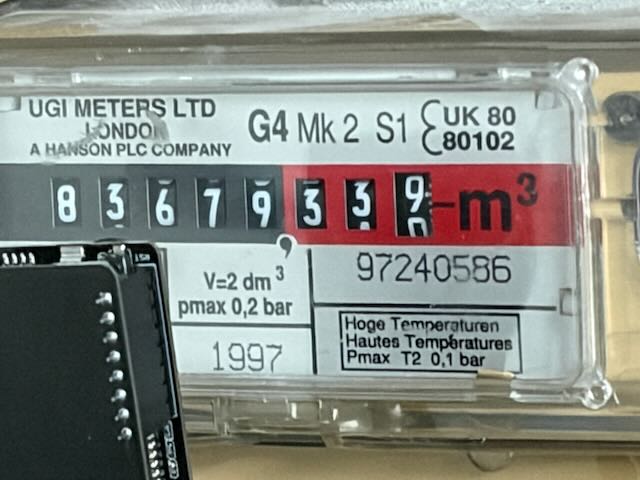
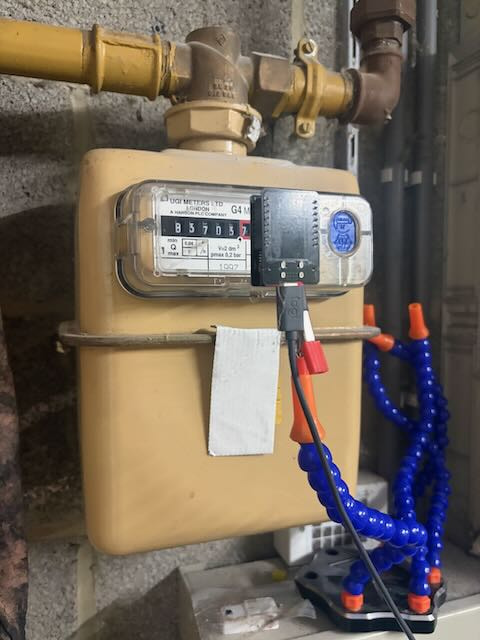
I wanted to share a project I’ve been working on: reading a mechanical roller gas meter (UGI G4, 5 black + 3 red rollers, no pulse output, no P1 port) and feeding it into the Energy dashboard.
TL;DR
An ESP32-CAM running ESPHome acts as a dumb camera with a flash LED. Every 15 minutes, a HA automation turns on the flash, grabs a snapshot and sends it to Claude (Haiku) via ai_task.generate_data, which returns the digits as structured data. A template sensor exposes the value as a total_increasing gas sensor.
Why not AI-on-the-edge-device?
I started with AI-on-the-edge-device, and it’s a great project. But I had to tune ROIs carefully, and any tiny camera movement broke the readings. Then an SD card corruption killed the config. Offloading the vision to an LLM means:
- no ROI or marker definitions,
- tolerance to small camera shifts (mine is on a gooseneck arm),
- everything in HA YAML, nothing on an SD card.
Hardware
- ESP32-CAM (AI-Thinker clone with USB-C / CH340, 8 MB PSRAM), around €10
- Gooseneck phone holder arm
- Onboard LED (GPIO4) as flash
- No 3D printer needed
ESPHome config
esp32-camera.yaml
esphome:
  name: gasmeter-cam

esp32:
  board: esp32cam

psram:
  mode: quad
  speed: 40MHz

logger:
api:
ota:
  platform: esphome

wifi:
  ssid: !secret wifi_ssid
  password: !secret wifi_password
  power_save_mode: none   # fixed 6–52 s delays on light commands

esp32_camera:
  external_clock:
    pin: GPIO0
    frequency: 10MHz
  i2c_pins:
    sda: GPIO26
    scl: GPIO27
  data_pins: [GPIO5, GPIO18, GPIO19, GPIO21, GPIO36, GPIO39, GPIO34, GPIO35]
  vsync_pin: GPIO25
  href_pin: GPIO23
  pixel_clock_pin: GPIO22
  power_down_pin: GPIO32
  resolution: 800x600
  jpeg_quality: 12
  frame_buffer_count: 1   # 2 = stale frames (dark images!)
  max_framerate: 5 fps
  idle_framerate: 0 fps   # no background captures

output:
  - platform: ledc
    pin: GPIO4
    id: led_output
    max_power: 100%

light:
  - platform: monochromatic
    name: "Gasmeter Flash"
    output: led_output
    restore_mode: ALWAYS_OFF
    gamma_correct: 1.0

esp32_camera_web_server:
  - port: 8080
    mode: stream
  - port: 8081
    mode: snapshot

debug:
sensor:
  - platform: uptime
    name: Uptime
  - platform: wifi_signal
    name: WiFi Signal
  - platform: debug
    free:
      name: "Heap Free"
    psram:
      name: "PSRAM Free"
text_sensor:
  - platform: debug
    reset_reason:
      name: "Reset Reason"
In HA, I use a Generic Camera pointing at http://<esp-ip>:8081 rather than the native ESPHome camera entity, because the native one gave me 10 s timeouts.
The automation
Read gas meter
alias: Read gas meter
mode: single
triggers:
  - trigger: time_pattern
    minutes: /15
actions:
  - action: light.turn_on
    target:
      entity_id: light.gasmeter_cam_gasmeter_flash
    data:
      brightness_pct: 100
  - wait_template: "{{ is_state('light.gasmeter_cam_gasmeter_flash', 'on') }}"
    timeout: 15
    continue_on_timeout: true
  - if:
      - condition: template
        value_template: "{{ not wait.completed }}"
    then:
      - action: light.turn_off
        target:
          entity_id: light.gasmeter_cam_gasmeter_flash
      - stop: "Flash did not turn on"
  - delay: 3
  # Purge snapshot: flushes any old frame from the camera buffer
  - action: camera.snapshot
    continue_on_error: true
    target:
      entity_id: camera.camera_gasmeter_snapshot
    data:
      filename: /config/www/gasmeter_warmup.jpg
  - delay: 1
  - action: ai_task.generate_data
    continue_on_error: true
    response_variable: result
    data:
      task_name: Read gas meter
      entity_id: ai_task.claude_ai_task
      instructions: >
        5 black rollers followed by 3 red rollers. Read the 5 black rollers
        and the first 2 red rollers, left to right. Ignore the third red
        roller. If a roller is between two digits, use the digit that fills
        most of its window.
      structure:
        digits:
          description: Exactly 7 digits, left to right, no separator
          required: true
          selector:
            text:
        notes:
          description: Short note on image quality (lighting, blur, glare)
          selector:
            text:
      attachments:
        - media_content_id: media-source://camera/camera.camera_gasmeter_snapshot
          media_content_type: image/jpeg
  - action: light.turn_off
    target:
      entity_id: light.gasmeter_cam_gasmeter_flash
  - variables:
      digits: >-
        {{ result.data.digits | string | trim
           if result is defined and result.data is defined
           and result.data.digits is defined else '' }}
  - variables:
      new: >-
        {% set d = digits | string %}
        {{ (d[:5] ~ '.' ~ d[5:7]) | float(0)
           if d is match('^[0-9]{7}$') else 0 }}
      old: "{{ states('input_number.gas_index') | float(0) }}"
  - condition: template
    value_template: "{{ new >= old and (new - old) <= 2 }}"
  - action: input_number.set_value
    target:
      entity_id: input_number.gas_index
    data:
      value: "{{ new }}"
The final condition is the safety net: a reading is only accepted if it is not lower than the previous one and not more than 2 m³ higher (15 min). Bad readings are simply dropped.
Template sensor for the Energy dashboard
template:
  - sensor:
      - name: "Gas consumption total"
        unique_id: gas_consumption_total
        unit_of_measurement: "m³"
        device_class: gas
        state_class: total_increasing
        availability: "{{ states('input_number.gas_index') | float(0) > 0 }}"
        state: "{{ states('input_number.gas_index') }}"
Lessons learned (aka the bugs I hit so you don’t have to)
- Dark images: the cause was
frame_buffer_count: 2, which returned a stale frame taken before the flash turned on. Use1. - Flash commands delayed by up to 52 s: WiFi power save. Set
power_save_mode: none. - Background captures (“Received 7 images in last 60s”): set
idle_framerate: 0 fps. There is noidle_update_intervaloption. - Don’t put an example number in the prompt. The model got biased towards it. Asking for raw digits only, and doing the decimal formatting in Jinja, fixed it.
'int' object is not subscriptable: HA auto-converts"8368989"to an int. Force| stringbefore slicing.- Keep a
notesfield in the structure. It’s invaluable for debugging bad reads (“roller 6 between 8 and 9”). - Guard against
resultbeing undefined when the AI call fails (continue_on_error+is defined). - Remove any live camera card from your dashboard, because it polls the ESP32 constantly. I display the saved snapshot instead (
type: picture,/local/gasmeter_warmup.jpg).
Cost
I’m on a Claude Max plan, which includes monthly API credits, so this costs me nothing extra so far. I’ll update this post with real token usage after a month. Reading every 30–60 min would be plenty for energy tracking if you pay per use.
To do
- Auto-restart the ESP32 after 3 failed reads (
button: platform: restart+ a counter helper) - Fewer reads at night
- Long-term reliability stats (success rate over a month)
Feedback welcome! I’m especially curious whether anyone has tried this with local vision models (Ollama + a small VLM) instead of a cloud API. And would anyone be interested in a ready-made kit?