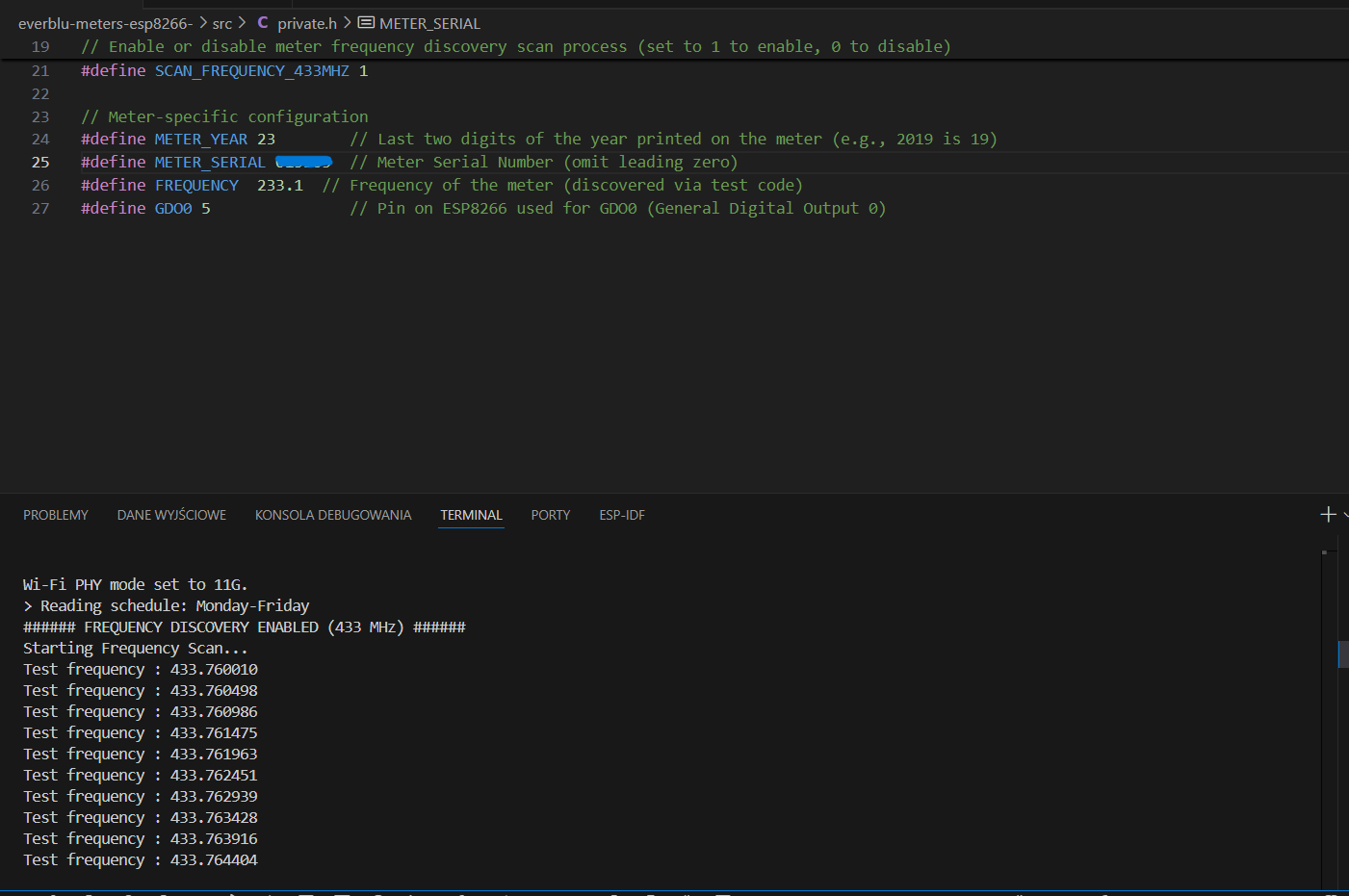
Hello. I can’t find the device’s frequency. How do I change the search range? It’s between 43.76xx and 43.8xx. Where can I change this range?
@AdamosHA
I have implemented a fix this in my fork: Automatic frequency calibration, adaptive tracking, stability fixes, and code quality improvements by genestealer · Pull Request #14 · genestealer/everblu-meters-esp8266-improved · GitHub
Aw thanks for your work. Very nice, i’m going testing that.
1 Like
Hello Richard,
Thanks a lot for your work. Your post here made me dig up the project I abandonned several months/years ago…
In fact I had build and uploaded the code to he ESP with your method succesfully last friday. The readed values on the Itron seems to be relevant (234kL)
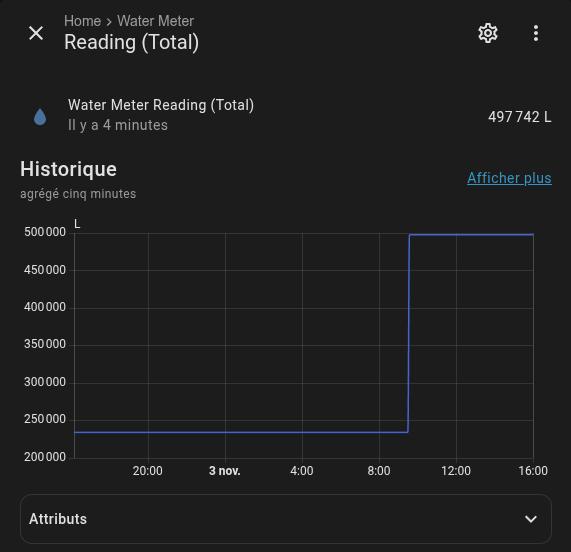
But today, when trying to force another Reading request from HA side I had the suprise to read a totally different value (497kL) wich seems to provide from another Itron (near from my house I think)
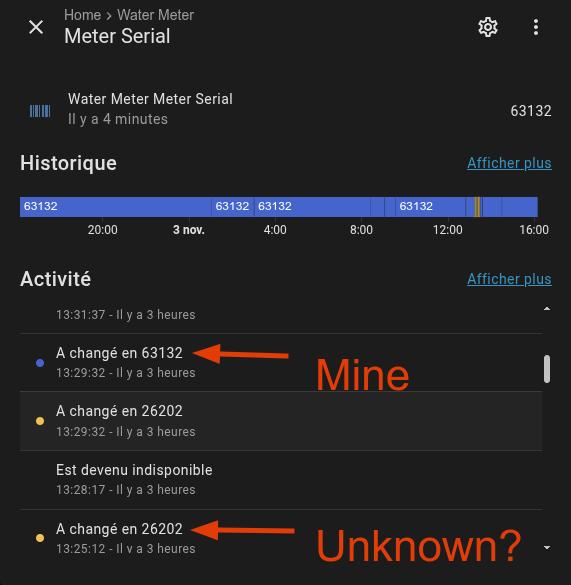
Unexpectedly, the serial Number seems to have changed. However It is hard specified in the private.h file?
Have you got any idea?
Hello @Richard.Huish
Good news, It’s working for me now.
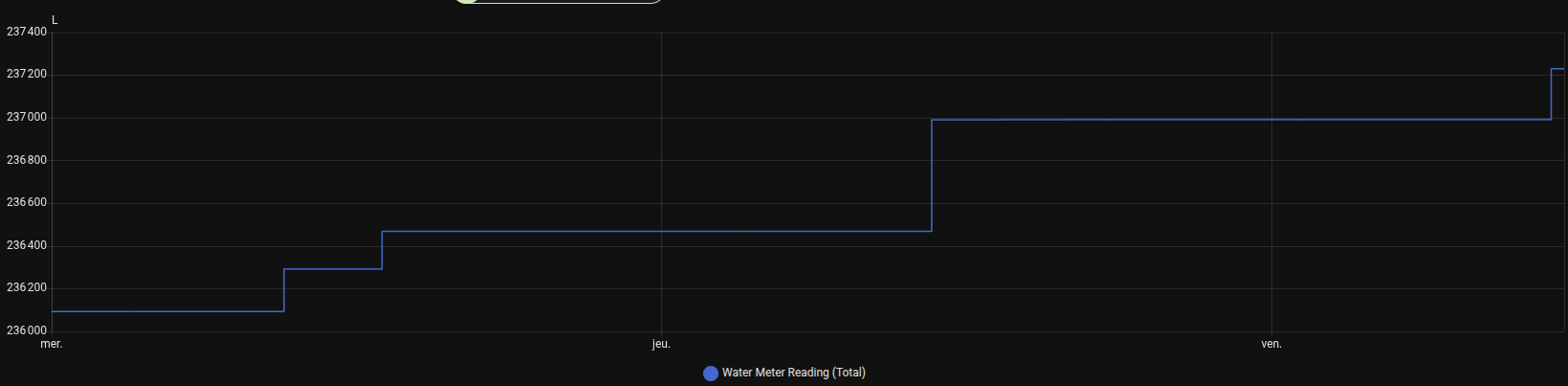
I don’t know exactly what has solved the issue, but it seems to be the EEPROM reset function… and probably defining the Frequency into the private.h file.
Another time. Thanks a lot for your work!
Good morning and merry Christmas to everyone.
I came across this project while researching a way to get my water consumption monitored in Home Assitant.
Unfortunately I´m having issues getting it to work. I´m an IT nerd, but not a full blood programmer or wireless expert unfortunately. I was hoping someone could give me a nudge into the right direction here?
I have the exact same EverBlu Cyble Advanced module that is described here (V2.1) but I seem unable to get it to talk to me.
My setup also looks pretty identical to the one described here (d1_mini ESP8266 with a CC1101).
I don´t seem to get a response from the meter. I tried different days and times of day, but all I get seems to be background signals from time to time. I assume its background noise as the frequency is always different and the quality is bad. I also can´t reproduce the same responding frequency.
I identified one outlier on my meters serial and manufacturing date.
The SN is 21-00XXXXXX-YYY, the manufacturing date below is listed as 12/2020. So I wasn´t entirely sure at first if “20” or “21” would be appropriate here, so I tested different combos of years 20 & 21 with different combos of the “short” SN (XXXXXX) and also longer versions like 2100XXXXXX or 2000XXXXXX or XXXXXXYYY and so on. All with no discernable difference in behaviour:
Here is my private.h:
#define secret_wifi_ssid “XXXX” // WiFi SSID (Network Name)
#define secret_wifi_password “XXXX” // WiFi Password
#define secret_mqtt_server “XXXX” // MQTT Server IP Address
#define secret_clientName “XXXX” // MQTT Client Name
#define secret_local_timeclock_server “pool.ntp.org” // NTP Server Address
#define ENABLE_WIFI_PHY_MODE_11G 0
#define METER_YEAR 21 // Last two digits of the year printed on the meter (e.g., 2019 is 19)
#define METER_SERIAL XXXXXX // Meter Serial Number (omit leading zero)
#define CLEAR_EEPROM_ON_BOOT 1
#define AUTO_SCAN_ENABLED 1
#define GDO0 5
#define DEBUG_CC1101 1
(Joining wifi and MQTT works just fine btw).
Here is a full monitor log of my last run:
Executing task: C:\Users\XXXXX.platformio\penv\Scripts\platformio.exe run --target upload --target monitor --environment d1_mini
Processing d1_mini (platform: espressif8266; board: d1_mini; framework: arduino)
Verbose mode can be enabled via -v, --verbose option
CONFIGURATION:
PLATFORM: Espressif 8266 (4.2.1) > WeMos D1 R2 and mini
HARDWARE: ESP8266 80MHz, 80KB RAM, 4MB Flash
PACKAGES:
- framework-arduinoespressif8266 @ 3.30102.0 (3.1.2)
- tool-esptool @ 1.413.0 (4.13)
- tool-esptoolpy @ 1.30000.201119 (3.0.0)
- tool-mklittlefs @ 1.203.210628 (2.3)
- tool-mkspiffs @ 1.200.0 (2.0)
- toolchain-xtensa @ 2.100300.220621 (10.3.0)
LDF: Library Dependency Finder →
LDF Modes: Finder ~ chain, Compatibility ~ soft
Found 39 compatible libraries
Scanning dependencies…
Dependency Graph
|-- EspMQTTClient @ 1.13.3
|-- ArduinoOTA @ 1.0
|-- SPI @ 1.0
|-- EEPROM @ 1.0
|-- ESP8266mDNS @ 1.2
|-- ESP8266WiFi @ 1.0
Building in release mode
Compiling .pio\build\d1_mini\src\cc1101.cpp.o
Compiling .pio\build\d1_mini\src\main.cpp.o
Compiling .pio\build\d1_mini\src\utils.cpp.o
src\utils.cpp: In function ‘void show_in_hex_formatted(const uint8_t*, size_t, int)’:
src\utils.cpp:23:16: warning: comparison of integer expressions of different signedness: ‘int’ and ‘size_t’ {aka ‘unsigned int’} [-Wsign-compare]
23 | for (i = 0; i < len; i++)
|^~~
src\cc1101.cpp: In function ‘uint8_t is_look_like_radian_frame(uint8_t*, size_t)’:
src\cc1101.cpp:578:17: warning: comparison of integer expressions of different signedness: ‘int’ and ‘size_t’ {aka ‘unsigned int’} [-Wsign-compare]
578 | for (i = 0; i < len; i++)
|^~~
src\cc1101.cpp: In function ‘tmeter_data parse_meter_report(uint8_t*, uint8_t)’:
src\cc1101.cpp:747:39: warning: comparison of integer expressions of different signedness: ‘int’ and ‘long unsigned int’ [-Wsign-compare]
747 | if (data.liters == 0 || data.liters == 0xFFFFFFFFUL)
|^
src\cc1101.cpp:882:20: warning: comparison of integer expressions of different signedness: ‘uint32_t’ {aka ‘unsigned int’} and ‘int’ [-Wsign-compare]
882 | if (newest > data.liters)
| ~^
src\utils.cpp: In function ‘int encode2serial_1_3(uint8_t*, int, uint8_t*)’:
src\utils.cpp:294:19: warning: ‘bytepos’ may be used uninitialized in this function [-Wmaybe-uninitialized]
294 | return bytepos + 2;
| ^
Linking .pio\build\d1_mini\firmware.elf
Retrieving maximum program size .pio\build\d1_mini\firmware.elf
Checking size .pio\build\d1_mini\firmware.elf
Advanced Memory Usage is available via “PlatformIO Home > Project Inspect”
RAM: [====== ] 55.6% (used 45580 bytes from 81920 bytes)
Flash: [==== ] 39.2% (used 409300 bytes from 1044464 bytes)
Building .pio\build\d1_mini\firmware.bin
Creating BIN file “.pio\build\d1_mini\firmware.bin” using “C:\Users\XXXXXX.platformio\packages\framework-arduinoespressif8266\bootloaders\eboot\eboot.elf” and “.pio\build\d1_mini\firmware.elf”
Configuring upload protocol…
AVAILABLE: espota, esptool
CURRENT: upload_protocol = esptool
Looking for upload port…
Auto-detected: COM7
Uploading .pio\build\d1_mini\firmware.bin
esptool.py v3.0
Serial port COM7
Connecting…
Chip is ESP8266EX
Features: WiFi
Crystal is 26MHz
MAC: f4:cf:a2:78:6f:ab
Uploading stub…
Running stub…
Stub running…
Changing baud rate to 460800
Changed.
Configuring flash size…
Compressed 413456 bytes to 282593…
Writing at 0x00000000… (5 %)
Writing at 0x00004000… (11 %)
Writing at 0x00008000… (16 %)
Writing at 0x0000c000… (22 %)
Writing at 0x00010000… (27 %)
Writing at 0x00014000… (33 %)
Writing at 0x00018000… (38 %)
Writing at 0x0001c000… (44 %)
Writing at 0x00020000… (50 %)
Writing at 0x00024000… (55 %)
Writing at 0x00028000… (61 %)
Writing at 0x0002c000… (66 %)
Writing at 0x00030000… (72 %)
Writing at 0x00034000… (77 %)
Writing at 0x00038000… (83 %)
Writing at 0x0003c000… (88 %)
Writing at 0x00040000… (94 %)
Writing at 0x00044000… (100 %)
Wrote 413456 bytes (282593 compressed) at 0x00000000 in 6.8 seconds (effective 484.2 kbit/s)…
Hash of data verified.
Leaving…
Hard resetting via RTS pin…
— Terminal on COM7 | 115200 8-N-1
— Available filters and text transformations: colorize, debug, default, direct, esp8266_exception_decoder, hexlify, log2file, nocontrol, printable, send_on_enter, time
— More details at
— Quit: Ctrl+C | Menu: Ctrl+T | Help: Ctrl+T followed by Ctrl+H
rl␀l r␂$␒ n␌␌␌ ␌l ␌b| ␂␇␒ r␒b ␌b␄ nn␂lnn␒b␌b␜p $b␎lrlp n ␂␌␌ ␌l␌ ␂␌␌␌b␌n n ␌ ␌␄b nn’l ␄l␂ ␒␒nn␌l␂␎␂nr n␌␌bl ␂p n0␂␌␌r ␜␜b␌␄␂␌b␌n n␌␄␌b nn'␌␌l␂ ␒␒nn␌l␂␎␂nr n␌␌b␄ ␂␎r n␌␌b␄ ␂ ␂␌␌ ␄ ␒␌l␂ n ␂ ␜␂␇␒ n ␒r n| ␌l␌ ␌l␂␜b␒␒␂␌b␒r␒␂l nb n␂␌l`␂ ␜r␒l l␒ ␌␌␌
Everblu Meters ESP8266/ESP32 Starting…
Water usage data for Home Assistant
Target meter: 2021-00XXXXXX
=== Configuration Validation ===
✓ METER_YEAR: 21 (2021)
✓ METER_SERIAL: XXXXXX
✓ FREQUENCY: 433.820000 MHz
✓ Reading Time (UTC): 10:00
✓ GDO0 Pin: GPIO 5
✓ Reading Schedule: Monday-Friday
✓ Configuration valid - proceeding with initialization
EEPROM initialized
CLEARING EEPROM (CLEAR_EEPROM_ON_BOOT = 1)…
EEPROM cleared. Remember to set CLEAR_EEPROM_ON_BOOT = 0 after testing!
No valid frequency offset found in EEPROM
No stored frequency offset found. Performing wide initial scan…
Performing wide initial scan (first boot - no saved offset)…
Wide scan from 433.720001 to 433.920013 MHz (step: 0.010000 MHz)
This may take 1-2 minutes on first boot…
CC1101 radio found OK (PARTNUM: 0x00, VERSION: 0x14)
Frequency synthesizer calibrated for 433.720001 MHz
MARCSTATE : raw:0x13 0x13 free_byte:0x0F sts:0x02 sending 2s WUP…
202 free_byte:0x0F sts:0x07
size_byte=18 l_radian_frame_size_byte=25
ERROR: Timeout waiting for GDO0 (sync detection)
ERROR: Timeout waiting for meter acknowledgement frame
size_byte=124 l_radian_frame_size_byte=171
ERROR: Timeout waiting for GDO0 (sync detection)
ERROR: Timeout waiting for meter data frame
Frequency synthesizer calibrated for 433.730011 MHz
MARCSTATE : raw:0x13 0x13 free_byte:0x0F sts:0x02 sending 2s WUP…
202 free_byte:0x0E sts:0x07
size_byte=18 l_radian_frame_size_byte=25
ERROR: Timeout waiting for GDO0 (sync detection)
ERROR: Timeout waiting for meter acknowledgement frame
size_byte=124 l_radian_frame_size_byte=171
ERROR: Timeout waiting for GDO0 (sync detection)
ERROR: Timeout waiting for meter data frame
Frequency synthesizer calibrated for 433.740021 MHz
MARCSTATE : raw:0x13 0x13 free_byte:0x0F sts:0x02 sending 2s WUP…
202 free_byte:0x0F sts:0x07
size_byte=18 l_radian_frame_size_byte=25
ERROR: Timeout waiting for GDO0 (sync detection)
ERROR: Timeout waiting for meter acknowledgement frame
size_byte=124 l_radian_frame_size_byte=171
ERROR: Timeout waiting for GDO0 (sync detection)
ERROR: Timeout waiting for meter data frame
Frequency synthesizer calibrated for 433.750031 MHz
MARCSTATE : raw:0x13 0x13 free_byte:0x0F sts:0x02 sending 2s WUP…
202 free_byte:0x0E sts:0x07
size_byte=18 l_radian_frame_size_byte=25
ERROR: Timeout waiting for GDO0 (sync detection)
ERROR: Timeout waiting for meter acknowledgement frame
size_byte=124 l_radian_frame_size_byte=171
ERROR: Timeout waiting for GDO0 (sync detection)
ERROR: Timeout waiting for meter data frame
Frequency synthesizer calibrated for 433.760040 MHz
MARCSTATE : raw:0x13 0x13 free_byte:0x0F sts:0x02 sending 2s WUP…
202 free_byte:0x0E sts:0x07
size_byte=18 l_radian_frame_size_byte=25
ERROR: Timeout waiting for GDO0 (sync detection)
ERROR: Timeout waiting for meter acknowledgement frame
size_byte=124 l_radian_frame_size_byte=171
ERROR: Timeout waiting for GDO0 (sync detection)
ERROR: Timeout waiting for meter data frame
Frequency synthesizer calibrated for 433.770050 MHz
MARCSTATE : raw:0x13 0x13 free_byte:0x0F sts:0x02 sending 2s WUP…
202 free_byte:0x0E sts:0x07
size_byte=18 l_radian_frame_size_byte=25
ERROR: Timeout waiting for GDO0 (sync detection)
ERROR: Timeout waiting for meter acknowledgement frame
size_byte=124 l_radian_frame_size_byte=171
ERROR: Timeout waiting for GDO0 (sync detection)
ERROR: Timeout waiting for meter data frame
Frequency synthesizer calibrated for 433.780060 MHz
MARCSTATE : raw:0x13 0x13 free_byte:0x0F sts:0x02 sending 2s WUP…
202 free_byte:0x0E sts:0x07
size_byte=18 l_radian_frame_size_byte=25
ERROR: Timeout waiting for GDO0 (sync detection)
ERROR: Timeout waiting for meter acknowledgement frame
size_byte=124 l_radian_frame_size_byte=171
ERROR: Timeout waiting for GDO0 (sync detection)
ERROR: Timeout waiting for meter data frame
Frequency synthesizer calibrated for 433.790070 MHz
MARCSTATE : raw:0x13 0x13 free_byte:0x0F sts:0x02 sending 2s WUP…
202 free_byte:0x0F sts:0x07
size_byte=18 l_radian_frame_size_byte=25
ERROR: Timeout waiting for GDO0 (sync detection)
ERROR: Timeout waiting for meter acknowledgement frame
size_byte=124 l_radian_frame_size_byte=171
ERROR: Timeout waiting for GDO0 (sync detection)
ERROR: Timeout waiting for meter data frame
Frequency synthesizer calibrated for 433.800079 MHz
MARCSTATE : raw:0x13 0x13 free_byte:0x0F sts:0x02 sending 2s WUP…
202 free_byte:0x0E sts:0x07
size_byte=18 l_radian_frame_size_byte=25
ERROR: Timeout waiting for GDO0 (sync detection)
ERROR: Timeout waiting for meter acknowledgement frame
size_byte=124 l_radian_frame_size_byte=171
ERROR: Timeout waiting for GDO0 (sync detection)
ERROR: Timeout waiting for meter data frame
Frequency synthesizer calibrated for 433.810089 MHz
MARCSTATE : raw:0x13 0x13 free_byte:0x0F sts:0x02 sending 2s WUP…
202 free_byte:0x0F sts:0x07
size_byte=18 l_radian_frame_size_byte=25
ERROR: Timeout waiting for GDO0 (sync detection)
ERROR: Timeout waiting for meter acknowledgement frame
size_byte=124 l_radian_frame_size_byte=171
ERROR: Timeout waiting for GDO0 (sync detection)
ERROR: Timeout waiting for meter data frame
Frequency synthesizer calibrated for 433.820099 MHz
MARCSTATE : raw:0x13 0x13 free_byte:0x0F sts:0x02 sending 2s WUP…
202 free_byte:0x0F sts:0x07
size_byte=18 l_radian_frame_size_byte=25
ERROR: Timeout waiting for GDO0 (sync detection)
ERROR: Timeout waiting for meter acknowledgement frame
size_byte=124 l_radian_frame_size_byte=171
ERROR: Timeout waiting for GDO0 (sync detection)
ERROR: Timeout waiting for meter data frame
Frequency synthesizer calibrated for 433.830109 MHz
MARCSTATE : raw:0x13 0x13 free_byte:0x0F sts:0x02 sending 2s WUP…
202 free_byte:0x09 sts:0x07
size_byte=18 l_radian_frame_size_byte=25
ERROR: Timeout waiting for GDO0 (sync detection)
ERROR: Timeout waiting for meter acknowledgement frame
size_byte=124 l_radian_frame_size_byte=171
ERROR: Timeout waiting for GDO0 (sync detection)
ERROR: Timeout waiting for meter data frame
Frequency synthesizer calibrated for 433.840118 MHz
MARCSTATE : raw:0x13 0x13 free_byte:0x0F sts:0x02 sending 2s WUP…
202 free_byte:0x0E sts:0x07
size_byte=18 l_radian_frame_size_byte=25
ERROR: Timeout waiting for GDO0 (sync detection)
ERROR: Timeout waiting for meter acknowledgement frame
size_byte=124 l_radian_frame_size_byte=171
ERROR: Timeout waiting for GDO0 (sync detection)
ERROR: Timeout waiting for meter data frame
Frequency synthesizer calibrated for 433.850128 MHz
MARCSTATE : raw:0x13 0x13 free_byte:0x0F sts:0x02 sending 2s WUP…
203 free_byte:0x0D sts:0x07
size_byte=18 l_radian_frame_size_byte=25
ERROR: Timeout waiting for GDO0 (sync detection)
ERROR: Timeout waiting for meter acknowledgement frame
size_byte=124 l_radian_frame_size_byte=171
ERROR: Timeout waiting for GDO0 (sync detection)
ERROR: Timeout waiting for meter data frame
Frequency synthesizer calibrated for 433.860138 MHz
MARCSTATE : raw:0x13 0x13 free_byte:0x0F sts:0x02 sending 2s WUP…
202 free_byte:0x0E sts:0x07
size_byte=18 l_radian_frame_size_byte=25
ERROR: Timeout waiting for GDO0 (sync detection)
ERROR: Timeout waiting for meter acknowledgement frame
size_byte=124 l_radian_frame_size_byte=171
ERROR: Timeout waiting for GDO0 (sync detection)
ERROR: Timeout waiting for meter data frame
Frequency synthesizer calibrated for 433.870148 MHz
MARCSTATE : raw:0x13 0x13 free_byte:0x0F sts:0x02 sending 2s WUP…
202 free_byte:0x0E sts:0x07
size_byte=18 l_radian_frame_size_byte=25
ERROR: Timeout waiting for GDO0 (sync detection)
ERROR: Timeout waiting for meter acknowledgement frame
size_byte=124 l_radian_frame_size_byte=171
ERROR: Timeout waiting for GDO0 (sync detection)
ERROR: Timeout waiting for meter data frame
Frequency synthesizer calibrated for 433.880157 MHz
MARCSTATE : raw:0x13 0x13 free_byte:0x0F sts:0x02 sending 2s WUP…
202 free_byte:0x0E sts:0x07
size_byte=18 l_radian_frame_size_byte=25
ERROR: Timeout waiting for GDO0 (sync detection)
ERROR: Timeout waiting for meter acknowledgement frame
size_byte=124 l_radian_frame_size_byte=171
ERROR: Timeout waiting for GDO0 (sync detection)
ERROR: Timeout waiting for meter data frame
Frequency synthesizer calibrated for 433.890167 MHz
MARCSTATE : raw:0x13 0x13 free_byte:0x0F sts:0x02 sending 2s WUP…
202 free_byte:0x0F sts:0x07
size_byte=18 l_radian_frame_size_byte=25
ERROR: Timeout waiting for GDO0 (sync detection)
ERROR: Timeout waiting for meter acknowledgement frame
size_byte=124 l_radian_frame_size_byte=171
ERROR: Timeout waiting for GDO0 (sync detection)
ERROR: Timeout waiting for meter data frame
Frequency synthesizer calibrated for 433.900177 MHz
MARCSTATE : raw:0x13 0x13 free_byte:0x0F sts:0x02 sending 2s WUP…
202 free_byte:0x0E sts:0x07
size_byte=18 l_radian_frame_size_byte=25
ERROR: Timeout waiting for GDO0 (sync detection)
ERROR: Timeout waiting for meter acknowledgement frame
size_byte=124 l_radian_frame_size_byte=171
GDO0 triggered at 832ms
First sync pattern received (1 bytes)
rssi=149 lqi=128 F_est=0
ERROR: Timeout waiting for GDO0 (frame start)
ERROR: Timeout waiting for meter data frame
Frequency synthesizer calibrated for 433.910187 MHz
MARCSTATE : raw:0x13 0x13 free_byte:0x0F sts:0x02 sending 2s WUP…
202 free_byte:0x0E sts:0x07
size_byte=18 l_radian_frame_size_byte=25
ERROR: Timeout waiting for GDO0 (sync detection)
ERROR: Timeout waiting for meter acknowledgement frame
size_byte=124 l_radian_frame_size_byte=171
ERROR: Timeout waiting for GDO0 (sync detection)
ERROR: Timeout waiting for meter data frame
Wide scan failed - no meter signal found!
Please check:
- Meter is within range (< 50m typically)
- Antenna is connected to CC1101
- Meter serial/year are correct in private.h
- Current time is within meter’s wake hours
Frequency synthesizer calibrated for 433.820007 MHz
No valid frequency offset found in EEPROM
Wi-Fi PHY mode 11G is disabled.
Reading schedule (configured): Monday-Friday
Reading schedule (effective): Monday-Friday
Frequency (effective): 433.820000 MHz
WARNING: FREQUENCY not set in private.h; using default 433.820000 MHz (RADIAN).
Initializing CC1101 radio…
Frequency synthesizer calibrated for 433.820007 MHz
CC1101 radio initialized successfully
Waiting for Wi-Fi/MQTT… timeouts enabled (Wi-Fi 30s, MQTT 30s). Will retry automatically.
[Wi-Fi] Connecting to ‘XXXXXX’… (status=7: DISCONNECTED)
[Wi-Fi] Connected to ‘XXXXXX’ (IP: XXXXXX, RSSI: -75 dBm)
Connected to MQTT Broker
Configure time from NTP server. Please wait…
Current date (UTC) : 2025/12/24 08:49/08 - 1766566148
Configured UTC offset: +0 minutes
Current date (UTC+offset): 2025/12/24 08:49/08 - 1766566148
Configure Arduino OTA flash.
Ready
IP address: XXXXXX
Send MQTT config for HA.
MQTT config sent
Publish Wi-Fi details
Wi-Fi details published
Publish meter settings
Meter settings published
Setup done
Ready to go…
[MQTT] Connected to XXXXXX:1883 as ‘everbluMeters’
Publish Wi-Fi details
Wi-Fi details published
Publish Wi-Fi details
Wi-Fi details published
Any ideas anyone? Many thanks in advance for any tips.
Best regards,
Dennis
Hi DWeyel,
Happy to help, sorry I only just saw this, I have been working on an improvement over the last few days, especially about issues with different board type (D1 Mini, NodeMCU, Huzzah, etc.).
Note:
- Try the ** “21”** for METER_YEAR which should always be 2 digits
- Use only the numeric middle portion for METER_SERIAL (omit leading zeros and suffix)
Please can you try out the latest code from my repo (linked at the top of the post) and let me know if you still have issues?
Also a couple of things to double check:
- Verify CC1101 wiring (especially GDO0 to GPIO 5)
- Check antenna connection
- Move ESP8266 closer to meter (< 5 meters for testing)
- Try reading at different times of day (some meters only respond at specific hours)
- Verify the meter says “Cyble Enhanced” on it
Thanks Richard for coming back to me.
I tested the new version, sadly without any success.
- I checked the wiring and I believe everything is in order.
- I´m no further than 50 cm away from the meter when I do the test.
- I´m going to continue testing at different times of day, and will also try a different CC1101 brand (I already tested two identical models)
- The meter is the same one that you show on your pictures, down to the V2.1.
Hi @DWeyel
Was this with version v1.1.5?
Can you please enable DEBUG_CC1101 in the private file and ensure CLEAR_EEPROM_ON_BOOT is set to 1 at least once to clear EEPROM.
Then please post the debug output to a new issue on the repo: GitHub · Where software is built
Hi Richard,
I spend some time on this on the weekend and setup a new kit from scratch. New Wemos D1 and new CC1101 board, new cables, new programming… And now it works. The pinout is identical, so my guess is it was either a bad cable connection or a bad CC1101. Either way: Thanks for your assistance Richard! 
1 Like
Hi, someone try to connect this watermeter but in 868MHz ? I don’t find a working integration in 868…
What meter is it? Do you have a photo?
Hi all,
Thanks to the inspiration from this thread, I’ve created a new migration over to ESPHome and looking for beta testers
1 Like
Hey! That’s awesome and I’m more than happy to try it out.
I’ll drop your message as well when my latest fork is merged upstream as there’s quite a few quality of life improvements that I’ve been working on recently that you would possibly like to integrate.
Can I double check? Have you got this fully working in ESP home?
1 Like
ohhh nice!
Yeah any improvements is welcomed
And yep… fully integrated, very easy to set-up!
- Download the files from cc1101_component and put them into custom_components/cc1101_component
- Use the water_meter.yaml (configure to your needs)
- Set the GPIOs.
- Flash.
- Configure the settings via the web portal (via the IP) or via Home Assistant.
1. Frequency2. Meter Serial / ID3. Meter Year4. Refresh Rate5. Read Meter Now
Done
Well… It should be as easy as that!
Fab. Ok my code is up to rev v1.2.0 there have been quite a few changes.
You should be able to sync the fork to update the code for the CC1101 radio but you may be missing the automatic frequency scan and offset.
Note, the frequency for the radio is 433.82 but the DIY hardware shifts so my code can cope with oscillator drift automatic frequency offset.
Which version of the code did you base it on?
I tried the OTA update today for the first time but it fails with this error:
A fatal error occurred: Failed to connect to ESP8266: Timed out waiting for packet header
 *** [upload] Error 2
 =================================================== [FAILED] Took 55.40 seconds ===================================================

 Environment    Status    Duration
 -------------  --------  ------------
 d1_mini        FAILED    00:00:55.396
 ============================================== 1 failed, 0 succeeded in 00:00:55.396 ==============================================
This is how my section in the platform.ini looks like:
[env:d1_mini]
extends = env:base
platform = espressif8266
board = d1_mini

[env:d1_mini-ota]
extends = env:d1_mini
upload_protocol = espota
upload_port = 192.168.2.114 ; Set your device IP here
monitor_port = socket://192.168.2.114:23 ; Change to match upload_port
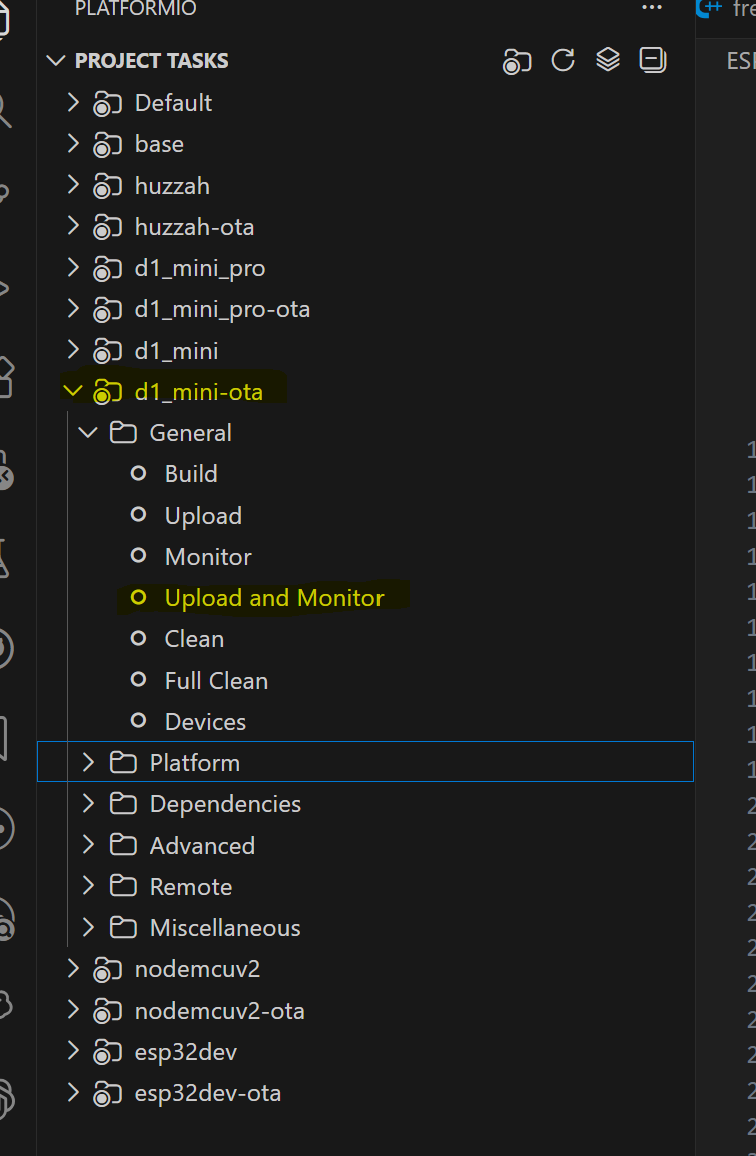
I marked this variable env:d1_mini-ota and hit the Upload Button in VSCode.
What can be the problem?
@smartmatic Can you post a issue to the repo in github please?
From the images you posted it’s saying it timed out, did you try to upload more than once, to make sure the esp was not “busy” the first time?
Can I also check you used the update button highlighted below:
@91JJ This is very cool and I has inspired me refactor my code to work nativity with ESPHome and other projects with an abstraction layer.
2 Likes