Does any one knows if it possible to receive NL-alerts.
Want to use the nl-alert to automate some systems, like ventilation and lights in the building.
Best regards
Ocean
Does any one knows if it possible to receive NL-alerts.
Want to use the nl-alert to automate some systems, like ventilation and lights in the building.
Best regards
Ocean
NL-Alert is a Dutch mechanism of alerting civilians in the vicinity of a (potantial) crisis situation through their mobile phones using cell broadcast. Different from SMS, cell broadcast is anonymous and works even with a network overload. It’s sent out by the Dutch government.
We got an Alert yesterday, about a large harzadous fire, issuing the closing of doors and windows. I was away from my phone, doing some home improvement. A Home Assistant integration would be awesome. That way, I can have cloud_tts issue the alert through all speakers in the house and have the LEDs turn Red.
If they show up as notifications on the phone then I believe the app can read them.
Look at last_notification
Well there must be an API because of this… Uitbreiding van NL-Alert | Crisis.nl
" Op dit moment kun je NL-Alert pushnotificaties via de Yazula-app en NL-Alarm app ontvangen. In de toekomst zullen ook andere apps NL-Alert pushnotificaties delen. Het ministerie van Justitie en Veiligheid is in gesprek met regionale publieke omroepen om NL-Alert pushnotificaties ook te delen via hun apps."
Has scaped NL-alert
You can use this now: https://api.public-warning.app/api/v1/providers/nl-alert/alerts. It looks like this:
{
  "data": [
    {
      "id": "feba2ed1e2d6",
      "message": "Brand met veel rook in Amsterdam, Vlothavenweg. Blijf uit de rook! Sluit ramen en deuren. Zet ventilatie uit. Meer informatie op https://www.brandweer.nl/nieuws/grote-brand-vrachtschip-aan-vlothavenweg/ *** Dutch Public Warning System. Fire with a lot of smoke in Amsterdam, Vlothavenweg. Stay out of the smoke! Close windows and doors. Switch ventilation systems off. For more info, see https://www.brandweer.nl/nieuws/grote-brand-vrachtschip-aan-vlothavenweg/",
      "type": "alert",
      "start_at": "2025-05-15T21:45:39Z",
      "area": [
        "52.40124,4.86918 52.40224,4.83122 52.33634,4.79426 52.25336,4.71471 52.21705,4.85392 52.28918,4.89195 52.29476,4.90032 52.27244,4.90564 52.2743,4.91325 52.28639,4.91325 52.31335,4.92086 52.3612,4.91781 52.39971,4.91477 52.40124,4.86918"
      ],
      "stop_at": "2025-05-15T22:45:39Z"
    },
    ...
  ]
}
Thank you for the link to the API. Could you also provide a link to the accompanying documentation or website?
Thank you,
Eric
I would also like to use this. But how can we use the geo data in area and determine if we are in it? Or perhaps show those areas on the map in HA?
Making a map can be easy done with some linux script that creates a map instance using the rest apt.
Hi Adriaan, who is the provider of this website?
I sent you a pm but maybe you didn’t see that?
I also use https://api.public-warning.app/api/v1/providers/nl-alert/alerts as the source for NL alert. This is the official NL-Alert endpoint also used by Actueel | NL Alert.
Using a REST-sensor I poll this endpoint every five minutes with this YAML configuration:
- resource: https://api.public-warning.app/api/v1/providers/nl-alert/alerts
  scan_interval: 300
  sensor:
    - name: NL-Alert
      icon: mdi:message-alert
      value_template: >
        {{ value_json.data[0].id }}
      json_attributes_path: $.data[0]
      json_attributes:
        - id
        - message
        - start_at
        - stop_at
        - area
Then I run an automation every time this sensor is updated to roughly determine if the alert is applicable, and turn off or on ventilation if it is specified in the message.
alias: NL-Alert
description: ""
triggers:
  - trigger: state
    entity_id:
      - sensor.nl_alert
conditions:
  - alias: NL-Alert applicable to Home zone
    condition: template
    value_template: |-
      {% set area_string = state_attr("sensor.nl_alert","area")[0] %}
      {% set area = area_string.split(" ") %}
      {% set coordinates = area[0].split(",") | map("float") | list %}
      {% set min = namespace(lat=coordinates[0],lon=coordinates[1]) %}
      {% set max = namespace(lat=coordinates[0],lon=coordinates[1]) %}


      {% for coordinate_string in area %}
      {% set coordinates = coordinate_string.split(",") | map("float") | list %}
      {% set min.lat = [min.lat, coordinates[0]] | min %}
      {% set max.lat = [max.lat, coordinates[0]] | max %}

      {% set min.lon = [min.lon, coordinates[1]] | min %}
      {% set max.lon = [max.lon, coordinates[1]] | max %}

      {% endfor %}

      {% set target = namespace(
        lat=state_attr("zone.home","latitude"),
        lon=state_attr("zone.home","longitude")
      ) %}
      {% set inside = (
        target.lat >= min.lat and target.lat <= max.lat and
        target.lon >= min.lon and target.lon <= max.lon
      ) %}

      {{ inside }}
actions:
  - alias: Check for fan control
    choose:
      - conditions:
          - condition: template
            value_template: >-
              {{ "ventilatie uit" in (state_attr("sensor.nl_alert","message") |
              lower) }}
        sequence:
          - action: automation.turn_off
            metadata: {}
            data:
              stop_actions: true
            target:
              entity_id: automation.fan_control
          - action: fan.turn_off
            metadata: {}
            data: {}
            target:
              entity_id: fan.itho_cve_fan
        alias: Ventilation off
      - conditions:
          - condition: template
            value_template: >-
              {{ "ventilatie aan" in (state_attr("sensor.nl_alert","message") |
              lower) }}
        sequence:
          - action: automation.turn_on
            metadata: {}
            data: {}
            target:
              entity_id: automation.fan_control
          - action: automation.trigger
            metadata: {}
            data:
              skip_condition: true
            target:
              entity_id: automation.fan_control
        alias: Ventilation on
  - action: notify.notify
    metadata: {}
    data:
      message: |-
        {{ state_attr("sensor.nl_alert","message") }}
      title: NL-Alert
  - action: tts.speak
    metadata: {}
    data:
      cache: true
      message: |-
        "NL Alert: {{ state_attr("sensor.nl_alert","message") }}
      language: nl_NL
      media_player_entity_id: media_player.alle_speakers
    target:
      entity_id: tts.piper
mode: single
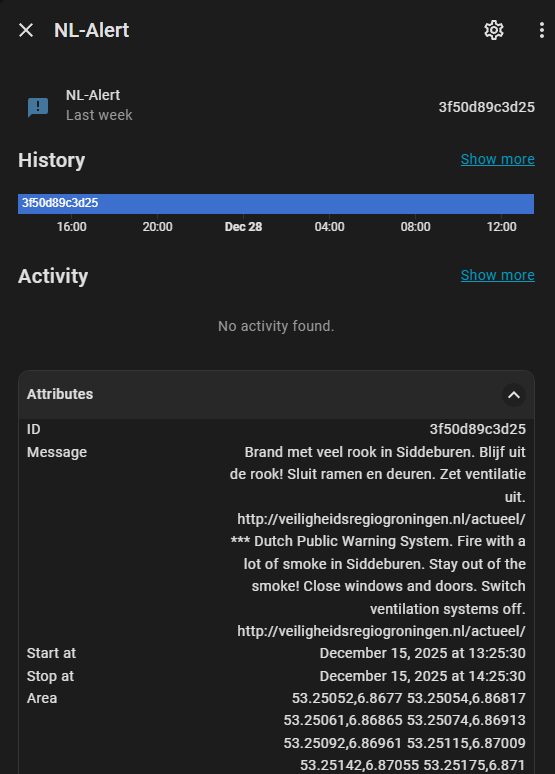
This gives you a sensor that will look something like this:
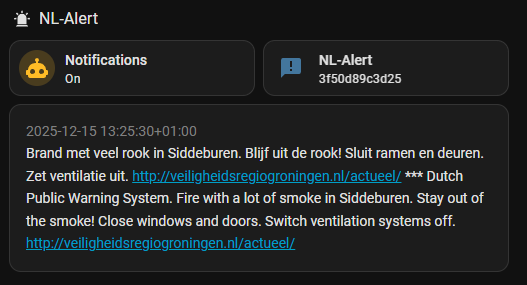
And can be integrated into a dashboard with a markdown card:
I have this condition, which i think is a bit more accurate. (Not using min/max of area)
conditions:
  - condition: template
    value_template: |-
      {% set home_lat = state_attr('zone.home', 'latitude') %}
      {% set home_lon = state_attr('zone.home', 'longitude') %}

      {% set bounds = state_attr('sensor.nl_alert','area')[0].split() %}

      {% if home_lat is not none and home_lon is not none %}
        {% set inside = namespace(result=false) %}

        {% for i in range(bounds | length) %}
          {% set j = (i + 1) % (bounds | length) %}
          {% set temp_i = bounds[i].split(",") %}
          {% set temp_j = bounds[j].split(",") %}
          {% set lat_i, lon_i = temp_i[0] | float, temp_i[1] | float %}
          {% set lat_j, lon_j = temp_j[0] | float, temp_j[1] | float %}

          {% if ((lon_i > home_lon) != (lon_j > home_lon)) and
                (home_lat < (lat_j - lat_i) * (home_lon - lon_i) / (lon_j - lon_i) + lat_i) %}
             {% set inside.result = not inside.result %}
          {% endif %}
        {% endfor %}

        {% if inside.result %}
           True
        {% else %}
           False
        {% endif %}
      {% else %}
        Unknown
      {% endif %}
    alias: zone.home in alert area
Also: do not use the ‘stop at’. It is meaningless, as it is always one hour after start.
I think this solution works a lot better then my current solution,
however I think this only checks the first record in the JSON
am I right?
I think we need to loop through all.
Yes, only the newest. I don’t see a point in looping through older alerts.
it there are several wild fires in the country,
and 1 is close to me I want to know,
for this I can use the 24hour filter
  - resource: https://api.public-warning.app/api/v1/providers/nl-alert/alerts?filter=last-24h
    scan_interval: 300
    sensor:
      - name: NL-Alert
        value_template: "{{ value_json.data | length }}"
        json_attributes:
          - data
and in the automation this
{% set target = namespace(
        lat=state_attr("zone.home","latitude"),
        lon=state_attr("zone.home","longitude")
      ) %}
{% set alerts = state_attr('sensor.nl_alert', 'data') %}
{# If no alerts → return False #}
{% if not alerts %}
  false
{% elif home_lat is not none and home_lon is not none %}
  {% set inside = namespace(result=false) %}
  {% for alert in alerts %}
  {# Loop through all alert polygons #}
      {% for area in alert.area %}
        {% set min = namespace(lat=90,lon=90) %}
        {% set max = namespace(lat=-90,lon=-90) %}
        {% for coordinate_string in area.split(' ') %}
          {% set coordinates = coordinate_string.split(",") | map("float") | list %}
          {% set min.lat = [min.lat, coordinates[0]] | min %}
          {% set max.lat = [max.lat, coordinates[0]] | max %}
          {% set min.lon = [min.lon, coordinates[1]] | min %}
          {% set max.lon = [max.lon, coordinates[1]] | max %}
        {% endfor %}
        {% if target.lat >= min.lat and target.lat <= max.lat and
          target.lon >= min.lon and target.lon <= max.lon %}
          {% set inside.result = true %}
        {% endif %}
      {% endfor %}
  {% endfor %}
  {{ inside.result }}
{% else %}
  false
{% endif %}
I went with the square calculation as I understand that one a little better.
I think I will try to assign this to a variable instead of a condition so I can use it on more the one place,
but for now this will be my check against multiple alerts
[edit]
I decided to go for a template binary sensor
- binary_sensor:
    - name: nl-alert
      state: >-
        {% set target = namespace(
                lat=state_attr("zone.home","latitude"),
                lon=state_attr("zone.home","longitude")
              ) %}
        {% set alerts = state_attr('sensor.nl_alert', 'data') %}
        {# If no alerts → return False #}
        {% if not alerts %}
          false
        {% elif home_lat is not none and home_lon is not none %}
          {% set inside = namespace(result=false) %}
          {% for alert in alerts %}
          {# Loop through all alert polygons #}
              {% for area in alert.area %}
                {% set min = namespace(lat=90,lon=90) %}
                {% set max = namespace(lat=-90,lon=-90) %}
                {% for coordinate_string in area.split(' ') %}
                  {% set coordinates = coordinate_string.split(",") | map("float") | list %}
                  {% set min.lat = [min.lat, coordinates[0]] | min %}
                  {% set max.lat = [max.lat, coordinates[0]] | max %}
                  {% set min.lon = [min.lon, coordinates[1]] | min %}
                  {% set max.lon = [max.lon, coordinates[1]] | max %}
                {% endfor %}
                {% if target.lat >= min.lat and target.lat <= max.lat and
                  target.lon >= min.lon and target.lon <= max.lon %}
                  {% set inside.result = true %}
                {% endif %}
              {% endfor %}
          {% endfor %}
          {{ inside.result }}
        {% else %}
          false
        {% endif %}
I can use this same sensor in several automations, basically controlling the fan speeds,
only turning them off is not enough because if the fan speed changes the change should not enable them again.
I read the api every 5 minutes and process only the newest. The odds of having multiple NL Alerts within these 5 minutes are close to zero.
Then you can set a NL alert helper to ‘active’ or something like that. I only loop through the coordinates when a new id is found. This is more efficient.
that’s fair and a good idea,
still I am not sure only checking the last one suffice,
I think I still have to exclude test messages which are send 3 times a year,
however this is also a good way to test my automations
I split the action part in a case for “TESTBERICHT” and for real alerts. This way the automation (trigger and condition part) is tested as well.
I created a template sensor helper to produce the center coordinates of the area specified in the rest sensor. It took me quite a while to get it to work. Maybe it can be of help to someone. Allows you to update a device_tracker with the proper center location of the alarm.
{% set raw = state_attr('sensor.nl_alert','area') %}
{% if raw and raw | length > 0 %}
  {% set coord_string = raw[0] if raw is iterable else raw %}
  {% set coord_string = coord_string | string %}
  {% set points = coord_string.split() %}

  {% set lats = points | map('regex_replace', '(.*),(.*)', '\\1') | map('float') | list %}
  {% set lons = points | map('regex_replace', '(.*),(.*)', '\\2') | map('float') | list %}

  {% if lats and lons %}
    {% set center_lat = (lats | min + lats | max)/2 %}
    {% set center_lon = (lons | min + lons | max)/2 %}
    {{ center_lat | round(5) }},{{ center_lon | round(5) }}
  {% else %}
    unknown
  {% endif %}
{% else %}
  unknown
{% endif %}