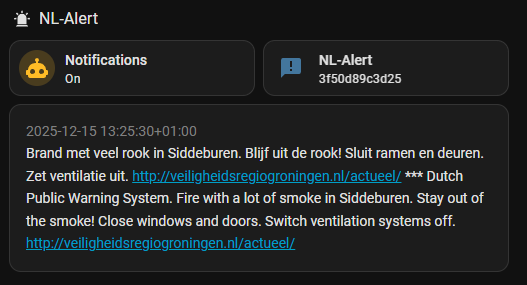
I also use https://api.public-warning.app/api/v1/providers/nl-alert/alerts as the source for NL alert. This is the official NL-Alert endpoint also used by Actueel | NL Alert.
Using a REST-sensor I poll this endpoint every five minutes with this YAML configuration:
- resource: https://api.public-warning.app/api/v1/providers/nl-alert/alerts
  scan_interval: 300
  sensor:
    - name: NL-Alert
      icon: mdi:message-alert
      value_template: >
        {{ value_json.data[0].id }}
      json_attributes_path: $.data[0]
      json_attributes:
        - id
        - message
        - start_at
        - stop_at
        - area
Then I run an automation every time this sensor is updated to roughly determine if the alert is applicable, and turn off or on ventilation if it is specified in the message.
alias: NL-Alert
description: ""
triggers:
  - trigger: state
    entity_id:
      - sensor.nl_alert
conditions:
  - alias: NL-Alert applicable to Home zone
    condition: template
    value_template: |-
      {% set area_string = state_attr("sensor.nl_alert","area")[0] %}
      {% set area = area_string.split(" ") %}
      {% set coordinates = area[0].split(",") | map("float") | list %}
      {% set min = namespace(lat=coordinates[0],lon=coordinates[1]) %}
      {% set max = namespace(lat=coordinates[0],lon=coordinates[1]) %}


      {% for coordinate_string in area %}
      {% set coordinates = coordinate_string.split(",") | map("float") | list %}
      {% set min.lat = [min.lat, coordinates[0]] | min %}
      {% set max.lat = [max.lat, coordinates[0]] | max %}

      {% set min.lon = [min.lon, coordinates[1]] | min %}
      {% set max.lon = [max.lon, coordinates[1]] | max %}

      {% endfor %}

      {% set target = namespace(
        lat=state_attr("zone.home","latitude"),
        lon=state_attr("zone.home","longitude")
      ) %}
      {% set inside = (
        target.lat >= min.lat and target.lat <= max.lat and
        target.lon >= min.lon and target.lon <= max.lon
      ) %}

      {{ inside }}
actions:
  - alias: Check for fan control
    choose:
      - conditions:
          - condition: template
            value_template: >-
              {{ "ventilatie uit" in (state_attr("sensor.nl_alert","message") |
              lower) }}
        sequence:
          - action: automation.turn_off
            metadata: {}
            data:
              stop_actions: true
            target:
              entity_id: automation.fan_control
          - action: fan.turn_off
            metadata: {}
            data: {}
            target:
              entity_id: fan.itho_cve_fan
        alias: Ventilation off
      - conditions:
          - condition: template
            value_template: >-
              {{ "ventilatie aan" in (state_attr("sensor.nl_alert","message") |
              lower) }}
        sequence:
          - action: automation.turn_on
            metadata: {}
            data: {}
            target:
              entity_id: automation.fan_control
          - action: automation.trigger
            metadata: {}
            data:
              skip_condition: true
            target:
              entity_id: automation.fan_control
        alias: Ventilation on
  - action: notify.notify
    metadata: {}
    data:
      message: |-
        {{ state_attr("sensor.nl_alert","message") }}
      title: NL-Alert
  - action: tts.speak
    metadata: {}
    data:
      cache: true
      message: |-
        "NL Alert: {{ state_attr("sensor.nl_alert","message") }}
      language: nl_NL
      media_player_entity_id: media_player.alle_speakers
    target:
      entity_id: tts.piper
mode: single
This gives you a sensor that will look something like this:
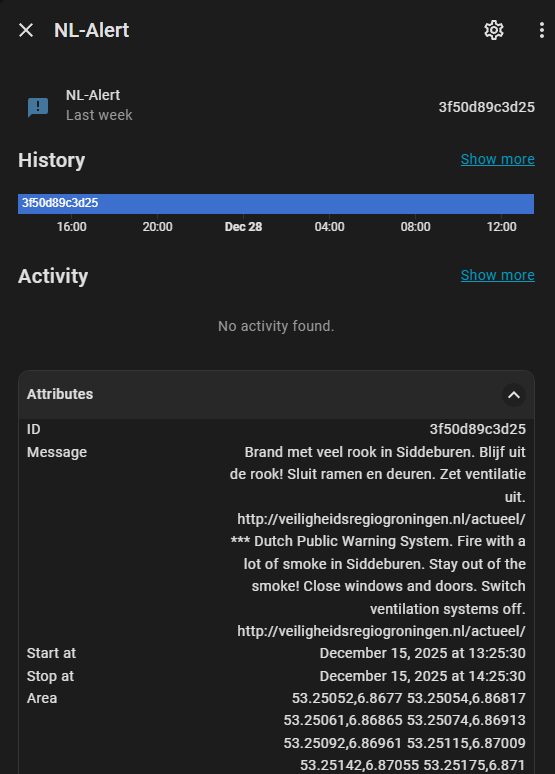
And can be integrated into a dashboard with a markdown card: