I have a Ninja Artisan outdoor oven and plan to smoke some meats, I decided not to go with the Ninja wireless thermostat and am looking for one I can use with my phone but integrate into HA too.
Any recommendations?
Hi,
I use this thermometer:
[https://www.aliexpress.com/item/1005006367825992.html]
It’s connected over ESPHome.
Configuration:
esp32_ble_tracker:

#text_sensor:
#  - platform: ble_scanner
#    name: "BLE Devices Scanner"

ble_client:
  - mac_address: 22:BF:60:21:15:A5
    id: grill_bt5
    auto_connect: true

sensor:
  - platform: ble_client
    type: characteristic
    ble_client_id: grill_bt5
    name: "BBQ Temperatur 1"
    service_uuid: '0000ffb0-0000-1000-8000-00805f9b34fb'
    characteristic_uuid: '0000ffb2-0000-1000-8000-00805f9b34fb'
    notify: true
    device_class: "temperature"
    lambda: |-
      uint16_t Temp1 = x[2]*256+x[3];
      return (float)(Temp1/10);

  - platform: ble_client
    type: characteristic
    ble_client_id: grill_bt5
    name: "BBQ Temperatur 2"
    service_uuid: '0000ffb0-0000-1000-8000-00805f9b34fb'
    characteristic_uuid: '0000ffb2-0000-1000-8000-00805f9b34fb'
    notify: true
    device_class: "temperature"
    lambda: |-
      uint16_t Temp1 = x[4]*256+x[5];
      return (float)(Temp1/10);

  - platform: ble_client
    type: characteristic
    ble_client_id: grill_bt5
    name: "BBQ Temperatur 3"
    service_uuid: '0000ffb0-0000-1000-8000-00805f9b34fb'
    characteristic_uuid: '0000ffb2-0000-1000-8000-00805f9b34fb'
    notify: true
    device_class: "temperature"
    lambda: |-
      uint16_t Temp1 = x[6]*256+x[7];
      return (float)(Temp1/10);

  - platform: ble_client
    type: characteristic
    ble_client_id: grill_bt5
    name: "BBQ Temperatur 4"
    service_uuid: '0000ffb0-0000-1000-8000-00805f9b34fb'
    characteristic_uuid: '0000ffb2-0000-1000-8000-00805f9b34fb'
    notify: true
    device_class: "temperature"
    lambda: |-
      uint16_t Temp1 = x[8]*256+x[9];
      return (float)(Temp1/10);

  - platform: ble_client
    type: characteristic
    ble_client_id: grill_bt5
    name: "BBQ Temperatur 5"
    service_uuid: '0000ffb0-0000-1000-8000-00805f9b34fb'
    characteristic_uuid: '0000ffb2-0000-1000-8000-00805f9b34fb'
    notify: true
    device_class: "temperature"
    lambda: |-
      uint16_t Temp1 = x[10]*256+x[11];
      return (float)(Temp1/10);

  - platform: ble_client
    type: characteristic
    ble_client_id: grill_bt5
    name: "BBQ Temperatur 6"
    service_uuid: '0000ffb0-0000-1000-8000-00805f9b34fb'
    characteristic_uuid: '0000ffb2-0000-1000-8000-00805f9b34fb'
    notify: true
    device_class: "temperature"
    lambda: |-
      uint16_t Temp1 = x[12]*256+x[13];
      return (float)(Temp1/10);
I have the 4 sensors one for a year now. Works very well and there is a HA integration.
I’m very happy with it.
Looks great, but unfortunately I can’t afford to spend that.
Well, I actually can’t too  I’ve got it for birthday.
Hi,
got also a 4 probe BT thermometer from Ali and it is working great with the inkbird integration. Found it straight away through the BT proxy.
I assume that this requires BT connection (and range) from HA host device to the thermometer?
Yes, it needs to have connectivity to BT that is connected to your HA. I have a few ESP32 bluetooth proxy devices around the house and those pick up the BT thermometers without any issues.
Inkbird works fine.
I have the six probe version
Do those devices act as bluetooth repeaters?
Can you share any information on them?
I’ve successfully reflashed ESPHome on the Sinilink XY-WFPOW module that comes with the XY-T04-W K-type thermocouple controller board. There is an on-board relay that turns a blower fan on/off. Had to purchase a different thermocouple model, one with a longer probe and carefully enlarge the existing temp probe hole in the ceramic lid.
This configuration exposes the raw ModBus registers as sensors and controls. I’m working on a new climate platform so it can be controlled via a climate card.
This configuration includes a thermostat climate component to easily control and monitor the BBQ temprature.
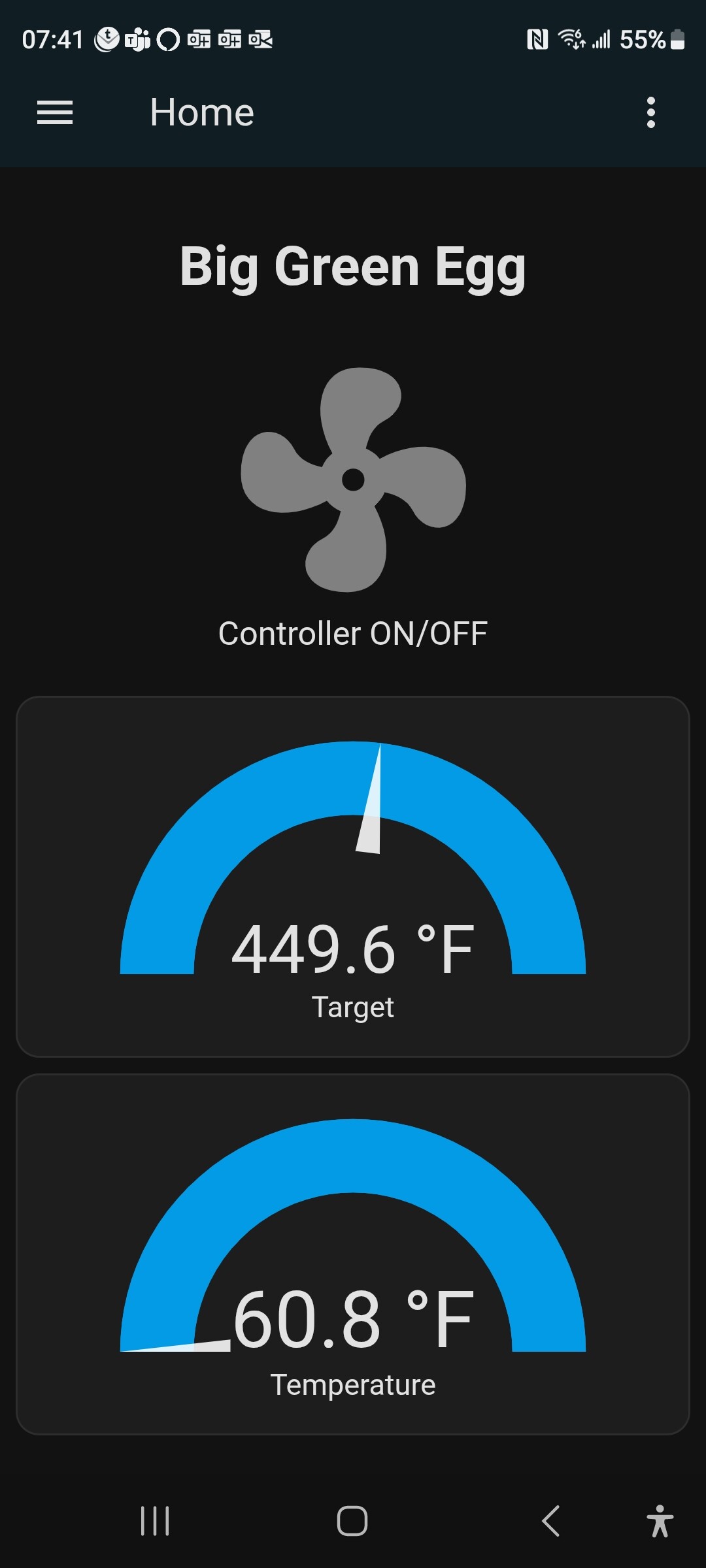
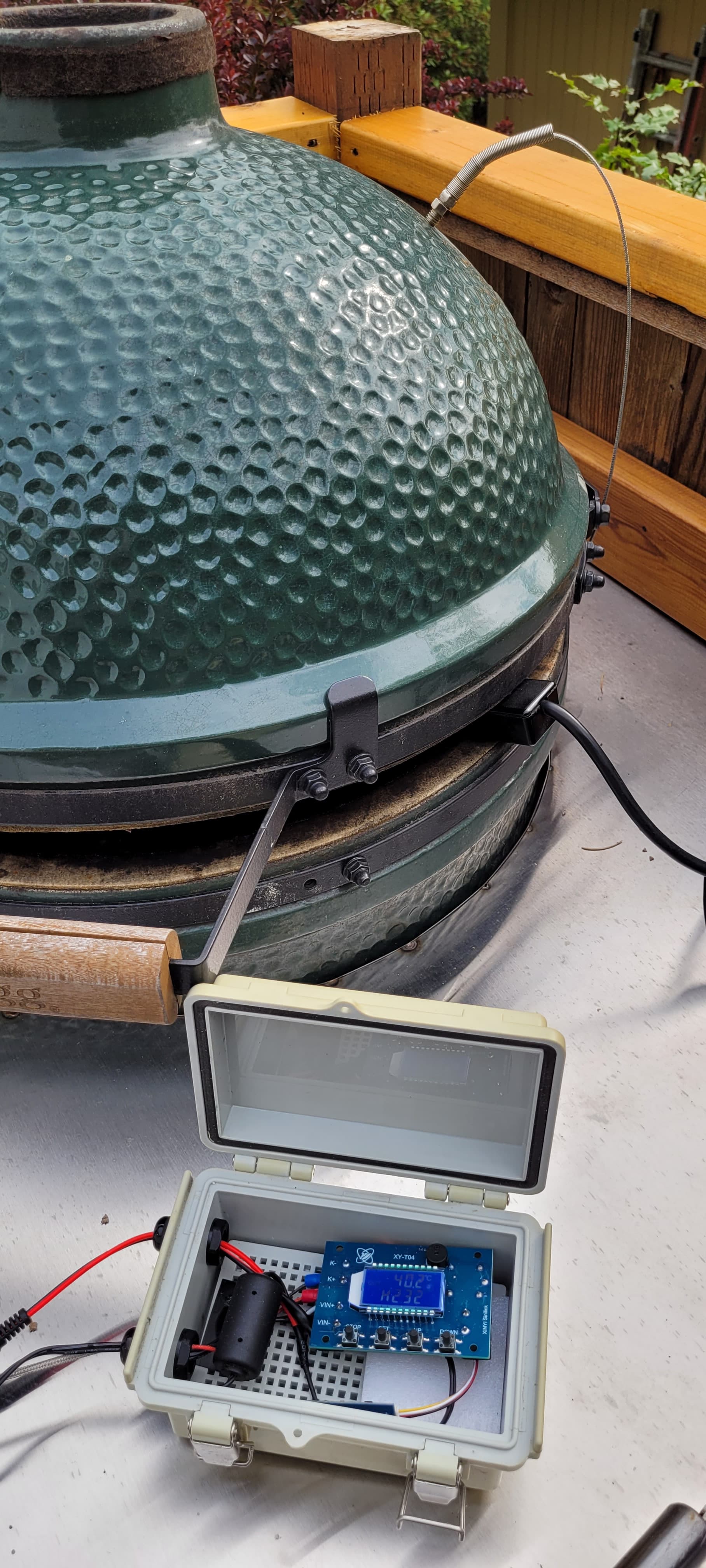
Thanks to @framenic for getting me started.
status_led:
  pin:
    number: GPIO2
    inverted: true

uart:
  id: mod_bus
  tx_pin: GPIO1
  rx_pin: GPIO3
  baud_rate: 115200
  data_bits: 8
  stop_bits: 1
  parity: none

modbus:
 id: modbus1
# send_wait_time: 1ms

modbus_controller:
  - id: XYT04
    ## This address should be set to the "Address" value in the config menu
    address: 0x01
    modbus_id: modbus1
    setup_priority: 600
    update_interval: 1s
    command_throttle: 1ms

sensor:
  - name: "Sensor Status"
    internal: true
    platform: modbus_controller
    modbus_controller_id: XYT04
    entity_category: diagnostic
    address: 0x01
    register_type: holding
    value_type: U_WORD
  - name: "Remaining Delay Time"
    internal: true
    platform: modbus_controller
    modbus_controller_id: XYT04
    entity_category: diagnostic
    address: 0x02
    register_type: holding
    value_type: U_WORD
    unit_of_measurement: minutes
  - name: "Current Temperature"
    id: current_temperature
    platform: modbus_controller
    modbus_controller_id: XYT04
    address: 0x03
    device_class: temperature
    unit_of_measurement: "°C"
    register_type: holding
    value_type: U_WORD
    accuracy_decimals: 1
    lambda: return x * 0.1;
  - name: "°C/°F"
    internal: true
    platform: modbus_controller
    modbus_controller_id: XYT04
    entity_category: diagnostic
    address: 0x04
    register_type: holding
    value_type: U_WORD
  - name: "Work Mode"
    internal: true
    platform: modbus_controller
    modbus_controller_id: XYT04
    entity_category: diagnostic
    address: 0x05
    register_type: holding
    value_type: U_WORD
  - name: "Baud Rate"
    internal: true
    platform: modbus_controller
    modbus_controller_id: XYT04
    entity_category: diagnostic
    address: 0x13
    register_type: holding
    value_type: U_WORD
  - name: "Delay Start Time"
    internal: true
    platform: modbus_controller
    modbus_controller_id: XYT04
    entity_category: diagnostic
    address: 0x0A
    register_type: holding
    value_type: U_WORD
    unit_of_measurement: minutes
  - name: "Alarm Status"
    internal: true
    platform: modbus_controller
    modbus_controller_id: XYT04
    entity_category: diagnostic
    address: 0x0C
    register_type: holding
    value_type: U_WORD

number:
  - name: "Target Temperature"
    id: target_temperature
    platform: modbus_controller
    modbus_controller_id: XYT04
    entity_category: ""
    device_class: temperature
    unit_of_measurement: "°C"
    mode: box
    address: 0x06
    register_type: holding
    value_type: U_WORD
    step: 0.1
  - name: "Hysteresis Temperature"
    internal: true
    platform: modbus_controller
    modbus_controller_id: XYT04
    device_class: temperature
    unit_of_measurement: "°C"
    mode: box
    address: 0x07
    register_type: holding
    value_type: U_WORD
    step: 0.1
  - name: "High Temp Alarm"
    internal: true
    platform: modbus_controller
    modbus_controller_id: XYT04
    device_class: temperature
    unit_of_measurement: "°C"
    mode: box
    address: 0x08
    register_type: holding
    value_type: U_WORD
    step: 0.1
  - name: "Low Temp Alarm"
    internal: true
    platform: modbus_controller
    modbus_controller_id: XYT04
    device_class: temperature
    unit_of_measurement: "°C"
    mode: box
    address: 0x09
    register_type: holding
    value_type: U_WORD
    step: 0.1
  - name: "Temperature Correction"
    internal: true
    platform: modbus_controller
    modbus_controller_id: XYT04
    device_class: temperature
    unit_of_measurement: "°C"
    mode: box
    address: 0x0B
    register_type: holding
    value_type: U_WORD
    step: 0.1
  - name: "Slave Device Address"
    internal: true
    platform: modbus_controller
    modbus_controller_id: XYT04
    entity_category: diagnostic
    address: 0x12
    register_type: holding
    value_type: U_WORD

switch:
  - name: "Blower Status"
    platform: modbus_controller
    modbus_controller_id: XYT04
    address: 0x00
    register_type: holding
    bitmask: 0x1
  - name: "Screen Backlight"
    internal: true
    platform: modbus_controller
    modbus_controller_id: XYT04
    address: 0x14
    register_type: holding
    bitmask: 0x1
  - name: "Alarm Switch"
    internal: true
    platform: modbus_controller
    modbus_controller_id: XYT04
    address: 0x0D
    register_type: holding
    bitmask: 0x1
  - name: "High Temp Alarm Switch"
    internal: true
    platform: modbus_controller
    modbus_controller_id: XYT04
    address: 0x0E
    register_type: holding
    bitmask: 0x1
  - name: "Low Temp Alarm Switch"
    internal: true
    platform: modbus_controller
    modbus_controller_id: XYT04
    address: 0x0F
    register_type: holding
    bitmask: 0x1
  - name: "Delay Start Switch"
    internal: true
    platform: modbus_controller
    modbus_controller_id: XYT04
    address: 0x10
    register_type: holding
    bitmask: 0x1
  - name: "Power Switch" # "Emergency Stop Switch"
    id: power_switch
    platform: modbus_controller
    modbus_controller_id: XYT04
    address: 0x11
    register_type: holding
    bitmask: 0x1
    inverted: True

climate:
  - name: thermostat
    id: thermostat_id
    platform: thermostat
    sensor: current_temperature
    visual:
      min_temperature: 90
      max_temperature: 400
      temperature_step:
        target_temperature: 1.0
        current_temperature: 1.0
    idle_action:
      - number.set:
          id: target_temperature
          value: !lambda "return id(thermostat_id).target_temperature;"
    min_idle_time: 0s
    heat_action:
      - number.set:
          id: target_temperature
          value: !lambda "return id(thermostat_id).target_temperature;"
    min_heating_off_time: 0s
    min_heating_run_time: 0s
    target_temperature_change_action:
      - number.set:
          id: target_temperature
          value: !lambda "return id(thermostat_id).target_temperature;"
    on_control:
      - lambda: |-
            if (x.get_mode() == CLIMATE_MODE_OFF) {
                id(power_switch).turn_off();
            } else {
                id(power_switch).turn_on();
            }
Thank you!
I received my BFOUR Wireless Meat Thermometer, Model BF-5 today and this worked for me too. The only thing that needed configuring was the ble_client mac_address. I found mine by uncommenting the text_sensor temporarily and looking at the logging.
From a BLE standpoint, I’m curious. How did you find the uuid’s? I didn’t have to change them for my device so I assume they’re not unique like MAC addresses but I didn’t see them in the logging.
I needed to do a little work to get the temperatures reported in Fahrenheit and the sensor boilerplate started getting a bit long so I moved it to a separate file, bbq-probe.yaml. Mine looks like this now:
# Requires probe_number

name: "Probe ${probe_number}"
platform: ble_client
type: characteristic
ble_client_id: grill_bt5
service_uuid: '0000ffb0-0000-1000-8000-00805f9b34fb'
characteristic_uuid: '0000ffb2-0000-1000-8000-00805f9b34fb'
notify: true
device_class: "temperature"
unit_of_measurement: °C
accuracy_decimals: 1
lambda: |-
  auto offset = 2*(${probe_number}-1);
  auto temp = ((uint16_t)x[2+offset]*256+x[3+offset]);
  if (temp == 0xFFFF) return NAN;
  return (float)temp/10;
and the sensors are declared like this:
sensor:
  - <<: !include
      file: bbq-probe.yaml
      vars:
        probe_number: 1
  - <<: !include
      file: bbq-probe.yaml
      vars:
        probe_number: 2
  - ...
Good to hear that it worked for you.
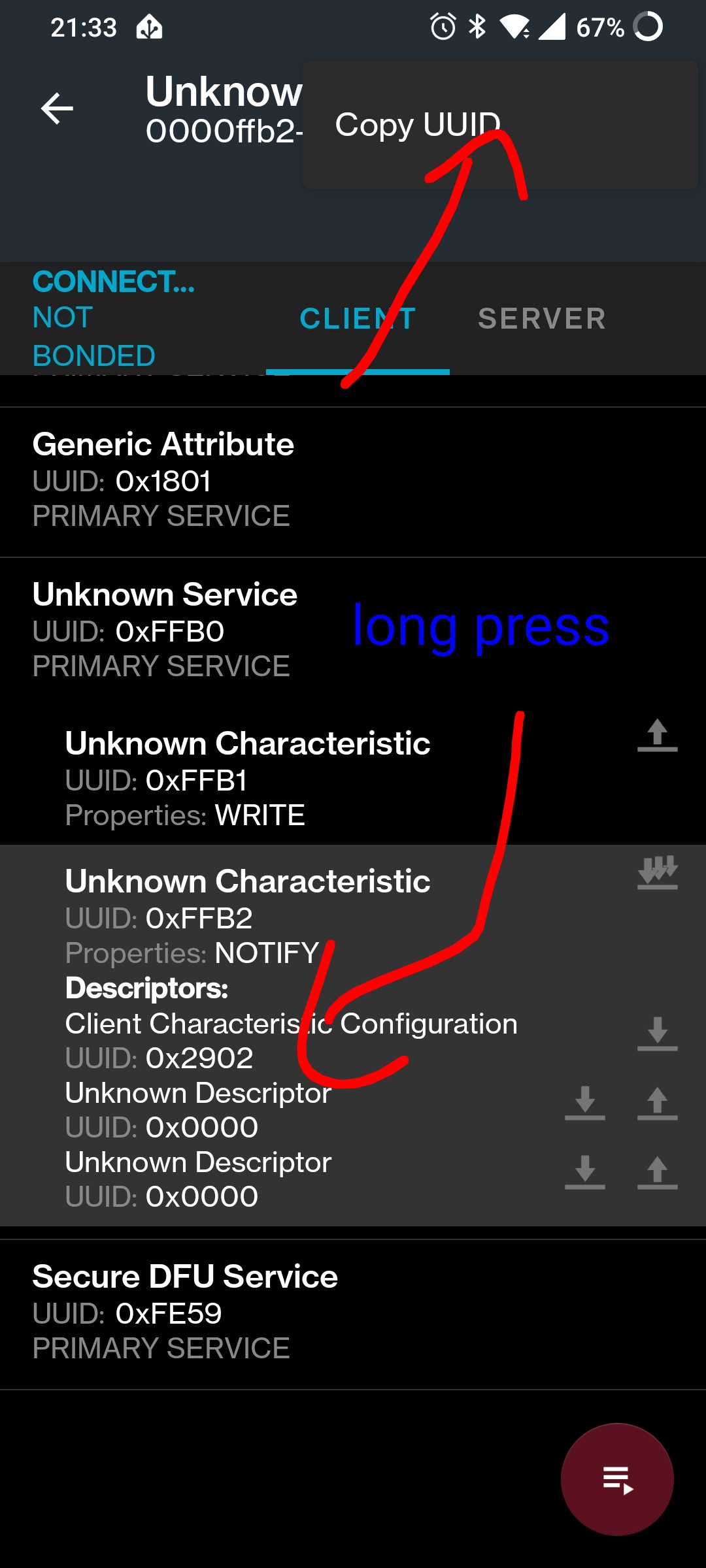
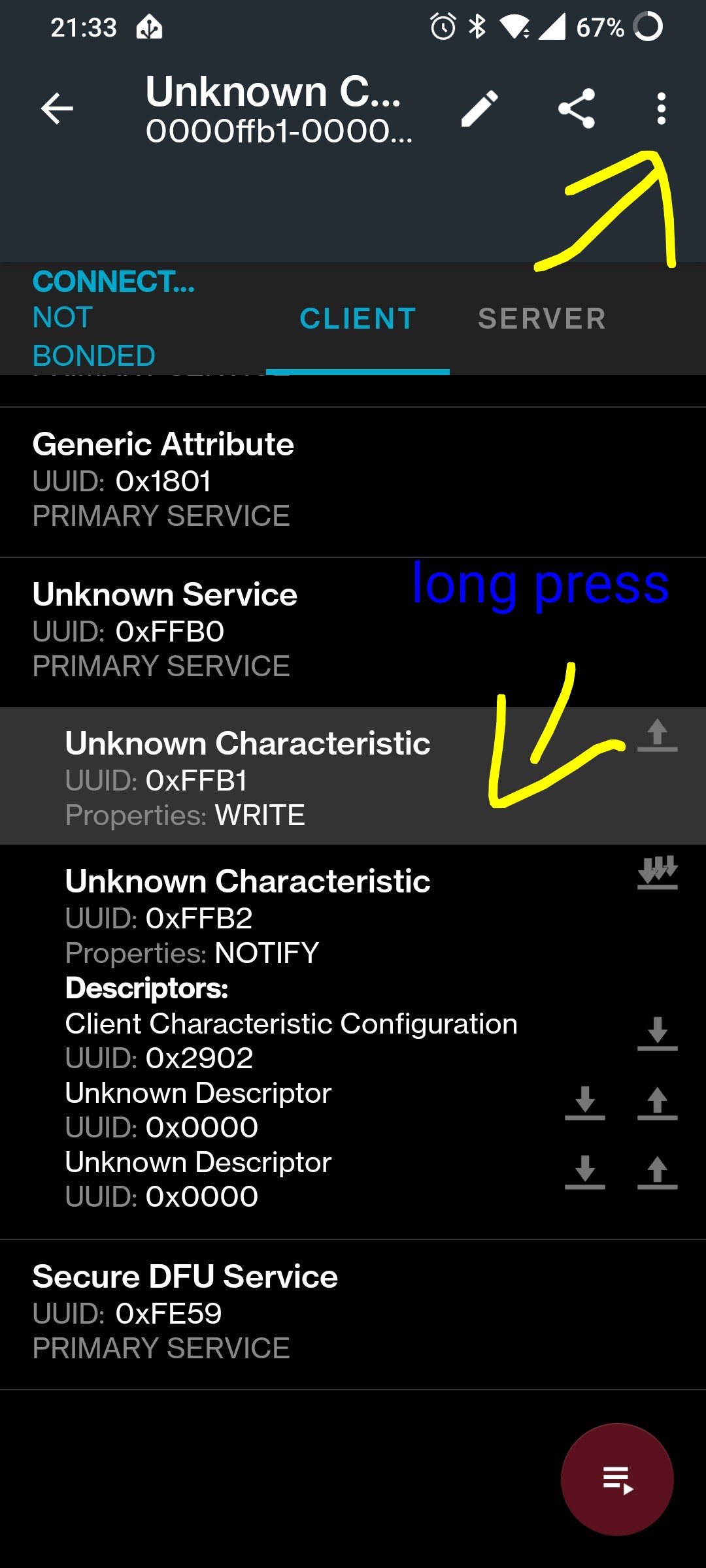
I used NRF Connect App from Nodic Semic Conductor on my phone. There is some kind of scanner. Then you can connect to device. In the three point menu there is one entro “Show log” and in this log I found the necessary information.
Best regards
Werner
For Change into Fahrenheit change this:
unit_of_measurement: °C
into
unit_of_measurement: °F
and do the calculation here:
return (float)temp/10;
should be:
return (float)((temp/10)*(9/5))+32;
Thank you again. I was hoping there was a way to get that data from HA. I’ll check out that NRF app.
As for the temperature reporting. It’s enough for the device to report in the native °C. You just need to tell HA what the units are by setting unit_of_measurement. Then it knows to convert to whatever units are local. I suppose this isn’t a problem for the rest of the world that uses sensible units.
You should be casting to float before the division. Otherwise you’re losing the tenths of a degree. This doesn’t look so bad in Celsius but after converting to °F - the numbers will tend to jump by 2°F at a time.
To sum up, adding the unit_of_measurement line was itself enough to get the temperature reported in °F. I cast to float before the divide by 10 so I didn’t lose precision and then set accuracy_decimals to make the precision explicit. By that point the sensor boilerplate got so long I just had to factor them out into a template file.
Wow thanks! I can’t believe how well this worked with my random Amazon “Intelitopia AT-01” bluetooth BBQ probes. I was about to buy something fancy to get my temperature probes connected through brute force but made carnitas today and had some tinkering time.
For anybody that gets stuck:
- NRF Connect app on Android will show you the MAC address and UUIDs you need.
- NRF app might give you hexadecimal UUIDs (like 0xFFF0). I converted them to 128-bit format (like 0000FFF0-0000-1000-8000-00805F9B34FB).
- Look for a sensor that has a value that changes. In my case, this “characteristic” was the only one like that. The probes come from different bytes in the total value. I couldn’t figure out which value was changing in the app on iPhone. In the Android app selecting “Enable CCCDs” let me see the value on the one characteristic I needed to determine which one it was.
- The hexidecimal conversion I needed was different than the previous examples in this thread. I gave chatgpt the bluetooth value along with the equivalent reading from the BBQ probe display and it gave me something that worked.

Here’s the ESP Home configuration code I ended up using in my bluetooth proxy:
# find mac address using nRF Connect app on android or above text_sensor
ble_client:
  - mac_address: CB:C8:00:00:0E:03
    id: xBBQ
    auto_connect: true

sensor:
  ########## BBQ BLE devices ##########
  # find sensor UUID using nRF Connect app, different probes are on different bytes in the same value (y in x[y])
  # UUID is converted to full 128-byte bluetooth standard
  - platform: ble_client
    type: characteristic
    ble_client_id: xBBQ
    name: "BBQ Temp Dome"
    service_uuid: '0000FFF0-0000-1000-8000-00805F9B34FB'
    characteristic_uuid: '0000FFF4-0000-1000-8000-00805F9B34FB'
    notify: true
    device_class: "temperature"
    unit_of_measurement: "°C"
    accuracy_decimals: 1
    lambda: |-
      uint16_t temp = x[4] + x[5]*256;  // little-endian
      if (temp == 0xFFFF) return NAN;
      float t = temp / 10.0f;  // convert to °C
      return roundf(t * 10.0f) / 10.0f;  // properly rounds to one decimal

  - platform: ble_client
    type: characteristic
    ble_client_id: xBBQ
    name: "BBQ Temp Probe 1"
    service_uuid: '0000FFF0-0000-1000-8000-00805F9B34FB'
    characteristic_uuid: '0000FFF4-0000-1000-8000-00805F9B34FB'
    notify: true
    device_class: "temperature"
    unit_of_measurement: "°C"
    accuracy_decimals: 1
    lambda: |-
      uint16_t temp = x[4] + x[5]*256;  // little-endian
      if (temp == 0xFFFF) return NAN;
      float t = temp / 10.0f;  // convert to °C
      return roundf(t * 10.0f) / 10.0f;  // properly rounds to one decimal

  - platform: ble_client
    type: characteristic
    ble_client_id: xBBQ
    name: "BBQ Temp Probe 2"
    service_uuid: '0000FFF0-0000-1000-8000-00805F9B34FB'
    characteristic_uuid: '0000FFF4-0000-1000-8000-00805F9B34FB'
    notify: true
    device_class: "temperature"
    unit_of_measurement: "°C"
    accuracy_decimals: 1
    lambda: |-
      uint16_t temp = x[4] + x[5]*256;  // little-endian
      if (temp == 0xFFFF) return NAN;
      float t = temp / 10.0f;  // convert to °C
      return roundf(t * 10.0f) / 10.0f;  // properly rounds to one decimal
to find uuid with nrf app , long press a box ,
and click three dots on the up-right and copy uuid