Redirect Voice PE Replies to Sonos

Hi there,

since the release of the HA Voice Preview Edition I was looking for a possibility to redirect the replies of Voice PE to a Sonos speaker, as the quality of the builtin speaker is not sufficient. There was some information available about how this might be done, but no detailed information how to do it. So here it is (put together with some AI help)!!!

What does it do?

  • All replies Voice PE gives to a question are redirected to a sonos speaker of your choice
  • Only the mic of the Voice PE is used
  • The standard sounds of the Voice PE are output through the builtin speaker as usual

How does it work?
Configuration

  • You choose the sonos speaker to output the Voice PE replies
  • You choose the volume the replies should have on your speaker

Usage

  • You ask Voice PE a question
  • The reply is played via the sonos speaker

Flow

  • Voice PE mutes the output sonos speaker (to silent the speaker if it is playing, so Voice PE can understand your question)
  • Voice PE creates the reply using the LLM you configured (as usual)
  • Voice PE speaker is set to 0,0 (this is needed as the output through the internal speaker is not cut, but only muted as long as the answer takes)
  • The reply is redirected to a Home Assistant script
  • The script
    • unmutes the output sonos speaker
    • snapshots the state of the output sonos speaker
    • plays the reply
    • restores the sonos speaker state from the snapshot
    • sets the volume of the Voice PE builtin speaker to 50%

What is the advantage of this solution?

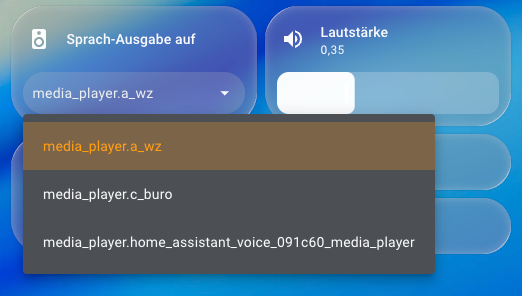
  • The sonos speaker can be chosen via HA dashboard
  • The volume of the reply on the sonos speaker can be chosen via HA Dashboard
  • The HA script can easily be tweaked to your needs without needing to reinstall the Voice PE YAML after every change

What must I do?

  • Add your Voice PE to ESPHome Builder (search Web on how to do it)
  • Edit your Voice PE YAML
  • Add the following lines at the end:
  # Mute output speaker
  on_start:
    - homeassistant.action:
        action: script.mute_tts_target

  # Mute Voice PE internal speaker
  on_tts_start:
    - media_player.volume_set:
        id: external_media_player
        volume: 0.0   

  # Start HA script and hand over URL with Voice PE reply
  on_tts_end:
    - homeassistant.action:
        action: script.voice_assistant_sonos
        data:
          url: !lambda 'return x;'
sequence:
  - variables:
      target: "{{ states('input_select.tts_target') | default('media_player.a_wz') }}"
      vol: "{{ states('input_number.tts_volume') | float(0.35) }}"
  - action: sonos.snapshot
    data:
      entity_id: "{{ target }}"
      with_group: true
  - action: media_player.volume_mute
    metadata: {}
    data:
      is_volume_muted: false
    target:
      entity_id: "{{ target }}"
  - action: media_player.volume_set
    data:
      entity_id: "{{ target }}"
      volume_level: "{{ vol }}"
  - data:
      entity_id: "{{ target }}"
      media_content_type: music
      media_content_id: "{{ url }}"
    action: media_player.play_media
  - delay:
      hours: 0
      minutes: 0
      seconds: 2
      milliseconds: 0
  - wait_template: "{{ not is_state(target, 'playing') }}"
    timeout: "00:10:00"
    continue_on_timeout: true
  - data:
      entity_id: "{{ target }}"
    action: sonos.restore
  - action: media_player.volume_set
    target:
      entity_id:
        - media_player.home_assistant_voice_091c60_media_player
    data:
      volume_level: 0.5
alias: voice_assistant_sonos
mode: queued
fields:
  url:
    description: Audio-URL of Assist-Reply
    example: https://…/tts.mp3
description: ""

This script plays the Voice PE reply on the sonos speaker
Replace media_player.home_assistant_voice_091c60_media_player with the entity of your Voice PE

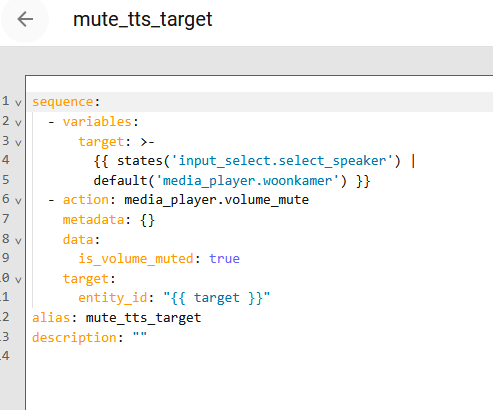
  • Create the script “mute_tts_target”:
sequence:
  - variables:
      target: "{{ states('input_select.tts_target') | default('media_player.a_wz') }}"
  - action: media_player.volume_mute
    metadata: {}
    data:
      is_volume_muted: true
    target:
      entity_id: "{{ target }}"
alias: mute_tts_target
description: ""

This script mutes the sonos speaker after the wake word, so Voice PE mic can understand you better.
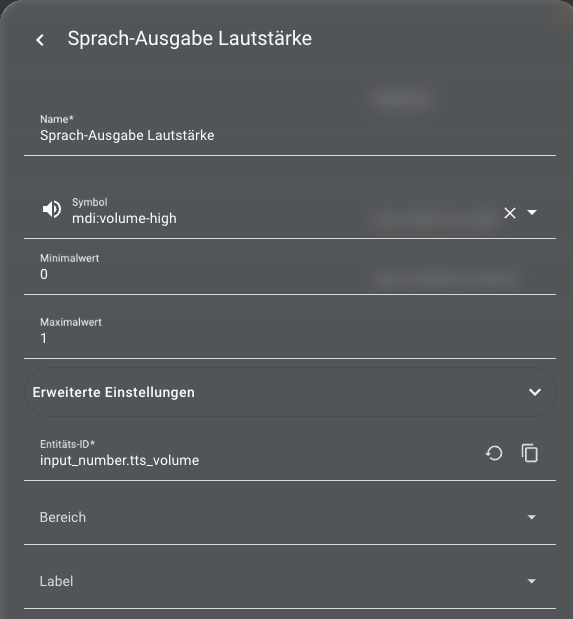
I also created a little dashboard using the Voice PE entities and the helper entitites

That’s it!!

Please share your thoughts and experience if you try it out

Disclaimer: If you try it out this is of course at your own risk!

P.S.: This script is for sonos only, but it should be easy to port it to your speaker type as long as it can play back an URL stream

Cons of this solution

  • The reply is starting the after it is completely processed by the LLM (I think that is also happening on Voice PE itself(?) - so no direct streaming)
  • You cannot stop the reply by pressing the Voice PE button (This may be implemented in a future release :wink: )
  • The internal Voice PE speaker is restored to a default 0,5 volume after the reply, but that can be adjusted in the script.
6 Likes

How about moving this to Community Guides and adding it to the Home Assistant Cookbook?

The Home Assistant Cookbook - Index

Thanks for the advice. Done :wink:

could this also be used with Amazon Echo speakers (Alexa)?

AFAIK the problem is to get an Echo
speaker to play the stream from the URL. So you need to sort that out first. I have also an Echo Show, and redirecting to that directly does not work

You can bypass the PE making a secondary response after the Sonos by choosing - set_conversation_response: ""

Here is my incomplete, sandbox code. I have hardcoded a response to return the date:time in a manner that I can make sure we are using the correct pipeline and intents, but my comment above is valid. I built upon the example here.

I am not sure it is the best answer, but it might be a step further than your muting solution and would cut a small bit of code out:

- alias: Route Voice to Sonos Speakers
  description: Route voice responses to Sonos speakers - Office and Guest Room only
  mode: parallel
  triggers:
    - trigger: conversation
      command: what time is it
      id: time
  conditions: []
  variables:
    sonos_mapping:
      assist_satellite.office_assist_assist_satellite: media_player.office_sonos
      assist_satellite.guest_assist_assist_satellite: media_player.guest_sonos
    responding_satellite:
      "{% for entity_id, sonos in sonos_mapping.items() %}\n  {%
      if states(entity_id) == 'responding' %}\n    {{ entity_id }}\n  {% endif %}\n{%
      endfor %}\n"
    target_sonos:
      "{{ sonos_mapping.get(responding_satellite, 'media_player.office_sonos')
      }}"
  actions:
    - set_conversation_response: ""
    - variables:
        was_playing: "{{ states(target_sonos) == 'playing' }}"
    - action: tts.speak
      metadata: {}
      data:
        cache: false
        media_player_entity_id: "{{ target_sonos }}"
        message: The current time is {{ now().strftime('%I:%M %p') }}
      target:
        entity_id: tts.piper
    - delay:
        seconds: 0
    - if:
        - condition: template
          value_template: "{{ was_playing }}"
      then:
        - action: media_player.media_play
          target:
            entity_id: "{{ target_sonos }}"

PS., your code worked perfectly upon first blush. I’ll keep an eye on the logs, but thanks so much for taking the time to post your work. It helped me a ton tonight.

@Snapjack I have been digging into this post and issue now for two weeks. Returning to your code, I am convinced that it is entirely possible you are not using the Music Assistant add-on? My reasoning is because Music Assistant states clearly that you should remove the Sonos HA integration when integrating Sonos speakers for MA use in the MA settings.

The two actions, sonos.snapshot and sonos.restore, are functions available only through the HA Sonos integration. The MA Sonos architecture does’t need an explicit call to pause and resume Sonos music when using the MA announcements feature. They simply work.


For the background of others, when a new Sonos speaker is found, you can:

  • Use the Sonos integration in HA which will pop up. This will automatically create a Sonos media_player entity for any Sonos speaker found

  • Disregard the HA integration discovery (and hide it), open MA, and install the Sonos integration in Music Assistant. This will automatically create a MA player provider for your Sonos speakers in the MA interface. It will also create a MA media_player entity in HA.

  • Include the Sonos speakers as integrations into BOTH MA and HA which creates duplicate HA entries as a MA media_player entity and Sonos media_player entities. If I am understanding this correct, and my testing is correct, this is why MA advises against using the integration in both places. It cause conflicts in automations and when referencing entities in your future use. It’s just cleaner to forego the Sonos integration and defer to including in MA and let it create entities in HA which perform the same function as the HA Sonos integration once performed.

There are workarounds, but I have found them unnecessary. Integrating Sonos speakers through MA and allowing it to create MA entities in HA seems the easiest and cleanest.


Using MA, you gain access to the commands music_assistant.play_announcement and music_assistant.play_media actions. You would call the media_player.(all other commands for pause, play, volume…) for any other media actions within intents, scripts or automations.

Using this approach, I added a few firmware lines to the PE after taking control in ESPHome Builder. The lines call a script as yours does, but uses handling built into MA to pause and resume music through native commands. This seems to act more reliably:

Here is the full ESP32 code you would paste into ESPHome Builder when trying this approach. This firmware was current on 09/08/2025, but current firmware can also be found here.

Change the name in substitutions at the top to the name of YOUR PE instance. Also make sure you have your wifi credentials saved in the ESPHome Secrets file which is can be accessed at the top and to the right of your device name in ESPHome Device Builder:

on_tts_start:
    - if:
        condition:
          # The intent_progress trigger didn't start the TTS Reponse
          lambda: 'return id(voice_assistant_phase) != ${voice_assist_replying_phase_id};'
        then:
          - lambda: id(voice_assistant_phase) = ${voice_assist_replying_phase_id};
          - script.execute: control_leds
          # Start a script that would potentially enable the stop word if the response is longer than a second
          - script.execute: activate_stop_word_once
    # Add our TTS interception here
    - media_player.volume_set:
        id: external_media_player
        volume: 0.0
  on_tts_end:
    - homeassistant.action:
        action: script.mass_announce_tts
        data:
          url: !lambda 'return x;'
    - delay: 
        milliseconds: 10  # Give announcement time to start
    - if:
        condition:
          media_player.is_announcing:
        then:
          media_player.stop:
            announcement: true
  # When the voice assistant ends ...
  on_end:
    - wait_until:
        not:
          voice_assistant.is_running:
    - mixer_speaker.apply_ducking:
        id: media_mixing_input
        decibel_reduction: 0
        duration: 0s
    # ADD THIS to restore volume after TTS
    - media_player.volume_set:
        id: external_media_player
        volume: 0.7  # Or whatever default volume you prefer
    - if:
        condition:
          lambda: return id(voice_assistant_phase) == ${voice_assist_error_phase_id};
        then:
          - delay: 0s
    - lambda: id(voice_assistant_phase) = ${voice_assist_idle_phase_id};
    - script.execute: control_leds
  on_timer_finished:
    - switch.turn_on: timer_ringing
  on_timer_started:
    - script.execute: control_leds
  on_timer_cancelled:
    - script.execute: control_leds
  on_timer_updated:
    - script.execute: control_leds
  on_timer_tick:
    - script.execute: control_leds

The key changes from stock firmware are:

  • on_tts_start → we mute the PE volume
  • on_tts_end → we call script.mass_announce_tts, let the returned response from the HA pipeline begin for 10ms and if the PE has been sent a voice response to play, we stop the announcement from playing. The 10ms is needed because we can’t “stop” the announcement if it hasn’t started playing.
  • on_end → we do some cleanup by restoring the PE volume and change the ducking and delay time to quickly return to the idle state.

Since the assistant pipeline architecture can’t be overridden without writing our own pipeline, the best we can do is silence the response. No amount of coding and exploring I have tried has resulted with me finding a way to simply accept voice input and redirect responses to the Sonos solely. The pipeline is distinctly designed for the input device to be the output device. Period. All we can do is mute the response.

This means there will be an announcement response. We can only choose to mute it, in the case above, let it play for 10ms (too quickly to even audibly hear) and stop the whole response. Obviously, our Sonos will not resume playing until the whole response sequence has completed, so media_player.stop: announcement: true cuts down our wait period. Likewise, adjusting the delays in on_tts_end further cuts down our wait time for MA to unpause our Sonos music.


The second part is the HA script found in our scripts.yaml file of the root (/config/) directory. For those new to HA programming, this is the same directory which has your configuration.yaml file. I use a seperate scripts.yaml file, so have a script: !include scripts.yaml reference in my configuration.yaml.

mass_announce_tts:
  sequence:
    # Store whether Sonos was playing before announcement
    - variables:
        was_playing: "{{ states('media_player.office_sonos') == 'playing' }}"
    - action: music_assistant.play_announcement
      target:
        entity_id: "media_player.office_sonos"
      data:
        url: "{{ url }}"
    - delay:
        seconds: 1
    # Only resume if it was actually playing before
    - if:
        - condition: template
          value_template: "{{ was_playing }}"
      then:
        - action: media_player.media_play
          target:
            entity_id: "media_player.office_sonos"
  alias: "Mass Announce TTS"
  mode: queued
  fields:
    url:
      description: "TTS URL from PE"

This file uses the MA logic to take my hard-coded sonos entity and outputs the response from my PE. Obviously, one would change media_player.office_sonos to their own entity. If you have more than one PE and/or Sonos, you would also want to add logic to evaluate the area of the PE which accepted the voice response and direct output to the Sonos in that area. I will follow up with how I did this later. But this is a good testing model.


For anyone who is new to this, or afraid to work with the firmware on your own, know that you can quickly and easily revert to stock firmware, as if nothing was ever touched, by visiting this Nabu Casa page and reflashing the PE back to stock.

2 Likes

I also added this to Voice PE

  on_start:
    # mute output speaker
    - homeassistant.action:
        action: script.mute_tts_target
    # the default speaker ducking action is no longer needed 

and this script

sequence:
  - variables:
      target: "{{ states('input_select.tts_target') | default('media_player.a_wz') }}"
  - action: media_player.volume_mute
    metadata: {}
    data:
      is_volume_muted: true
    target:
      entity_id: "{{ target }}"
alias: mute_tts_target
description: ""

using a input_select helper (containin the media player I want to be able to mute, can be selected via dashboard) to mute the sonos speaker while asking Voice PE something, so the speaker output does not interfere with my voice input.

The sonos speaker is of course unmuted before redirecting the output of the sonos speaker to the sonos speaker.

Here is the complete Voice PE yaml:

# the default actions of the "home-assistant-voice.yaml" are extended or replaced with special actions to redirect the tts output where neccessary
voice_assistant:
  on_start:
    # mute output speaker
    - homeassistant.action:
        action: script.mute_tts_target
    # the default speaker ducking action is no longer needed 

  on_tts_start:
    # mute Voice PE internal speaker
    - media_player.volume_set:
        id: external_media_player
        volume: 0.0 
    # default action
    - if:
        condition:
          # The intent_progress trigger didn't start the TTS Reponse
          lambda: 'return id(voice_assistant_phase) != ${voice_assist_replying_phase_id};'
        then:
          - lambda: id(voice_assistant_phase) = ${voice_assist_replying_phase_id};
          - script.execute: control_leds
          # Start a script that would potentially enable the stop word if the response is longer than a second
          - script.execute: activate_stop_word_once          

  on_tts_end:
    # start HA script and hand over URL with Voice PE reply
    - homeassistant.action:
        action: script.voice_assistant_sonos
        data:
          url: !lambda 'return x;'
    - delay: 
        milliseconds: 10  # Give announcement time to start
    - if:
        condition:
          media_player.is_announcing:
        then:
          media_player.stop:
            announcement: true      
    # no default action              

  # When the voice assistant ends ...
  on_end:
    - wait_until:
        not:
          voice_assistant.is_running:
    # Stop ducking audio.
    - mixer_speaker.apply_ducking:
        id: media_mixing_input
        decibel_reduction: 0
        duration: 0s
    # unmute the sonos speaker at the end of a conversation   
    - homeassistant.action:
        action: script.unmute_tts_target 
    # If the end happened because of an error, let the error phase on for a second
    - if:
        condition:
          lambda: return id(voice_assistant_phase) == ${voice_assist_error_phase_id};
        then:
          - delay: 1s
    # Reset the voice assistant phase id and reset the LED animations.
    - lambda: id(voice_assistant_phase) = ${voice_assist_idle_phase_id};
    - script.execute: control_leds   

and here’s the script to redirect:

sequence:
  - variables:
      target: "{{ states('input_select.tts_target') | default('media_player.a_wz') }}"
      vol: "{{ states('input_number.tts_volume') | float(0.35) }}"
  - action: media_player.volume_mute
    metadata: {}
    data:
      is_volume_muted: false
    target:
      entity_id: "{{ target }}"
  - action: sonos.snapshot
    data:
      entity_id: "{{ target }}"
      with_group: true
  - action: media_player.volume_set
    data:
      entity_id: "{{ target }}"
      volume_level: "{{ vol }}"
  - data:
      entity_id: "{{ target }}"
      media:
        media_content_id: "{{ url }}"
        media_content_type: music
        metadata: {}
    action: media_player.play_media
  - delay:
      hours: 0
      minutes: 0
      seconds: 2
      milliseconds: 0
  - wait_template: "{{ not is_state(target, 'playing') }}"
    timeout: "00:10:00"
    continue_on_timeout: true
  - data:
      entity_id: "{{ target }}"
    action: sonos.restore
  - action: media_player.volume_mute
    metadata: {}
    data:
      is_volume_muted: true
    target:
      entity_id: "{{ target }}"
  - action: media_player.volume_set
    target:
      entity_id:
        - media_player.home_assistant_voice_091c60_media_player
    data:
      volume_level: 0.5
alias: voice_assistant_sonos
mode: queued
fields:
  url:
    description: Audio-URL of Assist-Reply
    example: https://…/tts.mp3
description: ""

1 Like

I would be really interested in seeing this work with multiple PE devices and multiple speakers!

I tried to implement what you have now but I am having some issues. As in, it does nothing. The message still plays on my voice PE and nothing plays on my speakers. I placed the script in the scripts file and added the lines to the esp home config for the PE in the substitutions block. I think it’s the esp home config I’m messing up.

substitutions:
  name: home-assistant-voice-092806
  friendly_name: Home Assistant Voice Office

  on_tts_start:
    - if:
        condition:
          # The intent_progress trigger didn't start the TTS response
          lambda: 'return id(voice_assistant_phase) != ${voice_assist_replying_phase_id};'
        then:
          - lambda: id(voice_assistant_phase) = ${voice_assist_replying_phase_id};
          - script.execute: control_leds
          # Start a script that would potentially enable the stop word if the response is longer than a second
          - script.execute: activate_stop_word_once
    # Add our TTS interception here
    - media_player.volume_set:
        id: external_media_player
        volume: 0.0

  on_tts_end:
    - homeassistant.action:
        action: script.voice_assistant_office
        data:
          url: !lambda 'return x;'
    - delay:
        milliseconds: 10  # Give announcement time to start
    - if:
        condition:
          media_player.is_announcing:
        then:
          - media_player.stop:
              announcement: true

# When the voice assistant ends ...
  on_end:
    - wait_until:
        not:
          voice_assistant.is_running:
    - mixer_speaker.apply_ducking:
        id: media_mixing_input
        decibel_reduction: 0
        duration: 0s
    # ADD THIS to restore volume after TTS
    - media_player.volume_set:
        id: external_media_player
        volume: 0.7  # Or whatever default volume you prefer
    - if:
        condition:
          lambda: return id(voice_assistant_phase) == ${voice_assist_error_phase_id};
        then:
          - delay: 0s
    - lambda: id(voice_assistant_phase) = ${voice_assist_idle_phase_id};
    - script.execute: control_leds

  on_timer_finished:
    - switch.turn_on: timer_ringing

  on_timer_started:
    - script.execute: control_leds

  on_timer_cancelled:
    - script.execute: control_leds

  on_timer_updated:
    - script.execute: control_leds

  on_timer_tick:
    - script.execute: control_leds

packages:
  Nabu Casa.Home Assistant Voice PE: github://esphome/home-assistant-voice-pe/home-assistant-voice.yaml

esphome:
  name: ${name}
  name_add_mac_suffix: false
  friendly_name: ${friendly_name}

api:
  encryption:
    key: #KEY_HERE#

wifi:
  ssid: !secret wifi_ssid
  password: !secret wifi_password

Any guidance would be more than welcome :slight_smile:

coorenskevin

The first thing I note is that you pasted the code right after your substitutions: block. The code should be pasted at the bottom below your packages/esphome/api/wifi blocks. The packages: declaration loads the stock firmware. The code you paste basically overrides the hooks from the stock firmware. Currently, your workflow loads the stock firmware AFTER you have already declared updated hooks…and just overwrites your code.

Likewise, you will need to add voice_assistant: to Snapjack’s code or copy my code directly, as this defines to ESPHome Developer where to place the hooks (ie., on_tts_start…etc) when writing the firmware.

If you follow the link which the declaration packages: references, you can see the yaml which is used to build the stock firmware. The code you place at the bottom is basically overriding the stock firmware hooks with your new hooks. The voice_assistant: declaration is important to tell ESPHome where to make the overrides.

I have updated my code since my last post. I will make another post and show the updates.

I have updated my code from the above. It is well remarked and I hope that others can follow what I have done. This works well if you are using the Music Assistant integration.

My code is basically a fork in what Snapjack did, just because I wanted to use the Music Assistant Sonos integration. It is meant to give readers a choice if that is what they are doing too. I should have made a new thread so as not to take away from his great work.

The benefit of the Music Assistant integration is the action: music_assistant.play_announcement code which handles all of the ducking and music pause/resume logic directly without the need for us to directly call those functions. It just works.

My PE code. You would place this AFTER the stock code created when taking control of your PE in ESPHome Builder (ie, after your wifi: block):

# Extended voice assistant actions to redirect TTS output to Sonos via Music Assistant
# This configuration mutes the PE's internal speaker and routes all TTS responses through
# the paired Sonos speaker in each room, with Music Assistant handling pause/resume
voice_assistant:
  on_start:
    # Voice assistant has started listening
    # No need to mute Sonos - Music Assistant handles pause/resume automatically

  on_tts_start:
    # Mute PE internal speaker to prevent dual audio output
    - media_player.volume_set:
        id: external_media_player
        volume: 0.0
    # Handle LED state changes for visual feedback
    - if:
        condition:
          lambda: 'return id(voice_assistant_phase) != ${voice_assist_replying_phase_id};'
        then:
          - lambda: id(voice_assistant_phase) = ${voice_assist_replying_phase_id};
          - script.execute: control_leds
          # Enable stop word detection for longer responses
          - script.execute: activate_stop_word_once          

  on_tts_end:
    # Pass the TTS URL and device identity to Home Assistant script for routing
    # The script will determine which Sonos speaker to use based on the PE's name
    - homeassistant.action:
        action: script.voice_assistant_sonos
        data:
          url: !lambda 'return x;'
          device_name: ${friendly_name}  # Identifies which PE is calling
    - delay: 
        milliseconds: 10
    # Stop any active announcements if needed
    - if:
        condition:
          media_player.is_announcing:
        then:
          media_player.stop:
            announcement: true      

  on_end:
    # Wait for voice assistant pipeline to fully complete
    - wait_until:
        not:
          voice_assistant.is_running:
    # Stop audio ducking on PE speaker (restore normal mixing)
    - mixer_speaker.apply_ducking:
        id: media_mixing_input
        decibel_reduction: 0
        duration: 0s
    # Restore PE internal speaker volume for local feedback sounds
    - media_player.volume_set:
        id: external_media_player
        volume: 0.5
    # Music Assistant automatically handles Sonos unmute and resume
    # Handle error state display with brief LED indication
    - if:
        condition:
          lambda: return id(voice_assistant_phase) == ${voice_assist_error_phase_id};
        then:
          - delay: 1s
    # Reset phase and LED state to idle
    - lambda: id(voice_assistant_phase) = ${voice_assist_idle_phase_id};
    - script.execute: control_leds

The updated script is below. I use multiple PEs tied to Sonos speakers in my home. In this case, I have 5 PEs tied to the 5 SONOS speakers in their specific locations. I have hard-coded their mappings to avoid confusing my AI agent when playing music. Few decisions, fewer mistakes. Likewise, my SONOS output speakers (paired to the PEs for voice output) are named “(Area) Music Assistant” in MA and in the Home Assistant MA entities should all be the same (creating device/entities named media_player.(area)_music_assistant).

If you have enabled the Home Assistant SONOS integration, you will also have SONOS devices/entites. Do not use these. Use the Music Assistant devices/entities instead.

Here is my script:

voice_assistant_sonos:
  description:  
    Redirects Voice PE device announcements to SONOS speakers in 
    pre-defined areas where a sonos speaker is assigned to the PE.
    Note - the 100ms delay ensures music is started so that MA
    can have something to snapshot after the announcement is made.
  sequence:
    - variables:
        # Map PE friendly names to Sonos entities
        sonos_mapping:          
          "alexs assistant": "media_player.area1_music_assistant"
          "noahs assistant": "media_player.area2_music_assistant"
          "guest assistant": "media_player.area3_music_assistant"
          "master assistant": "media_player.area4_music_assistant"
          "office assistant": "media_player.area5_music_assistant"
        # Convert device name to lowercase for matching
        calling_device: "{{ device_name | lower }}"
        target_sonos: "{{ sonos_mapping[calling_device] | default('media_player.office_music_assistant') }}"
    
    # Ensures MA playback starts so we have something to snapshot
    - delay:
        milliseconds: 100
        
    - action: music_assistant.play_announcement
      data:
        url: "{{ url }}"
      target:
        entity_id: "{{ target_sonos }}"
        
  alias: voice_assistant_sonos
  mode: parallel  # Changed from queued to parallel for multiple PEs
  max: 5  # Allow up to 5 simultaneous calls
  fields:
    url:
      description: Audio-URL of Assist-Reply
      example: https://…/tts.mp3
    device_name:
      description: Name of calling PE device (from friendly_name substitution)
      example: "Office Assistant"
  icon: mdi:play-pause

Make sure you rename the devices/entities in sonos_mapping: to the Music Assistant devices/entities created by your MA integration. Again, I have 5 such mappings, adjust for the number of devices YOU are mapping. Also note that mode: and max: need to be adjusted accordingly too.

4 Likes

Thanks for this! I updated the esp home config and now I don’t get any replies on it anymore so I guess that’s progress. However the script doesn’t get triggered… I updated some names since I am not using Sonos speaker but rather Bluesound speakers integrated through music assistant. When I check the scripts section in HA I see it has never been triggered…

Btw, what do you mean with mode and max need to be updated accordingly? What are the options and how do I decide?

Also something to note, this might be normal though, the leds on my PE flicker red now if I prompt it. I think they used to be white?

esp home config:

substitutions:
  name: home-assistant-voice-092806
  friendly_name: Home Assistant Voice Office

packages:
  Nabu Casa.Home Assistant Voice PE: github://esphome/home-assistant-voice-pe/home-assistant-voice.yaml

esphome:
  name: ${name}
  name_add_mac_suffix: false
  friendly_name: ${friendly_name}

api:
  encryption:
    key: ******

wifi:
  ssid: !secret wifi_ssid
  password: !secret wifi_password

# Extended voice assistant actions to redirect TTS output to Sonos via Music Assistant
# This configuration mutes the PE's internal speaker and routes all TTS responses through
# the paired Sonos speaker in each room, with Music Assistant handling pause/resume
voice_assistant:
  on_start:
    # Voice assistant has started listening
    # No need to mute Sonos - Music Assistant handles pause/resume automatically

  on_tts_start:
    # Mute PE internal speaker to prevent dual audio output
    - media_player.volume_set:
        id: external_media_player
        volume: 0.0
    # Handle LED state changes for visual feedback
    - if:
        condition:
          lambda: 'return id(voice_assistant_phase) != ${voice_assist_replying_phase_id};'
        then:
          - lambda: id(voice_assistant_phase) = ${voice_assist_replying_phase_id};
          - script.execute: control_leds
          # Enable stop word detection for longer responses
          - script.execute: activate_stop_word_once          

  on_tts_end:
    # Pass the TTS URL and device identity to Home Assistant script for routing
    # The script will determine which Sonos speaker to use based on the PE's name
    - homeassistant.action:
        action: script.voice_assistant_custom
        data:
          url: !lambda 'return x;'
          device_name: ${friendly_name}  # Identifies which PE is calling
    - delay: 
        milliseconds: 10
    # Stop any active announcements if needed
    - if:
        condition:
          media_player.is_announcing:
        then:
          media_player.stop:
            announcement: true      

  on_end:
    # Wait for voice assistant pipeline to fully complete
    - wait_until:
        not:
          voice_assistant.is_running:
    # Stop audio ducking on PE speaker (restore normal mixing)
    - mixer_speaker.apply_ducking:
        id: media_mixing_input
        decibel_reduction: 0
        duration: 0s
    # Restore PE internal speaker volume for local feedback sounds
    - media_player.volume_set:
        id: external_media_player
        volume: 0.5
    # Music Assistant automatically handles Sonos unmute and resume
    # Handle error state display with brief LED indication
    - if:
        condition:
          lambda: return id(voice_assistant_phase) == ${voice_assist_error_phase_id};
        then:
          - delay: 1s
    # Reset phase and LED state to idle
    - lambda: id(voice_assistant_phase) = ${voice_assist_idle_phase_id};
    - script.execute: control_leds

and the script:

voice_assistant_custom:
  description: Redirects Voice PE device announcements to custom speakers in
    pre-defined areas where a media player is assigned to the PE.
    Note - the 100ms delay ensures music is started so that MA
    can have something to snapshot after the announcement is made.
  sequence:
    - variables:
        # Map PE friendly names to media player entities
        pe_mapping:
          "Home Assistant Voice Office": "media_player.office_2"
        # Convert device name to lowercase for matching
        calling_device: "{{ device_name | lower }}"
        target_player: "{{ pe_mapping[calling_device] | default('media_player.office_2') }}"

    # Ensures MA playback starts so we have something to snapshot
    - delay:
        milliseconds: 100

    - action: music_assistant.play_announcement
      data:
        url: "{{ url }}"
      target:
        entity_id: "{{ target_player }}"

  alias: voice_assistant_custom
  mode: parallel # Changed from queued to parallel for multiple PEs
  max: 5 # Allow up to 5 simultaneous calls
  fields:
    url:
      description: Audio-URL of Assist-Reply
      example: https://…/tts.mp3
    device_name:
      description: Name of calling PE device (from friendly_name substitution)
      example: "Office Assistant"
  icon: mdi:play-pause

I am sorry if some of these things are obvious but I am trying to understand how this works and why :slightly_smiling_face:

I am unsure whether this code will work for your speakers. I have been specifically tyring to work with the SONOS speakers because of their built-in integration with HA. YMMV with other brands.

The mode and max allow the pairings to work in parallel nature. It’s the same idea that you can have two different playlists playing in parallel on two different speakers/areas in your home through MA. If you are only using one pairing, then choose mode: queued and do away with the max: statement.

With that said, I am guessing the music ducking and resume feature of MA would work on other speakers. Again, I don’t have, nor have I tried, this function on other brands.

The difference between what my code does, and what Snapjack did, is simply using the announcement feature of the MA integration: music_assistant.play_annoucement. This function stops what is playing, makes the announcement on the requested speaker, then restores the music (or whatever was playing before) on the speaker.

His code has logic for ducking playback by utilizing SONOS integration commands sonos.snapshot to capture metadata about what is playing, and sonos.restore to restore it to the previous point in playback.

In THEORY the MA command music_assistant.play_annoucement will work on any speaker. You could test that in your system by playing music in MA, then going into developer tools >> actions and copy the command above in the search box. It will bring up a UI panel just as if you were creating an automation. From there, you could supply the target(device/entity)/URL and choose perform action to see if it works as you intended. If so, then my code should work.

If you are unsure what URL to use, create a folder labeled WWW in your /config/ (root) directory using the file editor and place an audio file in there. Your TTS folder holds the audio files which have been converted from text to speech in the past. You can copy one of those files over to your new WWW directory. The URL to that file will be: http://192.168.x.xxx:8123/local/yourfilename.flac. You should be able to play that file in your browser window before running the test above. Just delete that WWW folder when done testing. It is a publicly accessible folder and probably better deleted if you don’t have need for it to exist outside of this test.

  • You should also be looking in your HA System Log when testing, as well as reviewing the home-assistant.log each time you test your script, or use the developer tools >> action tool. It might be easier to ctrl+a (select all) and then delete/clear the log when reviewing. it can become long and require a lot of scrolling to get to the end in an average day.
  • Any time you make changes to a script, you need to reload home assistant. If you are only adjusting YAML (scripts), you can choose the fast reload option.

I have been using MA to play announcements (TTS speak etc.) on my speakers and that works just fine. The thing I am worried about is why the script isn’t even being run… So it never even gets to that part.

Somehow for a second I completely forgot there are logs at all :upside_down_face: so upon checking them I saw this.

31m2025-09-24 22:04:36.827 ERROR (MainThread) [homeassistant.components.esphome.manager] Home Assistant Voice Office: Service call script.voice_assistant_custom: with data {'url': 'http://192.168.128.6:8123/api/tts_proxy/c6gy_ca8eb0tNZB3IQT7OA.flac', 'device_name': 'Home Assistant Voice Office'} rejected; If you trust this device and want to allow access for it to make Home Assistant service calls, you can enable this functionality in the options flowe[0m

I enabled access now in the config for the device in settings → Devices & Services → ESP Home and then clicking the cog wheel.

Unfortunately I do not have access to the voice PE But I will test it in the morning and update you on the matter. I think this might be an important step to include in the guide as it is not obvious for people starting out with the voice PE :slight_smile:

This code in the updated PE firmware calls the HA script and using !lambda ‘return x;’ returns the needed url information to the HA script at the end of the pipeline process when tts ends:

- homeassistant.action:
    action: script.voice_assistant_custom
    data:
      url: !lambda 'return x;'
      device_name: ${friendly_name}  # Identifies which PE is calling

So I’m not really sure why it isn’t being called in your instance.

On a different note, I would edit the error in your post above to hide the IP of your instance. Just good practice when posting on the web.

You should not need to change permissions to run the script. The script runs as an internal process. If you are trying to access a FLAC/audio file from developer tools >> actions >> music_assistant.play_annoucement using a URL from any other folder than /WWW/, you can’t without permission changes though.

That is why I mention testing the script on an audio file in the WWW folder. It is publically accessable without permission changes. You should be able to play the file from your browser if in that folder. Once you find that it plays, then test the developer tools >> actions script using the url from your browser. It should work.

The IP address is an internal local one so there is no problem having it there.

However flipping the switch for the permission fixed the issue. I tried doing the things from developer tools and those all worked fine. I don’t know why but for me it doesn’t work if I don’t enable the permission. Once I do it starts working instantly.

So thanks for all the help! :slight_smile:

I have a wrapper application for (local) Ollama and TTS that triggers a webhook script when the TTS output is ready in an mp3 file. The script plays the file (via URL) on a selected media player. The issue is, because the voice pipeline was initiated on the HA PE, it expects a (streaming) TTS response. It keeps looping for a long time until it eventually times out while it’s waiting for a response that never comes. Does your approach address that issue? Does anyone know a way to terminate the voice pipeline in this script so HA PE resets and can take the next prompt?

My simple POC webhook script:

alias: Ollama_response
description: “”
triggers:

  • allowed_methods:
    • POST
    • PUT
      local_only: true
      webhook_id: ollama_response
      trigger: webhook
      conditions:
      actions:
  • target:
    device_id: d4813a52xxxx
    data:
    metadata: {}
    media:
    media_content_id: “{{ trigger.json.audio_file_url }}”
    media_content_type: audio/mp3
    metadata: {}
    action: media_player.play_media
  • delay: “{{ trigger.json.delay }}”
  • data:
    device_id: 9ffxxxx
    action: assist_pipeline.stop
  • target:
    device_id: d48xxxx
    action: media_player.turn_off
    mode: single

(The action “assist_pipeline.stop” in the script is an AI suggestion…which doesn’t seem to exist.)

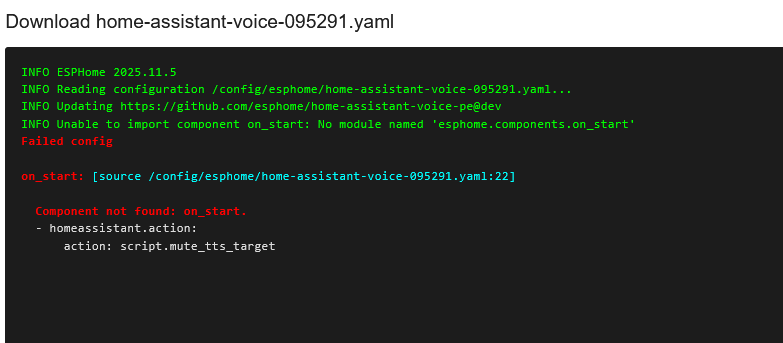
when i want to install the yaml to the device i get this error

i do have the script

i found it it was missing:

voice_assistant:

Mute output speaker

on_start:
- homeassistant.action:
action: script.mute_tts_target

the voice_assitant:
wasn’t in the text to copy

all works now

Would be great to have this baked in and exposed via easy to use calls. I am using a futureproofhome sat1 and it literally sits idle because I dont want to attach a speaker to it when I have Sonos everywhere and logic to follow people with announcements.

There is no good way besides taking control and hacking the several different yaml files and hoping that an update doesnt nuke it.

I really hope someone on esphome or HASS dev team is looking into adding this functionality.