Hello;
My Home assistant is on a RPi under Debian.
I want to supervise several remote RPi temperature
I have followed instructions: file command_line.yaml with instructions:
# Temperature CPU RPI4
- sensor:
    name: RPi4 CPU Temperature
    unique_id: RPi4_CPU_Temperature
    command: "cat /sys/class/thermal/thermal_zone0/temp"
    value_template: "{{ value | multiply(0.001) | round(0) }}"
    unit_of_measurement: c°
    scan_interval: 60
# Temperature CPU RPI5
- sensor:
    name: RPi5 CPU Temperature
    unique_id: RPi5_CPU_Temperature
    command: "ssh [email protected] cat /sys/class/thermal/thermal_zone0/temp"
    value_template: "{{ value | multiply(0.001) | round(0) }}"
    unit_of_measurement: c°
    scan_interval: 60
# Temperature CPU RPI0
- sensor:
    name: RPi0 CPU Temperature
    unique_id: RPi0_CPU_Temperature
    command: "ssh [email protected] cat /sys/class/thermal/thermal_zone0/temp"
    value_template: "{{ value | multiply(0.001) | round(0) }}"
    unit_of_measurement: c°
    scan_interval: 60
For the local Rpi (PI4) no problem.
But for remote, no success: the device is “unknown”.
On terminal with ‘pi’ user the instruction is success; I have generated a ssh-keygen and copied on remote RPi. The command don’t need user or password.
My questions:
- Have I done mistake ?
- On home assistant, which user is used to launch terminal command ?
- Any idea ?
Thanks
do you have the following in configuration.yaml
command_line: !include command_line.yaml
Also, change
unit_of_measurement: c°
to
unit_of_measurement: °C
Hello
For the configuration.yaml file, I had the correct line; to no avail. And my Rpi4 returned the correct values.
I also changed the unit; to no avail.
I repeat, the local “cat” command returns the correct value, but the “ssh…” command returns an “unknown” value.
Thank you.
Sorry I missed that in your original post.
The unit_of_measurement is mostly a cosmetic change as it shouldn’t have made a difference - just formatting in a '‘standard’ way.
I believe the issue is the fact that you are using SSH and hence need to check that the ‘HA Server user’ has passwordless access.
Execute SSH command remotely - Configuration - Home Assistant Community
In the terminal, it’s a different docker image to the docker image that Home Assistant is running in. This is quite a common mistake.
You need to move your rsa keys (.ssh folder) to the config folder so that it can be accessed outside the docker image the terminal runs in.
Excuse me.
You have the right diagnostic and SJ20035 have the right commands via this link
As I was suspecting, the ssh command in command_line.yaml is not executed in my standard environment assigned to pi user (Home Assistant is installed in a docker under Debian).
The link in reference is perfect; the only line to add is to create a .ssh folder in the config directory if it doesn’t exist.
Thank too both.
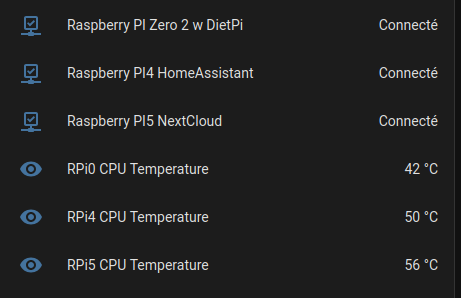
The result
Glad it is sorted.
If you want to do more monitoring, then you could always put Glances on the Pi’s and use the Glances integration:
Setting up a System Monitor on the Raspberry Pi using Glances - Pi My Life Up
Glances - Home Assistant