Yeah, with the hardware decoding it should be much better.
ESP32-S3 (800x480)
Partial: 250 (4 ms)
Full 16 (62 ms)
Yeah, with the hardware decoding it should be much better.
ESP32-S3 (800x480)
Partial: 250 (4 ms)
Full 16 (62 ms)
Brilliant project @strange_v!
I got this working yesterday to provide a view of a basic Home Assistant dashboard, on the cheap Guition ESP32-S3-4848S040 480x480 display you’ve mentioned, but saw a strange issue today -
When clicking (tapping) onto different tabs/views, the display shows a few flashes of the view it should’ve switched to, but then it overwrites that with blocks of the original page it was displaying. Swiping to scroll makes it show the “new” page again briefly, but again before reverting to the original view.
I’m guessing this is a problem with my instance of the RemoteWebViewServer - could it be it has more than one “tab” open of my dashboard, from the display having been updated and rebooted (maybe with a different name), and requesting the URL freshly, and is somehow sending the captured view of both?
I didn’t have time this morning to have a look with Chrome DevTools to see what’s open on the server end, but wondered if it was something you’d seen.
I had a similar issue once, but it was with the self-test page, which appeared on top of the normal dashboard. I thought it was only related to the self-test, but it now seems the issue runs deeper. I’ll try to find the root cause and fix it, but if you discover easy steps to reproduce, please post them here.
The problem occurred during the cleanup procedure (5 minutes after the device was disconnected). Fixed in v1.0.1.
Thanks very much  glad you were able to reproduce and fix it
Oh wow. I will be busy this weekend. Still love your HA Deck, but this seems to be next level. 
By the way, if you’ve designed a nice-looking web dashboard for the 480x480 screen, please share. It looks like I need some inspiration in that direction 
Has anybody faced this compiling issue? Thank you!
[6/6] zorxx/multipart-parser (1.0.1)
-- Project sdkconfig file /data/build/esp32-display-quad/sdkconfig.esp32-display-quad
-- Configuring incomplete, errors occurred!

fatal: not a git repository (or any parent up to mount point /)
Stopping at filesystem boundary (GIT_DISCOVERY_ACROSS_FILESYSTEM not set).
Traceback (most recent call last):
  File "<frozen runpy>", line 198, in _run_module_as_main
  File "<frozen runpy>", line 88, in _run_code
  File "/root/.platformio/penv/.espidf-5.4.2/lib/python3.12/site-packages/kconfgen/__main__.py", line 16, in <module>
    main()
  File "/root/.platformio/penv/.espidf-5.4.2/lib/python3.12/site-packages/kconfgen/core.py", line 319, in main
    config = kconfiglib.Kconfig(args.kconfig)
             ^^^^^^^^^^^^^^^^^^^^^^^^^^^^^^^^
  File "/root/.platformio/penv/.espidf-5.4.2/lib/python3.12/site-packages/kconfiglib.py", line 947, in __init__
    self._init(filename, warn, warn_to_stderr, encoding)
  File "/root/.platformio/penv/.espidf-5.4.2/lib/python3.12/site-packages/kconfiglib.py", line 1085, in _init
    self._parse_block(None, self.top_node, self.top_node).next = None
    ^^^^^^^^^^^^^^^^^^^^^^^^^^^^^^^^^^^^^^^^^^^^^^^^^^^^^
  File "/root/.platformio/penv/.espidf-5.4.2/lib/python3.12/site-packages/kconfiglib.py", line 3028, in _parse_block
    self._parse_block(_T_ENDMENU, node, node)
  File "/root/.platformio/penv/.espidf-5.4.2/lib/python3.12/site-packages/kconfiglib.py", line 2989, in _parse_block
    prev = self._parse_block(None, parent, prev)
           ^^^^^^^^^^^^^^^^^^^^^^^^^^^^^^^^^^^^^
  File "/root/.platformio/penv/.espidf-5.4.2/lib/python3.12/site-packages/kconfiglib.py", line 2989, in _parse_block
    prev = self._parse_block(None, parent, prev)
           ^^^^^^^^^^^^^^^^^^^^^^^^^^^^^^^^^^^^^
  File "/root/.platformio/penv/.espidf-5.4.2/lib/python3.12/site-packages/kconfiglib.py", line 3028, in _parse_block
    self._parse_block(_T_ENDMENU, node, node)
  File "/root/.platformio/penv/.espidf-5.4.2/lib/python3.12/site-packages/kconfiglib.py", line 3027, in _parse_block
    self._parse_props(node)
  File "/root/.platformio/penv/.espidf-5.4.2/lib/python3.12/site-packages/kconfiglib.py", line 3158, in _parse_props
    self._parse_help(node)
  File "/root/.platformio/penv/.espidf-5.4.2/lib/python3.12/site-packages/kconfiglib.py", line 3313, in _parse_help
    if node.help is not None:
       ^^^^^^^^^
AttributeError: 'MenuNode' object has no attribute 'help'
CMake Error at /data/cache/platformio/packages/framework-espidf/tools/cmake/kconfig.cmake:209 (message):
  Failed to run kconfgen
  (/root/.platformio/penv/.espidf-5.4.2/bin/python;-m;kconfgen;--list-separator=semicolon;--kconfig;/data/cache/platformio/packages/framework-espidf/Kconfig;--sdkconfig-rename;/data/cache/platformio/packages/framework-espidf/sdkconfig.rename;--config;/data/build/esp32-display-quad/sdkconfig.esp32-display-quad;--env-file;/data/build/esp32-display-quad/.pioenvs/esp32-display-quad/config.env).
  Error 1
Call Stack (most recent call first):
  /data/cache/platformio/packages/framework-espidf/tools/cmake/build.cmake:691 (__kconfig_generate_config)
  /data/cache/platformio/packages/framework-espidf/tools/cmake/project.cmake:718 (idf_build_process)
  CMakeLists.txt:3 (project)


========================== [FAILED] Took 9.77 seconds ==========================
Uninstall and reinstallation of ESPHome helped. 
OMG. This is so cool!!! I can even stream my door cam (and it will only popup, when somebody is in front of the door)
@strange_v Thank you so much for sharing this! Once I have a nice setup, I will share it.
Love to hear it! Glad the project’s useful for you; the door-cam popup sounds perfect. In my case, the headless browser doesn’t want to render the feed (I haven’t had time to dig deeper).
Thanks for sharing, and I’d love to see your setup when it’s ready!
Choosing type: picture-entity instead of - type: picture-glance works for me.
Hello,
I am a complete noob and I am trying to learn/get this working.
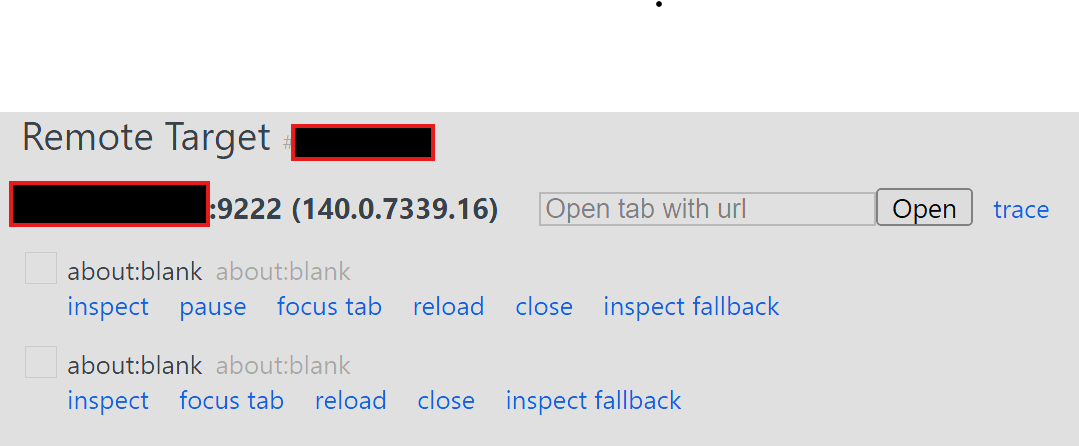
I got the webview server running in HAOS as addon, but when I try to access the ip:9222 via chrome://inspect/devices I just get a blank page (about:blank) - I think I should see HA log in page instead, no?
expose_debug_proxy is enabled in HA
Is there something I am missing?
Thank you.
Okay, it looks like the server is running, but no devices are connected (no tab is open).
Do you have any device (screen) configured to use the server?
Would this work on the esp32 cheap yellow display? (Esp32 with 2.8" screen and sd card)
No, it doesn’t have PSRAM, which is needed to hold the required buffers.
UPD: Overall, I don’t recommend using RWV on non-S3 boards (maybe on P4 later, if I buy one and add hardware decoding to the component).
I get this error when starting the addon:
/app/node_modules/sharp/lib/sharp.js:121
  throw new Error(help.join('\n'));
        ^
Error: Could not load the "sharp" module using the linux-x64 runtime
Unsupported CPU: Prebuilt binaries for linux-x64 require v2 microarchitecture
Possible solutions:
- Ensure optional dependencies can be installed:
    npm install --include=optional sharp
- Ensure your package manager supports multi-platform installation:
    See https://sharp.pixelplumbing.com/install#cross-platform
- Add platform-specific dependencies:
    npm install --os=linux --cpu=x64 sharp
- Consult the installation documentation:
    See https://sharp.pixelplumbing.com/install
    at Object.<anonymous> (/app/node_modules/sharp/lib/sharp.js:121:9)
    at Module._compile (node:internal/modules/cjs/loader:1688:14)
    at Object..js (node:internal/modules/cjs/loader:1820:10)
    at Module.load (node:internal/modules/cjs/loader:1423:32)
    at Function._load (node:internal/modules/cjs/loader:1246:12)
    at TracingChannel.traceSync (node:diagnostics_channel:322:14)
    at wrapModuleLoad (node:internal/modules/cjs/loader:235:24)
    at Module.require (node:internal/modules/cjs/loader:1445:12)
    at require (node:internal/modules/helpers:135:16)
    at Object.<anonymous> (/app/node_modules/sharp/lib/constructor.js:10:1)
Node.js v22.18.0
I’m running HA 2025.10.1 on HAOS 16.2 on Proxmox.
CPU(s)
12 x Intel(R) Core™ i5-10500T CPU @ 2.30GHz (1 Socket)
Kernel Version
Linux 6.8.12-13-pve (2025-07-22T10:00Z)
Boot Mode
EFI
Manager Version
pve-manager/8.4.11/14a32011146091ed
Sorry, I’m not familiar with Proxmox, so my reply is a quote from ChatGPT.
This happens because the VM that’s running Home Assistant OS is exposing only an x86-64-v1 CPU to the guest. The sharp prebuilt for linux-x64 is compiled for x86-64-v2 (needs at least SSE3/SSSE3/SSE4.1/SSE4.2/POPCNT). In Proxmox, if your VM’s CPU type is kvm64/qemu64 (or anything that hides newer flags), the guest looks like v1, so sharp refuses to load.
Fix (recommended)
In Proxmox, change the HAOS VM to expose a modern CPU:
VM → Hardware → Processor → Type: host (best), or pick an x86-64-v2 profile if available.
Fully power off the VM (not just reboot), then start it again.
Now the container/add-on inside HAOS will inherit SSE4.2/POPCNT and sharp loads fine.
Quick verification inside HAOS
Open the Terminal & SSH add-on (or host console) and check flags:
grep -m1 ‘^flags’ /proc/cpuinfo
You should see ssse3 sse4_1 sse4_2 popcnt in the list. If they’re missing, the VM is still exposing v1.
Thank you strange_v for your work and this amazing set of sw - rwv server and client! I am using the server as addon with HA (raspberry pi 4) and the client with an esp32-s3 Crowpanel 7.0 hmi advance - they work great! Thank You!
Thanks for the feedback! I’ve noticed that on smaller screens the HA web dashboard isn’t my favorite — I want more control over positioning (like in LVGL). But at 7″ and up, everything starts to feel much more natural.