asimo
(Alain)
1
Hi there,
Although I’m sure about username & password, I’m not able to sign in anymore.
I’m running HA OS, core 2026.6.4, supervisor 2026.07.5, OS 18.0, Frontend 20260527.7 in a VM on a Synology nas.
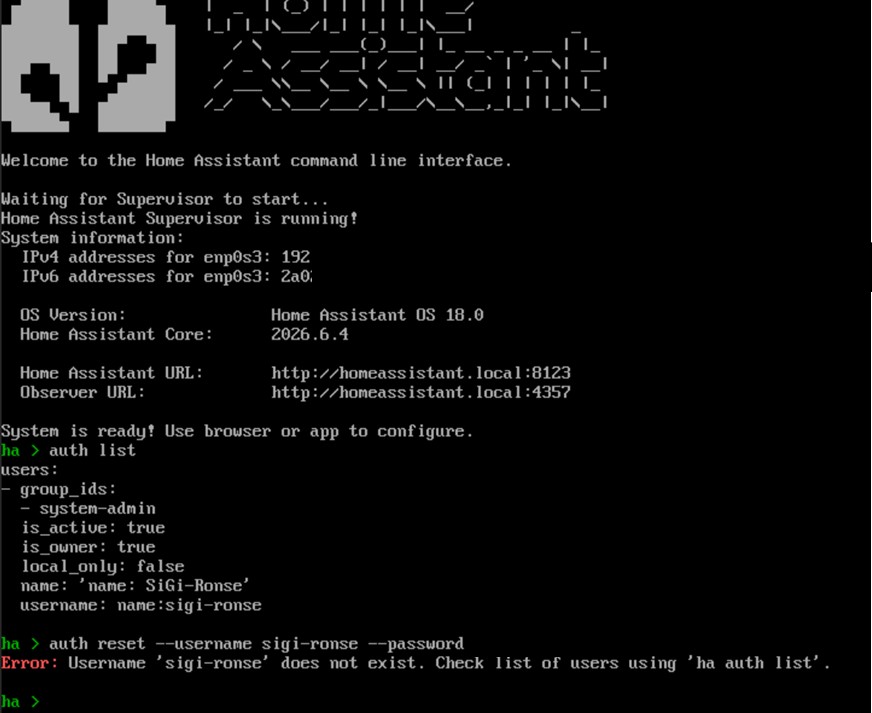
So far I managed to get the CLI and can see the username using “auth list”
Then I want to reset the password using “auth reset –username sigi-ronse –password MyNewPW
And then I get the error “Username does not exist” while it’s mentioned few lines above ?!!!?
What is going wrong here and how can I solve this.
Thanks for your help
Alain
Baxxy13
(Baxxy13)
2
Try the documented method…
auth reset --interactive
As you can see you have changed the username to “name:sigi-ronse”.
Try to login as that.
My look like this:
# ha auth list
users:
- group_ids:
  - system-admin
  is_active: true
  is_owner: true
  local_only: false
  name: Patrik
  username: patrik
asimo
(Alain)
4
Oh dear!
All the time it was right in front of me and I didn’t see it ?!!?
On the other hand I’m10.000% sure I never entered a username like “name:sigi-ronse” !
Where is the “name:” coming from ?!!?
Some bug somewhere ??
Can someone please have a look at this because I can assure you that this was a major PANIC moment.
Thanks a lot for the reactions !
Regards
Alain