REST Sensor - how to set attributes if response is an array

I have a rest sensor that returns an array.
Is there any way to assign the entire JSON response into an attribute of the sensor?

This is a working example of the rest sensor (works for anyone) but obviously I haven’t got the json_attributes_path or json_attributes correct despite several attempts.

sensor:
  - platform: rest
    name: Train Data
    unique_id: train_data
    resource: https://api.tfl.gov.uk/StopPoint/910GFRNDXR/ArrivalDepartures?lineIds=elizabeth
    value_template: ok
    json_attributes_path: $
    json_attributes: []

which returns a JSON array in this format:

[
  {
    "$type": "Tfl.Api.Presentation.Entities.ArrivalDeparture, Tfl.Api.Presentation.Entities",
    "platformName": "Platform B",
    "destinationNaptanId": "910GMDNHEAD",
    "destinationName": "Maidenhead Rail Station",
    "naptanId": "910GFRNDXR",
    "stationName": "Farringdon",
    "estimatedTimeOfArrival": "2025-07-29T21:37:00Z",
    "scheduledTimeOfArrival": "2025-07-29T21:37:00Z",
    "estimatedTimeOfDeparture": "2025-07-29T21:38:00Z",
    "scheduledTimeOfDeparture": "2025-07-29T21:38:00Z",
    "minutesAndSecondsToArrival": "39:58",
    "minutesAndSecondsToDeparture": "40:58",
    "departureStatus": "OnTime"
  },
  {
    "$type": "Tfl.Api.Presentation.Entities.ArrivalDeparture, Tfl.Api.Presentation.Entities",
    "platformName": "Platform B",
    "destinationNaptanId": "910GHTRWTM4",
    "destinationName": "Heathrow Terminal 4 Rail Station",
    "naptanId": "910GFRNDXR",
    "stationName": "Farringdon",
    "estimatedTimeOfArrival": "2025-07-29T22:14:00Z",
    "scheduledTimeOfArrival": "2025-07-29T22:14:00Z",
    "estimatedTimeOfDeparture": "2025-07-29T22:15:00Z",
    "scheduledTimeOfDeparture": "2025-07-29T22:15:00Z",
    "minutesAndSecondsToArrival": "76:58",
    "minutesAndSecondsToDeparture": "77:58",
    "departureStatus": "OnTime"
  },
  {
    "$type": "Tfl.Api.Presentation.Entities.ArrivalDeparture, Tfl.Api.Presentation.Entities",
    "platformName": "Platform B",
    "destinationNaptanId": "910GHAYESAH",
    "destinationName": "Hayes & Harlington Rail Station",
    "naptanId": "910GFRNDXR",
    "stationName": "Farringdon",
    "estimatedTimeOfArrival": "2025-07-29T22:26:00Z",
    "scheduledTimeOfArrival": "2025-07-29T22:26:00Z",
    "estimatedTimeOfDeparture": "2025-07-29T22:27:00Z",
    "scheduledTimeOfDeparture": "2025-07-29T22:27:00Z",
    "minutesAndSecondsToArrival": "88:58",
    "minutesAndSecondsToDeparture": "89:58",
    "departureStatus": "OnTime"
  },
]

You can use command_line, an example below that you can tweak…you can even pipe this through jq before…but then you need to ‘know’ jq as well :slight_smile:


    command: >
         echo "{\"events\":" $(
         curl 
         -s 
         'https://api.fingrid.fi/v1/variable/336/events/json?start_time={{ (now()-timedelta(hours=4)).strftime('%Y-%m-%dT%H:%M:%SZ') }}&end_time={{ (now()+timedelta(hours=12)).strftime('%Y-%m-%dT%H:%M:%SZ') }}'
         ) "}" 
    value_template: > 
        {{ value_json.events | length }}
    json_attributes:
        - events
1 Like

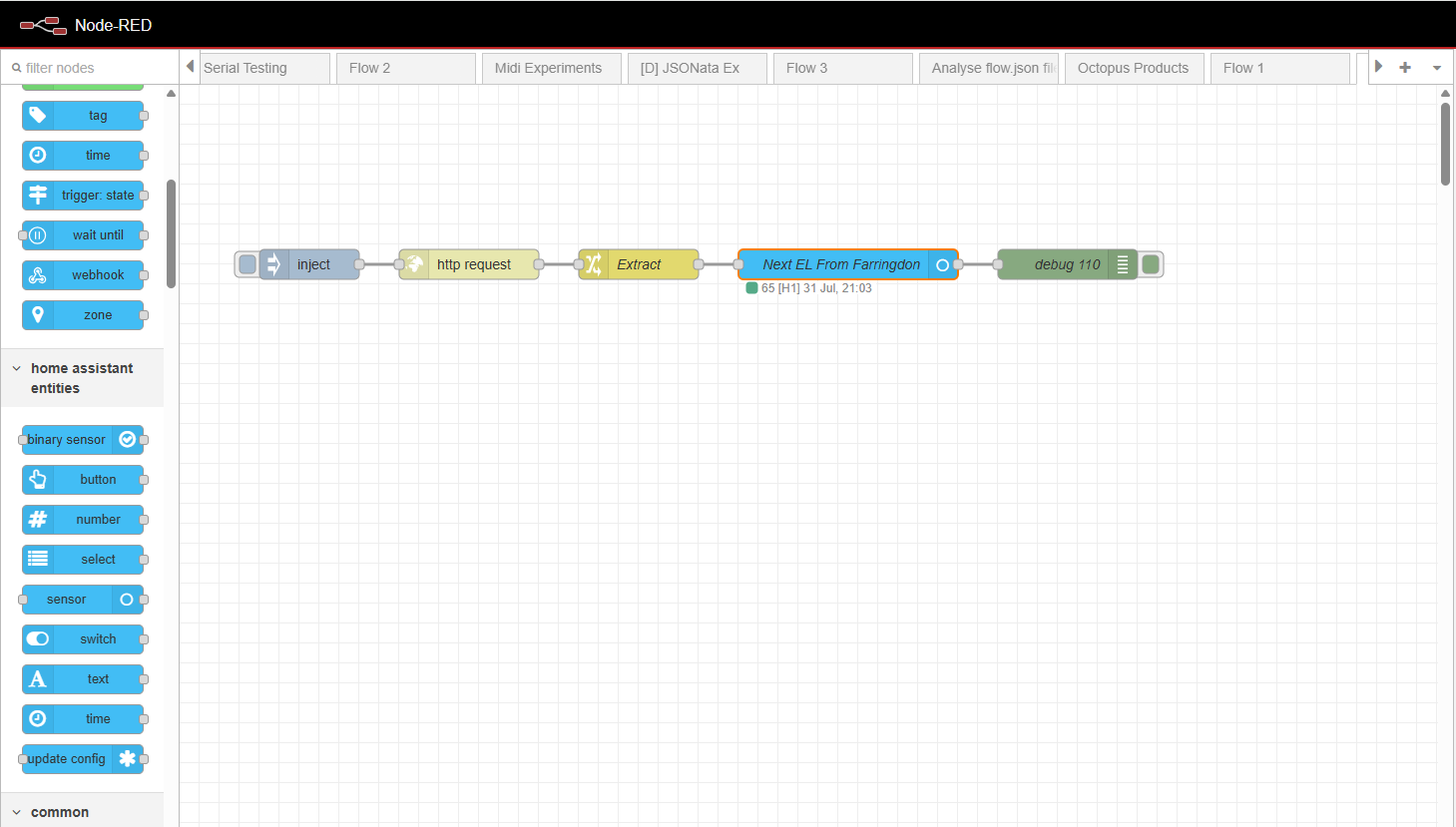
A case where the use of Node-RED is so very much easier.

Flow:

Result:

Effort: 5 minutes work at most (in fact, it took me longer to write this response than it took to write the Node-RED code).

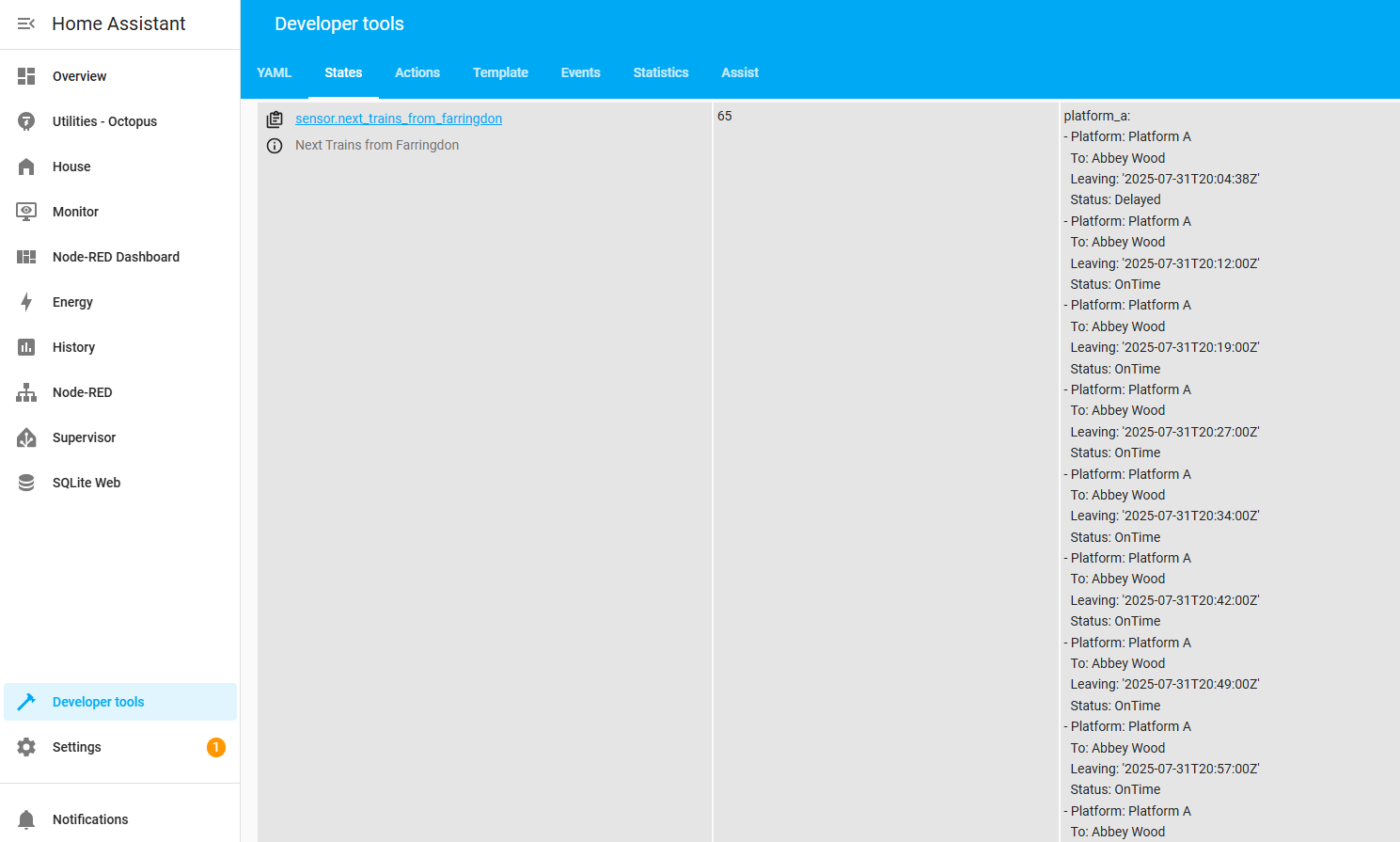
Whats more, I have JSONata to pre-process the result - select fields, sort by platform, turn UTC timestamps into local time…

Only if you know nodered and how to install, config and map to HA… I am a big (!) fan of nodered but not sure if this is simpler by-default.

OK I tried. As you yourself say, you can use the command_line (what is that?) and pipe (?) through jq (?).

I still got to sort by platform and separate Platform A and Platform B into two separate attributes. I guess you can do that by piping through jq though.

You win.

Command line - Home Assistant

lots of tech talk here I agree so I hope my example on command_line works without jq…still…impossible without tech talk

100%.not about winning… nodered is really a super tool if one knows how to deal with things and it is much more user friendly due to the graphical nature but… one still needs to know how to deal with the data afterwards

As the OP here is my 2c …

The NodeRed solution may be a good one but I tried Node Red quite a few years ago and apart from the nice GUI I found it didn’t add anything for me that I couldn’t do without it (maybe notwithstanding the current example) and it seemed like an unnecessary ‘overhead’. I am not inclined to use it now for one solution.

But as I said - I see the benefits of it if that is what you choose.

As for using command_line, that is indeed what I was doing including piping to jq and it worked pretty well…

  #=== Bakerloo
  - sensor:
      name: TFL Bakerloo Line
      unique_id: tfl_bakerloo_line
      command: >
          curl https://api.tfl.gov.uk/Line/bakerloo/Status?true 2> /dev/null
            | jq '{"name": .[].name, "lineStatuses": [.[].lineStatuses[]
            | {"description": .statusSeverityDescription, "reason": .reason}], "lineTypes": [.[].serviceTypes[]
            | {"name": .name}]}'
      value_template: &line_state >
        {% if value_json is defined and value_json != '' %}
          {% set value_json = value_json.lineStatuses
                        | map(attribute='description')
                        | list
                        | join(' + ')
                        | truncate %}
          {% set ns = namespace (state='') %}
          {% for description in value_json.split(' + ') %}
            {% if description not in ns.state %}
              {% if ns.state != '' %}
                {% set ns.state = ns.state ~ ' + ' %}
              {% endif %}
              {% set ns.state = ns.state ~ description %}
            {% endif %}
          {% endfor %}
          {{ ns.state }}
        {% else %}
          NO DATA AVAILABLE
        {% endif %}
      json_attributes: &line_attributes
        - name
        - lineStatuses
        - lineTypes
      command_timeout: 55

… except that it would often fail with a return code of 5 and there is no way to deal with non-zero return codes using command_line so my logs would get spammed.

I am away from home for a while but I have/had a jq that checked for the curl output and always returned something valid. But this was based on my url for which I cannot remember if 5 would be an error it kicked back