Ever stood in the kitchen at 8pm going “…is that taco place even still open?” and then unlocked your phone, opened Maps, typed it in, waited, squinted… yeah. Me too. So I built a card to kill that little ritual.
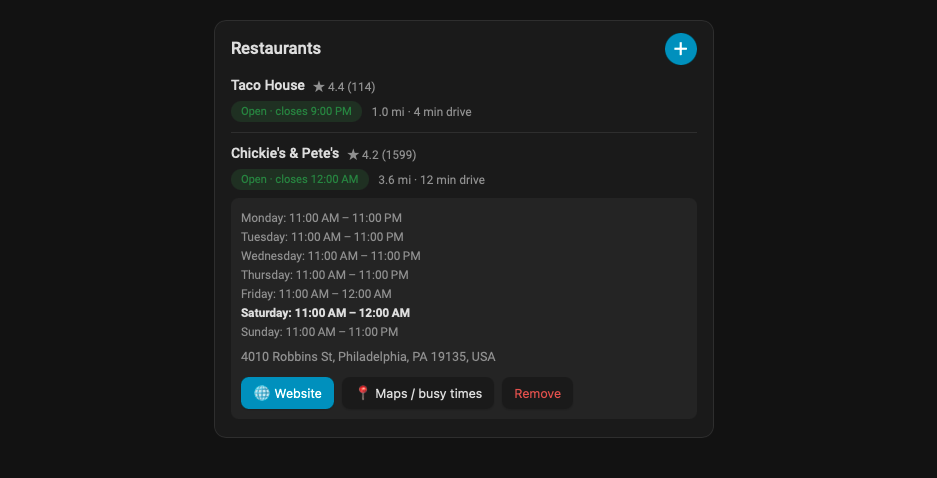
Restaurant Card keeps a list of your favorite restaurants on your Lovelace dashboard with live Google data:
 Open / Closed right now, with the closing (or next opening) time
 Full weekly hours, today highlighted, one tap away
 Driving distance & time from home, traffic-aware
 Google rating and review count
 One-tap buttons to the restaurant’s website and Google Maps
 Search and add places right from the card, no hunting for Place IDs
Tap a row to expand the details; tap the buttons to jump straight to the menu or to Maps (which is also where you can eyeball live busyness, more on that below).
Two pieces (and why)
It ships as a card plus a small companion integration. You can run the card standalone with an API key in the card config, but the integration is the nice way to do it:
- Your Google API key is entered once in Settings and stays server-side. It never sits in your dashboard YAML or gets shipped to the browser.
- Data is polled on a schedule and cached, so you stay comfortably inside Google’s free tier.
- Each restaurant becomes a sensor (
open/closed), so you can use them in automations too. For example, a notification when your favorite spot opens, or a “date night?” template that only suggests places that are open right now.
The card auto-detects the integration and needs literally zero config once it’s installed:
type: custom:restaurant-card
Install (HACS)
Both are custom repositories for now:
- HACS → ⋮ → Custom repositories
https://github.com/rcpilotp51/restaurant-card-integration→ category Integrationhttps://github.com/rcpilotp51/restaurant-card→ category Dashboard
- Download both, restart Home Assistant
- Settings → Devices & Services → Add Integration → Restaurant Card → paste your Google Maps Platform API key
- Edit a dashboard → Add card → “Restaurant Card”
Repos:
- Card: https://github.com/rcpilotp51/restaurant-card
- Integration: https://github.com/rcpilotp51/restaurant-card-integration
What you’ll need
A Google Maps Platform API key with Places API (New) and Routes API enabled. The READMEs walk through it, including the one thing that trips everyone up: a server-side integration can’t use a key that’s restricted by HTTP referrer (that’s for browser use), so restrict it by API (and optionally IP) instead.
The “busyness” question (because someone will ask  )
)
I really wanted live “popular times” on the card. Turns out Google’s official Places API doesn’t expose popular-times / live-busyness at all; it only lives in consumer Maps. So for now there’s a one-tap Maps button that drops you right into the live busyness view. If anyone knows a clean, ToS-friendly source for popular-times data, I’m all ears. I’ve scoped out SerpApi’s free tier as a possible future add-on that would render it right on the card.
Feedback is very much welcome
This is early. It works well on my setup but I’d love more eyes on it. Bug reports, feature ideas, “it looks weird on my theme” screenshots, all appreciated. If it saves you even one phone-unlock, mission accomplished. 
Happy automating!