Hello everyone, what is the best way to remember current light (state, colour, brightness) and return it later in automation or script if required? I thought I would hold global variables as MQTT sensors, so in automation I’m able to save state but I’m unable to apply settings to the light when needed.
6 Likes

For those still wanting to accomplish this without jumping through too many hoops.
You can make use of scenes to save the state beforehand and then reapply it when you want to revert back to the previous state. Better than creating many inputs in the config. Can save the state of many entities in one go.
- id: 'doorbell_pressed'
  alias: 'Doorbell Pressed'
  description: 'Flash lights light blue when someone presses the doorbell'
  trigger:
  - entity_id: binary_sensor.doorbell_button
    from: 'off'
    platform: state
    to: 'on'
  condition: []
  action:
  - data:
      scene_id: doorbell_notification_revert
      snapshot_entities: 'light.living_room,light.kitchen'
    service: scene.create
  - data:
      effect: Facebook
      entity_id: light.living_room
    service: light.turn_on
  - data:
      effect: Facebook
      entity_id: light.kitchen
    service: light.turn_on
  - delay: 00:00:04
  - data:
      entity_id: scene.doorbell_notification_revert
    service: scene.turn_on
26 Likes
How did you get this to work?
I have one automation that does this:

and then another one that does this.
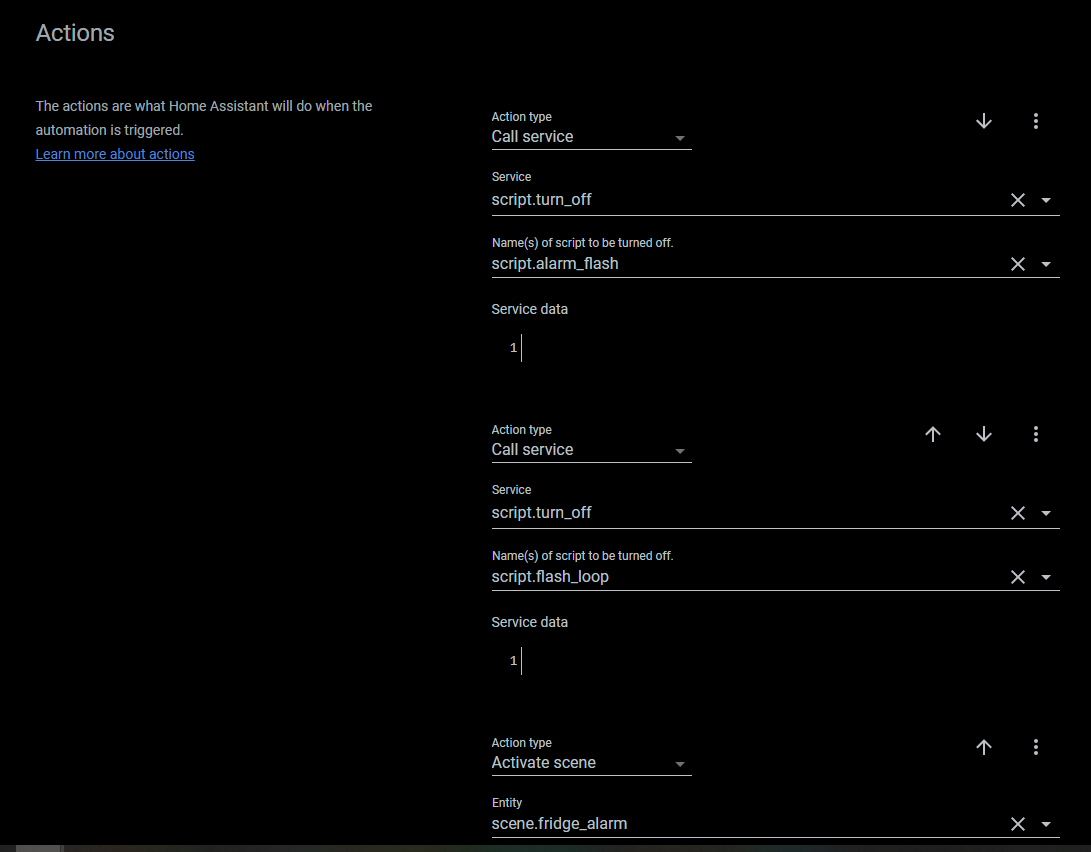
But it doesnt revert?
1 Like
This works great!!!
The only problem is when the lights were turned off and get activated by this automation the lights wil go back off but keep the effect “facebook” set when you turn on the lights manualy they will turn on with effect “facebook”.
is there any way around this?
2 Likes
I have a workaround… I believe the problem is when the light is off, the color, brightness, and temperature state isn’t being captured by scene.create. If you turn on the light and wait a short amount of time (250ms) you can get the previous state. That requires saving two scenes instead of one though, the first to capture the power state, and the second to capture the color, brightness, and temperature. Here is an example of a red/blue siren that correctly sets the previous power, color, brightness, and temperature after the scripts runs:
alias: Front Light Siren
sequence:
  - service: scene.create
    data:
      scene_id: front_light_before_siren_script
      snapshot_entities: light.tasmota
  - type: turn_on
    device_id: 9e5f76d63dfa4149a5a9bce4e2bd390e
    entity_id: light.tasmota
    domain: light
  - delay:
      hours: 0
      minutes: 0
      seconds: 0
      milliseconds: 250
  - service: scene.create
    data:
      scene_id: front_light_after_on_before_siren_script
      snapshot_entities: light.tasmota
  - repeat:
      count: '10'
      sequence:
        - scene: scene.cloudfree_light_red
        - delay:
            hours: 0
            minutes: 0
            seconds: 0
            milliseconds: 500
        - scene: scene.cloudfree_light_blue
        - delay:
            hours: 0
            minutes: 0
            seconds: 0
            milliseconds: 500
  - service: scene.turn_on
    target:
      entity_id: scene.front_light_after_on_before_siren_script
  - service: scene.turn_on
    target:
      entity_id: scene.front_light_before_siren_script
mode: single
icon: mdi:alarm-light-outline
5 Likes
I would also need something like that, I created an input_boolean, when you turn it on it should save the current state of the lights in the bedroom and then start a script I created where the colors of the lights are changed, at the deactivation of the input_boolean I would like it to return to the previous state, how can this be done?
  alias: Camera da letto snapshot
  description: ''
  trigger:
  - entity_id: input_boolean.pulsante
    from: 'off'
    platform: state
    to: 'on'
  condition: []
  action:
  - data:
      snapshot_entities: light.yeelight_colorc_0x1b0ffc9a light.yeelight_colorc_0x18906fb6
        light.yeelight_colorc_0x189042ff light.faretti_camera_da_letto light.suprema_smart_controller_rgbww_4
    service: scene.create
  - service: script.1643407098523
  - delay: 00:00:04
this is what I copied, but I don’t know how to make sure that when the input_boolean is deactivated it returns as before
You have missed the scene_id: when you created the scene.
You will need to call scene.turn_on after the trigger on to off of your input_boolean. The scene.turn_on will need to call the previously set scene_id.
I would advise to look at the option to first turn on the lights, take the snapshot, then change your colors. And at the end called the snapshot and turn off the lights.
This trick is necessary with some bulbs to keep the original color.
So…
I want to have the Office Light turn on to BLUE FLASH in the corner. I don’t always keep it on depending on shades etc…
I snapshot it “xx_NOW”
turn it on just in case it is off
Snap shot it “xx_VALUES”
Set what I want it to do “FLASH BLUE for X”
Restore set “xx_VALUES”
Restore set “xx_NOW”
The xx refers to the item name so I can restore kitchen to kitchen not bedroom.
Of course, I simplified it and would need if criteria X met then , type wording.
1 Like
Coincidence, I’m looking for this too at the moment.
I want one of the RGB bulbs in my living room to signal me in a different color on a specific event and turn back to the previous state/color when done.
1 Like
i do this with node red, same as what you described there
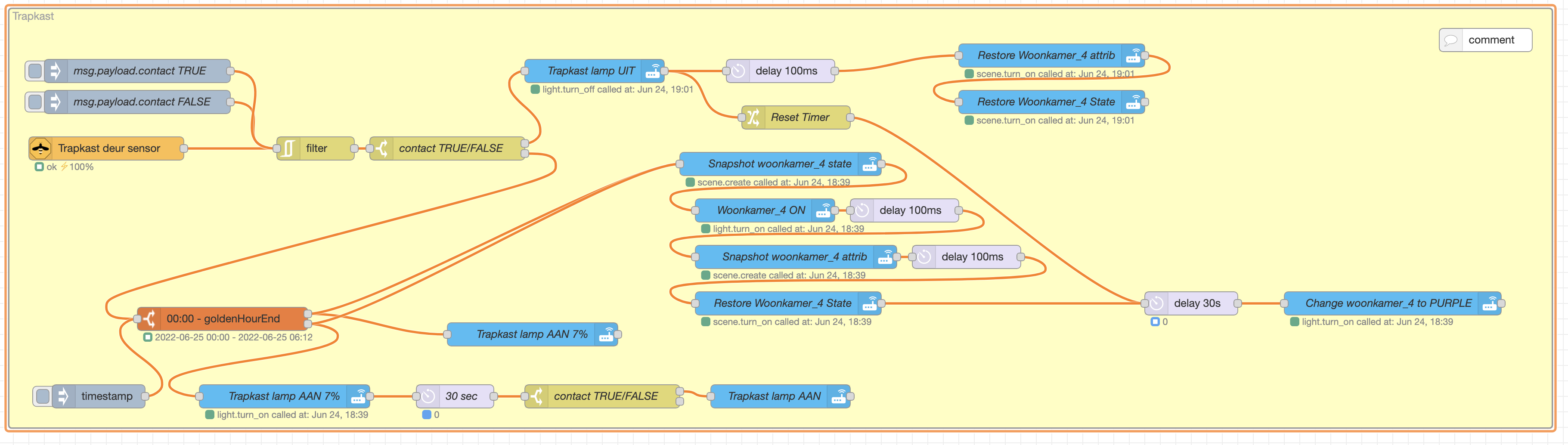
I have had the same question and with the tip here above from @bdurrett I created a node-red flow to achieve exactly this.
Situation to solve
I have a door with a door sensor that triggers the light inside the cupboard, and after 30 seconds it triggers one of my 8 Hue Color spots in the adjacent room to indicate that the door is left unintentionally open by coloring Purple.
Step by step
This is the explanation of the steps it covers:
- When the door opens, a filter checks whether the command is already issues to prevent double messages and unwanted reactions/triggers upon those double messages.
- Once passed the filter a switch node figures out wether the message is true or false (close or open).
- When false (so the door is open) it wil look at the time of day.
When it is between 0:00 and golden hour end (night) it wil switch the light in the cupboard on on 7% brightness to prevent invading the eyes of my spouse.
When it is outside this time-frame the light wil switch on at 7% and after 30 seconds if the contact is still false (so the door is then open) the light wil fade to 100% for more light. We asume we are then searching something more thoroughly. - In either time of day it wil take a snapshot of the state of my Hue color spot number 4.
- Than it switches that very spot on, and after 100ms i take a snapshot of the attribs of the switched on spot.
- After that I restore the state of that very spot back to either on or off, and the 30 seconds delay counter starts. I spend a hard time figuring out that just turning the spot off will not do the right trick in every situation.
- When the door is closed within the 30 second timeframe it wil stop the counter and nothing happens.
When the door is closed after the 30 seconds timeframe it wil restore the attrib and than the state. - If the door stay’s open for more than 30 seconds the Hue spot nr 4 will change to 100% illuminated Purple.
Flow
JSON:
[{"id":"3212eb0a78ff1ba0","type":"group","z":"11a02663.08c012","name":"Trapkast","style":{"fill":"#ffffbf","label":true},"nodes":["b0f04fe858500d47","4fcf2a260fe3c6c4","77e14d0a11470c22","b60fef41534b233b","a5c31f9e46d3092e","9f6c4301f9defe5c","929704f5a17c3644","cebca89a791205ef","e2787f67ab041335","3d9b2ec91a0e98ab","0e3e23eb22af216d","3c478fd0daa1d3a7","81f4eb65eebc4e58","7ab05df485b0d131","55e9f93b4ceab156","ee67a4a356f1c8c1","147dfe4f5c7cc0f4","5a2b6e4cf6737b58","ee5f5aa849a4f18e","7cec540873c03076","f42eb1fc196943a8","785e9e38f04e37bf","8172042c97344d11","36e7f8a3c4173438","681852033a8f630f","2e2ea2222f92fd3a"],"x":1974,"y":1919,"w":1992,"h":542},{"id":"b0f04fe858500d47","type":"api-call-service","z":"11a02663.08c012","g":"3212eb0a78ff1ba0","name":"Trapkast lamp UIT","server":"6182da52.101a64","version":3,"debugenabled":true,"service_domain":"light","service":"turn_off","entityId":"light.trapkast_lamp","data":"{\t\"transition\": 1\t}","dataType":"jsonata","mergecontext":"","mustacheAltTags":false,"outputProperties":[{"property":"paylaod","propertyType":"msg","value":"","valueType":"date"}],"queue":"first","x":2730,"y":2000,"wires":[["81f4eb65eebc4e58","147dfe4f5c7cc0f4"]]},{"id":"4fcf2a260fe3c6c4","type":"api-call-service","z":"11a02663.08c012","g":"3212eb0a78ff1ba0","name":"Trapkast lamp AAN 7%","server":"6182da52.101a64","version":3,"debugenabled":false,"service_domain":"light","service":"turn_on","entityId":"light.trapkast_lamp","data":"{\t \"transition\": 10,\t \"brightness_pct\": 1 \t}","dataType":"jsonata","mergecontext":"","mustacheAltTags":false,"outputProperties":[],"queue":"first","x":2650,"y":2340,"wires":[[]]},{"id":"77e14d0a11470c22","type":"zigbee2mqtt-in","z":"11a02663.08c012","g":"3212eb0a78ff1ba0","name":"Trapkast deur sensor","server":"265e5b4d.7ae9b4","friendly_name":"Trapkast Deur Sensor","device_id":"0x00158d0007e02ff1","state":"0","outputAtStartup":false,"x":2100,"y":2100,"wires":[["7cec540873c03076"]]},{"id":"b60fef41534b233b","type":"switch","z":"11a02663.08c012","g":"3212eb0a78ff1ba0","name":"contact TRUE/FALSE","property":"payload.contact","propertyType":"msg","rules":[{"t":"true"},{"t":"false"}],"checkall":"true","repair":false,"outputs":2,"x":2540,"y":2100,"wires":[["b0f04fe858500d47"],["a5c31f9e46d3092e"]]},{"id":"a5c31f9e46d3092e","type":"time-range-switch","z":"11a02663.08c012","g":"3212eb0a78ff1ba0","name":"","lat":"52.21163","lon":"5.95582","startTime":"00:00","endTime":"goldenHourEnd","startOffset":0,"endOffset":0,"x":2250,"y":2320,"wires":[["4fcf2a260fe3c6c4","8172042c97344d11"],["929704f5a17c3644","8172042c97344d11"]]},{"id":"9f6c4301f9defe5c","type":"api-call-service","z":"11a02663.08c012","g":"3212eb0a78ff1ba0","name":"Trapkast lamp AAN","server":"6182da52.101a64","version":3,"debugenabled":false,"service_domain":"light","service":"turn_on","entityId":"light.trapkast_lamp","data":"{\t \"transition\": 90,\t \"brightness_pct\": 70\t}","dataType":"jsonata","mergecontext":"","mustacheAltTags":false,"outputProperties":[],"queue":"none","x":2970,"y":2420,"wires":[[]]},{"id":"929704f5a17c3644","type":"api-call-service","z":"11a02663.08c012","g":"3212eb0a78ff1ba0","name":"Trapkast lamp AAN 7%","server":"6182da52.101a64","version":3,"debugenabled":false,"service_domain":"light","service":"turn_on","entityId":"light.trapkast_lamp","data":"{\t \"brightness\": 7\t}","dataType":"jsonata","mergecontext":"","mustacheAltTags":false,"outputProperties":[],"queue":"first","x":2330,"y":2420,"wires":[["e2787f67ab041335"]]},{"id":"cebca89a791205ef","type":"switch","z":"11a02663.08c012","g":"3212eb0a78ff1ba0","name":"contact TRUE/FALSE","property":"payload.contact","propertyType":"msg","rules":[{"t":"true"},{"t":"false"}],"checkall":"true","repair":false,"outputs":2,"x":2740,"y":2420,"wires":[["9f6c4301f9defe5c"],[]]},{"id":"e2787f67ab041335","type":"delay","z":"11a02663.08c012","g":"3212eb0a78ff1ba0","name":"30 sec","pauseType":"delay","timeout":"30","timeoutUnits":"seconds","rate":"1","nbRateUnits":"1","rateUnits":"second","randomFirst":"1","randomLast":"5","randomUnits":"seconds","drop":false,"allowrate":false,"outputs":1,"x":2550,"y":2420,"wires":[["cebca89a791205ef"]]},{"id":"3d9b2ec91a0e98ab","type":"inject","z":"11a02663.08c012","g":"3212eb0a78ff1ba0","name":"","props":[{"p":"payload"},{"p":"topic","vt":"str"}],"repeat":"","crontab":"","once":false,"onceDelay":0.1,"topic":"","payload":"","payloadType":"date","x":2090,"y":2420,"wires":[["a5c31f9e46d3092e"]]},{"id":"0e3e23eb22af216d","type":"inject","z":"11a02663.08c012","g":"3212eb0a78ff1ba0","name":"msg.payload.contact FALSE","props":[{"p":"payload.contact","v":"false","vt":"bool"}],"repeat":"","crontab":"","once":false,"onceDelay":0.1,"topic":"","x":2140,"y":2040,"wires":[["7cec540873c03076"]]},{"id":"3c478fd0daa1d3a7","type":"inject","z":"11a02663.08c012","g":"3212eb0a78ff1ba0","name":"msg.payload.contact TRUE","props":[{"p":"payload.contact","v":"true","vt":"bool"}],"repeat":"","crontab":"","once":false,"onceDelay":0.1,"topic":"","x":2140,"y":2000,"wires":[["7cec540873c03076"]]},{"id":"81f4eb65eebc4e58","type":"change","z":"11a02663.08c012","g":"3212eb0a78ff1ba0","name":"Reset Timer","rules":[{"t":"set","p":"reset","pt":"msg","to":"1","tot":"str"}],"action":"","property":"","from":"","to":"","reg":false,"x":2990,"y":2060,"wires":[["ee5f5aa849a4f18e"]]},{"id":"7ab05df485b0d131","type":"comment","z":"11a02663.08c012","g":"3212eb0a78ff1ba0","name":"","info":"","x":3880,"y":1960,"wires":[]},{"id":"55e9f93b4ceab156","type":"api-call-service","z":"11a02663.08c012","g":"3212eb0a78ff1ba0","name":"Change woonkamer_4 to PURPLE","server":"6182da52.101a64","version":3,"debugenabled":false,"service_domain":"light","service":"turn_on","entityId":"light.woonkamer_4","data":"{\"rgb_color\":[255,0,255],\"brightness\":254}","dataType":"json","mergecontext":"","mustacheAltTags":false,"outputProperties":[],"queue":"none","x":3760,"y":2300,"wires":[[]]},{"id":"ee67a4a356f1c8c1","type":"api-call-service","z":"11a02663.08c012","g":"3212eb0a78ff1ba0","name":"Restore Woonkamer_4 State","server":"6182da52.101a64","version":3,"debugenabled":false,"service_domain":"scene","service":"turn_on","entityId":"scene.woonkamer_4_state_before","data":"","dataType":"json","mergecontext":"","mustacheAltTags":false,"outputProperties":[],"queue":"none","x":3320,"y":2040,"wires":[[]]},{"id":"147dfe4f5c7cc0f4","type":"delay","z":"11a02663.08c012","g":"3212eb0a78ff1ba0","name":"","pauseType":"delay","timeout":"100","timeoutUnits":"milliseconds","rate":"1","nbRateUnits":"1","rateUnits":"second","randomFirst":"1","randomLast":"5","randomUnits":"seconds","drop":false,"allowrate":false,"outputs":1,"x":2970,"y":2000,"wires":[["36e7f8a3c4173438"]]},{"id":"5a2b6e4cf6737b58","type":"api-call-service","z":"11a02663.08c012","g":"3212eb0a78ff1ba0","name":"Snapshot woonkamer_4 attrib","server":"6182da52.101a64","version":3,"debugenabled":false,"service_domain":"scene","service":"create","entityId":"","data":"{\"scene_id\":\"woonkamer_4_attrib_before\",\"snapshot_entities\":[\"light.woonkamer_4\"]}","dataType":"json","mergecontext":"","mustacheAltTags":false,"outputProperties":[],"queue":"first","x":2990,"y":2240,"wires":[["681852033a8f630f"]]},{"id":"ee5f5aa849a4f18e","type":"delay","z":"11a02663.08c012","g":"3212eb0a78ff1ba0","name":"","pauseType":"delay","timeout":"30","timeoutUnits":"seconds","rate":"1","nbRateUnits":"1","rateUnits":"second","randomFirst":"1","randomLast":"5","randomUnits":"seconds","drop":false,"allowrate":false,"outputs":1,"x":3500,"y":2300,"wires":[["55e9f93b4ceab156"]]},{"id":"7cec540873c03076","type":"rbe","z":"11a02663.08c012","g":"3212eb0a78ff1ba0","name":"","func":"rbe","gap":"","start":"","inout":"out","septopics":false,"property":"payload.contact","topi":"topic","x":2370,"y":2100,"wires":[["b60fef41534b233b"]]},{"id":"f42eb1fc196943a8","type":"api-call-service","z":"11a02663.08c012","g":"3212eb0a78ff1ba0","name":"Woonkamer_4 ON","server":"6182da52.101a64","version":3,"debugenabled":false,"service_domain":"light","service":"turn_on","entityId":"light.woonkamer_4","data":"","dataType":"jsonata","mergecontext":"","mustacheAltTags":false,"outputProperties":[],"queue":"none","x":2950,"y":2180,"wires":[["785e9e38f04e37bf"]]},{"id":"785e9e38f04e37bf","type":"delay","z":"11a02663.08c012","g":"3212eb0a78ff1ba0","name":"","pauseType":"delay","timeout":"100","timeoutUnits":"milliseconds","rate":"1","nbRateUnits":"1","rateUnits":"second","randomFirst":"1","randomLast":"5","randomUnits":"seconds","drop":false,"allowrate":false,"outputs":1,"x":3130,"y":2180,"wires":[["5a2b6e4cf6737b58"]]},{"id":"8172042c97344d11","type":"api-call-service","z":"11a02663.08c012","g":"3212eb0a78ff1ba0","name":"Snapshot woonkamer_4 state","server":"6182da52.101a64","version":3,"debugenabled":false,"service_domain":"scene","service":"create","entityId":"","data":"{\"scene_id\":\"woonkamer_4_state_before\",\"snapshot_entities\":[\"light.woonkamer_4\"]}","dataType":"json","mergecontext":"","mustacheAltTags":false,"outputProperties":[],"queue":"first","x":2970,"y":2120,"wires":[["f42eb1fc196943a8"]]},{"id":"36e7f8a3c4173438","type":"api-call-service","z":"11a02663.08c012","g":"3212eb0a78ff1ba0","name":"Restore Woonkamer_4 attrib","server":"6182da52.101a64","version":3,"debugenabled":false,"service_domain":"scene","service":"turn_on","entityId":"scene.woonkamer_4_attrib_before","data":"","dataType":"json","mergecontext":"","mustacheAltTags":false,"outputProperties":[],"queue":"none","x":3320,"y":1980,"wires":[["ee67a4a356f1c8c1"]]},{"id":"681852033a8f630f","type":"delay","z":"11a02663.08c012","g":"3212eb0a78ff1ba0","name":"","pauseType":"delay","timeout":"100","timeoutUnits":"milliseconds","rate":"1","nbRateUnits":"1","rateUnits":"second","randomFirst":"1","randomLast":"5","randomUnits":"seconds","drop":false,"allowrate":false,"outputs":1,"x":3210,"y":2240,"wires":[["2e2ea2222f92fd3a"]]},{"id":"2e2ea2222f92fd3a","type":"api-call-service","z":"11a02663.08c012","g":"3212eb0a78ff1ba0","name":"Restore Woonkamer_4 State","server":"6182da52.101a64","version":3,"debugenabled":false,"service_domain":"scene","service":"turn_on","entityId":"scene.woonkamer_4_state_before","data":"","dataType":"json","mergecontext":"","mustacheAltTags":false,"outputProperties":[],"queue":"none","x":2980,"y":2300,"wires":[["ee5f5aa849a4f18e"]]},{"id":"6182da52.101a64","type":"server","name":"Wolk 9 Home Assistant","version":2,"addon":true,"rejectUnauthorizedCerts":true,"ha_boolean":"y|yes|true|on|home|open","connectionDelay":true,"cacheJson":true,"heartbeat":false,"heartbeatInterval":"10"},{"id":"265e5b4d.7ae9b4","type":"zigbee2mqtt-server","name":"MQTT Server","host":"localhost","mqtt_port":"1883","mqtt_username":"mqtt","mqtt_password":"mqttmqttmqtt212121","tls":"","usetls":false,"base_topic":"zigbee2mqtt"}]
Caveats:
- I had a pretty hard time figuring out how to prevent this flow from triggering my Hue spot nr 4 solely to turn on without any visible action.
It was the filter node that helped me out, that prevented the Mqtt entity to repeat it’s status every once in a while to trigger my flow. This might be a solution for a lot of seemly unpredictable behavior of Mqtt entities in a node-red / HA environment. So the filter node has become my friend for ever. - I found out that it is poor that the node-red environment triggers entities by name of ‘supervisor’ and nothing else as information in the log’s/history of an entity. This makes troubleshooting a pain in the @#@. I would like to see that the node-red environment at least log’s the node’s ID so that you can search for that node and take action.
Dutch vs English
The flow is with dutch labels. For the non-Dutch readers here are some translations for understanding;
- woonkamer means living room
- trapkast means cupboard under the stairs
- AAN means ON
- UIT means OFF
- Trapkast deur sensor means cupboard under the stairs door sensor
I’m trying this code in a script with a lightgroup.
Where can i find DeviceID ?