I have a HomeAssist instance running on a VM with a typical 192.168.x.x IP address. I can access this just fine from the IP on my network.
I have setup a reverse-proxy via IIS pointing to this IP. The reverse-proxy work just fine if I point it to a static page on the VM, but when I try to access my HomeAssist through this, I get a “400 bad request”.
I am running the latest 2026.10.3
I have set the Trust X-Forwarded-For in the settings
I have set the trusted IPs. I have tried a few different variants all with the same error.
192.168.1.188/32 (actual IP of the reverse proxy)
192.168.1.0.0/24
192.168.0.0/16
0.0.0.0/0
When I check the logs, I get the error:
Logger: homeassistant.components.http.forwarded
Source: components/http/forwarded.py:126
Integration: HTTP (documentation, issues)
First occurred: 12:07:13 PM (2 occurrences)
Last logged: 1:02:16 PM
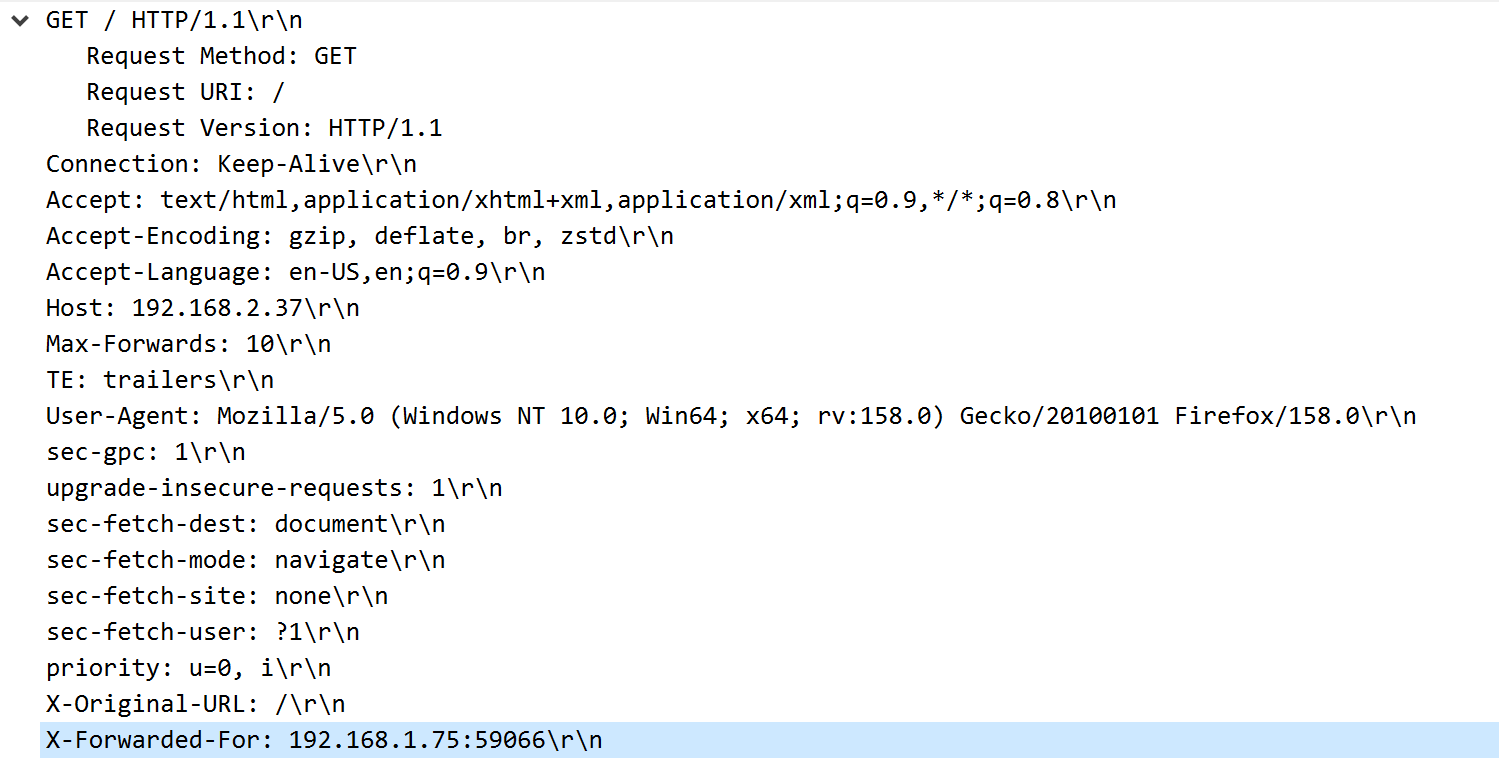
Invalid IP address in X-Forwarded-For: 192.168.1.75:24422
192.168.1.75 is the local IP of the laptop I am on. I have tried adding that to the trusted IP list as well but it still throws this error.
IIS was what I had on my old Win Server at the time. I have other reverse proxies that work just fine for PiHole, Vaultwarden, etc so IIS I don’t think is the issue.
Not sure what port 24422 is either, this is not anything I set. It changes so I think that is something from HomeAssist?
These are the last 2 attempts:
Invalid IP address in X-Forwarded-For: 192.168.1.75:28792
Invalid IP address in X-Forwarded-For: 192.168.1.75:29454
I get it but that doesn’t answer the question. I have other reverse-proxy applications working just fine setup in IIS. I would like to have HomeAssist working before I re-architecture my whole system.
It shows the X-Forwarded-For address as my laptop IP 192.168.1.75.
But I added that to my trusted IPs, so even if IIS was being weird about the way it handles the X-Forwaded-For, HomeAssist should see that as an trusted IP.
that questions implicate several points of vacuum knowledge about networking as well as missleading answers corresponding to alternate solutions with different things / software / … not handy or familiar / licenced to the one that asked.
It would be fine to stuck on the details instead trying to mislead to whole different setup.
First, despite not explicitly written, I assume your broadcast address 192.168.1.255. => Not knowing details about ipv4? => RTFM because that is absolutly basics to understand anything leading from “i think …” to now you know …
this leads to definitely delete the entries => Backdooring
192.168.0.0/16 as it superfluos to dangerous
0.0.0.0/0 is an absolutly blackhole for exploits what explains missing port and routing knowledge confirms = much equals not much help, more likely danger of suicide freedom.
in media res if 2S is something with / from Windows, Iam out as my windows are cleaned and shiny and only cisco & Unix are running, but it looks like that DNS / resolver is not proper set up on at least one box. It should, and MUST work for SSL, on all devs properly.
If not setting up a central DNS like unbound / bind … i guess Windows like all other can achieve this with hosts-file. Drawback each machine must be maintanced seperatly. Another pitfall I have no clue about the resolve order of lost systems. Unix can use 3 different orders that can be edited and weighed.
Nota bene: when changing and testing remember that DNS data is almost always cached that needs to b flushed after every change to take effect!! Otherwise you are bogus looped.
IMHO, IIS is not a great choice. It hosts virtual servers but it is not a stateful reverse proxy. Back when Microsoft was into that they had an ENTIRELY SEPARATE product for stateful packet inspection and reverse proxy called Isa. What you have us barely one step beyond just serving bare on that windows box.
Isa would be a decent choice if it weren’t old. But it is. If you’re sticking with IIS make sure you’re using ARR and url rewrite, please… But
Im with Fles. Use something designed for reverse proxy. IIS is not.
There’s a meaningful difference between:
IIS can reverse-proxy HTTP traffic using ARR.
IIS was architected from the outset as a dedicated reverse-proxy security boundary.
Reason. Go see the current attacks on PHP. And they’re not decelerating. And watch the minute a bot hits that IIS box. They immediately switch to include known windows attack vectors too… Most in the biz expect an exponential attack ramp. We’re seeing rapidly escalating precision attacks performed automatically by botnets using the patience and precision of a trained black hat.
I don’t know about you, but I’m in the business and… I’m also not inclined to spend the gdp of a small nation state protecting my gear from AI attack, Personally I’m not leaving any of my gear exposed. Maybe consider a personal VPN solution like tailscale or well. Anything else besides bare IIS. (also ex ms perf and core engineer for what it’s worth.)
Tldr: don’t. IIS is akin to apache not nginix. The ms analog for a reverse proxy used to be Isa server and had SSL termination inspection threat and traffic control. IIS does not on its own. You’d basically have an unprotected windows web server… Yeahno. Bitwarden behind it double no.