I spent an evening fighting RF learning with my Broadlink RM4 Pro, so I wrote a tiny tool for it. Sharing it in case it saves someone else the evening.
The problem
Learning RF codes with remote.learn_command (command_type: rf) technically works, but:
- you hold the button through a ~30 s frequency sweep, then press it again at the right moment. Buttons that don’t repeat while held are very hard to catch;
- the captures are long and noisy. Mine were ~25 frames, almost 1 second of transmission per press. That made the RM4 Pro slow, and quick taps on a dashboard button got merged into one long press (the lamp only reacted once);
- 2 of my 6 learned codes simply didn’t work.
The idea
Most cheap 433 MHz remotes (lamps, sockets, doorbells…) use the same 24-bit Princeton / EV1527 protocol. If you know the code, you don’t need to learn anything: you can generate a clean packet. And there are already thousands of these codes published as Flipper Zero .sub files (e.g. UberGuidoZ/Flipper).
rf2broadlink turns a 24-bit code or a .sub file into a Broadlink packet you can paste into Home Assistant:
$ python3 rf2broadlink.py Power.sub --ha
b64:sgAuAQgYGAgYCAgYCBgYCBgIGAgYCAgYGAgIGBgIGAgYCAgYCBgIGAgY…

$ python3 rf2broadlink.py 67AE02 --te 263 --ha     # same thing from the hex code
It’s a single Python file, with no dependencies and an MIT-0 licence (do whatever you want with it). The generated packets are 6 frames (~0.2 s) plus a short silence, so consecutive presses stay separate.
Example: a FIMEI floor lamp
My FIMEI floor lamp (433.92 MHz, EV1527, TE 263 µs) uses address 0x67AE plus one byte per key:
| Key | Code | Key | Code |
|---|---|---|---|
| Power | 67AE02 |
Brightness − | 67AE03 |
| Main light | 67AE09 |
Brightness + | 67AE06 |
| Rotating lights | 67AE05 |
Warmer | 67AE04 |
| Reading light | 67AE0A |
Cooler | 67AE0E |
| Max 3000 K | 67AE01 |
Timer 1 h | 67AE0C |
| Max 4000 K | 67AE08 |
Max 6000 K | 67AE0F |
The .sub files are in UberGuidoZ/Flipper#691.
Each key is a template button:
template:
  - button:
      - name: "Floor lamp – Power"
        icon: mdi:power
        press:
          - action: remote.send_command
            target:
              entity_id: remote.living_room_rm4_pro
            data:
              command: "b64:<output of rf2broadlink 67AE02 --te 263>"
Tip: several steps per tap
One press of brightness/colour temperature is a tiny step on this lamp, and it only counts separate presses: a longer or glued-together transmission counts as one. Making the packet longer didn’t help. Repeating the short packet with a pause did:
            data:
              command: "b64:…"
              num_repeats: 4     # 1 = fine, 4 = medium, 12 = big jump
              delay_secs: 0.3
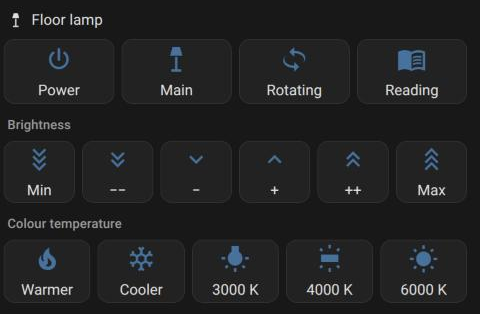
In the end I have a dashboard row with Min / −− / − / + / ++ / Max (12, 4, 1, 1, 4, 12 presses), which feels like a real dimmer.
Status
- Princeton/EV1527: verified on real hardware (the 12 lamp keys above, RM4 Pro, HA 2026.10). The tests check the output byte-for-byte against those packets.
- Flipper
RAWfiles: implemented and unit-tested, not yet tried on hardware. Reports welcome. - Rolling-code remotes (garages, cars, alarms) can’t work this way.
- I’ve only tested the RM4 Pro. Other Broadlink models with RF should use the same format.
Feedback, issues and PRs are very welcome, especially if you try it with other remotes. 