Hi,
I am trying to round this to the closest whole number.
"{{ states('sensor.id_4_range') | float / 1.609 | round(1) }}"
I want to remove all decimal point and round down if the value is less than 0.5 e.g., 95.4 would equate to 95, or round up if the value is equal to or greater than 0.5 e.g., 95.5 or 95.7 would equate to 96.
Any ideas?
Thanks.
123
November 18, 2022, 6:43pm
2
"{{ (states('sensor.id_4_range') | float(0) / 1.609) | round(0) }}"
You have to group the calculation with parentheses so that the result of the calculation is rounded. If you omit the parentheses, the rounding is performed on the value 1.609 only.
round(0) rounds the supplied value to the nearest integer value (in the manner you requested).
Reference: Templating - Number Functions and Filters
That’s amazing, thanks for your help
mpschr
March 15, 2024, 9:39pm
5
Found the answer on a thread with the exact same device. A VW ID.
For other interested people, I just added two sensors with theoretical ranges based on the range sensor and the state of charge sensor.
template:
 - sensor:
     - name: "ID4 theoretical 100% range"
       unique_id: "sensor.grissi_theoretical_100p_range"
       unit_of_measurement: "km"
       device_class: distance
       state_class: measurement
       state: "{{ (states('sensor.grissi_range') | float() / states('sensor.grissi_state_of_charge') | float() * 100) | round(0) }}"
 - sensor:
     - name: "ID4 theoretical 80% range"
       unique_id: "sensor.grissi_theoretical_080p_range"
       unit_of_measurement: "km"
       device_class: distance
       state_class: measurement
       state: "{{ (states('sensor.grissi_range') | float() / states('sensor.grissi_state_of_charge') | float() * 80) | round(0) }}"
I was actually looking how to do simple math on the statistics card, but here ware
ceekay1
November 12, 2024, 4:05pm
6
Hi there. I use round, and most of the time it does what I want. Now I found a situation where it doesn’t work as expected.
The sensor is a template calculating the absolute water level:
{{ (1000*e**(19.016-(4064.95/(float(states('sensor.luft_aussen_temperature'))+236.25)))*100/(461.66*(float(states('sensor.luft_aussen_temperature'))+273.15)) * float(states('sensor.luft_aussen_humidity'))/100 | float) | round(1) }}
Currently it calculates 6.5
In developer tools - template this code
{{ float(states('sensor.luft_aussen_abs_feuchtigkeit')) }}
{{ float(states('sensor.luft_aussen_abs_feuchtigkeit'))|round(0) }}
or shorthand this
{{ float(6.5) }}
{{ float(6.5)|round(0) }}
outputs
Ergebnistyp: string
6.5
I expected to get a 7 in the second line. What am I missing?
{{ float(6.6)|round(0) }}
Renders 7, so I think it is a bug in round()?
Thanks for any input.
Kertz1954
February 18, 2025, 2:41am
7
It’s a bug. A very serious bug. Renders HA totally useless until it is fixed. Issue raised.
#136979 In home-assistant/core;
· Kertz1954 opened 3 weeks ago
maxym
March 24, 2026, 7:00pm
8
Not a bug per se. I would say it’s a chain of strange decisions within python, and jinja creators community, to avoid implementing it. Not to provide a most popular rounding method that most of us are taught, familiar with, and expect. The Arithmetic rounding is not even available among the optional ones.
It has been discussed in the past. For example: Jinja round() function gives results which may be unexpected
See documentation (look for Filter round): Templating - Home Assistant
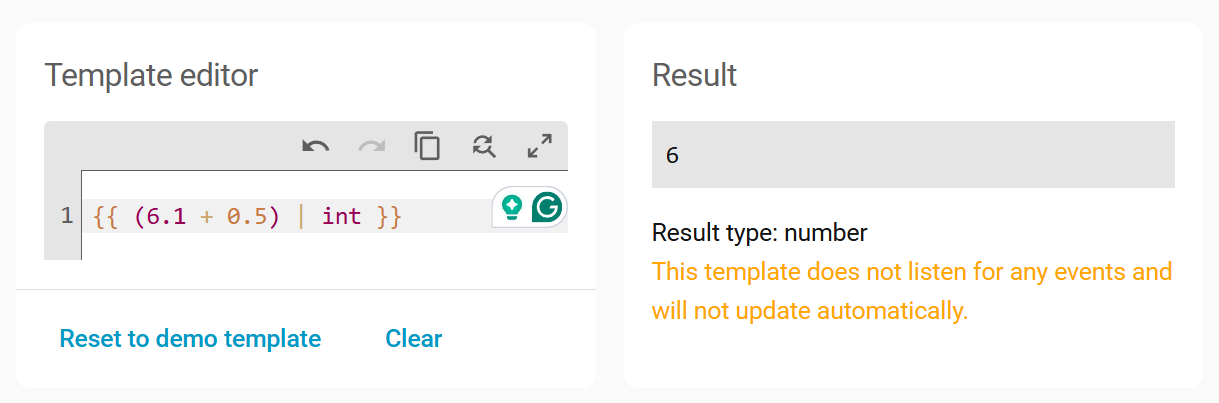
BTW for the arithmetic rounding to integers, this formula might be satisfying:{{ (value + 0.5) | int }}
exx
April 11, 2026, 3:12pm
9
How would that be satisfying? It would round 6.1 up to 7, would it not?
exx
April 11, 2026, 5:06pm
11
I admittedly did not.
At a glance, I would not expect that method to use floor(). Interesting.
petro
April 28, 2026, 11:54am
12
It doesn’t use floor. It cuts the decimals off when converting a float to an integer.