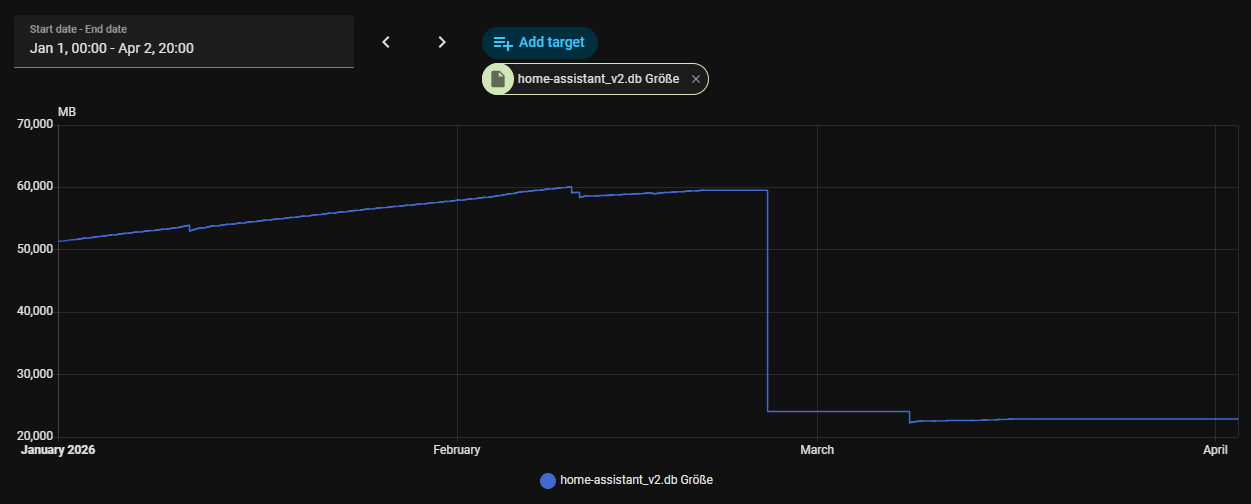
# [GUIDE] Fix & Shrink Massive HA Databases (>50GB) – The “Table-Swap” Method
### The Problem
When a Home Assistant database explodes (e.g., to 60GB) due to millions of orphaned entries, standard PURGE or DELETE commands fail. They take hours, lock your I/O, and often lead to further corruption. This usually happens when the states table is flooded with “zombie” rows that lack a valid entity association.
### Step 0: The “NULL-Bloat” Diagnostic
Run this command on your PC to see if your database is filled with garbage rows:
```cmd
sqlite3.exe “home-assistant_v2.db” “SELECT quote(entity_id), COUNT() FROM states GROUP BY entity_id ORDER BY COUNT() DESC LIMIT 5;”
```
If you see a result like NULL | 213,892,148, your database is 80% garbage. Deleting these via standard SQL will crash your NUC. You must use the Table-Swap method.
—
### The Solution: The “Table-Swap”
Instead of deleting garbage, we “extract the gold” by streaming valid rows into a fresh database. This method uses sequential I/O, which is exponentially faster than random-access deletion.
—
### Step 1: Preparation & Recovery
1. Stop HA Core: Run ha core stop to prevent file locks.
2. Move to PC: Transfer the .db to a computer with a fast NVMe SSD and sqlite3.exe.
3. Structural Recovery: If your DB is corrupted, create a stable base first:
sqlite3.exe home-assistant_v2.db .recover > HA_FIXED.db
—
### Step 2: Identify Your Unique Schema
SQLite requires an exact match for column counts during a mass import. Check your source with:
sqlite3.exe HA_FIXED.db ".schema states" ".schema statistics"
Count the column names inside the parentheses (...):
| Feature in Output | Column Count | Type |
| — | — | — |
| entity_id_low_id present | 11 | Modern (v4) |
| event_id present, but no old_state_id | 15 | Hybrid (v2/v3) |
| old_state_id AND origin_idx present | 20 | Legacy (v1) |
| mean_weight present in statistics | 14 | Legacy Stats |
| mean_weight missing in statistics | 10 | Modern Stats |
—
### Step 3: Create the “Custom-Fit” Target (HA_NEW.db)
Create a new file HA_NEW.db. You must define tables manually to include PRIMARY KEY AUTOINCREMENT, otherwise the Recorder will fail to write new data later.
Choose the block that matches your column count from Step 2:
#### Option A: Modern (11 Columns States / 10 Columns Stats)
```sql
sqlite3.exe HA_NEW.db “CREATE TABLE states (state_id INTEGER PRIMARY KEY AUTOINCREMENT, entity_id_low_id INTEGER, state VARCHAR(255), attributes_id INTEGER, last_changed_ts FLOAT, last_reported_ts FLOAT, last_updated_ts FLOAT, old_state_id INTEGER, attributes CHAR(0), context_id_bin BLOB, metadata_id INTEGER); CREATE TABLE statistics (id INTEGER PRIMARY KEY AUTOINCREMENT, created_ts FLOAT, start_ts FLOAT, mean FLOAT, min FLOAT, max FLOAT, last_reset_ts FLOAT, state FLOAT, sum FLOAT, metadata_id INTEGER);”
```
#### Option B: Hybrid (15 Columns States / 10 Columns Stats)
```sql
sqlite3.exe HA_NEW.db “CREATE TABLE states (state_id INTEGER PRIMARY KEY AUTOINCREMENT, entity_id VARCHAR(255), state VARCHAR(255), attributes TEXT, event_id INTEGER, last_changed DATETIME, last_changed_ts FLOAT, last_reported_ts FLOAT, last_updated DATETIME, last_updated_ts FLOAT, old_state_id INTEGER, attributes_id INTEGER, context_id VARCHAR(36), context_user_id VARCHAR(36), context_parent_id VARCHAR(36)); CREATE TABLE statistics (id INTEGER PRIMARY KEY AUTOINCREMENT, created_ts FLOAT, start_ts FLOAT, mean FLOAT, min FLOAT, max FLOAT, last_reset_ts FLOAT, state FLOAT, sum FLOAT, metadata_id INTEGER);”
```
#### Option C: Legacy (20 Columns States / 14 Columns Stats)
```sql
sqlite3.exe HA_NEW.db “CREATE TABLE states (state_id INTEGER PRIMARY KEY AUTOINCREMENT, entity_id CHAR(0), state VARCHAR(255), attributes CHAR(0), event_id SMALLINT, last_changed CHAR(0), last_changed_ts FLOAT, last_reported_ts FLOAT, last_updated CHAR(0), last_updated_ts FLOAT, old_state_id INTEGER, attributes_id INTEGER, context_id CHAR(0), context_user_id CHAR(0), context_parent_id CHAR(0), origin_idx SMALLINT, context_id_bin BLOB, context_user_id_bin BLOB, context_parent_id_bin BLOB, metadata_id INTEGER); CREATE TABLE statistics (id INTEGER PRIMARY KEY AUTOINCREMENT, created DATETIME, start DATETIME, mean FLOAT, min FLOAT, max FLOAT, last_reset DATETIME, state FLOAT, sum FLOAT, metadata_id INTEGER, created_ts FLOAT, start_ts FLOAT, last_reset_ts FLOAT, mean_weight FLOAT);”
```
—
### Step 4: High-Speed Data Migration
Use ATTACH and INSERT OR IGNORE to skip corrupted duplicates and leave the NULL rows behind.
```cmd
sqlite3.exe “HA_NEW.db” “ATTACH ‘HA_FIXED.db’ AS alt; BEGIN; INSERT OR IGNORE INTO states_meta SELECT * FROM alt.states_meta; INSERT OR IGNORE INTO states SELECT * FROM alt.states; INSERT OR IGNORE INTO events SELECT * FROM alt.events; INSERT OR IGNORE INTO statistics SELECT * FROM alt.statistics; INSERT OR IGNORE INTO statistics_meta SELECT * FROM alt.statistics_meta; INSERT OR IGNORE INTO statistics_short_term SELECT * FROM alt.statistics_short_term; COMMIT;”
```
—
### Step 5: Finalizing (Indexing & Vacuum)
Without indexes, the DB is useless. This step takes the longest (30-60 mins for 90M rows).
```cmd
sqlite3.exe “HA_NEW.db” “CREATE INDEX IF NOT EXISTS ix_states_last_updated_ts ON states (last_updated_ts); CREATE INDEX IF NOT EXISTS ix_states_metadata_id_last_updated_ts ON states (metadata_id, last_updated_ts); ANALYZE; VACUUM;”
```
—
### Step 6: Move Back to NUC
1. Transfer: Move HA_NEW.db to /config/home-assistant_v2.db.
2. Permissions: Run chmod 644 home-assistant_v2.db.
3. Start: Run ha core start.
### What to Expect: Auto-Migration
Upon startup, HA will detect the legacy structure and perform final optimizations. Do not interrupt!
Typical Logs:
```text
WARNING (Recorder) Adding index ix_states_context_id to table states…
WARNING (Recorder) Data migration step ‘state_context_id_as_binary’ completed
WARNING (Recorder) Data migration step ‘entity_id_post_migration’ completed
```
On a clean file, this takes minutes. On the old 60GB file, it would have caused a system hang.
### Results
* Original: 59.5 GB (Fragmented/Legacy with 213M NULLs)
* Final: 17.2 GB (Cleaned/Modernized)
* Time: ~15 min Swap + ~45 min Indexing.
Conclusion: If your DB is over 20GB and hanging: stop deleting. Start Swapping.
 ). Otherwise you do not need history, only current states. Additional reason for inclusion is some troubleshooting or debugging of entity history, but this is temporary only.