Hi. I am new to HA, but have experience from other home automation systems. From my job I also have experience with plc systems.
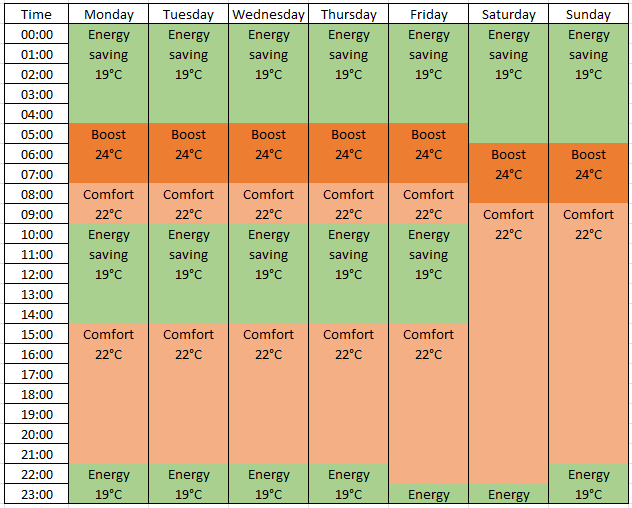
I have searched the forum, but can’t find a good answer to my problem. I am trying to set up a simple schedule to control the setpoint of a z-wave thermostat depending of the time of day and day of week, see attached example of what I want to do.
I have made a test schedule by using the helper function. The schedule has different blocks back to back, allthough slightly simpler than the attached example.
My problem is I am unable to distinguish between the different blocks, I can’t name them individually and when setting up an automation I cant trigger on individual blocks.
What is the simplest solution to achieve a schedule to manipulate a device setpoint?
Ok, thanks.
How does it compare to Chronos Scheduler and Schedule Wizard?
Also, how do I install HACS? I’m unable to find it in App Store.
I also tried the link from HomeAssistant web page, but http://homeassistant.local:8123 does not respond even though I can access http://homeassistant.local to configure my system.
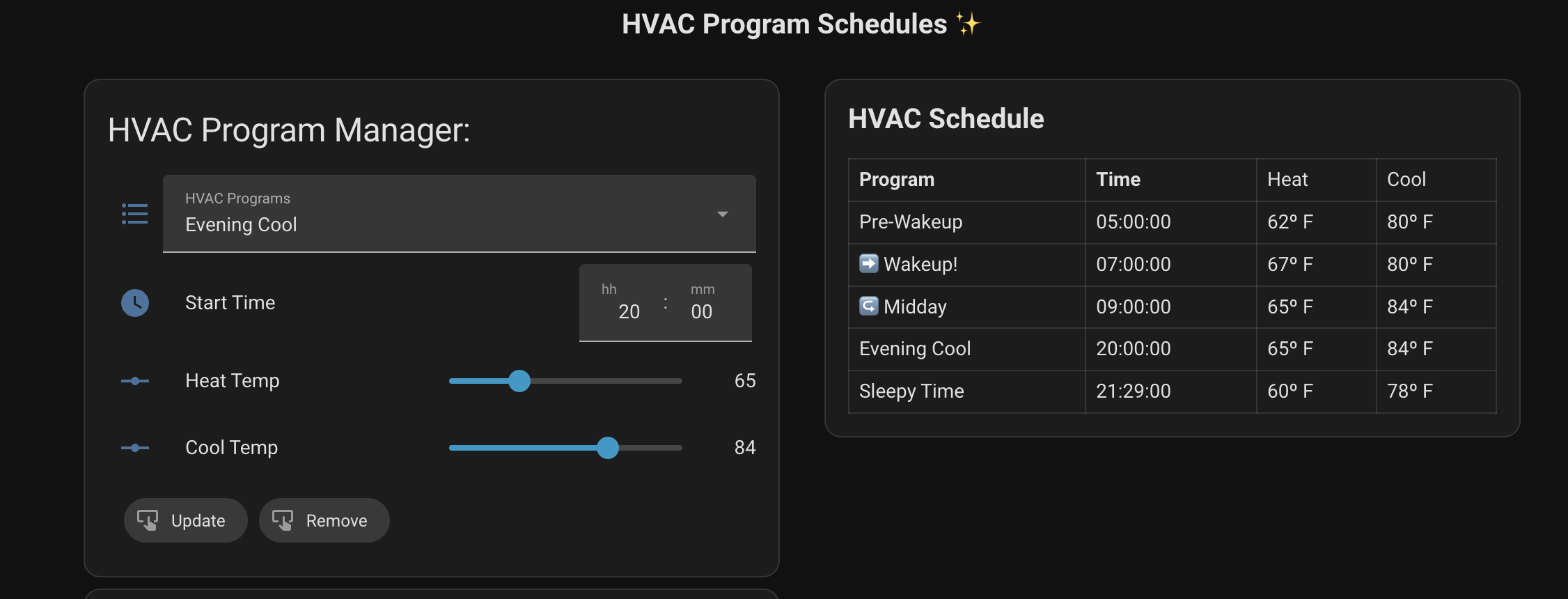
Not quite clear what blocks you are referring to, but I switched from using the scheduler to saving the schedule in an attribute. I wouldn’t call it the “simple” approach, but I just have a couple of automations that update the schedule based on the times I enter:
Sorry for the long delay here. I installed scheduler cards and it is working a lot better than the built in schedule helper for what i want to do, but i miss the possibility to have different schedules for different days within the same schedule. I also tried Chronos which i find works well for my lighting schedule, but not so well for my heating schedule.
Are there other hints you can use to know when to shift the schedule? I initially set mine up with weekends being different. But now I use other sensors to adjust. For example, could you look at when the coffee maker is turned on or a motion sensor is triggered to alter the set point? Or even a bed sensor to know when you get up?
Other than my pre-wakeup warming of the house, almost all of my schedule changes could be done by occupancy and home/away sensors and/or door and window sensors. I also adjust based on the forecast temp.
For my schedule, my automation sets a datetime for the next trigger time to change the set points. I could also shift time there on the weekend, if I wanted.
I cannot think of any other parameters to manipulate the schedule. This particulara schedule is for bathroom floor heating, the warm up time from eco to comfort and vice versa takes almost two hours. This means I need to change the mode or temperature setting about two hours before I plan to get up. I get up the same time mon-fri and a different time sat-sun every week. In the evenings I want to start heating the same time from sun-thu and a different time fri-sat. The ideal would be to have a week schedule with different time settings for each day. Isn’t this how everybody use heating schedules?
There’s a lot of different ways to do this, of course. For this simple use case and ignoring things like you are away on vacation, I would just hard-code an automation:
You don’t really have that many different settings, so could just fill out that. You can disable the automation when you go out of town and it’s not terribly hard to update in the UI for the infrequent times you want to alter the schedule.
Simple is often good.
You could also create a “variables:” section and trigger every hour and then based on the hour and the day of the week look up in that matrix, and if found set the temp.
Coming at this as a fellow homeowner with a pretty new install, I went down the same path and ended up in the “simple is good” camp. I set up one automation per temperature block using time triggers with weekday conditions, each one calling the set temperature action on the thermostat. Naming each trigger after the block (Boost, Comfort, Energy saving) makes it easy to read back later.
One thing I’d add from my own experience: put a simple helper toggle as a condition on the automation, so you can pause the whole schedule with one switch when you’re home sick or the weather does something unusual. That saved me more than once during shoulder season.
The scheduler card is nice for visibility, but if the goal is just getting it working today, the plain automation approach is easier to debug when something doesn’t fire, since you can see exactly which time trigger ran.
Thanks for mentioning Velair, @vajdum. I’m its developer.
@cortinaman, Velair supports different temperature blocks for each day within one weekly schedule, so you can have Monday–Friday mornings, Saturday–Sunday mornings, and a different split for the evenings. You configure those from its sidebar panel without creating an automation for each change.
For the roughly two-hour warm-up you described, you can either schedule the temperature change earlier yourself or enable Adaptive Preconditioning. With that enabled, the block time becomes the time you want the room near the target temperature, and Velair estimates when to start heating using the temperature readings and, as it gathers observations, local history.
For underfloor heating, the temperature your thermostat reports matters: learning from floor temperature and learning from room temperature represent different things. I wouldn’t promise a particular result without knowing your setup. Which thermostat are you using, and what temperature does its Home Assistant climate entity report?