I have just installed the seeed sensor mr6008bha2
works wonderfully and is included in the esphome list with all sensors
how do I get the whole thing into the esp home builder
so read out the original firmware and make it changeable
thanks
Hello…
I am not sure if i understand what you are trying to achieve…
Since you are saying it is working…did it come esphome pre-programmed or did you make the esphome code?
If it came pre programmed, than the maker of the device should have the code open for public on his web page or at least when asking for it.
yes there is firmware already on it
https://www.esphome.io/components/seeed_mr60bha2.html
there are lots of code examples
I wanted to use the original code to learn
I’m interested in how the input option works in AP mode under esphome code
Should have what you need.
thanks
I overlooked that
Does anyone know if the mr60bha2 has a HLK-LD6002 inside it?
I have several HLK-LD6002 traveling from china and I was planning to implement the integration to espHome, but I assume that we can just use the mr60bha2 integration in order to use it. right?
Did you manage to flash it?
I can’t choose a C6 in ESP-Home and therefore (I guess) it doesn’t work
I have this device, too.
It will show up in Home Assistant (ESPHome integration) as such:
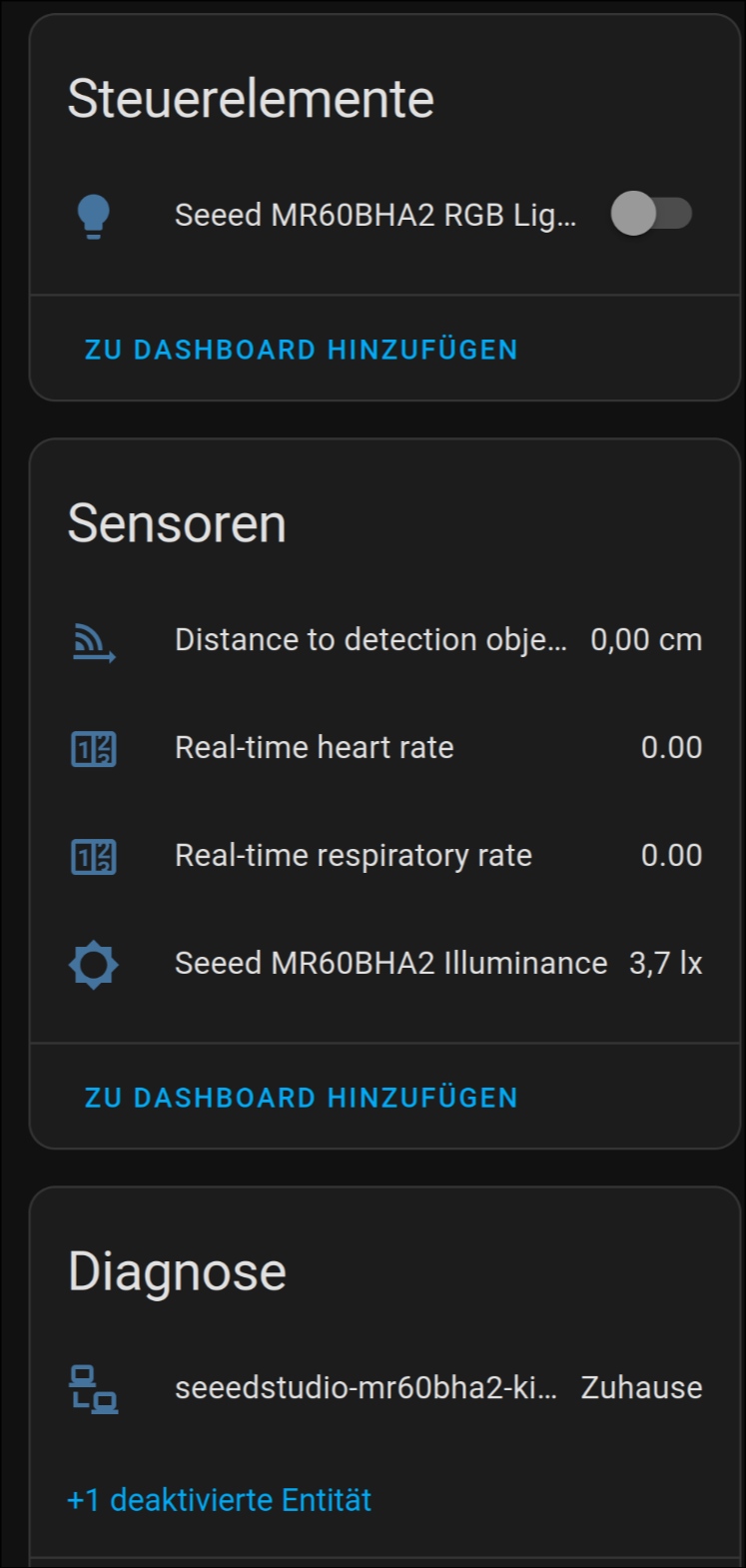
However, it does not get discovered by ESPHome Builder, so I cannot change anything about it. I would like to modify the code so that it will provide this (esphome.io link).
Also, Distance to detection object is constantly 0,00 cm. The other values will update (almost) in real-time, but distance does not at all.
I figured out how to do it.
You first need to create a new device in ESP-Home.
Make it with bare minimum and do not flash the device.
When the new device is in ESP-Home Builder, edit the yaml to the correct board:
esp32:
  board: esp32-c6-devkitc-1
  variant: esp32c6
  flash_size: 4MB # upload.flash_size
  framework:
    type: esp-idf
Compile it to a binary file.
Go to Web - ESPHome and flash the device.
When that is done, the board should be online in ESP-Home Builder.
Edit the yaml to this code below:
esphome:
  name: MR60BHA2
  friendly_name: MR60BHA2

esp32:
  board: esp32-c6-devkitc-1
  variant: esp32c6
  flash_size: 4MB # upload.flash_size
  framework:
    type: esp-idf

# Enable logging
logger:

# Enable Home Assistant API
api:
  encryption:
    key: "xaSm4KLT9cufhR+qQV52S1QYBXa7kY8GJTr06gmDl7I="

ota:
  - platform: esphome
    password: "38e8a3982cfd10e91487d2e4aec36253"

wifi:
  ssid: !secret wifi_ssid
  password: !secret wifi_password

  # Enable fallback hotspot (captive portal) in case wifi connection fails
  ap:
    ssid: "Heart Fallback Hotspot"
    password: "vd8aGl0rHP0z"

external_components:
  - source:
      type: git
      url: https://github.com/limengdu/MR60BHA2_ESPHome_external_components
      ref: main
    components: [ seeed_mr60bha2 ]
    refresh: 0s

captive_portal:


# For XIAO ESP32C6 Onboard LED
# light:
#   - platform: status_led
#     name: "Switch state"
#     pin: GPIO15

light:
  - platform: esp32_rmt_led_strip
    id: led_ring
    name: "Seeed MR60BHA2 RGB Light"
    pin: GPIO1
    num_leds: 1
    rmt_channel: 0
    rgb_order: GRB
    chipset: ws2812

i2c:
  sda: GPIO22
  scl: GPIO23
  scan: true
  id: bus_a

uart:
  id: uart_bus
  baud_rate: 115200
  rx_pin: 17
  tx_pin: 16
  parity: NONE
  stop_bits: 1

seeed_mr60bha2:
  id: my_seeed_mr60bha2

binary_sensor:
  - platform: seeed_mr60bha2
    has_target:
      name: "Person Information"

sensor:
  - platform: bh1750
    name: "Seeed MR60BHA2 Illuminance"
    address: 0x23
    update_interval: 10ms
  - platform: seeed_mr60bha2
    breath_rate:
      name: "Real-time respiratory rate"
    heart_rate:
      name: "Real-time heart rate"
    distance:
      name: "Distance to detection object"
    num_targets:
      name: "Target Number"
2 Likes
Hi how did you resolve the 0 cm issue Ihave the same issue
can i add update interval to all sensors separate ?
also a question about update interval for luminance 10ms . why so often ? can i change it to 10s ?
this solved it for me. I had to comment out the light line for rmt_channel: 0. probably will just comment out the entire light area as I’m not sure that’s useful for me.
im not getting any Illuminance reports though
is there any sensitivity settings that can be added by chance?
thank you
I just bought this device, and tested it briefly.
It pairs with Home Assistant no problem, and it detects heart rate, breathing and people at short distance, 2 meter so.
However, I read specs that it would detect people up to 6m, which is not the case for me.
Is there different firmware that is optimized for presence detection at longer distance? I don’t care for heart rate, all I want is a sensor that will detect when a person is in a room m, whether they move or sit still, and will not trigger on my cat. Alternative option suggestions are also welcome.