you don´t use ble for audio.
try rfkill unblock bluetooth on the pi to use the onboard bluetooth.
did the other dongles worked with linux before?
did you discover any other device?
1 Like
Hi @LongF ! Thanks a lot for trying the bridge and for the detailed report 
rfkill - good catch! We’ve just added rfkill unblock bluetooth to the container startup so this will be handled automatically in the next release. For now your manual workaround is exactly right.
Restart PermissionError - this is a known issue fixed in the 2.54.1 release. The container sends SIGTERM to PID 1 on restart, but some Docker security profiles block that. The fix adds a fallback that handles this gracefully.
One-stream limit on Pi 4 built-in BT - correct, the BCM4345C0 on the Pi 4 supports only one concurrent A2DP stream. USB dongles (any RTL8761B-based, e.g. TP-Link UB500 ~$12) will give you multiple streams - each dongle handles 2–3 speakers reliably. We’ve added a Bluetooth Adapters page to the docs with specific recommendations.
Let us know how it goes with the dongles!
Hi @AdoraBelle! Your ceiling BR/EDR (A2DP) speakers are absolutely the kind of device this bridge is built for - so the goal is definitely achievable.
The fact that none of your controllers can find them (even in bluetoothctl) points to a discovery issue, not a bridge issue. A few things to check:
- Make sure the speakers are in pairing/discoverable mode. Ceiling speakers often need a specific trigger - a button press, power cycle, or a reset sequence. If they’re not actively advertising, no controller will see them. Check the speaker manual for how to enter pairing mode.
- Try an explicit BR/EDR scan in bluetoothctl:
bluetoothctl scan bredr
The default scan on prioritizes LE on some adapters. - Adapter quality matters. The Pi’s built-in Broadcom has known quirks with BR/EDR discovery. If your two dongles are CSR8510-based, those are aging BT
4.0 adapters. A modern RTL8761B dongle (TP-Link UB500 v1/v2, ~$12) is significantly better for BR/EDR A2DP - see our adapter guide. - Moving to Proxmox LXC won’t help with discovery if you’re using the same adapter. The controller hardware is what matters.
What are the make/model of your dongles? And do the ceiling speakers have any visible buttons or LEDs that indicate pairing mode?
What’s New (v2.52.0 → v2.54.1)
 PulseAudio sink monitoring — idle standby is now driven by real PA/PipeWire sink state (
running/idle/suspended) instead of fragile daemon flags that reset on every MA
reconnect. No more speakers going to standby during active playback (#120). New SinkMonitor module subscribes to PA events in real time and fires callbacks on state transitions.
 WebSocket heartbeat — daemon now sends 30 s ping/pong on server-initiated WebSocket connections, matching MA’s client-side heartbeat. Prevents idle connection drops through proxies,
firewalls, and Docker bridge networks (#120).
 Restart reliability — process no longer hangs after restart (event loop wasn’t stopped); S6 overlay restart now works when running as non-root UID; restart banner no longer gets
stuck with a 60 s safety timeout.
 Raspberry Pi support — entrypoint auto-runs
 rfkill unblock bluetooth at startup so the on-board adapter works without manual intervention. New docs section covers the
single-stream A2DP limitation of Pi 4/5 built-in Bluetooth.
 OpenSSL 3.5 fix — update checks failed on newer distros because post-quantum ML-KEM key exchange produced oversized TLS Client Hello packets that middleboxes dropped; GitHub API calls
now pin a safe ECDH curve.
 Mobile UI fix — action buttons (Reconnect / Wake / Disable) no longer overflow on mobile at 125% zoom. Layout overrides that were accidentally scoped to dark-mode-only are now applied universally.
 Mute via MA by default —
 MUTE_VIA_MA now defaults to true so mute commands from the bridge web UI route through the Music Assistant API and the MA UI stays in sync (#132).
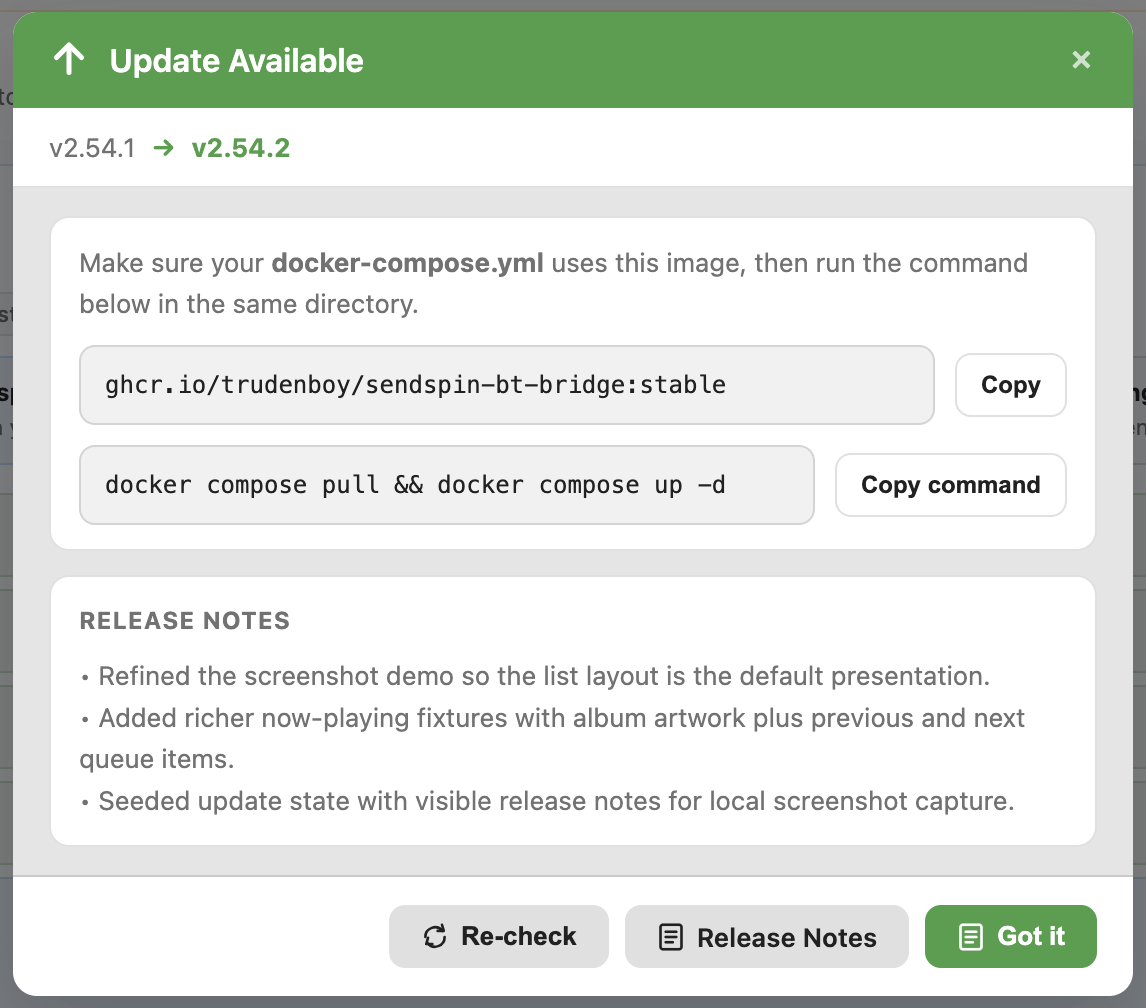
 Docker update UX — the update modal now shows the full Docker image name as a copyable code block and the correct
 docker compose pull && docker compose up -d command.
 Housekeeping — removed deprecated
 handoff_mode device option; dead idle-detection fallback methods cleaned up; MA Ingress sign-in crash with non-ASCII usernames fixed (#119); LXC upgrade hardened; logs endpoint fixed for Docker containers.
Thank you so much for the guidance!
A little more context - like I said, they came with the house … I have no clue what the exact model is, I know the brand is Homewerks cause that is the name I see when pairing them, but no manual. They are the ceiling vent kind that they sell at Home Depot, so no buttons or markings.
-
They do emit a specific sound when they are in pairing mode, so that is how I know. Plus, I can see them and pair them to two laptops and two phones (not all at once of course
 ) - so this is how I know they do in fact work and pair ok. I did the whole dance of pairing them, forgetting the device, restarting into pairing mode over and over for a few hours yesterday
-
I did this yesterday -
bluetoothctl scan bredr- no dice, I even found devices that belong to my neighbors but not the speakers. I did this by selecting the different BT controllers one at a time too, in case that was affecting the discovery (it was - with them selected individually I was seeing a lot more devices, just not the ones I needed)
On my laptop, where I can actually see and pair the speakers, I did that and got the mac address once paired. And at that point I was already drinking on my patio, so they do in fact reach quite far, haha
      Connected:
          HOMEWERKS(0250):
              Address: 56:58:02:B8:02:50
              Minor Type: Headset
              RSSI: -79
              Services: 0x800018 < AVRCP A2DP ACL >
Then I forgot the device, turned BT off on the laptop, restarted the speakers and tried to directly trust and pair with the rpi like so:
sudo bluetoothctl
select 00:1A:7D:DA:71:03
power on
trust 56:58:02:B8:02:50
pair 56:58:02:B8:02:50
No luck, it was not seeing them 
These are the devices - the integrated BT on the rpi 5, Sena UD100-G03 and Feasycom-ancient-something
➜  ~ cat /sys/class/bluetooth/hci0/device/uevent
DEVTYPE=usb_interface
DRIVER=btusb
PRODUCT=a12/1/8891
TYPE=224/1/1
INTERFACE=224/1/1
MODALIAS=usb:v0A12p0001d8891dcE0dsc01dp01icE0isc01ip01in00
➜  ~ cat /sys/class/bluetooth/hci1/device/uevent
DRIVER=hci_uart_bcm
OF_NAME=bluetooth
OF_FULLNAME=/soc@107c000000/serial@7d50c000/bluetooth
OF_COMPATIBLE_0=brcm,bcm43438-bt
OF_COMPATIBLE_N=1
MODALIAS=of:NbluetoothT(null)Cbrcm,bcm43438-bt
➜  ~ cat /sys/class/bluetooth/hci2/device/uevent
DEVTYPE=usb_interface
DRIVER=btusb
PRODUCT=a12/1/8241
TYPE=224/1/1
INTERFACE=224/1/1
MODALIAS=usb:v0A12p0001d8241dcE0dsc01dp01icE0isc01ip01in00
And thanks for this, at the very least you saved me a few hours of doing the same steps on proxmox, I will head to amazon instead to see about a new dongle. Honestly, mine were ordered back during covid times , have not had the need to update them, frankly the two were sitting in a drawer before yesterday, because I have 5 esp32 proxies around the house to control lights and stuff, and that has been working great - for the first time in forever I am trying to do something beyond controlling LED strips with BT, so it is actually a good reason to update the hardware.
I just added a device myself. Here’s the quirkiness of the process.
After initial bluetoothctl command and scan, I had to use -
pair MAC_ADDRESS
Then use -
trust MAC_ADDRESS
Then using -
connect MAC_ADDRESS
Here’s what I experienced - The first several attempts using connect MAC_ADDRESS failed. I had to do it nearly 10x before I got a success message in the console.
An update - I remembered that I had an old playstation in the guest bedroom that I had purchased a dongle for and checked it - the dongle is TP-Link USB Bluetooth Adapter for PC, Bluetooth 5.3 Long Range Receiver (UB500 Plus) which seems to be one of the recommended models for this, so I plugged it into HA to test - unfortunately, same behavior.
➜  ~ lsusb -v -d 2357:0604
Bus 001 Device 008: ID 2357:0604 TP-Link Bluetooth USB Adapter
➜  ~ cat /sys/bus/usb/devices/*/uevent 2>/dev/null | grep -A5 "2357"
PRODUCT=2357/604/200
TYPE=224/1/1
BUSNUM=001
DEVNUM=008
DEVTYPE=usb_interface
DRIVER=btusb
PRODUCT=2357/604/200
TYPE=224/1/1
INTERFACE=224/1/1
MODALIAS=usb:v2357p0604d0200dcE0dsc01dp01icE0isc01ip01in00
DEVTYPE=usb_interface
DRIVER=btusb
PRODUCT=2357/604/200
TYPE=224/1/1
INTERFACE=224/1/1
MODALIAS=usb:v2357p0604d0200dcE0dsc01dp01icE0isc01ip01in01
MAJOR=189
MINOR=9
DEVNAME=bus/usb/001/010
DEVTYPE=usb_device
DRIVER=usb
@mmstano Thanks for the suggestion - unfortunately I keep getting not available
➜  ~ sudo bluetoothctl

[NEW] Media /org/bluez/hci0
        SupportedUUIDs: 0000110a-0000-1000-8000-00805f9b34fb
        SupportedUUIDs: 0000110b-0000-1000-8000-00805f9b34fb
        SupportedUUIDs: 0000FDF0-0000-1000-8000-00805f9b34fb
[NEW] Media /org/bluez/hci1
        SupportedUUIDs: 0000110a-0000-1000-8000-00805f9b34fb
        SupportedUUIDs: 0000110b-0000-1000-8000-00805f9b34fb
        SupportedUUIDs: 0000FDF0-0000-1000-8000-00805f9b34fb
[NEW] Media /org/bluez/hci2
        SupportedUUIDs: 0000110a-0000-1000-8000-00805f9b34fb
        SupportedUUIDs: 0000110b-0000-1000-8000-00805f9b34fb
        SupportedUUIDs: 0000FDF0-0000-1000-8000-00805f9b34fb
Agent registered
[CHG] Controller EC:75:0C:A5:87:10 Pairable: yes
[CHG] Controller 2C:CF:67:96:15:68 Pairable: yes
[CHG] Controller 00:1A:7D:DA:71:03 Pairable: yes
hci2 new_settings: powered bondable ssp br/edr le secure-conn
hci1 new_settings: powered bondable ssp br/edr le secure-conn
hci0 new_settings: powered bondable ssp br/edr le secure-conn
AdvertisementMonitor path registered
[bluetoothctl]> select EC:75:0C:A5:87:10
Controller EC:75:0C:A5:87:10 homeassistant [default]
[bluetoothctl]> power on
Changing power on succeeded
[bluetoothctl]> pair 56:58:02:B8:02:50
Device 56:58:02:B8:02:50 not available
[DEL] Device 7D:3A:67:44:C2:90 7D-3A-67-44-C2-90
[DEL] DeviceSet /org/bluez/hci1/dev_7D_3A_67_44_C2_90
[DEL] DeviceSet /org/bluez/hci1/dev_7D_3A_67_44_C2_90
[bluetoothctl]> pair 56:58:02:B8:02:50
Device 56:58:02:B8:02:50 not available
[bluetoothctl]> pair 56:58:02:B8:02:50
Device 56:58:02:B8:02:50 not available
[bluetoothctl]> trust 56:58:02:B8:02:50
Device 56:58:02:B8:02:50 not available
[DEL] Device A4:C1:38:5B:28:44 A4-C1-38-5B-28-44
[DEL] DeviceSet /org/bluez/hci2/dev_A4_C1_38_5B_28_44
[bluetoothctl]> trust 56:58:02:B8:02:50
Device 56:58:02:B8:02:50 not available
[bluetoothctl]> trust 56:58:02:B8:02:50
Device 56:58:02:B8:02:50 not available
[bluetoothctl]> trust 56:58:02:B8:02:50
Device 56:58:02:B8:02:50 not available
[bluetoothctl]> pair 56:58:02:B8:02:50
Device 56:58:02:B8:02:50 not available
[bluetoothctl]> pair 56:58:02:B8:02:50
Device 56:58:02:B8:02:50 not available
[bluetoothctl]> pair 56:58:02:B8:02:50
Device 56:58:02:B8:02:50 not available
[bluetoothctl]> pair 56:58:02:B8:02:50
Device 56:58:02:B8:02:50 not available
[DEL] Device 74:D4:23:7B:65:B4 74-D4-23-7B-65-B4
[DEL] DeviceSet /org/bluez/hci2/dev_74_D4_23_7B_65_B4
[DEL] Device 74:D4:23:7B:65:B4 74-D4-23-7B-65-B4
[DEL] DeviceSet /org/bluez/hci1/dev_74_D4_23_7B_65_B4
[bluetoothctl]>
I rebooted everything to be safe, also installed today’s app update, and disabled BT on both my phone and laptop just in case.
Additionally, I fugured I’d hardcode the TP Link in the config and manually add the speaker by MAC address to the bridge - nothing
sendspin_server: auto
sendspin_port: 9000
bridge_name: 85b1ecde-sendspin-bt-bridge
ha_area_name_assist_enabled: true
tz: America/Phoenix
pulse_latency_msec: 600
startup_banner_grace_seconds: 5
recovery_banner_grace_seconds: 15
prefer_sbc_codec: false
bt_check_interval: 10
bt_max_reconnect_fails: 0
log_level: info
ma_api_url: ""
ma_api_token: ""
ma_auto_silent_auth: true
volume_via_ma: true
bluetooth_devices:
  - mac: 56:58:02:B8:02:50
    player_name: HOMEWERKS(0250)
    adapter: hci2
    preferred_format: flac:44100:16:2
bluetooth_adapters:
  - id: hci2
    mac: EC:75:0C:A5:87:10
    name: TP-Link Bluetooth USB Adapter (2357:0604)
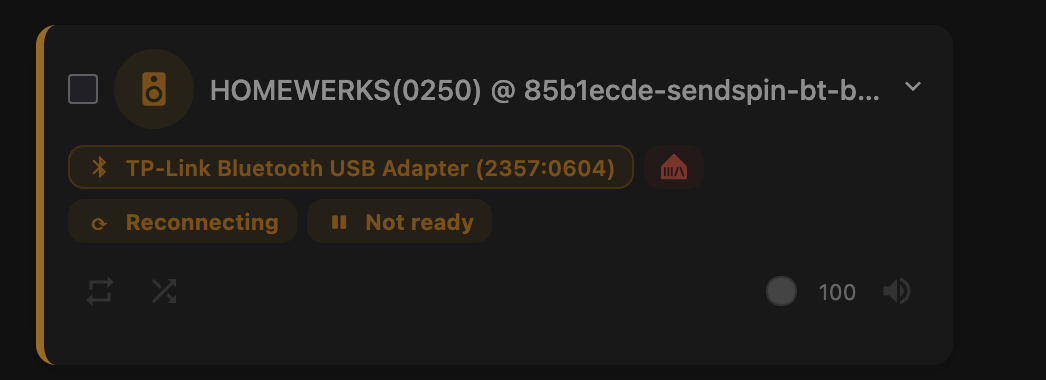
At this point, I think it might be time to give up - not meant to be No idea what else can I do (that does not involve going up into the attic and replacing the stupid speaker) so I am letting this go … But I still do think that sendspin would be a godsend for those kinds of set ups and thank you for your efforts!
Hi @AdoraBelle, I did some research on your specific situation and I think I found the root cause.
The MAC address is the clue
Your speaker’s MAC 56:58:02:B8:02:50 has the locally administered bit set (first octet 0x56 = 01010110, bit 1 = 1). This means the address was generated by the speaker’s firmware, not assigned by IEEE to a manufacturer.
The Bluetooth spec requires public (IEEE-assigned) BD_ADDR for BR/EDR (Classic). Locally administered / random addresses are only formally supported in BLE. BlueZ follows this strictly - which is likely why it ignores inquiry responses from your speakers entirely. Android, iOS, and Windows stacks are more permissive and accept these non-standard addresses, which is why your phone and laptop can see them just fine.
About your adapters
- hci0 / hci2 (
0a12:0001) - these are CSR8510 clones. The VID:PID0a12:0001is the most commonly faked Bluetooth dongle identifier. Linux kernel since 5.8 actively detects and adds workarounds for these clones, often limiting their functionality. These are probably not helping your situation. - hci1 (RPi 5 BCM43438) - built-in, limited transmit power for BR/EDR
- TP-Link UB500 Plus (hci2,
2357:0604, RTL8761B) - this is a proper adapter and the fact that it also can’t discover the speakers confirms the issue is on the speaker side, not the adapter side.
About the speakers
Looking up the FCC filing (SYJHOMEWERKS2), these are ~2014 era speakers with Bluetooth 2.1+EDR, only 2 mW output power. There are known compatibility issues even with newer iPhones (iPhone 12+). The cheap BT module inside has a non-standard implementation that happens to work with consumer device stacks but not with Linux BlueZ.
One last thing to try
Since you already have the MAC address from your laptop, you could try bypassing BlueZ’s discovery entirely and forcing a direct baseband connection (a “page” request):
# SSH into your HA / Pi
# Put speaker into pairing mode first!

# 1. Start HCI-level monitoring (in background)
sudo btmon &

# 2. Attempt direct connection by MAC, bypassing inquiry
sudo hcitool -i hci2 cc 56:58:02:B8:02:50

# 3. If that succeeds, try pairing via bluetoothctl
bluetoothctl pair 56:58:02:B8:02:50
hcitool cc sends a page request directly to the MAC address — no inquiry/discovery needed. If the speaker is in “connectable” mode (page scan enabled), this might work even though bluetoothctl scan can’t find it.
Also worth checking: does HA’s built-in Bluetooth integration have its hands on any of the adapters? If it’s setting discovery filters, that could interfere. Try temporarily disabling the HA
Bluetooth integration in Settings → Devices & Services.
Honest assessment
If hcitool cc doesn’t work either, this is most likely an unfixable incompatibility between these specific speakers and the Linux Bluetooth stack. The locally administered MAC + vintage 2014 firmware is a combination that BlueZ simply wasn’t designed to handle in BR/EDR mode. No adapter change will help because the issue is at the protocol level.
The speakers will continue to work perfectly with phones and laptops that use more forgiving Bluetooth stacks. For the bridge, you’d need speakers with standard-compliant Bluetooth addressing - which is pretty much any mainstream Bluetooth speaker from the last decade.
Sorry I don’t have better news, but I hope the hcitool cc workaround is worth a shot! 
1 Like
What’s New (v2.54.2 → v2.55.0)
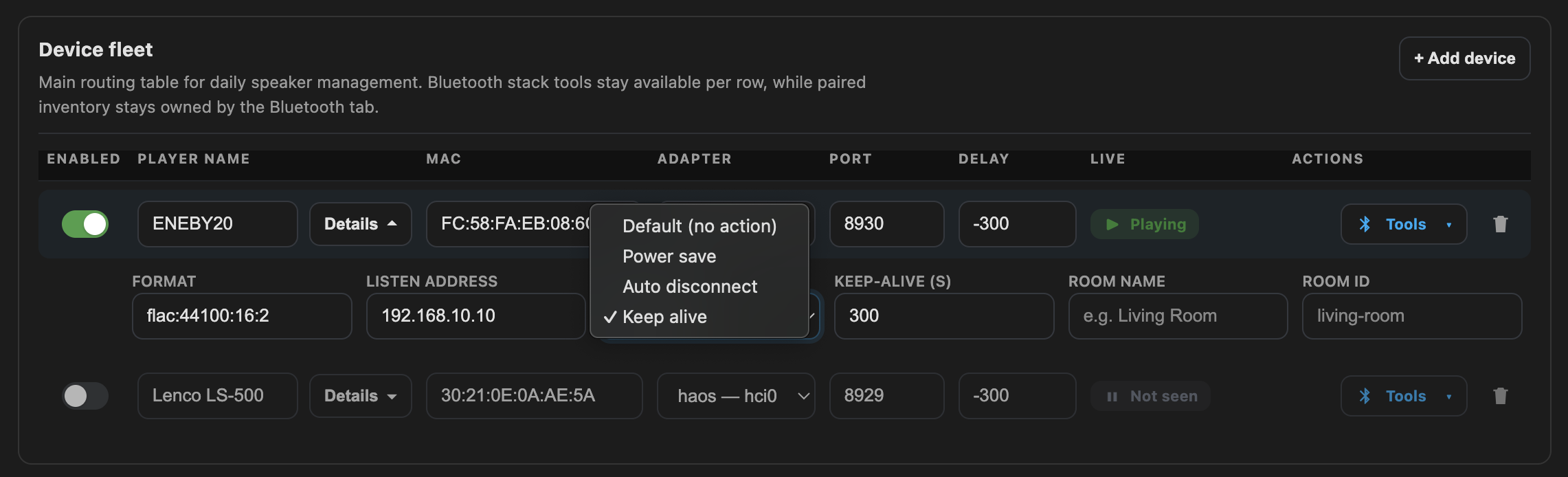
 Per-device idle mode — new
 idle_mode dropdown replaces the old keepalive + standby pair with four mutually-exclusive modes:
- default (speaker’s own timer),
- power save (suspend PA sink → release A2DP → speaker sleeps, BT stays connected → instant resume),
- auto disconnect (full BT disconnect after timeout),
- keep alive (2 Hz infrasound bursts at −50 dB — below human hearing but keeps A2DP active on speakers that ignore digital silence).
 Docker image −51% — 916 → ~450 MB. Removed redundant system FFmpeg on amd64/arm64 (PyAV bundles its own), force-removed transitive GStreamer/codec deps, stripped
 .so debug symbols, cleaned unused Python stdlib modules.
 Unified branding — all logos, favicons, and HA addon icons replaced with the landing page wave-bridge design (two pillars + three wave curves). Channel color differentiation preserved:
stable = teal-purple, rc = gold, beta = red. Total asset size down from ~310 KB to ~55 KB.
 PipeWire idle standby fix (#120) — PipeWire’s PA compat layer doesn’t emit sink state events for BT sinks, so the SinkMonitor never cancelled the idle timer. Daemon playback flags now act as a dual authority alongside SinkMonitor: idle timer only fires when both sources agree the device is idle. Fixes standby during active playback and the reverse (timer not starting when playback stops).
Mute desync after BT reconnect (#132) — the daemon unmuted the PA sink on reconnect but never told Music Assistant, leaving MA stuck on muted=true. The parent now detects sink_muted→false and forwards the unmute to MA via players/cmd/volume_mute.
 NumPy crash on older CPUs — numpy ≥2.0 requires X86_V2 (POPCNT/SSE4.2), unavailable on QEMU
 qemu64 and older Celerons/Pentiums. Pinned numpy<2.0 to restore compatibility.
Subprocess crash on PipeWire — kept libasound2-plugins (ALSA→PulseAudio bridge) which provides the .so that sounddevice/PortAudio needs to discover audio sinks. Removing it
caused a “No audio output device found” crash loop.
 Config download 404 in HA addon — the download button bypassed the ingress
 SCRIPT_NAME prefix; now uses API_BASE like all other endpoints.
Dependency & CI updates — dbus-fast 4.0.0→4.0.4, ruff 0.11.13→0.15.8, docker/build-push-action v6→v7, actions/download-artifact v4→v8.
Hello. Are we likely to see ArmV7 builds being automated again, any time soon? It looks like you are only building v7 for ‘stable’, but there haven’t been any builds for a while. I don’t mind building myself locally, so if not, it’s fine.
Thanks!
Hey! Good timing — you’re right, armv7 builds are automated for stable releases only, but the last couple (v2.56.0, v2.56.1) hit a timeout issue. The armv7 image is built via QEMU emulation, and
compiling numpy from source was taking 40+ minutes, exceeding the CI timeout.
I’ve just released v2.56.3 with a fix for this:
- Split the Docker pip install into two layers so heavy native deps (numpy, PyAV, dbus-python) are cached across releases and don’t recompile every time
- Added piwheels.org as an extra index for pre-built ARM wheels
- Increased the build timeout as a safety net for cold builds
The armv7 image for v2.56.3 should be available shortly once CI finishes. Thanks for the patience!
1 Like
Thank you! I can confirm 2.56.3 is all good.
1 Like
What’s new — v2.55.0 → v2.58.0
 DAC-anchored sync (sendspin 7.0) — the sync engine now auto-compensates for each speaker’s hardware latency, so the old large negative static_delay_ms offsets (−300…−600 ms) are no longer needed. Existing negative values auto-migrate to 0; if you still need fine-tuning, try small positive values (e.g. 50 ms). Also adds remote per-player delay and multi-server daemon support. static_delay_ms range is now 0–5000.
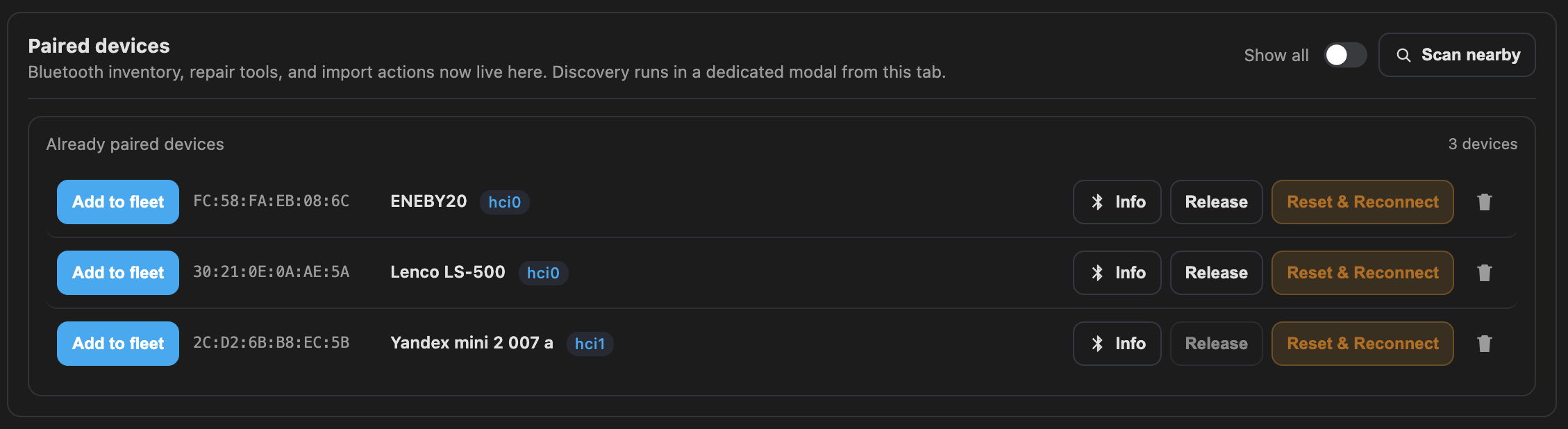
 Multi-adapter Bluetooth — fully adapter-aware now. Hosts with more than one controller (HAOS VMs with hci0+hci1) used to silently run Reset & Reconnect, Add & Pair and the BT Info modal against the default controller only, so bonds on the other radio were invisible. All four flows now target the right adapter, the Paired list shows an hciN badge per bond, and Remove no longer fails on the non-default controller.
 Sink-mute detection & auto-recovery — a system-level PA mute used to go unnoticed. Device cards now show an orange “Sink muted” warning with a one-click Unmute speaker, the health state drops to degraded, diagnostics surfaces a dedicated issue, and a watchdog auto-unmutes after 30 s if the desync persists.
 Sendspin port auto-probe — when SENDSPIN_PORT is default and the host is explicit, the bridge probes 9000 / 8927 / 8095 and picks whichever responds. Port mismatches now surface a dedicated “port unreachable” recovery hint instead of the generic “lost bridge transport”.
 Headless PipeWire — targeted “enable linger” hint. The classic case (SSH session ends → user-scope PipeWire dies → container sees Connection refused) now shows a specific banner “Audio server unreachable — enable user lingering” with the exact fix (sudo loginctl enable-linger + reboot), instead of the old generic “verify audio backend” text.
 WirePlumber + logind loop diagnosed — on headless PipeWire, WirePlumber’s logind integration can re-register A2DP endpoints every ~10 s, so BT never stabilises. The bridge now detects it and logs the exact remediation (disable with-logind in a WirePlumber drop-in). Sink discovery also got a longer window and no longer blocks the event loop.
 Connection errors visible in the device card — daemon connection failures used to log as warnings and vanish. After three consecutive failures they’re now surfaced in the device card’s last error, and the reconnect timeout was bumped so late reconnects don’t permanently kill volume control.
 Sourceplugin / Ynison — no more track mixing. MA’s queue metadata could overwrite the actually-playing track. Daemon is now the source of truth; MA-side fallback is suppressed when the daemon already has a title.
 HA addon Ingress — no more port conflict with Matter/Thread. All channels switched to ingress_port: 0, so Supervisor assigns a free port and there’s no collision with 8080/8081/8082.
 Album artwork under HA Ingress — artwork URLs now go through a signed same-origin proxy, so covers render correctly behind Ingress instead of failing the same-origin check.
 MA auth hardening — SSRF guard + DNS-rebinding defence on every MA auth route, session-bound MFA state, CSRF-required logout, X-Frame-Options, and rate-limit client IDs that respect trusted X-Forwarded-For. Nothing to configure — just a tighter default.
 Small fixes worth mentioning
- Deliberate mute no longer gets undone by the reconnect-unmute sync.
- The Already paired list no longer shows ghost BLE beacons picked up during scans.
- Clean shutdown no longer crashes with “Event loop stopped before Future completed”.
- Auto-released devices show Reclaim (not Reconnect) everywhere, including grid view.
- The 500 handler now returns plain text instead of redirecting to / (no more redirect loop when / itself is failing).
 Build & CI heads-up — numpy is on 2.x now, so the amd64 image requires a CPU baseline of x86-64-v2 (SSE3 / SSSE3 / SSE4.1 / SSE4.2). If you run under QEMU with cpu: qemu64 / kvm64, switch to host or a modern named model (Haswell, Skylake-Client, …) or the container will fail at startup with a NumPy baseline error. armv7 is unaffected.
As always — feedback and bug reports very welcome

1 Like
What’s new — v2.58.0 → v2.60.1
 On-line config apply (no more bridge restart for most saves) — saves from the web UI now apply live (immediately after click save button) . A pure diff layer classifies each changed field as hot-apply (IPC to the running daemon), warm-restart (single subprocess respawn, ~3–5 s silence), global broadcast, global restart, or restart-required (only Flask-bound fields still need a full restart). POST /api/config returns a per-action summary and the UI renders a detailed toast so you can see exactly what happened. Notably, static_delay_ms now reaches the running daemon via a new IPC command — previously it was persisted but never took effect until restart.
 static_delay_ms default is now 300 ms for newly added devices — field reports on Ubuntu + Docker + PipeWire two-speaker setups consistently show 300 ms gives noticeably better A/V sync than 0. Pre-filled on every new-device path (manual Add, scan Add, paired Add). Existing saved configs are untouched.
 Legacy-pair / stale-agent fix for HMDX JAM & IKEA KALLSUP-class speakers (BT 2.x, LegacyPairing: yes) — two surgical fixes in the standalone and per-device pair flows:
- agent off added to the cleanup phase — a lingering agent on the system bus was making the next agent on fail silently with Failed to register agent object → org.bluez.Error.ConnectionAttemptFailed.
- Auto-answer 0000 to Enter PIN code: / Enter passkey: prompts. Previously only SSP “Confirm passkey” was handled, so legacy PIN devices hung until the 15 s deadline.
- Plus an escalation for the “BlueZ has no current device object” reconnect loop: after three such attempts the bridge forces bluetoothctl remove, surfaces an actionable last_error, and lets the next cycle re-pair cleanly — instead of looping Failed to connect until bt_max_reconnect_fails releases the device.
 AKG Y500 / BlueZ 5.82+ A2DP profile auto-switch — on some devices the headset pairs and connects but no bluez_*.a2dp_sink appears, because the card lands in headset_head_unit due to the BlueZ 5.82/5.83 A2DP negotiation regression. After the normal sink retry loop fails, the bridge now inspects bluez_card.{MAC} and, if a2dp_sink is available but not active, switches the profile and retries sink lookup once — audio recovers automatically, no manual pactl needed. PA cards are also exposed in /api/diagnostics and the bug-report text.
Port-collision auto-shift — host-side bind preflight in SendspinClient auto-shifts listen_port on EADDRINUSE, records port_collision / active_listen_port on device status, and halts the restart loop after 5 consecutive bind failures (auto-clears when the daemon comes back alive). No more daemon crash loop when the configured port is taken.
 SinkMonitor log-flood fix — diagnoses the PulseAudio failure on first WARNING with an actionable hint, demotes subsequent attempts to DEBUG, and self-disables after 3 consecutive initial failures so callers fall back to daemon-flag idle detection. Exponential backoff 5→60 s for post-success transients; start() resets state so the monitor can be revived after the operator fixes PA.
 CSP script-src is nonce-only — ‘unsafe-inline’ dropped. Every inline on*= handler (Jinja templates + app.js-generated HTML) migrated to a delegated data-action dispatcher, with a regression guard scanning shipped assets to block reintroduction.
 Fresh Raspberry Pi OS Lite preflight — rpi-install.sh now idempotently clears BT soft-block via rfkill unblock and auto-enables bluetoothd; rpi-check.sh reports rfkill state and warns when systemd-user linger is off on PipeWire hosts (the “no bluez_* sinks after reboot” classic on headless installs). Docs also add a purge+reinstall fallback for stuck BlueZ on Trixie where plain --reinstall doesn’t clear the state.
As always — feedback and bug reports very welcome
1 Like
I can’t get this to connect to multiple speakers at once … either it pairs to the one speaker or the other one. But never to both at the same time. Using a ASUS BT500
Thanks for the report! Two speakers on a single adapter (incl. ASUS BT500) should work — that’s the default topology for most users.
Easiest way to get this fixed: please open the web UI → Diagnostics panel → click the Report button. It creates a GitHub issue pre-filled with your config, BlueZ/PulseAudio state, and per-device last_error — everything needed to pinpoint the cause in one go.
If you’re on anything earlier than v2.60.1, also try updating first — that release shipped a fix for a stale-agent / legacy-pair bug that could exactly match your symptom (one pair works, the next
silently fails with ConnectionAttemptFailed).
Looks like the v2.60.4 brought back the sink issues for the headless sessions. I haven’t looked into details yet but the sink cannot be found anymore. I will revert to the previous version and test, just to be sure.
After a few restart of the container, it came back to normal by itself
Mysteries…
1 Like
What’s new — v2.60.2 → v2.61.0
 BlueZ 5.86 dual-role A2DP Sink hardening (#166, bluez/bluez#1922) — on the regressed BlueZ band some speakers pair and connect but no
 bluez_card / bluez_sink ever appears, and the link drops ~30 s later (HMDX JAM, IKEA Kallsup, Synergy 65 S, some TWS / speakerphone combos). The bridge now issues an explicit Device1.ConnectProfile(A2DP_SINK_UUID) right after pair succeeds, repeats it after the generic Connect() on reconnect, and auto-switches bluez_card.{MAC} to a2dp_sink when PA lands in headset_head_unit. Cheap no-op on a healthy stack.
Standalone pair flow — reliability pass (#168) — pair <mac> now fires on [NEW] Device instead of a fixed 12 s sleep (matters for slow SSP speakers), popular-PIN retry kicks in on AuthenticationFailed (0000 → 1234 → 1111 → 8888 → 1212 → 9999), scan is narrowed to scan bredr at all five pair/scan sites (bluez/bluez#826), failure logs now annotate the rejected PIN via a new describe_pair_failure() helper, and bt_remove_device clears /var/lib/bluetooth/<adapter>/cache/<device> so a re-pair doesn’t trip on stale ServiceRecords / Endpoints entries.
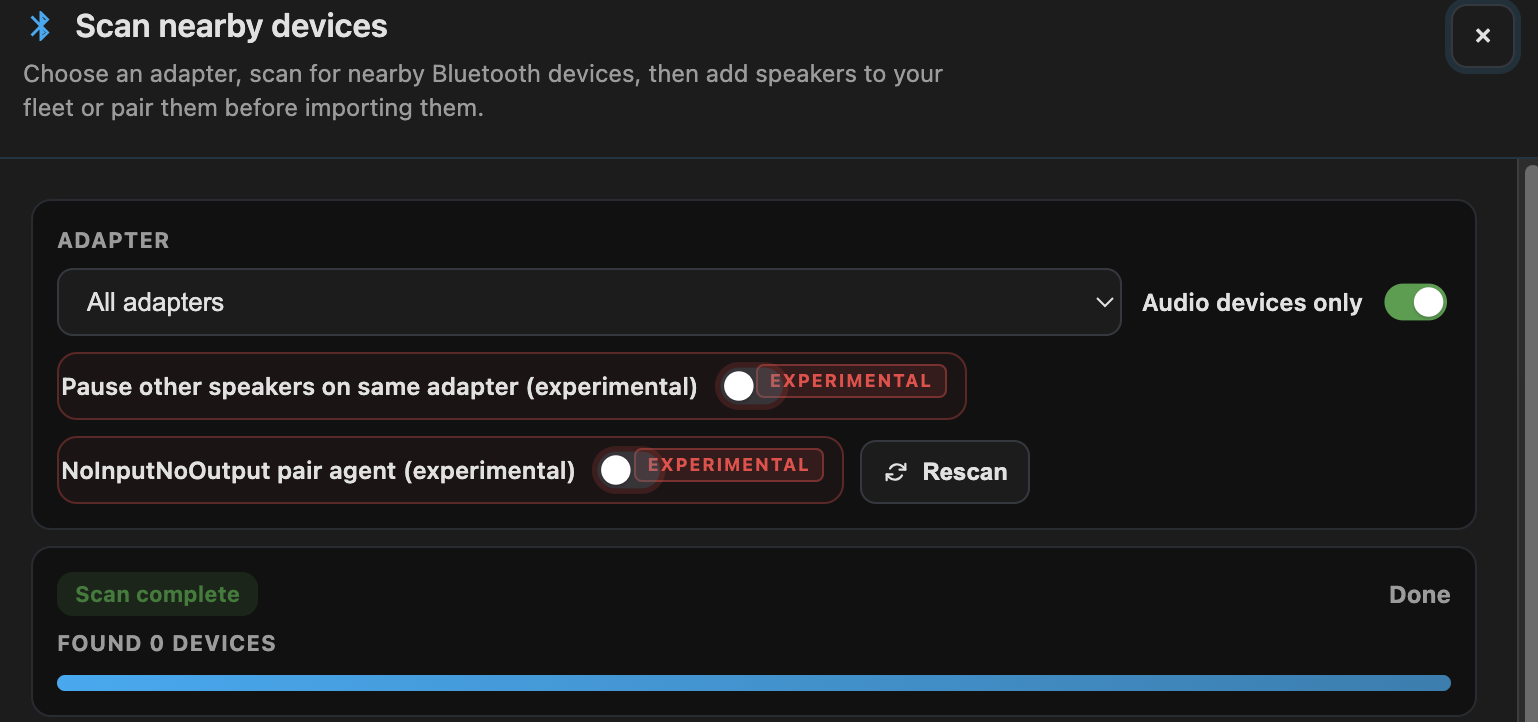
 Opt-in recovery ladders (experimental, v2.61.0) — three new flags surface in Settings → Experimental (now highlighted in red with an “EXPERIMENTAL” badge so volatile toggles are distinguishable from merely unsaved settings):
EXPERIMENTAL_A2DP_SINK_RECOVERY_DANCE— disconnect → 2 s wait → reconnect when no sink appears after connect. Helps on some PipeWire/BlueZ 5.86 setups, hurts others — hence opt-in.EXPERIMENTAL_PA_MODULE_RELOAD— last-resortpactl unload/load module-bluez5-discoverwhenbluez_card.*fails to register. Disruptive (drops every other active BT sink), throttled to once per 60 s, serialized against concurrent callers.EXPERIMENTAL_ADAPTER_AUTO_RECOVERY— runs thebluetooth-auto-recoveryladder (HCI mgmt reset → rfkill unblock → USB unbind/rebind) when reconnects hitBT_MAX_RECONNECT_FAILS. Per-adapter 60 s cooldown; the USB step briefly disconnects every device on that controller.
Also experimental: EXPERIMENTAL_PAIR_JUST_WORKS (NoInputNoOutput agent for SSP Just-Works, #168) with a scan-modal per-pair override.
Pair-time adapter quiesce is now experimental — the “Pause other speakers on same adapter” checkbox is hidden by default behind the experimental-features toggle. It only helps on single-adapter + BlueZ 5.78–5.86 regression band + Realtek exclusivity quirks, so it no longer adds clutter for users who don’t need it. API unchanged — quiesce_adapter on /api/bt/pair_new still works for scripted callers.

aiosendspin 5.1.0 → 5.1.1 — resampling stutter (aiosendspin#219), timestamp drift after extended playback (#217), and spurious reconnect when mDNS re-advertises the same endpoint ([#216 (Avoid reconnect when mDNS re-advertises same endpoint by maximmaxim345 · Pull Request #216 · Sendspin/aiosendspin · GitHub)). Matters most for rate-mismatched BT sinks, multi-hour sessions, and SENDSPIN_SERVER=auto.
Docker build hygiene — .dockerignore trims the UI dev tree (~215 MB of node_modules), __pycache__, and dev screenshots from the build context; Dockerfile narrows the scripts copy to the three runtime helpers actually used inside the container. Fresh CI runners no longer ship the dev UI into the builder, and local __pycache__ no longer leaks into shipped images.
As always — feedback and bug reports very welcome

Using the latest version on a Pi 0 2W. Followed the commands on the github more or less. But it hung as step 2 of the preflight saying no bluetooth access. After some work with 3 different AI’s, this worked and I’m presenting it in case it’s helpful. I don’t pretend it’s my work or that I could have done this on my own:
Here’s some base info:
REFERENCE
─────────
Docs: Installation — Raspberry Pi | Sendspin BT Bridge
Web UI: http://rooftop-bridge.local:8080
SSH: ssh [email protected]
IP: 192.168.1.117
MAC: 88-A2-9E-A3-39-F5
Login: harry1 / xxxxxx
Speaker: Pyle Audio PDWR62BTBK — MAC 32:CD:CA:88:A6:0F
MY SPEAKER
──────────
Name: Pyle Audio
Alias: Pyle Audio
MAC: 32:CD:CA:88:A6:0F
Paired: yes
Trusted: yes
Connected: yes
Bonded: yes
Blocked: no
Class: 0x00240418 (2360344)
Icon: audio-headphones
Fix: Sendspin Bluetooth Bridge on Raspberry Pi - Audio Sink Not Detected
Problem
The container runs as root by default, but the PulseAudio/PipeWire socket at /run/user/1000/pulse/native has 700 permissions (owner-only access). Root cannot access a socket owned by user 1000, causing Connection refused when pactl runs inside the container.
Symptoms
- Web UI shows “No Bluetooth controller detected” (false negative)
- Or Bluetooth connects but
pactl list sinks shortreturnsConnection refused - Audio sink never appears in Music Assistant
Solution
Add user: "1000:1000" to the docker-compose.yml to run the container as the same user that owns the PulseAudio socket.
Modified docker-compose.yml:
services:
sendspin-client:
image: Package sendspin-bt-bridge · GitHub
container_name: sendspin-client
restart: unless-stopped
user: “1000:1000” # ← ADD THIS LINE
network_mode: host
# … rest of config unchanged …
Apply the fix
cd ~/sendspin-bt-bridge
docker compose down
docker compose up -d
docker exec sendspin-client bluetoothctl connect
Verify
docker exec sendspin-client pactl list sinks short
Should show: bluez_output.xx_xx_xx_xx_xx_xx.1
~/sendspin-bt-bridge $ docker exec sendspin-client pactl list sinks short
90 bluez_output.32_CD_CA_88_A6_0F.1 PipeWire s16le 2ch 48000Hz SUSPENDED
101 sendspin_fallback PipeWire float32le 2ch 44100Hz SUSPENDED
harry1@rooftop-bridge:~/sendspin-bt-bridge $
1 Like