Sendspin Bluetooth Bridge — turn any BT speaker into an MA player and HA

Hey everyone! Sharing a companion project built on top of the Sendspin protocol.

What it does: Each Bluetooth speaker appears as a regular player in Music Assistant — play music, control volume, group for multiroom, all from the MA UI or a dedicated web dashboard.

Key features:
• Multi-device — bridge multiple BT speakers simultaneously, each as its own MA player
• Multiroom sync — group speakers across bridge instances with MA sync groups
• 4 deployment options — HA addon, Docker Compose, Proxmox LXC, OpenWrt LXC
• Web dashboard — real-time SSE updates, dark/light theme, transport controls
• Auto-reconnect with D-Bus disconnect detection
• Per-device latency compensation (static_delay_ms)
• Lazy startup — daemon starts only when BT connects (no phantom players)

Tested with 5 speakers across 3 bridge instances (x86_64 + ARMv7), CSR8510 USB adapters:
• IKEA ENEBY 20, ENEBY Portable
• Yandex Station Mini
• Lenco LS-500
• AfterShokz

Install as HA Addon (one click):

  1. Add repository: https://github.com/trudenboy/sendspin-bt-bridge
  2. Install “Sendspin BT Bridge” from the addon store
  3. Configure devices → Start

Links:
:link: Repository: https://github.com/trudenboy/sendspin-bt-bridge
:open_book: Documentation: https://trudenboy.github.io/sendspin-bt-bridge/

Built on the excellent sendspin-client by @loryanstrant and the Sendspin protocol. Thanks for making this possible! :pray:

14 Likes

Hi @trudenboy

Really interesting project.
I trying to set it up using docker but I am not able to connect to my Music Assistant instance.
I use a Long-Lived token but I have this error :

> 2026-03-09 21:15:54,396 - websockets.client - DEBUG - < TEXT '{"server_id":"11f9bfa7cd094d8c97c6cae412xxxxx"...ue,"onboard_done":true}' [215 bytes]
> 2026-03-09 21:15:54,396 - websockets.client - DEBUG - > TEXT '{"command": "auth", "args": {"token": "https://...lU"}, "message_id": 10}' [116 bytes]
> 2026-03-09 21:15:54,399 - websockets.client - DEBUG - < TEXT '{"message_id":"10","error_code":23,"details":"Invalid or expired token"}' [72 bytes]
> 2026-03-09 21:15:54,399 - services.ma_monitor - WARNING - MA monitor: authentication failed — check MA_API_TOKEN

I did it multiple times so I am sure my token is correct.

And also is it possible to create docker image for raspberry ?

Hi @schumijo, thanks for trying the project!

Regarding the auth error:

Looking at your logs, the token value starts with https://… - this looks like a URL rather than an actual token.

To get the correct token:

  1. Open your Music Assistant web UI
  2. Go to Settings → Profile → Long-lived Access Tokens
  3. Create new token and copy/paste to Bridge settings

Could you double-check what value you have in the MA_API_TOKEN field?

Also, it would help to know:

  • Which Music Assistant version you’re running
  • Whether you see anything related in the MA server logs when the connection attempt happens

If the error persists after verifying the token, please open an issue at github.com with the full logs (feel free to redact sensitive
parts) - it’ll be easier to troubleshoot there.

Regarding the Raspberry Pi Docker image:

Good news - the Docker image already supports Raspberry Pi! It’s built for three architectures: linux/amd64, linux/arm64, and linux/arm/v7.

Docker will automatically pull the
correct image for your Pi. Just follow the standard Docker Compose setup from the README and it should work out of the box.

If for some reason docker compose doesn’t pull the correct image, let me know which Raspberry Pi model you’re using and which installation method you’d prefer - I’ll help you get it running. :slightly_smiling_face:

And, I’ve released v2.16.2 with several improvements specifically aimed at making the Docker setup easier, especially on Raspberry Pi:

New: Pre-flight diagnostic script Before running docker compose up, you can now check if your system is ready:

curl -sSL https://raw.githubusercontent.com/trudenboy/sendspin-bt-bridge/main/scripts/rpi-check.sh | bash

It checks Docker, Bluetooth, audio system (PulseAudio/PipeWire), user permissions, RAM, and architecture - and outputs recommended .env values for your docker-compose.yml.

New: Startup diagnostics The container now prints a structured status table on startup (visible in docker logs), showing platform, audio system, Bluetooth adapter, D-Bus, and
config status - makes it much easier to spot misconfiguration.

New: Dedicated Raspberry Pi guide

Step-by-step instructions with model-specific notes (Pi 3/4/5, Zero 2W), prerequisites, and a troubleshooting section.

Thank you for Docker image it works.

but i still have some issues. Give me more time to analyze.
Also none of your scripts are working, it just stops after platform check :

> root@raspberrypi:~# curl -sSL https://raw.githubusercontent.com/trudenboy/sendspin-bt-bridge/main/scripts/rpi-check.sh | bash
> 
> ═══════════════════════════════════════════════════════
>   Sendspin Bluetooth Bridge — Pre-flight Check
> ═══════════════════════════════════════════════════════
> 
> 1. Platform
>   ✅ Architecture: aarch64 (arm64) — fully supported
1 Like

Thanks for trying it out! :tada:

Good catch on the scripts - there was a bug that caused them to stop after the first check. Already fixed in main.

The check script should now work:

curl -sSL https://raw.githubusercontent.com/trudenboy/sendspin-bt-bridge/main/scripts/rpi-check.sh | bash

There’s also a one-liner install script that handles everything - dependencies, Docker setup, config generation, and starting the container:

curl -sSL https://raw.githubusercontent.com/trudenboy/sendspin-bt-bridge/main/scripts/rpi-install.sh | bash

What’s New (v2.20.3 → v2.23.11)

:arrow_up: One-Click Updates — The header shows when a new version is available. Click the badge to see release notes and update instantly (LXC) or get directed to your platform’s
update mechanism (HA addon / Docker).

:key: Automatic MA Token — Click “Get token automatically” to sign in with your Music Assistant or Home Assistant credentials and receive an API token — no manual copy-paste
needed.

:arrows_counterclockwise: Smarter Restart — “Save & Restart” now shows real-time initialization progress per subsystem (BT · PA · SS · MA) with expandable per-device details, so you know exactly
what’s happening.

:art: Redesigned Header — Compact 2-row layout with runtime badge (LXC / Docker / HA Addon), live health indicators (BT/MA connection dots), hostname, IP, and uptime at a glance.

:video_game: Demo Mode — Try the full UI without hardware. Set DEMO_MODE=true or visit the live demo.

:new: Better Empty State — When no devices are configured, the UI detects whether a Bluetooth adapter is present and guides you to either add an adapter or scan for speakers.

:shield: S6 + AppArmor — Proper process supervision (S6 overlay) and security hardening (AppArmor enforce mode) for the HA addon.

:broom: Legacy Cleanup — Old config keys (BLUETOOTH_MAC, etc.) auto-migrate automatically. Separate mute control toggle. Refreshed docs and screenshots.

Hi @trudenboy

I am not able to get any sink :

> 2026-03-12 12:53:07,233 - bluetooth_manager - INFO - Available audio sinks: []
> 2026-03-12 12:53:07,253 - bluetooth_manager - INFO - Sink not yet available, retrying in 3s... (attempt 1/3)
> 2026-03-12 12:53:10,279 - bluetooth_manager - INFO - Sink not yet available, retrying in 3s... (attempt 2/3)
> 2026-03-12 12:53:13,305 - bluetooth_manager - WARNING - Could not find Bluetooth sink for 54:BD:79:2E:64:BF
> 2026-03-12 12:53:13,305 - bluetooth_manager - WARNING - Audio may play from default device instead of Bluetooth

pactl command is not working :

jojo@raspberrypi:~ $ docker exec sendspin-client pactl info
Connection failure: Connection refused
pa_context_connect() failed: Connection refused

I have no idea how to solve it
I am using docker on raspberry with your last script.
rpi-check is all green.

Hi @schumijo,

The Connection refused from pactl means the PulseAudio/PipeWire socket on your host isn’t reachable inside the container. This is the most common Docker setup issue on Raspberry Pi.

Could you run these commands on the host (not inside the container) and share the output?

# 1. What audio system is running?
pactl info 2>&1 | head -5`

# 2. Who runs PulseAudio?
echo "UID=$(id -u) User=$(whoami)"
ps aux | grep -E 'pulseaudio|pipewire' | grep -v grep

# 3. Does the socket exist at the expected path?
ls -la /run/user/$(id -u)/pulse/native 2>&1

# 4. What AUDIO_UID was configured?
cat ~/sendspin-bt-bridge/.env

Most likely cause: on Raspberry Pi OS, PulseAudio sometimes runs as a system service (socket at /var/run/pulse/) rather than per-user (/run/user/1000/pulse/), but Docker mounts expect the per-user
path. Another common case: the install script was run as a different user (e.g. sudo) and the UID doesn’t match.

I’ll tell you the exact fix once I see the output! :slightly_smiling_face:

Thank you for your help. Here is the output :

jojo@raspberrypi:~ $ pactl info 2>&1 | head -5
Server String: /run/user/1000/pulse/native
Library Protocol Version: 35
Server Protocol Version: 35
Is Local: yes
Client Index: 71
jojo@raspberrypi:~ $ echo "UID=$(id -u) User=$(whoami)"
ps aux | grep -E 'pulseaudio|pipewire' | grep -v grep
UID=1000 User=jojo
jojo      352237  0.0  0.2 111808 12288 ?        Ssl  16:18   0:00 /usr/bin/pipewire
jojo      352238  0.0  0.1  87744  4608 ?        Ssl  16:18   0:00 /usr/bin/pipewire -c filter-chain.conf
jojo      352241  0.0  0.2 103072  8704 ?        Ssl  16:18   0:00 /usr/bin/pipewire-pulse
jojo@raspberrypi:~ $ ls -la /run/user/$(id -u)/pulse/native 2>&1
srw-rw-rw- 1 jojo jojo 0 Mar 12 16:18 /run/user/1000/pulse/native
jojo@raspberrypi:~ $ cat ~/sendspin-bt-bridge/.env
# Sendspin BT Bridge — generated by rpi-install.sh on 2026-03-11T19:27:13+01:00
AUDIO_UID=1000
TZ=Europe/Paris
SENDSPIN_SERVER=auto
WEB_PORT=9090

Thanks for the diagnostics Jonathan! Your setup looks correct on the host side — PipeWire is running, socket exists, UID matches.

To narrow down why pactl gets “Connection refused” inside the container, could you run these commands?

   # 1. Is the socket actually visible inside the container?
   docker exec sendspin-client ls -la /run/user/1000/pulse/

   # 2. Are the audio env vars set correctly?
   docker exec sendspin-client env | grep -E 'PULSE|XDG'

   # 3. What UID is the container process running as?
   docker exec sendspin-client id

   # 4. What volumes are actually mounted?
   docker inspect sendspin-client --format '{{json .Mounts}}'

This will tell us whether the socket made it into the container and if the environment is configured correctly. Paste the output and we’ll get it sorted! :slightly_smiling_face:

I don’t know why but it works now :thinking:

1 Like

Great to hear it’s working! :tada:

This kind of issue is usually caused by a race condition — the PipeWire/PulseAudio socket isn’t ready yet when the container starts. A restart (of the container or PipeWire itself) resolves it
because the socket is already available on the second attempt.

If it happens again after a host reboot, let me know — we can add a startup delay or socket-wait logic to handle it automatically.

Enjoy! :loud_sound:

What’s New (v2.23.12 → v2.28.2)

:bug: Bug Report Button — one-click diagnostics: auto-collects system info, masks sensitive data, opens a pre-filled GitHub issue. Redesigned modal with SVG icons, inline validation, and dark-themed
diagnostic preview.

:shield: Security Hardening — session variable leak fixed, MAC address validation against injection, broad exception clauses narrowed to specific types, atomic config writes with crash-safe persistence.

:gear: Two-Tier Device Control — global enabled flag fully removes a device from BT/PA/MA stack; separate BT Release/Reclaim for Bluetooth-only control. Release state now persists across restarts.

:zap: Smooth Restart — PA sinks muted before restart and auto-unmuted after audio stabilises (1.5 s settling window); cached sink names skip the 3 s A2DP retry on restart. Sequential progress indicator
in the header.

:musical_note: Sink Routing Fix — each subprocess verifies and corrects its sink-input routing after audio starts; fixes silent speakers when PulseAudio ignores PULSE_SINK with multiple BT speakers.

:headphones: TWS Earbuds Support — SSP passkey auto-confirm for pairing TWS devices (HUAWEI FreeClip etc.); D-Bus resilience for stale BlueZ objects when earbuds are in charging case.

:key: HA Login Improvements — actual HA username displayed instead of generic “HA User”; login handler split into 4 per-flow handlers for maintainability.

:art: Dashboard Redesign — compact connection column (85px, dots-only); identity column with ellipsis player names and inline badges; progress time inline with progress bar; volume slider aligned with
playback bar; shuffle/repeat always visible; column labels removed.

:arrow_up: Update Modal Redesign — themed accent header with version comparison, SVG icons, Escape key support, and fade-in animations.

:wrench: LXC Auto-Update — AUTO_UPDATE toggle applies new versions automatically via upgrade.sh on LXC/systemd deployments.

:test_tube: Test Coverage — 187 tests across 15 files covering config, volume routing, device status, auth, API endpoints, daemon process, MA discovery, BT manager, and HA config translation.

2 Likes

Thanks to you and all the contributors of the project. Got it working today with an anker soundcore 2 bluetooth speaker: amazing! :tada:

For everyone else having issues with the initial bluetooth connection, because the device is not found. I was able to connect the device using the following commands in the terminal:

  1. bluetoothctl
  2. power on
  3. agent on
  4. default-agent
  5. scan on
  6. put bluetooth device into pairing mode
  7. pair AA:BB:CC:DD:EE:FF
  8. connect AA:BB:CC:DD:EE:FF
  9. trust AA:BB:CC:DD:EE:FF
  10. scan off
  11. quit
2 Likes

Thanks @lucianoj, glad the Anker Soundcore 2 is working! :tada:

Your manual bluetoothctl steps are exactly right — the web UI’s “Add & Pair” button runs the same sequence (agent on → default-agent → scan on → pair → trust → connect), but sometimes manual pairing
is still needed for tricky devices.

Over the last few releases we’ve been adding BT diagnostics and troubleshooting tools directly into the web UI, so there’s less need for SSH:

:clipboard: BT Info modal (v2.30.5) — :information_source: button on each paired device shows full bluetoothctl info (paired, trusted, connected, bonded, UUIDs) in a readable modal with Copy. Instantly tells you what’s wrong
— e.g. “paired but not trusted” — without SSH.

:arrows_counterclockwise: Adapter Reboot (v2.30.5) — ↻ button on each BT adapter does a power-cycle (off → 3s → on). Fixes stuck USB dongles without restarting the whole addon.

:stopwatch: Scan cooldown timer (v2.30.5) — Scan button shows a live countdown (Scan (28s) → Scan (27s) → …) so you know exactly when the next scan is available.

✕ Remove from BT stack (v2.27.1) — unpair a device directly from the UI without bluetoothctl remove.

:wrench: Reset & Reconnect — one-click BT reset for stuck connections: removes and re-pairs the device automatically.

:headphones: TWS earbuds auto-confirm (v2.26.0) — SSP passkey prompts are auto-confirmed during pairing, so TWS earbuds (HUAWEI FreeClip, etc.) pair without manual intervention.

:bug: Enhanced bug reports (v2.24.0 → v2.30.5) — the Report button now auto-collects BT device info (paired/trusted/connected per device), system diagnostics, last errors, and opens a pre-filled GitHub
issue. Makes it much easier to troubleshoot remotely.

:arrow_down::arrow_up: Config backup/restore (v2.30.5) — Download and Upload your config from the web UI — handy for saving a working setup before experimenting.

If anyone hits pairing issues, I’d suggest: BT Info button first (check paired/trusted/connected), then Reset & Reconnect if something’s off, and Adapter Reboot as a last resort before reaching for
bluetoothctl. :wrench:

4 Likes

Thanks for the response. Good to now and nice features :slight_smile:

1 Like

What’s New (v2.28.3 → v2.31.7)

:art: Major Dashboard Redesign — the UI went through a full visual overhaul: device cards, header, toolbar, badges, filters, and list view were rebuilt to better match Home Assistant / Music Assistant
design language. Added grid/list view, adapter and status filters, bulk group actions, SVG icons instead of emoji, and a shared chip/badge system across the dashboard.

:jigsaw: Configuration UI Overhaul — the Configuration section was refactored into a proper card-based settings surface with a cleaner hierarchy across General / Security / Bluetooth / Devices / Music
Assistant. Added a real Cancel action that restores the last saved state, improved section structure and helper text, and made the layout much closer to the redesign mockup.

:link: Better Navigation & Device Management — adapter badges now deep-link straight into Configuration → Bluetooth, custom adapter names are editable, paired devices can be removed from the Bluetooth
stack directly from the UI, and Music Assistant sync-group badges open the correct MA settings page in a new tab.

:bar_chart: Much Better Runtime Visibility — delay is now surfaced consistently across card and list views, playback progress and volume layout were cleaned up, list rows expose the same key runtime context
as cards, and adapter/status/group badges were visually unified. A large amount of follow-up polish fixed alignment drift, overlapping chips, duplicate status indicators, and empty placeholder
badges.

:gear: Two-Tier Device Control — device enable/disable became a first-class concept: the global enabled flag now fully removes a device from the BT / PulseAudio / Music Assistant stack, while BT
Release/Reclaim remains available for Bluetooth-only control. Released state now persists across restarts, and manually released devices are handled separately in health indicators.

:headphones: Audio Routing & Restart Reliability — sink routing was hardened significantly. The bridge now validates and corrects sink routing after audio starts, fixes silent-speaker cases when PulseAudio
ignores PULSE_SINK, improves graceful restart behavior by muting sinks before restart and unmuting after audio stabilizes, and avoids false “zombie playback” restarts during track changes or
re-anchoring.

:closed_lock_with_key: Security & Auth Hardening — added CSRF protection on login, CSP and X-Content-Type-Options headers, strict MAC / adapter validation against command injection, config upload size limits, sanitized
API error responses, and safer atomic config writes. The login handler was also split into dedicated per-flow handlers, and MFA session handling was tightened to prevent stale-session leakage.

:key: Home Assistant Login / MFA Improvements — HA/Ingress username handling was improved multiple times, the actual HA user is now shown correctly, and v2.31.7 fixes a regression in direct HA login
with MFA/TOTP: the second-step authenticator form now preserves a valid CSRF token, so entering the TOTP code no longer fails with Invalid session. Please try again.

:bug: Bug Reporting & Diagnostics — added one-click bug reporting with auto-collected diagnostics, downloadable plain-text reports, recent log export, enriched system/runtime details, better
validation, and a redesigned modal flow. Issue-template integration was also improved so pre-filled reports land in the correct fields.

:arrow_up: Update UX & Auto-Update — the header now shows runtime type, health indicators, update badges, a manual update check action, and a redesigned update modal with release notes preview. LXC
deployments gained one-click update support and optional AUTO_UPDATE.

:test_tube: Tests & CI — test coverage expanded substantially with dedicated tests for client lookup, MFA session safety, scan cooldown, and auth flow regressions. Current validation now passes with 223
tests, and CI was fixed to install libdbus-1-dev so dbus-python builds correctly in GitHub Actions.

:sparkles: Smaller UX Improvements — version badges link to GitHub releases, usernames link to the appropriate HA/MA profile, album-art popups no longer get clipped, empty states span the full grid width,
card hover no longer affects neighboring cards, and many small visual details across list/card/configuration views were polished for consistency.
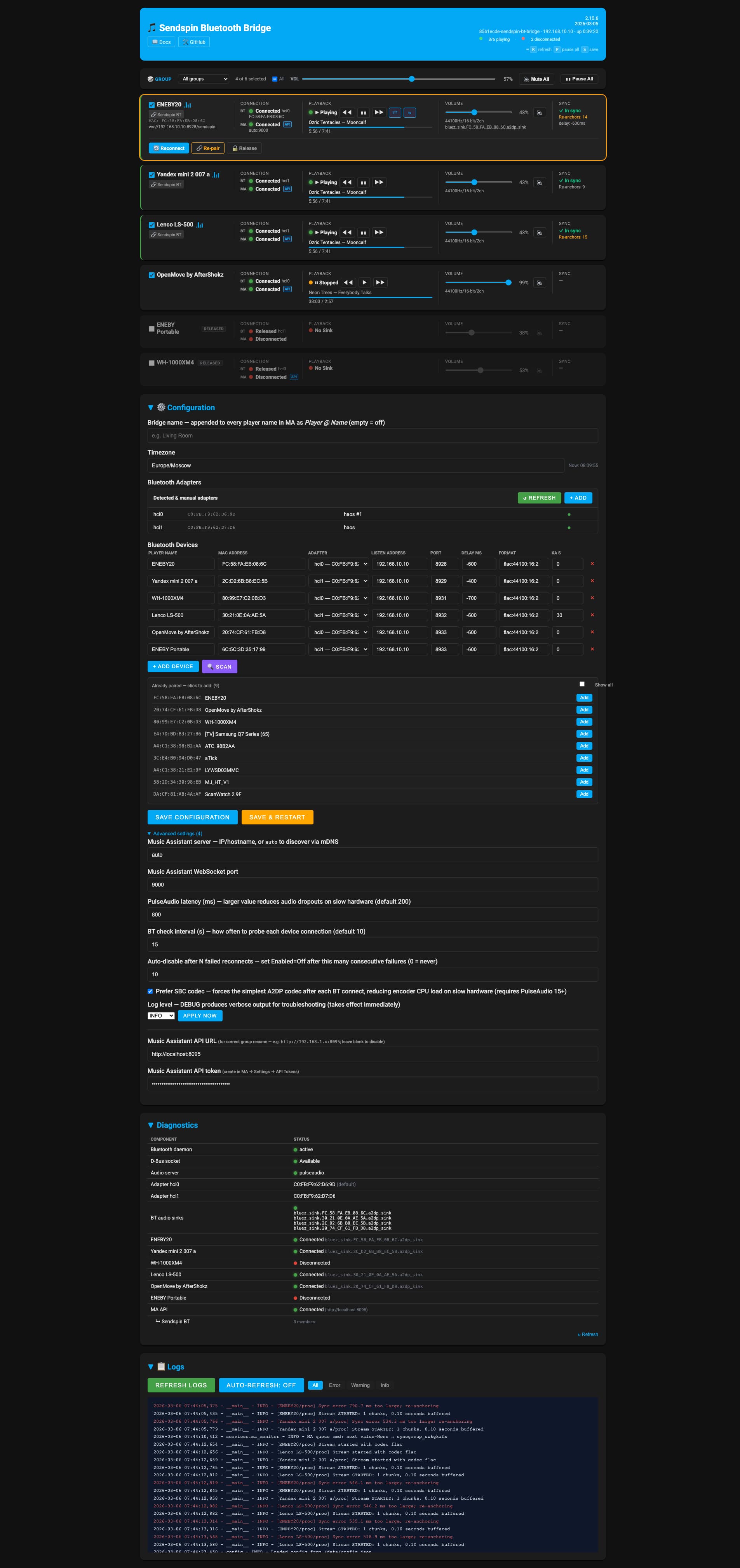
What changed since v2.31.8

Since v2.31.8, Sendspin Bluetooth Bridge has gone through a major stabilization and polish cycle.

On the runtime / ops side, updates for native LXC installs became much safer with archive-based sync, detached upgrade execution, smoke checks, and rollback logic. Config handling, diagnostics,
adapter resolution, duplicate-device protection, and recovery from broken runtime states were all hardened.

On the Music Assistant integration side, album-art delivery was fixed through a safe same-origin proxy, queue metadata and progress handling became more reliable, and the latest releases moved
MA transport/shuffle/repeat synchronization toward a backend-authoritative model with structured command responses, pending-state tracking, reconnect-state retention, and a monitor-first control
path.

On the UI side, the dashboard moved much closer to a real Music Assistant-style experience: cleaner card/list parity, tighter expanded-list playback layout, more truthful control availability,
larger artwork, better queue context, and more polished bulk actions.