The best thing to do is to use the Action tool to run the action. It will produce the response variable below, and there is a button to click that will copy the response in a form that you can use in the Template tool to figure out how to parse and/or modify the data to get what you need.
The structure of the data that is returned is a little weird… the response variable returns a dictionary (range) that contains a list of lists.
As an example, this sheet:
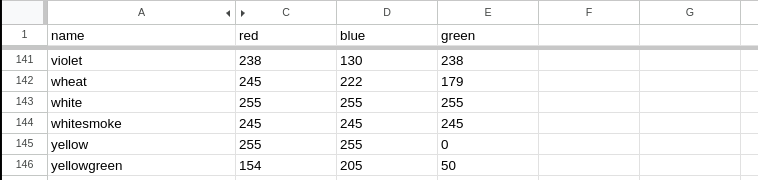
… Using the following action:
action: google_sheets.get_sheet
data:
  config_entry: ***redacted***
  worksheet: Sheet10
  rows: 5
response_variable: sheet_data
Returns the following response in the Action tool:
range:
  - - wheat
    - 245,222,179
    - "245"
    - "222"
    - "179"
  - - white
    - 255,255,255
    - "255"
    - "255"
    - "255"
  - - whitesmoke
    - 245,245,245
    - "245"
    - "245"
    - "245"
  - - yellow
    - 255,255,0
    - "255"
    - "255"
    - "0"
  - - yellowgreen
    - 154,205,50
    - "154"
    - "205"
    - "50"
From that, let’s say I wanted to get the “red” column value for yellowgreen. The template could be any of the following:
{{ sheet_data['range'][4][2] }}

{{ sheet_data['range'][-1][2] }}

{{ (sheet_data['range']|selectattr(0,'search','yellowgreen')|first)[2]}}
Sample Automation:
triggers:
  - trigger: time
    at: "7:00:00"
    variables:
      trigger_color: yellow
  - trigger: time
    at: "9:00:00"
    variables:
      trigger_color: aliceblue
  - trigger: time
    at: "17:00:00"
    variables:
      trigger_color: springgreen
conditions: []
actions:
  - action: google_sheets.get_sheet
    data:
      config_entry: ***redacted***
      worksheet: Sheet10
      rows: 145
    response_variable: sheet_data
  - variables:
      rgb: |
        {{ (sheet_data['range']|selectattr(0,'search', trigger_color) | first)[1].split(',')|map('int')|list}}
  - action: light.turn_on
    data:
      rgb: "{{ rgb }}"
    target:
      entity_id: light.colorful_light

# This example is kind of silly since you could just use the color name
# in the light action data, but it works with the experimental sheet I had... :)