Ah, I had no idea it was that simple! I must have had something out of place then. I just gave up and added them individually to the sensor but Thank you
Or you can write same config without groups:
# Example of configuration.yaml
sensor:
  - platform: temperature_feels_like
    source: sensor.temperature,sensor.humidity
It’s more simple.
can i use this to figure out if i need a thick jacket or just a t-shirt outside?
problem is that at start and end of summer its hard to tell how it would feel
and it matters if you are in the shade or out in the sun, also humidity and wind will have a say
sensor:
  - platform: temperature_feels_like
    name: 'Outside Feels Like Temperature'
    source:
      - sensor.outside_temperature
      - sensor.outside_humidity
i guess i need to add wind speed to the config for it to work
Yes, you can. Why not?..
there are just different opinions so hard to judge
some say you cant and some even say that it does not matter, but yeah for me at least there is a difference, no wind and just a little sun is different than storm like wind and no sun
also it makes a difference if you are in the shade or not
but yeah its for sure a spring project, for now i just need my thick jacket as there is no wun and almost storm like conditions and rain for the most part
Hi! New to this custom component.
Super handful, but I have a strange situation (at least from my understanding). Look at my log:
2022-07-11 16:53:17 DEBUG (MainThread) [custom_components.temperature_feels_like.sensor] Temp: 26.0 °C Hum: 32.5 % Wind: 0.0 m/s

2022-07-11 16:53:17 DEBUG (MainThread) [custom_components.temperature_feels_like.sensor] New sensor state is 25.5 °C
The temperature in the house is 26C and it feels like 25.5 ? Is it normal that it returns a lower value than the actual temperature ? There is no windchill in the house (more important, I didn’t put a wind sensor in the “feels_like” sensor) 
I used to work in a weather TV station (Météomédia, but only as a web developer) and when the value was lower than actual temperature we returned the actual temperature. Likewise with the windchill values.
Maybe it’s a little bit “philosophical”, but I think it can be important. Maybe I’m completely wrong too!
Stealing this. I made it work for the inside of my house with my xiaomi sensors.
Took me a bit to figure out “|float” to make the sensor outputs floats not strings and where to place that.
Also took out windspeedmps cause there shouldn’t be a strong breeze inside my house.
{% set temperature = states('sensor.atc_a447_temperature')|float %}
{% set humidity = states('sensor.atc_a447_humidity')|float %}
{% set wvp = (humidity/100) * 6.105 * e**((17.27*temperature) / (237.7 + temperature))%}
{{(temperature + 0.33 * wvp  - 4.00)|round(2)}}
2 Likes
I am newbie here, I tried the use the feel like temp sensor add-on with one of my indoor sensor, getting the following . Not sure what I am doing wrong? Please advise.
The value is showing as “unknown”
Here is my configuration.yaml entry looks like and test script:
sensor:
- platform: temperature_feels_like
name: ‘Feels Like Temperature’
source:- sensor.multisensor7_living_air_temperature_2
- sensor.multisensor7_living_humidity_2
alias: Test feels_like_temperature
description: “”
trigger:
- device_id: xxxxx
domain: zha
platform: device
type: remote_button_short_press
subtype: remote_button_short_press
condition: []
action: - data_template:
message: “Feels Like: {{ states(‘sensor.feels_like_temperature’) }}”
title: feels_like_temperature add-on test
service: notify.notify
mode: single
sensor:

  - platform: temperature_feels_like
    name: 'Guest FLT'
    source:
      - sensor.wifi_temperature_humidity_sensor_humidity
      - sensor.wifi_temperature_humidity_sensor_temperature
“Temperature Feels Like” uses the temperature sensor for both inputs and gives a false reading
sensor.wifi_temperature_humidity_sensor_humidity
Guest TH Humidity
59.0
state_class: measurement
unit_of_measurement: %
device_class: humidity
friendly_name: Guest TH Humidity
sensor.wifi_temperature_humidity_sensor_temperature
Guest TH Temperature
14.0
state_class: measurement
unit_of_measurement: °C
device_class: temperature
friendly_name: Guest TH Temperature
But I get this
sensor.guest_flt
Guest FLT
10.5
temperature_source: sensor.wifi_temperature_humidity_sensor_temperature
temperature_source_value: 14
humidity_source: sensor.wifi_temperature_humidity_sensor_temperature
humidity_source_value: 14
wind_speed_source: null
wind_speed_source_value: 0
unit_of_measurement: °C
device_class: temperature
friendly_name: Guest FLT
This is on a TUYA temp/humidity sensor
on a Sonoff it works OK
sensor.sonoff_10008d0a28_humidity
Bathroom TH Humidity
59.0	state_class: measurement
unit_of_measurement: %
device_class: humidity
friendly_name: Bathroom TH Humidity

sensor.sonoff_10008d0a28_temperature
Bathroom TH Temperature
17.4	state_class: measurement
unit_of_measurement: °C
device_class: temperature
friendly_name: Bathroom TH Temperature

sensor.bath_flt
Bath FLT
17.2	temperature_source: sensor.sonoff_10008d0a28_temperature
temperature_source_value: 17.4
humidity_source: sensor.sonoff_10008d0a28_humidity
humidity_source_value: 59
wind_speed_source: null
wind_speed_source_value: 0
unit_of_measurement: °C
device_class: temperature
friendly_name: Bath FLT
Fix (for my situation) is to comment out 2 lines like #or entity_id.find(“temperature”) >= 0 at lines 190 & 199
                if (
                    device_class == DEVICE_CLASS_TEMPERATURE
                    or domain in (WEATHER, CLIMATE)
                    or unit_of_measurement in TEMPERATURE_UNITS
                    #or entity_id.find("temperature") >= 0
                ):
                    self._temp = entity_id
                    entities.add(entity_id)

                if (
                    device_class == DEVICE_CLASS_HUMIDITY
                    or domain in (WEATHER, CLIMATE)
                    or unit_of_measurement == PERCENTAGE
                    #or entity_id.find("humidity") >= 0
                ):
                    self._humd = entity_id
                    entities.add(entity_id)
Which gives the correct
sensor.guest_flt
Guest FLT
12.0
temperature_source: sensor.wifi_temperature_humidity_sensor_temperature
temperature_source_value: 13.2
humidity_source: sensor.wifi_temperature_humidity_sensor_humidity
humidity_source_value: 57
wind_speed_source: null
wind_speed_source_value: 0
unit_of_measurement: °C
device_class: temperature
friendly_name: Guest FLT
Hi,
thanks for the sensor. Here the sensor getting wrong wind_speed from pirate weather sensor. First define the weather sensor as source and then special outdoor sensor to overwrite these with the real:
- platform: temperature_feels_like
  name: Außentemperatur gefühlt
  unique_id: temperature_feels_like_hausoputdoor
  source:
    - weather.pirateweather
    - sensor.mmx_hausoutdoor_temp_mean
    - sensor.netatmo_terrasse_humidity
Here you can see pirate weather is showing wind_speed 10.3 km/h and temperature_feels_like showing 2.8611?


10.3 km/h = 2.861(1) m/s
OK thank you, then your sensor converts in m/s and so everything is correct.
Have a look at GitHub - dolezsa/thermal_comfort: Thermal Comfort sensor for HA (absolute humidity, heat index, dew point, thermal perception)
1 Like
Any idea why the following doesn’t work?
I wand to create a virtual sensor that uses the real feel temperature inside and outside my room - in order to open or close the shutters. However I cannot use the Feels like temperature seemingly for other virtual sensors - they show up as not available…
Here is my yaml config:
# HACS Apparent Temperatue Addon
sensor:
  - platform: apparent_temperature
    name: 'Balcony Real Temperature'
    unique_id: BalconyFeelsLike
    source:
      - sensor.balcony_shadow_temperature_2
      - sensor.balcony_shadow_humidity_2

  - platform: apparent_temperature
    name: 'Guestroom Real Temperature'
    unique_id: GuestroomFeelsLike
    source:
      - sensor.h5104_3508_temperature
      - sensor.h5104_3508_humidity

  - platform: apparent_temperature
    name: 'Bedroom Real Temperature'
    unique_id: BedroomFeelsLike
    source:
      - sensor.h5104_5955_temperature
      - sensor.h5104_5955_humidity

  - platform: apparent_temperature
    name: 'Living Room Real Temperature'
    unique_id: LivingRoomFeelsLike
    source:
      - sensor.xiaomi_living_room_temperature
      - sensor.xiaomi_living_room_humidity


# Additional sensors/templates below - Gove Inside - Aqara Outside
template:
  - sensor:
      - name: Temperature Difference Bedroom
        unique_id : temp_diff_bedroom_balcony
        unit_of_measurement: °C
        device_class: temperature
        state_class: measurement
        state: >
          {{ ( states('sensor.bedroom_real_temperature')|float(0) - states('sensor.balcony_real_temperature')|float(0) )|round(2) }}
        availability: >
          {{ has_value('sensor.bedroom_real_temperature') and has_value('sensor.balcony_real_temperature') }}

# Additional sensors/templates below - Gove Inside - Aqara Outside
      - name: Temperature Difference Guestroom
        unique_id : 123456AQARG
        unit_of_measurement: °C
        device_class: temperature
        state_class: measurement
        state: >
          {{ ( states('sensor.guestroom_feels_like_temperature')|float(0) - states('sensor.balcony_feels_like_temperature')|float(0) )|round(2) }}
        availability: >
          {{ has_value('sensor.guestroom_feels_like_temperature') and has_value('sensor.balcony_feels_like_temperature') }}
I tried using both unique ID or name as reference and both don’t work.
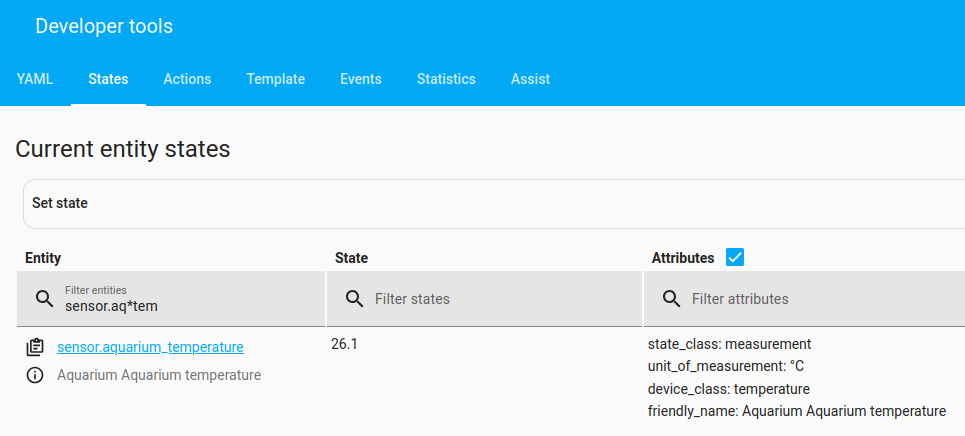
Show us a screenshot of the Developer Tools / States page that shows the feels_like sensors. Like this, but for your entities:
Thanks for your help
I figured it out by now - not sure why but the problem somehow was abut the Unique ID. Using the following it works now:
# HACS Apparent Temperatue Addon
sensor:
  - platform: apparent_temperature
    name: 'Balcony Real Temperature'
    unique_id : balcony_real_temperature
    source:
      - sensor.balcony_shadow_temperature_2
      - sensor.balcony_shadow_humidity_2

  - platform: apparent_temperature
    name: 'Guestroom Real Temperature'
    unique_id : guestroom_real_temperature
    source:
      - sensor.h5104_3508_temperature
      - sensor.h5104_3508_humidity

  - platform: apparent_temperature
    name: 'Bedroom Real Temperature'
    unique_id : bedroom_real_temperature
    source:
      - sensor.h5104_5955_temperature
      - sensor.h5104_5955_humidity

  - platform: apparent_temperature
    name: 'Living Room Real Temperature'
    unique_id : living_room_real_temperature
    source:
      - sensor.xiaomi_living_room_temperature
      - sensor.xiaomi_living_room_humidity


# Additional sensors/templates below - Gove Inside - Aqara Outside
template:
  - sensor:
      - name: Temperature Difference Bedroom
        unique_id : temp_diff_bedroom
        unit_of_measurement: °C
        device_class: temperature
        state_class: measurement
        state: >
          {{ ( states('sensor.bedroom_real_temperature')|float(0) - states('sensor.balcony_real_temperature')|float(0) )|round(2) }}
        availability: >
          {{ has_value('sensor.bedroom_real_temperature') and has_value('sensor.balcony_real_temperature') }}

# Additional sensors/templates below - Gove Inside - Aqara Outside
      - name: Temperature Difference Guestroom
        unique_id : temp_diff_guestroom
        unit_of_measurement: °C
        device_class: temperature
        state_class: measurement
        state: >
          {{ ( states('sensor.guestroom_real_temperature')|float(0) - states('sensor.balcony_real_temperature')|float(0) )|round(2) }}
        availability: >
          {{ has_value('sensor.guestroom_real_temperature') and has_value('sensor.balcony_real_temperature') }}
1 Like
unique_id should be lowercase and underscore only, like entity_id’s.
2 Likes
I just right click in studio code and generate uid.