tolomeo
January 7, 2024, 7:29am
1
Hi! Some of my temp sensors are not showing anymore in my statistics diagram card? Probably related to a recent update?
If I click the sensor directly, it shows current values and complete history. So I think there is nothing wrong with the sensor. The problem seems to be in the statistics diagram card?
tom_l
January 7, 2024, 7:32am
2
Working here.
Do those sensors have the attribute, state_class: measurement?
If not then LTS will not be collected for them.
tolomeo
January 7, 2024, 7:59am
3
Hi! Actually the two sensors that are causing problems are “Shelly H&T” sensors. My other temp sensors are ESPhome and they work fine.
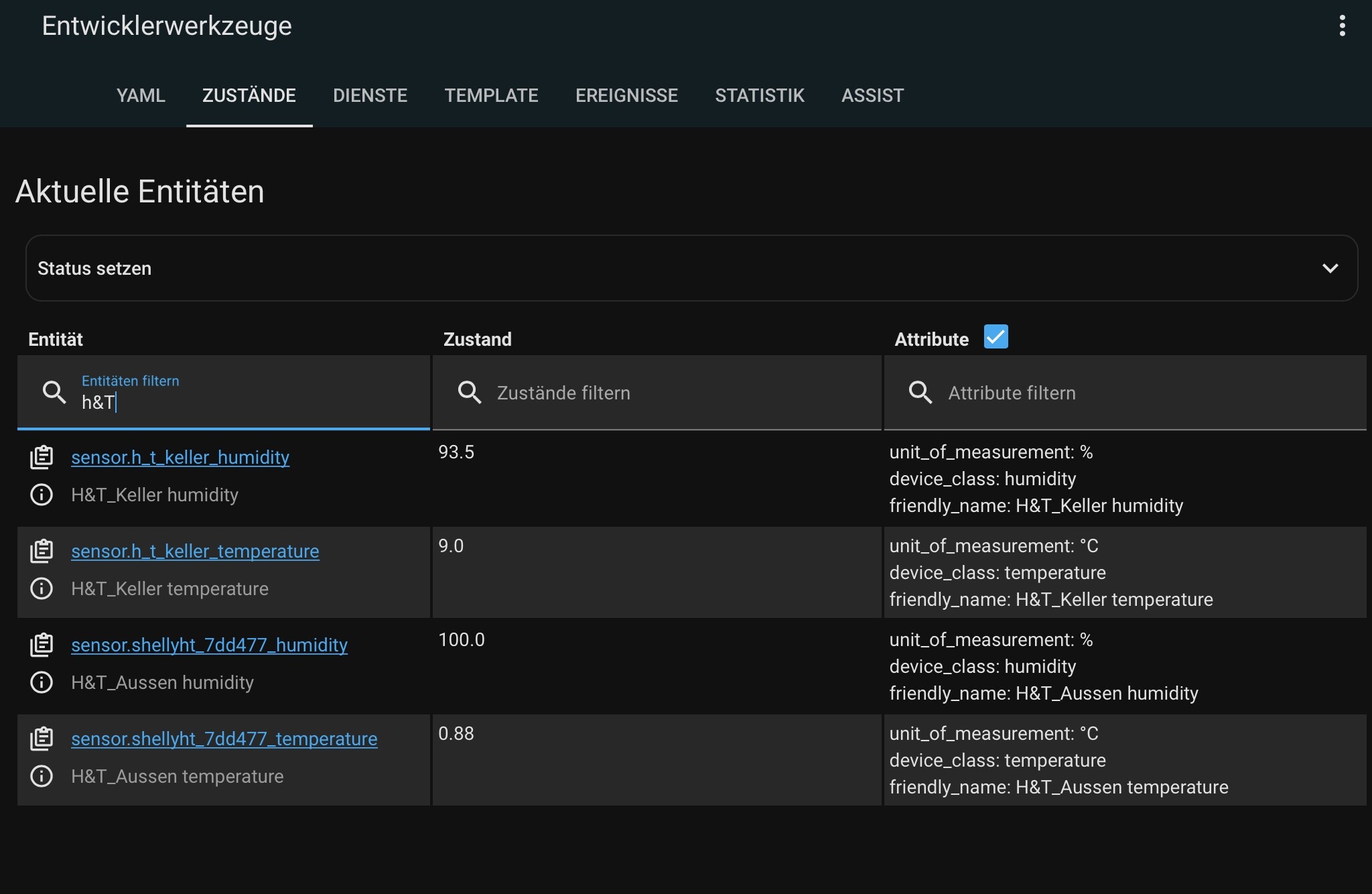
Where can i see the state class?
tom_l
January 7, 2024, 9:37am
4
Right hand column of Developer Tools → States.
Or at the bottom of the sensor more info pop up.
tolomeo
January 7, 2024, 10:30am
5
Thanks! It looks like this here (these 2 sensors dont show up in the diagrams):
tom_l
January 7, 2024, 11:06am
6
That is because none of them have state_class: measurement.
Which integration is supplying these sensors?
tolomeo
January 7, 2024, 12:24pm
7
Thanks!
Both have been added through the Shelly integration. It used to work until recently.
Can i manually add this state class?
tom_l
January 7, 2024, 12:44pm
8
You can but it would be better if the integration was updated to support this.
There was an issue open about it but it was let go stale and was closed:
opened 05:37PM - 21 Aug 23 UTC
closed 02:05PM - 01 Jan 24 UTC
integration: shelly
stale
### The problem
Shelly H&T and Flood sensors both have entities where the state… _class does not seem to be defined.
<img width="782" alt="image" src="https://github.com/home-assistant/core/assets/44064559/32227917-b217-4e49-ad76-20cc89803e26">
### What version of Home Assistant Core has the issue?
v2023.8.3
### What was the last working version of Home Assistant Core?
_No response_
### What type of installation are you running?
Home Assistant OS
### Integration causing the issue
Shelly
### Link to integration documentation on our website
https://www.home-assistant.io/integrations/shelly/
### Diagnostics information
[config_entry-shelly-f464401981e4379df6e61cd7ddefc896.json.txt](https://github.com/home-assistant/core/files/12399188/config_entry-shelly-f464401981e4379df6e61cd7ddefc896.json.txt)
### Example YAML snippet
_No response_
### Anything in the logs that might be useful for us?
_No response_
### Additional information
_No response_
Until this is fixed you can add state_class: measurement to the sensors using customize:
e.g. configuration.yaml
homeassistant:
  name: Home
  unit_system: metric
  # etc

  customize:
    sensor.h_t_keller_humidity:
      state_class: measurement
    sensor.h_t_keller_temperature:
      state_class: measurement
tolomeo
January 7, 2024, 1:02pm
9
Fantastic help here, many thanks @tom_l
Problem is fixed