I loaded a new version of Fedora, which has a new version of Firefox, and I had to delete cookies. Now the left hand menu on HA is abbreviated. The top half seems like before but the bottom only has notifications and my user. I have lost settings and everything else that was there. I know that this isn’t a HA issue, but can someone offer a suggestion how to restore the menu? The menu on my phone has not changed. And yes, I did try the FF back button to a ‘settings’ page but that doesn’t display correctly either. I can’t get to automations, devices & services or anything. Please help! TIA
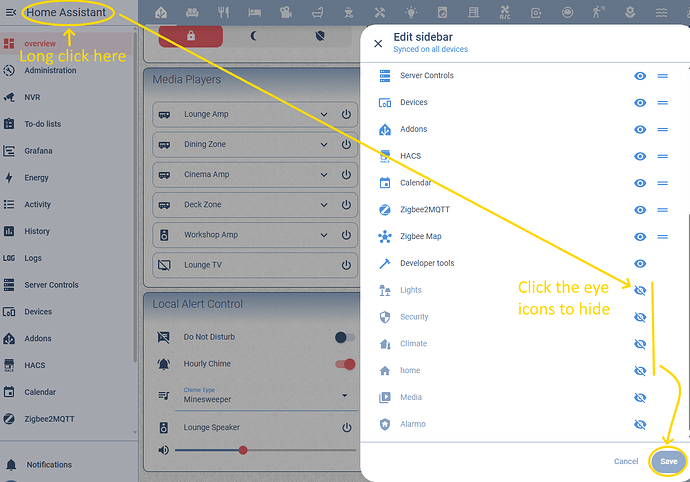
What happens if you long click the left hand menu title?
Do you mean on the sidebar toggle? I didn’t hover the cursor over it earlier so didn’t know the name. If I long click then it displays the options (overview - first desktop, my desktop, energy, logbook, history, media and to-do lists ‘bouncing’ with deletion X’s.
This seems like a linux/Red Hat/gnu issue because the FF back menu has become very difficult to work with. Also, as I mentioned, the menu on my phone still works as before and I haven’t updated HA. Maybe I should post a question on the Fedora forum.
Perhaps not, but that didn’t cause this problem. I just started Chrome and HA displays properly. I will post on Fedora.
Please update to the latest version.