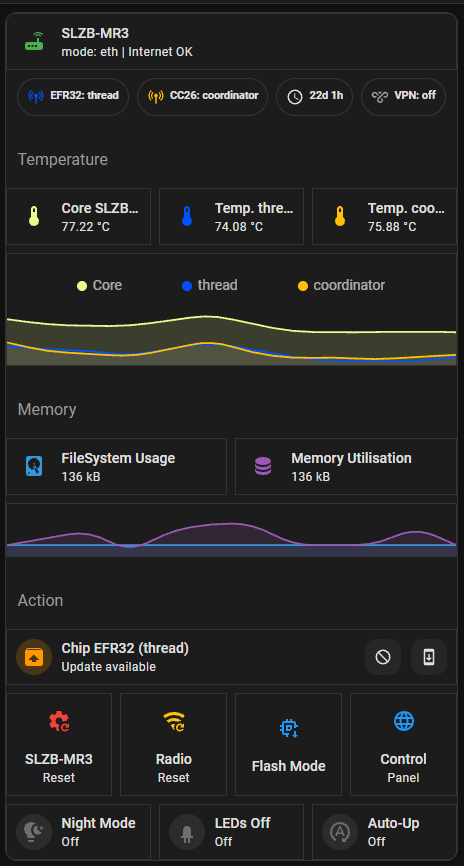
Hello everyone!
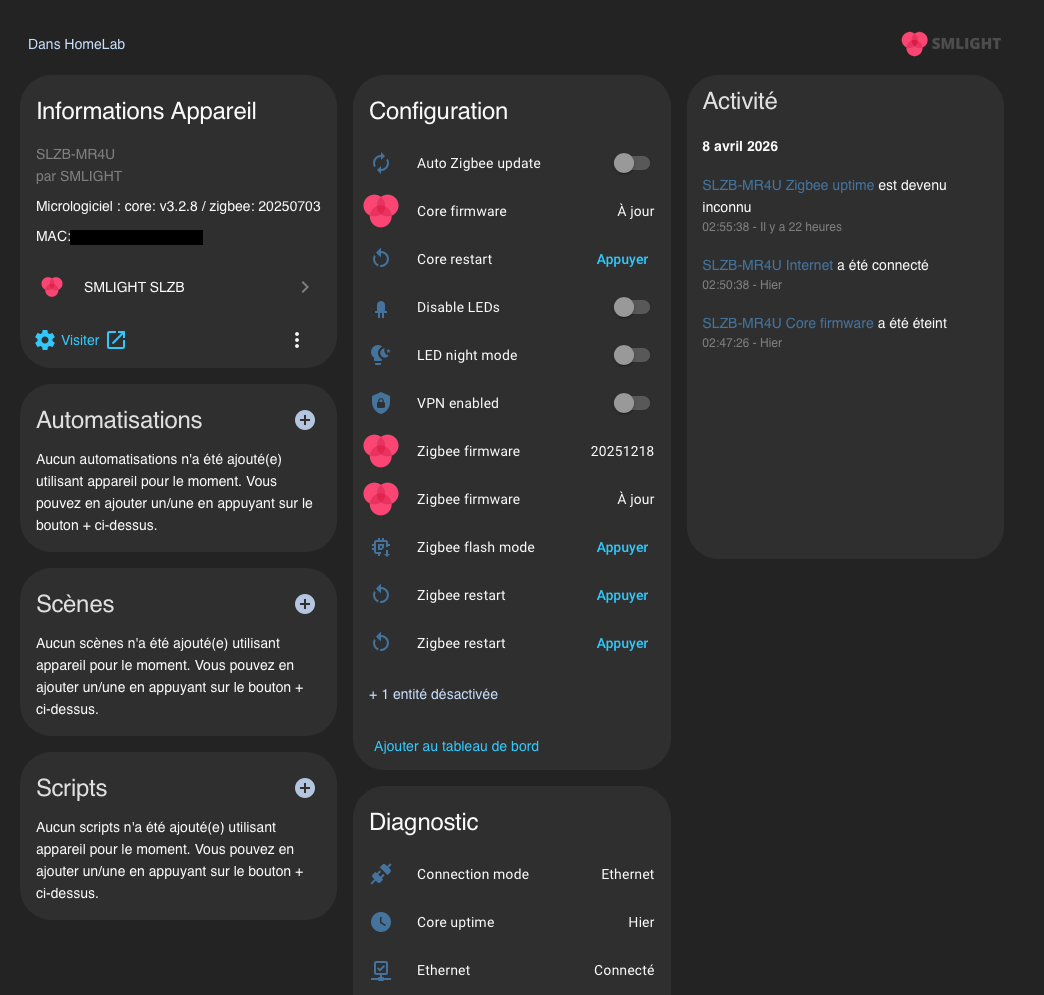
I recently upgraded my Zigbee coordinator from a Conbee II to a dual-protocol system using an SMLIGHT SLZB (-MR4U for me).
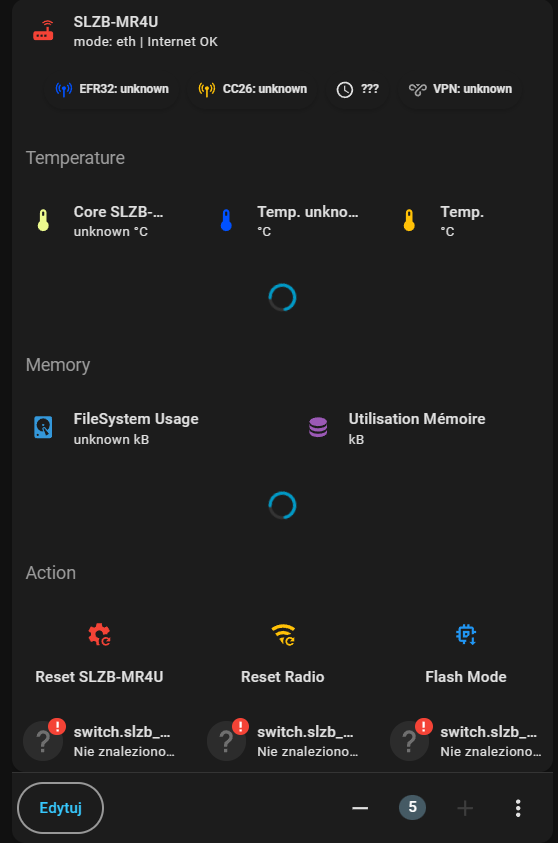
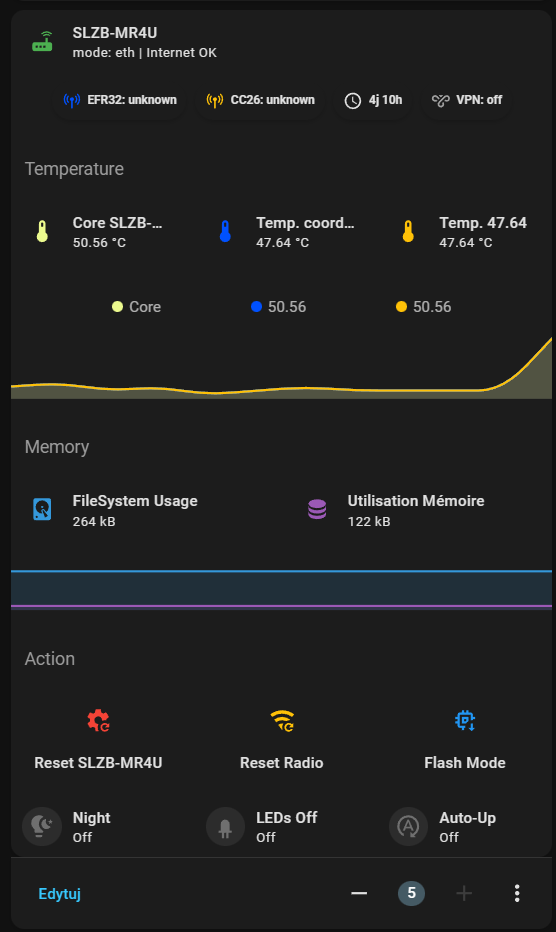
I needed a dedicated card to clearly visualize and monitor all entities related to this device in my Homelab dashboard. Since I couldn’t find a comprehensive solution on the forums, I decided to build my own:
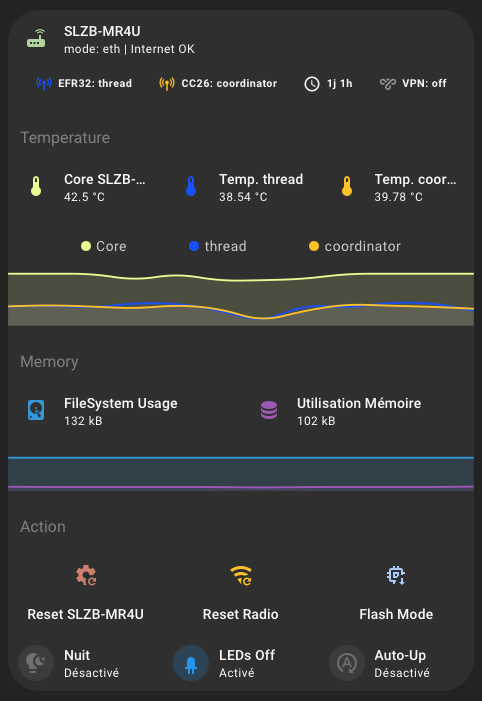
I designed it to be as dynamic as possible. Here is a breakdown of the features:
1. Header & Connectivity Status
- Identity: Displays the specific model name.
- Connection Mode: Dynamically shows if the device is communicating via Ethernet or Wi-Fi.
- Internet Status: A binary check displays “Internet OK” or “Local”.
- Visual Indicator: The router icon turns Green when the network is up, and Red otherwise.
2. Quick Status Bar (Chips)
- Chip Modes: Real-time display of active protocols on Chip 1 (EFR32) and Chip 2 (CC2652) (e.g., Coordinator, Thread, Router).
- Uptime: Calculates how many days and hours the system has been running since the last reboot.
- VPN Status: Shows if the secure tunnel is active with color coding (Blue/Grey).
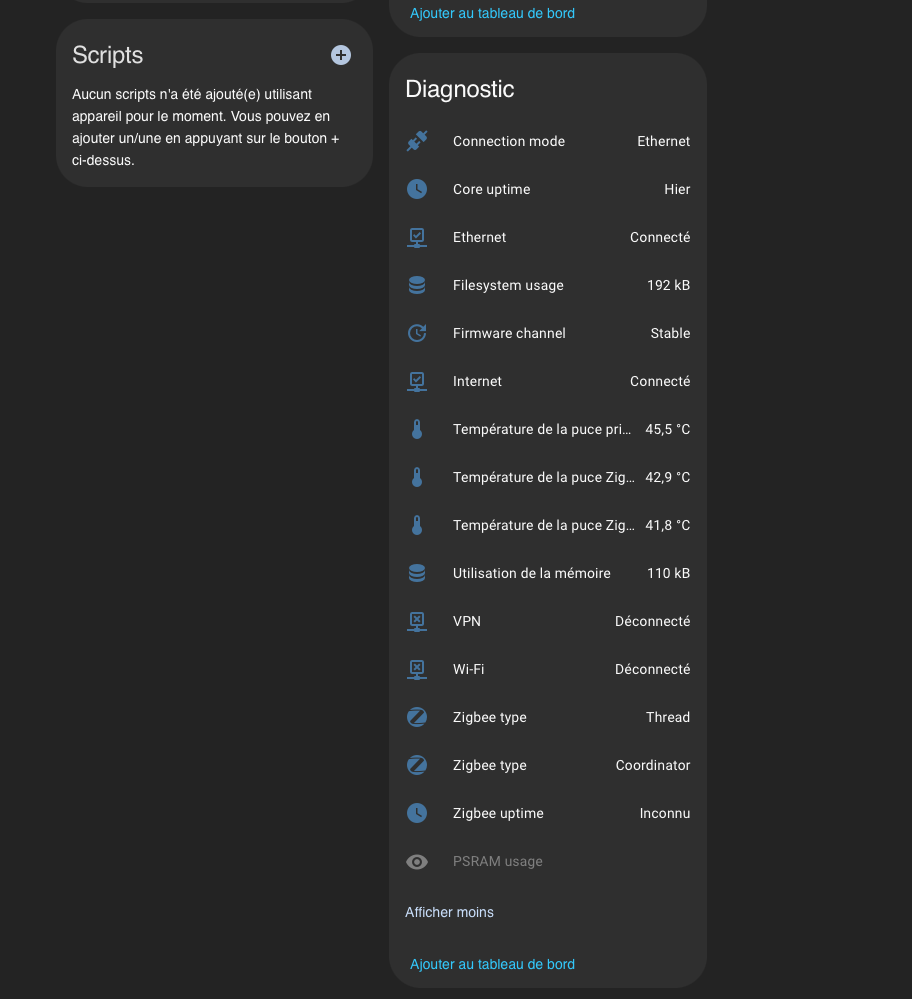
3. Thermal Monitoring (Triple Core)
- Time Visualization: A
mini-graph-carddisplays the 24-hour history for all three components. - Detailed Chips: Three individual cards show precise temperatures for the ESP32 (Core), Zigbee/Thread Chip 1, and Zigbee/Thread Chip 2. Card names change dynamically based on the current protocol in use.
4. Memory & Storage Management
- FileSystem Usage: Monitors flash memory occupancy (system files).
- Memory Usage: Displays RAM usage in kilobytes (kB).
- Load Graph: Helps visually detect potential memory leaks or saturated storage.
5. Maintenance Center & Actions
- Smart Updates: Three conditional blocks appear only when a new firmware is available for the Core or radio chips, offering a direct “Install” button. (Note: Behavior to be confirmed with the next firmware release).
- Hardware Controls:
- Reset SLZB-MR4U: Full device reboot (Hard Reset).
- Reset Radio: Software restart of communication chips without dropping the network connection.
- Flash Mode: Toggles chips into programming mode (requires confirmation).
- Comfort Settings: LED Night Mode management, total LED toggle, and Zigbee firmware auto-update toggle.
This card can be easily adapted whether you have a single-chip or a multi-protocol model.
Required Frontend Integrations (HACS):
To make this card work, you will need the following custom cards installed:
stack-in-card: To group everything into a single seamless block.mushroom-cards: For the overall aesthetic (Template, Chips, Update cards).mini-graph-card: For the temperature and memory history graphs.config-template-card: Crucial. This allows the use of JavaScript (${...}) to render dynamic chip names within the graphs.card-mod(Optional but recommended): For fine-tuning margins or colors.
The YAML Code:
type: custom:config-template-card
entities:
  - sensor.slzb_mr4u_zigbee_type
  - sensor.slzb_mr4u_zigbee_type_2
card:
  type: custom:stack-in-card
  cards:
    - type: custom:mushroom-template-card
      primary: SLZB-MR4U
      secondary: >
        mode: {{ states('sensor.slzb_mr4u_connection_mode') }} |  {{ 'Internet
        OK' if is_state('binary_sensor.slzb_mr4u_internet', 'on') else 'Local'
        }}
      icon: mdi:router-wireless
      icon_color: >
        {{ 'green' if is_state('binary_sensor.slzb_mr4u_ethernet', 'on') or
        is_state('binary_sensor.slzb_mr4u_wi_fi', 'on') else 'red' }}
      fill_container: true
    - type: custom:mushroom-chips-card
      chips:
        - type: template
          icon: mdi:antenna
          content: "EFR32: {{ states('sensor.slzb_mr4u_zigbee_type') }}"
          icon_color: "#0051FF"
        - type: template
          icon: mdi:antenna
          content: "CC26: {{ states('sensor.slzb_mr4u_zigbee_type_2') }}"
          icon_color: amber
        - type: template
          icon: mdi:clock-outline
          content: >
            {% set uptime = states('sensor.slzb_mr4u_core_uptime') %}  {% if
            uptime not in ['unknown', 'unavailable', 'none'] %}
              {% set delta = now() - as_datetime(uptime) %}
              {{ delta.days }}j {{ (delta.seconds // 3600) }}h
            {% else %} ??? {% endif %}
        - type: template
          icon: mdi:vpn
          content: "VPN: {{states('binary_sensor.slzb_mr4u_vpn')}}"
          icon_color: >-
            {{ 'blue' if is_state('binary_sensor.slzb_mr4u_vpn', 'on') else
            'grey' }}
      alignment: center
    - type: custom:mushroom-title-card
      subtitle: Temperature
    - type: horizontal-stack
      cards:
        - type: custom:mushroom-template-card
          entity: sensor.slzb_mr4u_temperature_de_la_puce_principale
          primary: Core SLZB-MR4U
          secondary: "{{ states(entity) }} °C"
          icon: mdi:thermometer
          icon_color: "#ECFA8E"
          tap_action:
            action: more-info
        - type: custom:mushroom-template-card
          entity: sensor.slzb_mr4u_temperature_de_la_puce_zigbee
          primary: Temp. {{ states('sensor.slzb_mr4u_zigbee_type') }}
          secondary: "{{ states(entity) }} °C"
          icon: mdi:thermometer
          icon_color: "#0051FF"
          tap_action:
            action: more-info
        - type: custom:mushroom-template-card
          entity: sensor.slzb_mr4u_temperature_de_la_puce_zigbee_2
          primary: Temp. {{ states('sensor.slzb_mr4u_zigbee_type_2') }}
          secondary: "{{ states(entity) }} °C"
          icon: mdi:thermometer
          icon_color: "#FFC107"
          tap_action:
            action: more-info
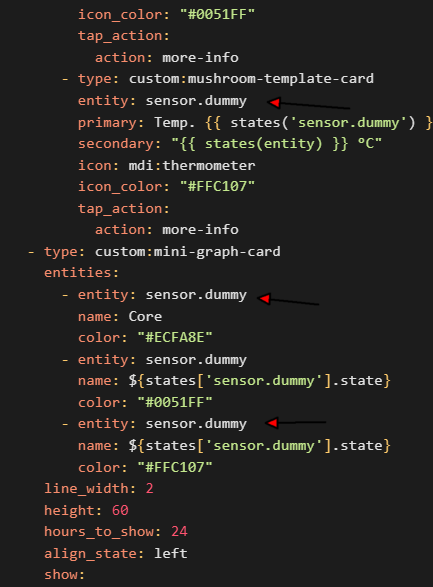
    - type: custom:mini-graph-card
      entities:
        - entity: sensor.slzb_mr4u_temperature_de_la_puce_principale
          name: Core
          color: "#ECFA8E"
        - entity: sensor.slzb_mr4u_temperature_de_la_puce_zigbee
          name: ${states['sensor.slzb_mr4u_zigbee_type'].state}
          color: "#0051FF"
        - entity: sensor.slzb_mr4u_temperature_de_la_puce_zigbee_2
          name: ${states['sensor.slzb_mr4u_zigbee_type_2'].state}
          color: "#FFC107"
      line_width: 2
      height: 60
      hours_to_show: 24
      align_state: left
      show:
        icon: false
        legend: true
        state: false
        name: false
    - type: custom:mushroom-title-card
      subtitle: Memory
    - type: horizontal-stack
      cards:
        - type: custom:mushroom-template-card
          entity: sensor.slzb_mr4u_filesystem_usage
          primary: FileSystem Usage
          secondary: "{{ states('sensor.slzb_mr4u_filesystem_usage') }} kB"
          icon: mdi:harddisk
          icon_color: "#3498db"
          tap_action:
            action: more-info
        - type: custom:mushroom-template-card
          entity: sensor.slzb_mr4u_utilisation_de_la_memoire
          primary: Utilisation Mémoire
          secondary: "{{ states('sensor.slzb_mr4u_utilisation_de_la_memoire') }} kB"
          icon: mdi:database
          icon_color: "#9b59b6"
          tap_action:
            action: more-info
    - type: custom:mini-graph-card
      entities:
        - entity: sensor.slzb_mr4u_filesystem_usage
          name: FileSystem Usage
          color: "#3498db"
        - entity: sensor.slzb_mr4u_utilisation_de_la_memoire
          name: Utilisation Mémoire
          color: "#9b59b6"
      line_width: 2
      height: 40
      hours_to_show: 24
      align_state: left
      show:
        icon: false
        legend: false
        state: false
        name: false
    - type: custom:mushroom-title-card
      subtitle: Action
    - type: conditional
      conditions:
        - entity: update.slzb_mr4u_core_firmware
          state: "on"
      card:
        type: custom:mushroom-update-card
        entity: update.slzb_mr4u_core_firmware
        name: MAJ Core
        show_buttons_control: true
    - type: conditional
      conditions:
        - entity: update.slzb_mr4u_zigbee_firmware
          state: "on"
      card:
        type: custom:mushroom-update-card
        entity: update.slzb_mr4u_zigbee_firmware
        name: MAJ {states['sensor.slzb_mr4u_zigbee_type'].state}
        show_buttons_control: true
    - type: conditional
      conditions:
        - entity: update.slzb_mr4u_zigbee_firmware_2
          state: "on"
      card:
        type: custom:mushroom-update-card
        entity: update.slzb_mr4u_zigbee_firmware_2
        name: MAJ {states['sensor.slzb_mr4u_zigbee_type_2'].state}
        show_buttons_control: true
    - type: horizontal-stack
      cards:
        - type: custom:mushroom-template-card
          primary: Reset SLZB-MR4U
          icon: mdi:cog-refresh
          icon_color: red
          layout: vertical
          tap_action:
            action: call-service
            service: button.press
            target:
              entity_id: button.slzb_mr4u_core_restart
        - type: custom:mushroom-template-card
          primary: Reset Radio
          icon: mdi:wifi-refresh
          icon_color: amber
          layout: vertical
          tap_action:
            action: call-service
            service: button.press
            target:
              entity_id: button.slzb_mr4u_zigbee_restart
        - type: custom:mushroom-template-card
          primary: Flash Mode
          icon: mdi:memory-arrow-down
          icon_color: blue
          layout: vertical
          tap_action:
            action: call-service
            service: button.press
            target:
              entity_id: button.slzb_mr4u_zigbee_flash_mode
    - type: horizontal-stack
      cards:
        - type: custom:mushroom-entity-card
          entity: switch.slzb_mr4u_led_night_mode
          name: Nuit
        - type: custom:mushroom-entity-card
          entity: switch.slzb_mr4u_disable_leds
          name: LEDs Off
        - type: custom:mushroom-entity-card
          entity: switch.slzb_mr4u_auto_zigbee_update
          name: Auto-Up
          icon: mdi:refresh-auto
This is my very first post!
I am open to suggestions and eager to improve, so please don’t hesitate to share your feedback, ideas for further enhancements, or even your own versions of this card.
I look forward to seeing how you use it!
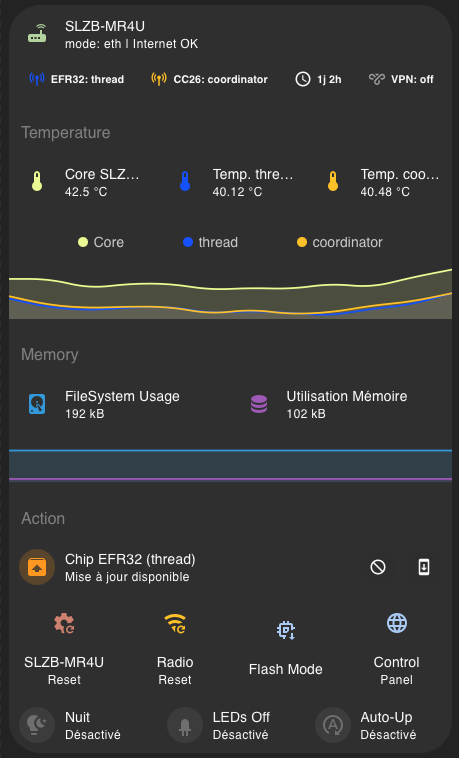
 , French
  , and Italian
  .
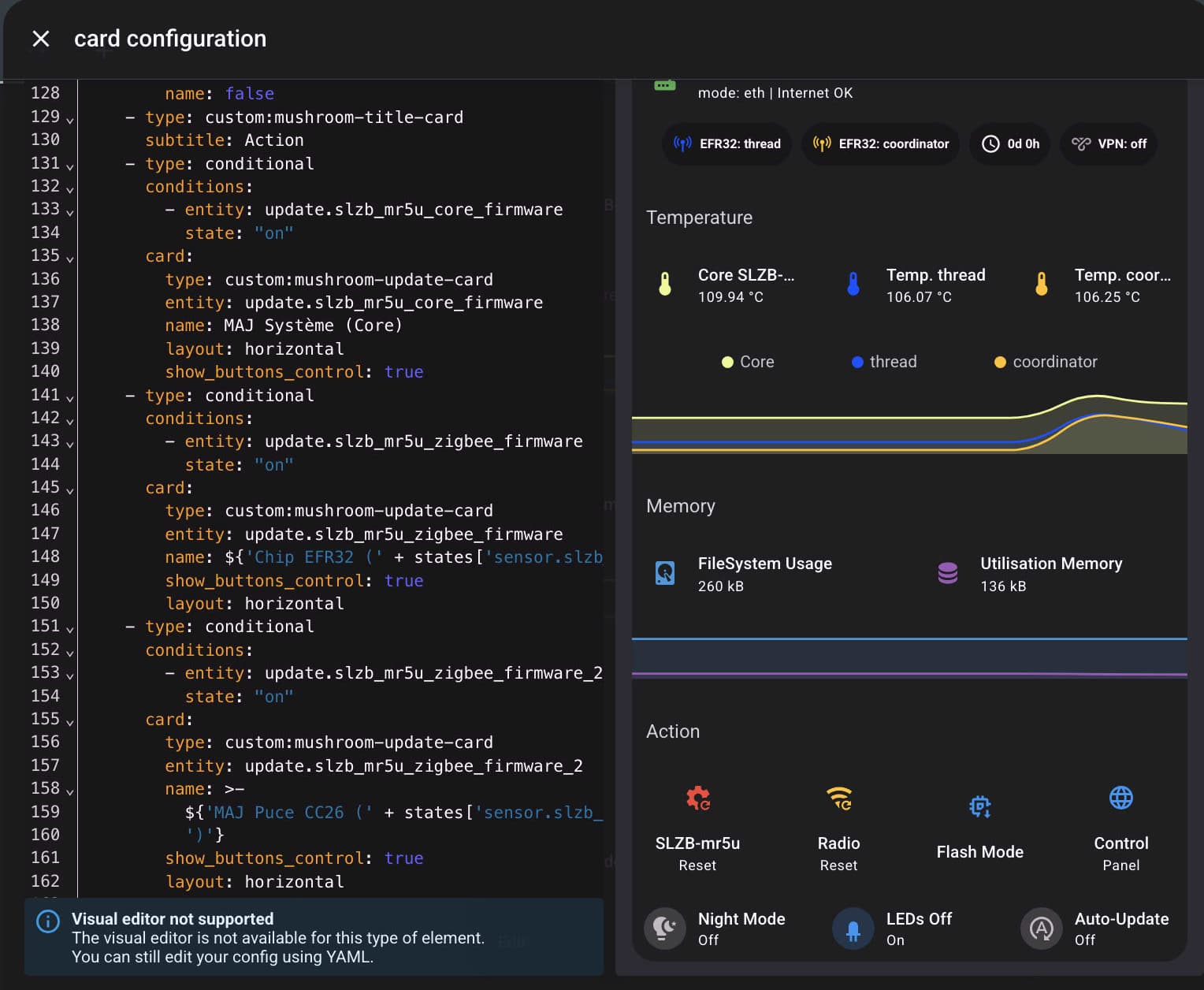
.

 Thanks a lot for making this available!