Shelly Camera + Home Assistant — this is how a camera integration should feel
Hi everyone,
dr_House here. 
I’ve been testing the Shelly Camera integration with Home Assistant, and I wanted to share some impressions because the experience turned out to be much better than I initially expected.
There are plenty of cameras that can technically be connected to Home Assistant.
But there is a big difference between:
“I managed to get the video stream into Home Assistant”
and
“Home Assistant actually understands the device.”
With the Shelly Camera, it feels much closer to the second case.
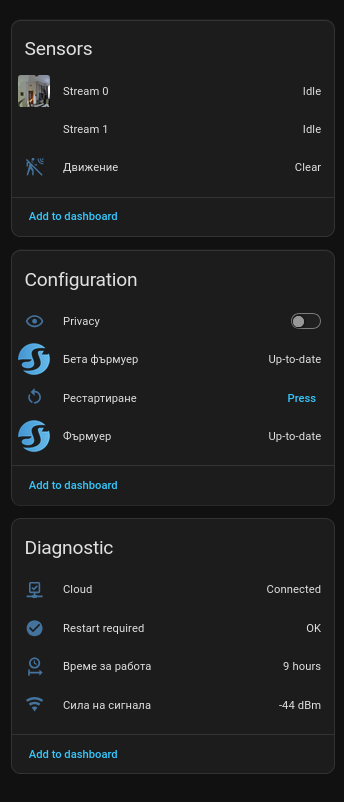
The camera appears as a proper Home Assistant device, with its important functions exposed as entities and controls instead of simply giving you an RTSP stream and leaving everything else outside HA.
In my current setup I get:
- Stream 0
- Stream 1
- Motion detection
- Privacy control
- Device restart
- Firmware status
- Device information and diagnostics
- Activity/history directly inside Home Assistant
And all of that is grouped cleanly under a single device.
That may sound like a small detail, but once you start building larger Home Assistant systems, clean device integration becomes extremely important.
Two camera streams
One of the first things I liked was seeing both Stream 0 and Stream 1 exposed directly in Home Assistant.
Having two streams gives you much more flexibility.
For example, the lower-bandwidth stream can potentially be used for dashboards, detection or continuous monitoring, while the higher-quality stream can be used when you actually want to inspect the camera.
This becomes especially interesting when you start combining cameras with things like:
Home Assistant dashboards, wall tablets, Frigate, NVR recording, AI detection and remote access.
Instead of treating the camera as one fixed video source, you can choose the appropriate stream depending on the task.
Motion detection is already part of Home Assistant
The camera’s motion detection is also directly available in Home Assistant.
And this is where things start becoming much more interesting.
Once motion becomes an HA entity, it can participate in the rest of the smart-home system.
For example:
Motion detected outside
→ turn on exterior lighting
→ start recording
→ send a notification
→ trigger another camera
→ check whether somebody is home
→ run an AI detection workflow
At that point, the camera stops being just a camera.
It becomes another sensor inside the automation system.
And for me, that is one of the biggest advantages of integrating security devices properly into Home Assistant.
Privacy mode is probably my favourite feature
The feature that surprised me the most is Privacy control.
It is exposed directly inside Home Assistant, which already makes it very useful for automations.
But there is another part that I find particularly interesting.
From what I can tell from using the camera, there seems to be a physical switching mechanism inside the device when Privacy mode is activated.
It sounds and behaves very much like a relay or another hardware-level disconnect.
I want to be careful here because I have not opened the camera and I have not seen an official hardware schematic confirming exactly how Shelly implemented this.
But if the camera is indeed physically disconnecting part of the camera hardware when Privacy mode is enabled, I think that is an excellent approach.
Because there is a fundamental difference between:
“Software stopped transmitting the video.”
and
“The camera hardware itself has been physically disconnected.”
For an indoor camera, I personally trust the second approach much more.
Software privacy is useful.
Hardware privacy is much more convincing.
And being able to control that directly from Home Assistant makes it even better.
For example:
Someone arrives home → Privacy ON
Nobody home → Privacy OFF
Alarm armed → Cameras active
Alarm disarmed → Indoor cameras enter Privacy mode
This allows the privacy state of the camera to become part of the actual behaviour of the home instead of something you manually enable from another application.
For me, this combination of Home Assistant automation + a potentially hardware-level privacy mechanism is one of the most interesting things about the camera.
I would actually love to see Shelly publish more technical information about exactly what happens internally when Privacy mode is activated.
This is what a native integration should feel like
Another thing I appreciate is that I don’t need to create a collection of template sensors, REST commands and workarounds just to make basic features accessible.
Home Assistant already sees the major parts of the device.
The integration feels clean.
And this matters.
When you have five devices, almost anything works.
When you have fifty, one hundred or several hundred devices, consistency becomes extremely important.
A camera should behave like a Home Assistant device.
A relay should behave like a Home Assistant device.
A thermostat should behave like a Home Assistant device.
You shouldn’t need a completely different control philosophy for every manufacturer.
The Shelly integration is getting very close to that experience.
Keep Home Assistant updated
There is one thing I would strongly recommend before testing newer Shelly devices:
Make sure you’re running the latest stable version of Home Assistant.
Home Assistant evolves extremely quickly, and integrations receive new device support, new entities, fixes and functionality continuously.
This is especially relevant with newly released hardware and newer firmware.
If your Shelly device works correctly in the Shelly app but some functionality appears to be missing in Home Assistant, one of the first things I would check is:
Settings → System → Updates
Update Home Assistant and then reload the Shelly integration or restart Home Assistant if necessary.
I would also keep the Shelly firmware updated.
Running a recent Shelly firmware together with a recent Home Assistant version gives you the best chance of getting all currently supported features.
In my case, I’m testing the camera with an up-to-date Home Assistant installation and recent camera firmware.
Local integration is where things become really powerful
For me, the most important part of the Shelly ecosystem has never been simply controlling a device from a phone.
It is the ability to combine devices with other systems.
A camera becomes much more useful when it can interact with:
Home Assistant.
Frigate.
Lighting.
Presence detection.
Alarm systems.
Door sensors.
Access control.
Notifications.
AI detection.
Energy management.
And other automation logic.
For example, I’m currently experimenting with using the camera as part of a larger Home Assistant + Frigate security system.
That’s where having the streams and motion information directly available starts making a lot of sense.
Instead of having several separate ecosystems and several applications, the devices become components of one larger automation system.
My impression so far
After testing quite a few devices and Home Assistant integrations, I think the Shelly Camera integration is a very good example of what a modern smart-home integration should look like.
It isn’t just:
“Here is your video stream.”
Home Assistant actually exposes meaningful parts of the device.
There is obviously still room for additional functionality, especially around advanced camera configuration, video controls and AI/security workflows.
But the foundation is already very good.
The combination of:
dual streams + motion detection + Home Assistant entities + privacy control + local smart-home automation
makes the camera much more interesting than I expected.
I’ll continue experimenting with it together with Home Assistant and Frigate, especially around object detection, face recognition, recording and security automations.
If anyone else is already testing the Shelly Camera with Home Assistant, I’d be interested to hear what you’re doing with it.
Especially if you’ve investigated exactly how the Privacy mode works internally.
— dr_House