I have Shelly Plus 2PM devices to control my covers.
For all covers I have pre-defined positions and, both the device web UI and the Shelly app provide a UI to set the cover to those pre-defined positions.
How can I do that in Home Assistant?
I have Shelly Plus 2PM devices to control my covers.
For all covers I have pre-defined positions and, both the device web UI and the Shelly app provide a UI to set the cover to those pre-defined positions.
How can I do that in Home Assistant?
You have a fairly robust API and scripting in the Shelly itself that might help you in this, this same API can be called from Home Assistant to add new features for you - perhaps you can use these methods with a cover template and do that.
My guess is that since it’s a 2PM that there is a script already or it’s just a simple timer of (on for X seconds = position Y), something you could replicate in the cover template too (I do this for my 1PM’s that control a cover).
I’m familiar with the scripting capabilities of Shelly devices. I’ve done some enhancements to my cover controllers.
But what I’m asking has nothing to do with that and does not require any timers either.
This is the UI on the device itself:
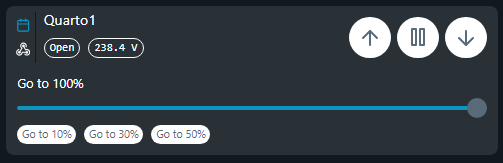
That’s what I’m looking for.
I know how to get and set those values from the devices, but I don’t mind setting them on HA too.
Hej,
you can do this using the api of the Shelly’s.
rest_command:
  rollo_wz_100:
    url: "http://192.168.33.1/rpc/Cover.GoToPosition?id=0&pos=100"
    method: get
  rollo_wz_50:
    url: "http://192.168.33.1/rpc/Cover.GoToPosition?id=0&pos=50"
    method: get
  rollo_wz_20:
    url: "http://192.168.33.1/rpc/Cover.GoToPosition?id=0&pos=20"
    method: get
type: button
tap_action:
  action: perform-action
  perform_action: rest_command.rollo_ku_50
  target: {}
name: 50%
show_icon: false
type: vertical-stack
cards:
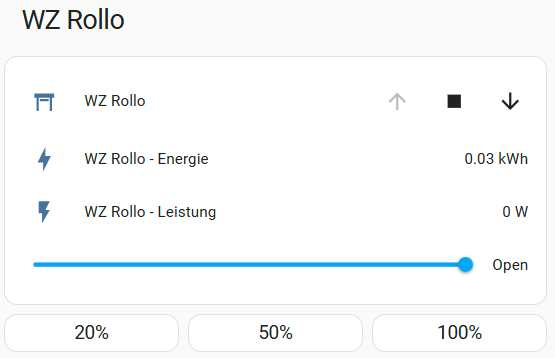
  - type: entities
    entities:
      - entity: cover.wz_rollo_shelly
        name: WZ Rollo
      - type: custom:slider-entity-row
        entity: cover.wz_rollo_shelly
        icon: mdi:blinds
        full_row: true
  - type: horizontal-stack
    cards:
      - type: button
        tap_action:
          action: perform-action
          perform_action: rest_command.rollo_wz_20
          target: {}
        name: 20%
        show_icon: false
      - type: button
        tap_action:
          action: perform-action
          perform_action: rest_command.rollo_wz_50
          target: {}
        name: 50%
        show_icon: false
      - type: button
        tap_action:
          action: perform-action
          perform_action: rest_command.rollo_wz_100
          target: {}
        name: 100%
        show_icon: false
title: WZ Rollo
Hope this helps …
Dirk
The Shelly cover entity has a cover.set_cover_position service.
I was looking for something built in the cover entity to use wherever one can pop up the cover slider.
type: grid
cards:
  - type: heading
    heading: Porta Varanda
  - features:
      - type: cover-open-close
      - type: cover-position
    type: tile
    entity: cover.es_2_escritorio
    layout_options:
      grid_columns: 3
      grid_rows: 3
    name: Estore
  - show_name: true
    show_icon: false
    type: button
    tap_action:
      action: call-service
      service: cover.set_cover_position
      target:
        entity_id: cover.es_2_escritorio
      data:
        position: 45
    layout_options:
      grid_columns: 1
      grid_rows: 1
    name: 45%
    entity: cover.es_2_escritorio
  - show_name: true
    show_icon: false
    type: button
    layout_options:
      grid_columns: 1
      grid_rows: 1
    name: 65%
    tap_action:
      action: call-service
      service: cover.set_cover_position
      target:
        entity_id: cover.es_2_escritorio
      data:
        position: 65
    entity: cover.es_2_escritorio
  - show_name: true
    show_icon: false
    type: button
    tap_action:
      action: none
    layout_options:
      grid_columns: 1
      grid_rows: 1
    name: " "