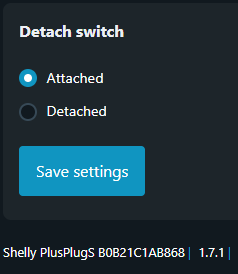
I‘m considering buying a shelly plus plug s to be used in home assistant.
Is it possible to use the button on the plug to trigger automations (i.e. in detached mode without changing on/off behavior) ?
To elaborate a little bit more: I want to attach the plug to our washing machine. The plug should always deliver power (irrespective of button press) so that one can still operate it manually.
When pressing the button, I want to start an automation in home-assistant to wait for solar energy excess to start the washing machine.
I don’t have that brand of outlet (plug), but the ones I do have don’t have a button entity to track. I use the wattage or amperage entity to inform if the devices attached to the outlet are drawing power.
With my limited experience in all of this, in your shoes for this I’d make an automation script to be triggered manually (voice, dashboard, physical smart button) that starts a “wait for excess solar” automation, which would turn on the outlet. If there’s another way to that end, I’ll be lurking to learn. . .
I also thought about using power consumption of the machine as a trigger, but in idle-mode this is too low to be detected (below 3 W, which is the lowest my current smart plugs can detect) and I don‘t want to stop the machine while running.
I thought also about adding a seperate smart button, but then found out that some shellys provide this detached mode where the existing button on the plug can be read out without turning the plug on/off.
Have to find out whether this also holds for this plug and whether it is possible in Home-Assistant.
Afaik there is no option to make it detached.
I reported it to Shelly years ago - I was in the same situation. I’m not aware that it has changed.
Back in days I replaced PlugS with PM
I’ve been working on a similar problem with the Shelly Plus Plug UK (SNPL-00112UK) and wanted to share a workaround for anyone writing Shelly Scripts.
You’re right that there are no input:0 button events — the only events fired are on the switch:0 component. However, I found that if you keep the button in momentary mode (not detached), each button press fires a switch:0 toggle event which you can intercept in a script.
The catch is that the hardware has already toggled the relay by the time your script sees the event. The workaround is to maintain a desiredOn variable representing the state you actually want, then use Timer.set(1, false, ...) to fire a 1ms callback which calls Switch.GetStatus and corrects the relay if it differs from your desired state.
One further gotcha: calling Switch.Set to correct the relay itself fires another toggle event, which would cause the script to register a spurious button press. I handle this with a suppressNext counter — increment it before any corrective Switch.Set, and in the event handler bail out and decrement if it’s non-zero.
Important caveat though: even with the 1ms correction, there is still a momentary power interruption on the connected device every time the button is pressed. In practice this means the workaround is fine for loads like lamps or heaters that don’t care about losing power briefly, but it’s not suitable for computers, routers, or anything else that loses state or resets on a power glitch.
It’s a hack, but it works reliably for the right use cases. Here’s my code: