Hello,
I’m running out of physical buttons on my smart button. I want to control my blinds with a single click. The logic for a single click is as follows:
- blinds not moving
- last target fully open → close blinds
- last target fully closed → open blinds
- blinds moving → stop moving
According to wiring on Documentation about Wave Shutter - Shelly Europe it can be controlled by single button:
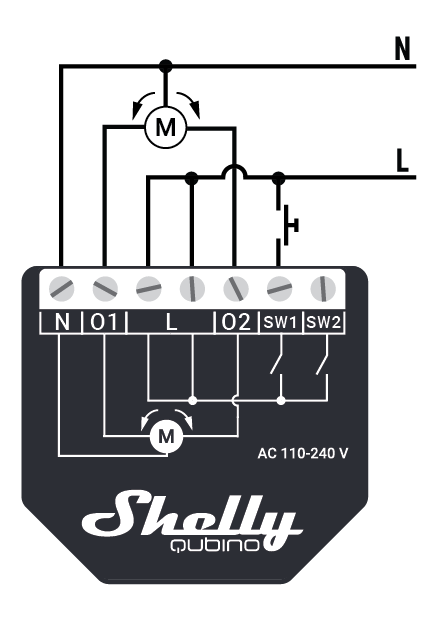
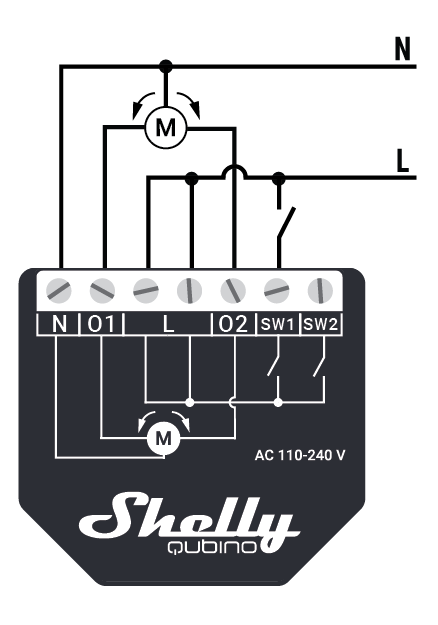
That plus the description of
Quote
Parameter No. 1 – Push-button (momentary) / bistable (toggle switch) selection
With this parameter, you can select between the switch type: push-button (momentary) or on/off toggle switch connected to SW1 and SW2 inputs.
Value size: 1 Byte
Default value: 0
Values & descriptions:
- 0 - momentary switch
- 1 - toggle switch (contact closed - ON / contact opened - OFF)
- 2 - single, momentary switch (the switch should be connected to SW1 terminal)
NOTE: When set = 2, 1x click on SW1 up - 1x click on SW1 stop - 1x click down
makes me think it should be feasible.
Is there anyone who has done this before and can share how?
Thank you
Stefan