I am using node-red with Google Calendar integration in HA. All is working, but I want to be able to debug my flow without waiting until the calendar event state becomes “on”. In the HA Developer tools I can go to the entity, set the state to on/off, and see the result in my node-red flow. All works. Now, however, I want to mimic the same functionality using an inject node in conjunction with an action node in node-red. In the action node the only thing I can find is calendar.create event which requires I input at least the start_date or start_date_time. I really don’t want to have to create an entirely new entry in my calendar just for debugging and I can’t figure out how to inject the on/off state elsewise (though again directly through the developer tools I can simulate this). Is there a way to simply send the on/off state without creating an entirely new entry?
You can use the Home Assistant REST API just like the developer tools do. If you want to keep the entity’s existing attributes, use a current state node to get the full state object, then pass that along to the API node.
The endpoint you want is:
POST /api/states/<entity_id>
More details are in the REST API docs:
https://developers.home-assistant.io/docs/api/rest

Import
[{"id":"f444fe3d5ca81cd5","type":"api-current-state","z":"c89d915bdff0f798","name":"","server":"","version":3,"outputs":1,"halt_if":"","halt_if_type":"str","halt_if_compare":"is","entity_id":"calendar.test","state_type":"str","blockInputOverrides":true,"outputProperties":[{"property":"data","propertyType":"msg","value":"","valueType":"entity"}],"for":"0","forType":"num","forUnits":"minutes","override_topic":false,"state_location":"payload","override_payload":"msg","entity_location":"data","override_data":"msg","x":856,"y":1680,"wires":[["e3a76e199d52c8ea"]]},{"id":"12ceb81b48549e4d","type":"inject","z":"c89d915bdff0f798","name":"","props":[{"p":"payload"}],"repeat":"","crontab":"","once":false,"onceDelay":0.1,"topic":"","payload":"on","payloadType":"str","x":618,"y":1680,"wires":[["f444fe3d5ca81cd5"]]},{"id":"69682ae9e70e48e7","type":"inject","z":"c89d915bdff0f798","name":"","props":[{"p":"payload"}],"repeat":"","crontab":"","once":false,"onceDelay":0.1,"topic":"","payload":"off","payloadType":"str","x":622,"y":1728,"wires":[["f444fe3d5ca81cd5"]]},{"id":"e3a76e199d52c8ea","type":"ha-api","z":"c89d915bdff0f798","name":"","server":"","version":1,"debugenabled":false,"protocol":"http","method":"post","path":"/api/states/{{data.entity_id}}","data":"{\"state\": payload, \"attributes\": data.attributes}","dataType":"jsonata","responseType":"json","outputProperties":[{"property":"payload","propertyType":"msg","value":"","valueType":"results"}],"x":1074,"y":1680,"wires":[[]]},{"id":"7e75dec45a7799d6","type":"global-config","env":[],"modules":{"node-red-contrib-home-assistant-websocket":"0.80.1"}}]
this is fantastic…I will work on tis in the weekend and see if I run into any issues…this at least gives me a starting point and yet another rabbit hole to go down 
what’s also a nice when it comes to debuggin is the node-red-contrib-datdp-data-review. A node which allows for a multi-line state below.
And against simply displaying a multi-line information grabbed from one location within a flow I send informations from various nodes onto some sort of stack located in the flow-variables.
the stack get populated by a small function which ensures a defined stacksize aswell a deduplication of entries, means if a new infos is same as before it gets skipped.
and the node itself then simply displays the stacked information, so I’d see what actually happened or didn’t since my flow differs from what my braincells expected.
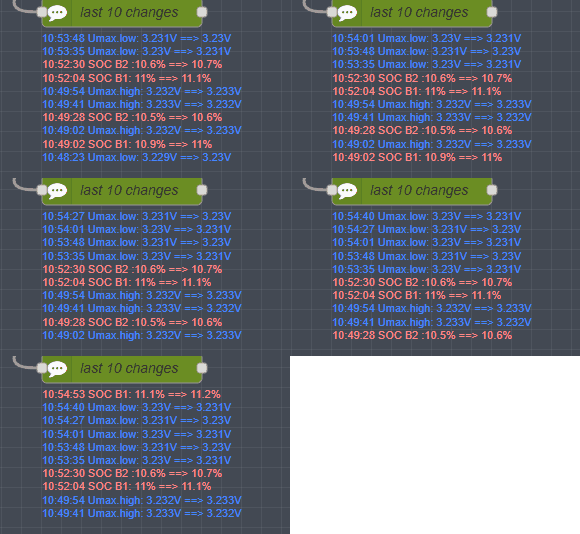
Somewhat similar to the home assistant ‘activity’ view, I’d say and a bit more flexible but manual scrolling through the debug output node-red offers.
this seems to work and is exactly what I was looking for…thanks!