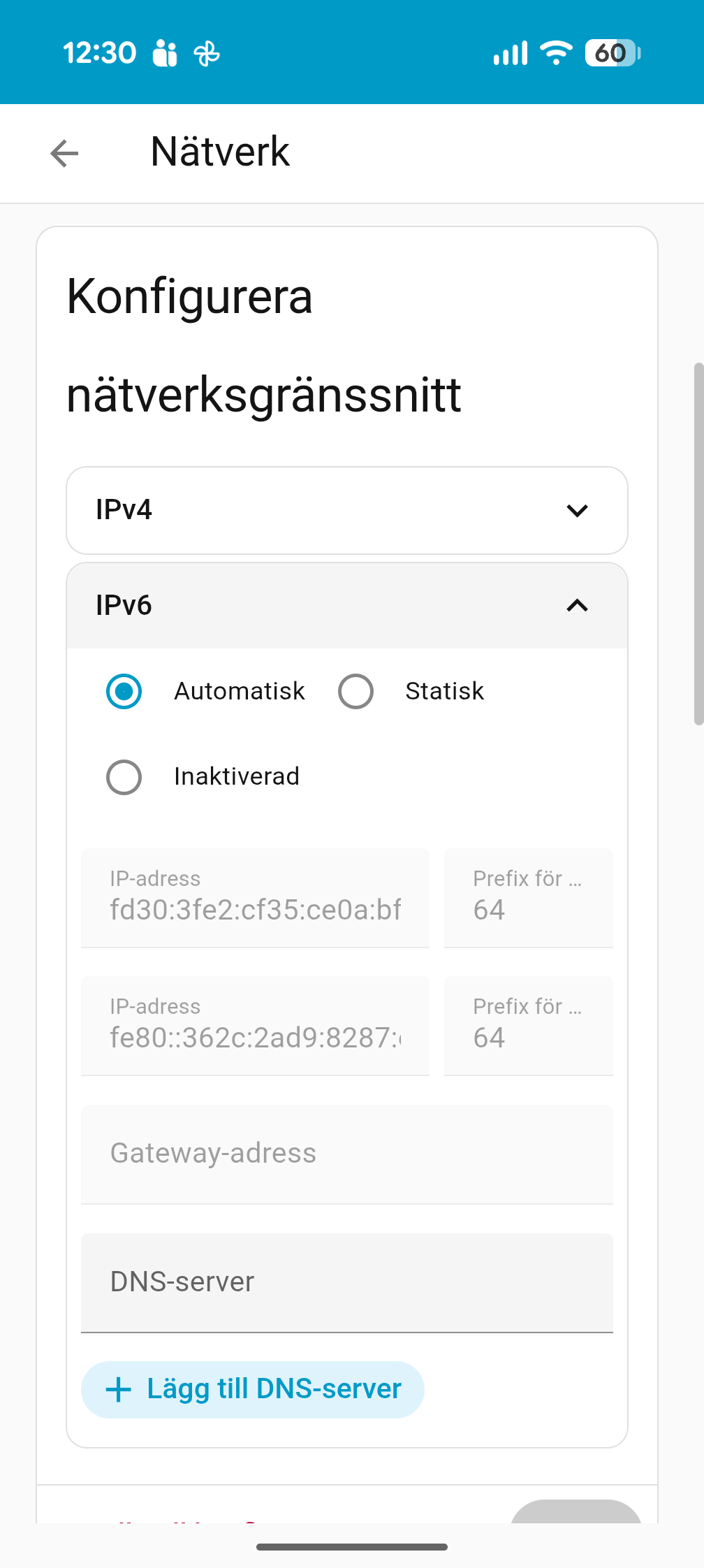
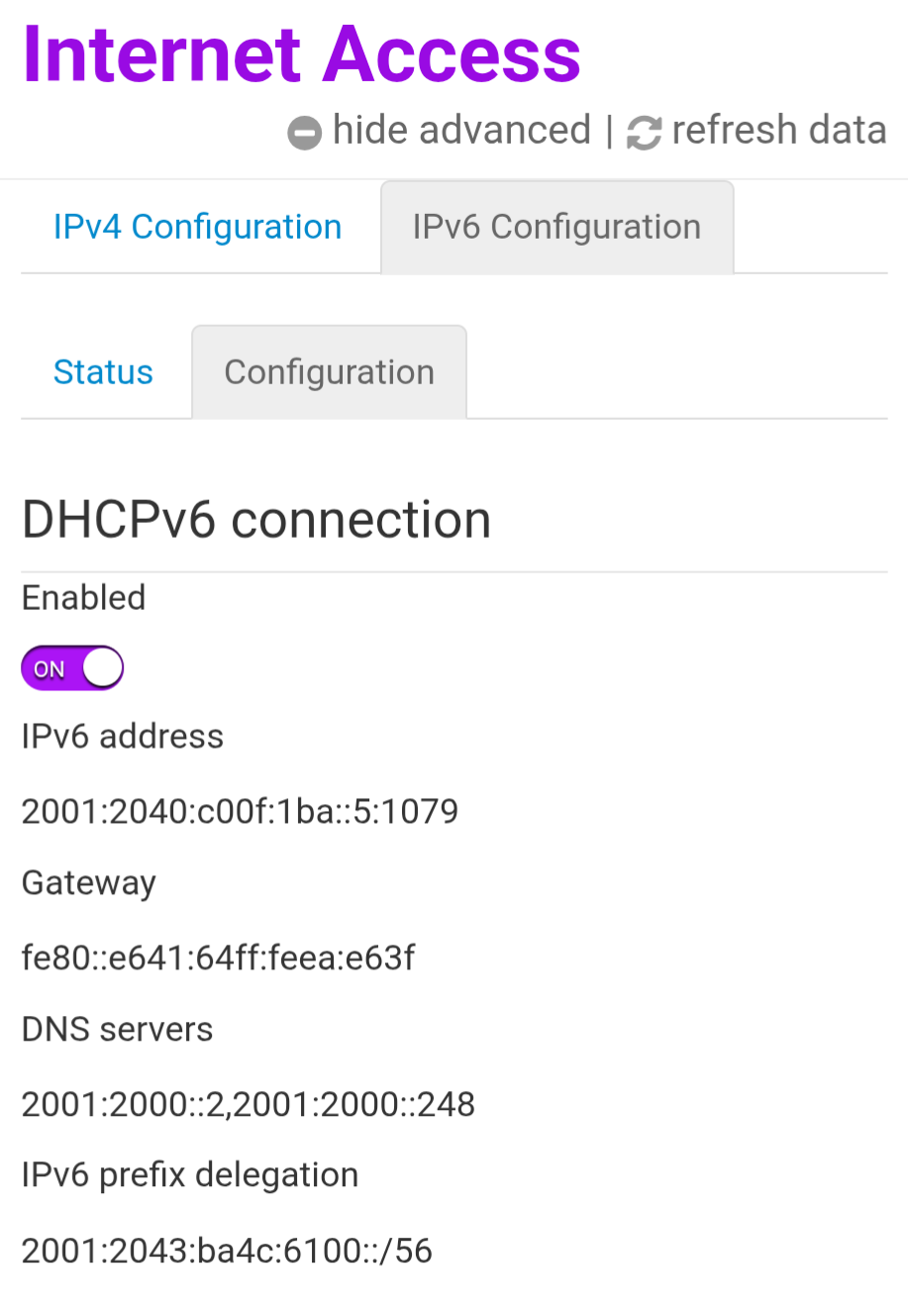
I’m really struggling with Thread Border router and matter.
I’m using SLZB-MR1U and trying to pair a new Ikea Matter bulb.
I have followed this guide to the point…
Also tried and search and try alot of things from different guides and forum threads.
Thread integration has a network and a phone icon with a key. I have tried debug/Sync thread credentials which succeeds and tell me HA and phone are on same network.
But when adding the unit it connects to, sends credentials and then gets stuck on “Checking network connectivity.” until it fails
During this process, should anything be seen in the OpenThread Border Router add-on log?
I can’t see any special errors in the log.
After a while I see some Meshforwarder errors but no idea what they are about
00:41:03.283 [N] MeshForwarder-: dst:[fe80:0:0:0:ab:81b7:b332:8890]:19788
00:41:04.214 [N] MeshForwarder-: Failed to send IPv6 UDP msg, len:96, chksum:db58, ecn:no, to:02ab81b7b3328890, sec:no, error:NoAck, prio:net, radio:15.4
Do I even have a working Thread network? How do I know?
Is it credential issues?
Are there any logs I can check/provide?
Really scratching my head here…
– Edit 260113
Added complete log from OTBR starting up and then trying to add matter device.
I have now Also changed SLZB-MR1U to USB mode and connect with USB mode instead of POE. Didnt see any erros about this but wanted to try at least since it’s recommended to use USB mode.
Using EFR32MG21 Revision: 20241105 in MR1U
Starting from 00:11:11.500 happens after I try to add matter devices. It doenst show up directly when trying to add device but a while after. No idea if it’s something else.
I have IPv6 auto configured in both HA and in my router (ISP Telia router Technicolor EWA 1330 (F1) so this should be up and running.
[08:34:17] INFO: Web UI and REST API port are exposed, starting otbr-web.
s6-rc: info: service mdns: starting
s6-rc: info: service s6rc-oneshot-runner: starting
s6-rc: info: service mdns successfully started
s6-rc: info: service s6rc-oneshot-runner successfully started
s6-rc: info: service fix-attrs: starting
s6-rc: info: service banner: starting
s6-rc: info: service fix-attrs successfully started
s6-rc: info: service legacy-cont-init: starting
s6-rc: info: service legacy-cont-init successfully started
[08:34:17] INFO: Starting mDNS Responder...
Default: mDNSResponder (Engineering Build) (Dec 15 2025 09:14:53) starting
-----------------------------------------------------------
 Add-on: OpenThread Border Router
 OpenThread Border Router add-on
-----------------------------------------------------------
 Add-on version: 2.15.3
 You are running the latest version of this add-on.
 System: Home Assistant OS 16.3  (amd64 / qemux86-64)
 Home Assistant Core: 2025.12.5
 Home Assistant Supervisor: 2026.01.0
-----------------------------------------------------------
 Please, share the above information when looking for help
 or support in, e.g., GitHub, forums or the Discord chat.
-----------------------------------------------------------
s6-rc: info: service banner successfully started
s6-rc: info: service otbr-agent: starting
[08:34:18] INFO: Migrating OTBR settings if needed...
2026-01-13 08:34:18 homeassistant asyncio[213] DEBUG Using selector: EpollSelector
2026-01-13 08:34:18 homeassistant zigpy.serial[213] DEBUG Opening a serial connection to '/dev/serial/by-id/usb-SMLIGHT_SMLIGHT_SLZB-MR1U_SLZB-MR1U237027-if00' (baudrate=460800, xonxoff=False, rtscts=False)
2026-01-13 08:34:18 homeassistant serialx.platforms.serial_posix[213] DEBUG Configuring serial port '/dev/serial/by-id/usb-SMLIGHT_SMLIGHT_SLZB-MR1U_SLZB-MR1U237027-if00'
2026-01-13 08:34:18 homeassistant serialx.platforms.serial_posix[213] DEBUG Configuring serial port: [0, 0, 3248, 0, 4100, 4100, [b'\x03', b'\x1c', b'\x7f', b'\x15', b'\x04', 0, 0, b'\x00', b'\x11', b'\x13', b'\x1a', b'\x00', b'\x12', b'\x0f', b'\x17', b'\x16', b'\x00', b'\x00', b'\x00', b'\x00', b'\x00', b'\x00', b'\x00', b'\x00', b'\x00', b'\x00', b'\x00', b'\x00', b'\x00', b'\x00', b'\x00', b'\x00']]
2026-01-13 08:34:18 homeassistant serialx.platforms.serial_posix[213] DEBUG Setting low latency mode: True
2026-01-13 08:34:18 homeassistant serialx.platforms.serial_posix[213] DEBUG Setting modem pins: ModemPins[!dtr !rts]
2026-01-13 08:34:18 homeassistant serialx.platforms.serial_posix[213] DEBUG TIOCMBIC: 0x00000006
2026-01-13 08:34:18 homeassistant zigpy.serial[213] DEBUG Connection made: <serialx.platforms.serial_posix.PosixSerialTransport object at 0x7fce99473950>
2026-01-13 08:34:18 homeassistant universal_silabs_flasher.spinel[213] DEBUG Sending frame SpinelFrame(header=SpinelHeader(transaction_id=0, network_link_id=0, flag=2), command_id=<CommandID.RESET: 1>, data=b'\x02')
2026-01-13 08:34:18 homeassistant universal_silabs_flasher.spinel[213] DEBUG Sending data b'~\x80\x01\x02\xea\xf0~'
2026-01-13 08:34:18 homeassistant serialx.descriptor_transport[213] DEBUG Immediately writing b'~\x80\x01\x02\xea\xf0~'
2026-01-13 08:34:18 homeassistant serialx.descriptor_transport[213] DEBUG Sent 7 of 7 bytes
2026-01-13 08:34:18 homeassistant serialx.descriptor_transport[213] DEBUG Event loop woke up reader
2026-01-13 08:34:18 homeassistant serialx.descriptor_transport[213] DEBUG Received b'~\x80\x06\x00p\xeet~'
2026-01-13 08:34:18 homeassistant universal_silabs_flasher.spinel[213] DEBUG Decoded HDLC frame: HDLCLiteFrame(data=b'\x80\x06\x00p')
2026-01-13 08:34:18 homeassistant universal_silabs_flasher.spinel[213] DEBUG Parsed frame SpinelFrame(header=SpinelHeader(transaction_id=0, network_link_id=0, flag=2), command_id=<CommandID.PROP_VALUE_IS: 6>, data=b'\x00p')
2026-01-13 08:34:18 homeassistant universal_silabs_flasher.spinel[213] DEBUG Sending frame SpinelFrame(header=SpinelHeader(transaction_id=3, network_link_id=0, flag=2), command_id=<CommandID.PROP_VALUE_GET: 2>, data=b'\x08')
2026-01-13 08:34:18 homeassistant universal_silabs_flasher.spinel[213] DEBUG Sending data b'~\x83\x02\x08\xbc\x9a~'
2026-01-13 08:34:18 homeassistant serialx.descriptor_transport[213] DEBUG Immediately writing b'~\x83\x02\x08\xbc\x9a~'
2026-01-13 08:34:18 homeassistant serialx.descriptor_transport[213] DEBUG Sent 7 of 7 bytes
2026-01-13 08:34:18 homeassistant serialx.descriptor_transport[213] DEBUG Event loop woke up reader
2026-01-13 08:34:18 homeassistant serialx.descriptor_transport[213] DEBUG Received b'~\x83\x06\x08T\x0fW\xff\xfe\xbd\xd4\xe7\x93k~'
2026-01-13 08:34:18 homeassistant universal_silabs_flasher.spinel[213] DEBUG Decoded HDLC frame: HDLCLiteFrame(data=b'\x83\x06\x08T\x0fW\xff\xfe\xbd\xd4\xe7')
2026-01-13 08:34:18 homeassistant universal_silabs_flasher.spinel[213] DEBUG Parsed frame SpinelFrame(header=SpinelHeader(transaction_id=3, network_link_id=0, flag=2), command_id=<CommandID.PROP_VALUE_IS: 6>, data=b'\x08T\x0fW\xff\xfe\xbd\xd4\xe7')
2026-01-13 08:34:18 homeassistant serialx.descriptor_transport[213] DEBUG Closing at the request of the application
2026-01-13 08:34:18 homeassistant zigpy.serial[213] DEBUG Waiting for serial port to close
2026-01-13 08:34:18 homeassistant serialx.descriptor_transport[213] DEBUG Closing connection: None
2026-01-13 08:34:18 homeassistant serialx.descriptor_transport[213] DEBUG Closing file descriptor 7
2026-01-13 08:34:18 homeassistant serialx.descriptor_transport[213] DEBUG Calling protocol `connection_lost` with exc=None
2026-01-13 08:34:18 homeassistant zigpy.serial[213] DEBUG Connection lost: None
Adapter settings file /data/thread/0_540f57fffebdd4e7.data is the most recently used, skipping
[08:34:18] INFO: Starting otbr-agent...
[NOTE]-AGENT---: Running 0.3.0-b067e5ac-dirty
[NOTE]-AGENT---: Thread version: 1.3.0
[NOTE]-AGENT---: Thread interface: wpan0
[NOTE]-AGENT---: Radio URL: spinel+hdlc+uart:///dev/serial/by-id/usb-SMLIGHT_SMLIGHT_SLZB-MR1U_SLZB-MR1U237027-if00?uart-baudrate=460800&uart-init-deassert
[NOTE]-AGENT---: Radio URL: trel://enp1s0
[NOTE]-ILS-----: Infra link selected: enp1s0
50d.10:16:01.130 [C] P-SpinelDrive-: Software reset co-processor successfully
00:00:00.149 [N] RoutingManager: BR ULA prefix: fdb9:43df:b445::/48 (loaded)
00:00:00.149 [N] RoutingManager: Local on-link prefix: fd30:3fe2:cf35:ce0a::/64
00:00:00.179 [N] Mle-----------: Role disabled -> detached
00:00:00.191 [N] P-Netif-------: Changing interface state to up.
00:00:00.210 [W] P-Netif-------: Failed to process request#2: No such process
00:00:00.210 [W] P-Netif-------: Failed to process request#6: No such process
s6-rc: info: service otbr-agent successfully started
s6-rc: info: service otbr-agent-configure: starting
s6-rc: info: service otbr-web: starting
s6-rc: info: service otbr-web successfully started
[08:34:18] INFO: Starting otbr-web...
[INFO]-WEB-----: Running 0.3.0-b067e5ac-dirty
listenAddr not specified, using default ::
[INFO]-WEB-----: Border router web started on wpan0
Done
s6-rc: info: service otbr-agent-configure successfully started
s6-rc: info: service otbr-agent-rest-discovery: starting
00:00:00.365 [W] P-Daemon------: Failed to write CLI output: Broken pipe
[08:34:18] INFO: Successfully sent discovery information to Home Assistant.
s6-rc: info: service otbr-agent-rest-discovery successfully started
s6-rc: info: service legacy-services: starting
s6-rc: info: service legacy-services successfully started
00:00:27.789 [N] Mle-----------: RLOC16 8c00 -> fffe
00:00:28.054 [N] Mle-----------: Attach attempt 1, AnyPartition reattaching with Active Dataset
00:00:34.554 [N] RouterTable---: Allocate router id 35
00:00:34.554 [N] Mle-----------: RLOC16 fffe -> 8c00
00:00:34.569 [N] Mle-----------: Role detached -> leader
00:00:34.569 [N] Mle-----------: Partition ID 0x11789bd5
[NOTE]-BBA-----: BackboneAgent: Backbone Router becomes Primary!
00:00:38.019 [W] DuaManager----: Failed to perform next registration: NotFound
00:11:11.500 [N] RouterTable---: Allocate router id 48
00:13:05.653 [N] MeshForwarder-: Failed to send IPv6 UDP msg, len:96, chksum:b751, ecn:no, to:2ee5c0e2ef145721, sec:no, error:NoAck, prio:net, radio:15.4
00:13:05.653 [N] MeshForwarder-:     src:[fe80:0:0:0:f8fa:1759:cd5d:bfca]:19788
00:13:05.653 [N] MeshForwarder-:     dst:[fe80:0:0:0:2ce5:c0e2:ef14:5721]:19788
00:13:06.943 [N] MeshForwarder-: Failed to send IPv6 UDP msg, len:96, chksum:48f3, ecn:no, to:2ee5c0e2ef145721, sec:no, error:NoAck, prio:net, radio:15.4
00:13:06.943 [N] MeshForwarder-:     src:[fe80:0:0:0:f8fa:1759:cd5d:bfca]:19788
00:13:06.943 [N] MeshForwarder-:     dst:[fe80:0:0:0:2ce5:c0e2:ef14:5721]:19788
00:13:07.393 [N] MeshForwarder-: Failed to send IPv6 UDP msg, len:96, chksum:1ea2, ecn:no, to:2ee5c0e2ef145721, sec:no, error:NoAck, prio:net, radio:15.4
00:13:07.393 [N] MeshForwarder-:     src:[fe80:0:0:0:f8fa:1759:cd5d:bfca]:19788
00:13:07.393 [N] MeshForwarder-:     dst:[fe80:0:0:0:2ce5:c0e2:ef14:5721]:19788
00:14:41.077 [N] RouterTable---: Release router id 48