Like I will using Bluetooth trackers so I want the main home page to show devices of the room I am in.
As I enter another room then the home page should one display only the devices from the new room.
Hope the above makes sense?
Aha, I see what you mean. Based on your wishes, I don’t think SMARTi. is the correct solution for you. Think of SMARTi as a global dashboard for your home that anyone can use no matter where they are located and what device they use.
Implementing a solution that will do what you describe will not be possible to implement on a general level (one solution that will fit all users) unfortunately.
SMARTi will however provide you with an overview of all your rooms with a quick access button to show all the devices in that room.

Would you consider a one off purchase instead of a subscription model? Regardless of how good it may be, subscriptions are a massive turn off
2 Likes
I have considered it yes but I am still debating how to best go about this. The main question how much a lifetime purchase should cost compared to a subscription model, but I am open to suggestions 
A “demo” version of the mode for smartphones would be useful. The dashboard looks interesting however I have no idea how it will look and perform on a phone. Probably most people, like me, mainly use a smartphone to operate HA and I would love to check the dashboard on it before I decide to subscribe.
1 Like
I will consider it, but its not planned at the moment. I might upload a video showing how it works on a phone if that might help.
I just installed this. However, it seems like the first two buttons aren’t working. Any tips on how to resolve this?
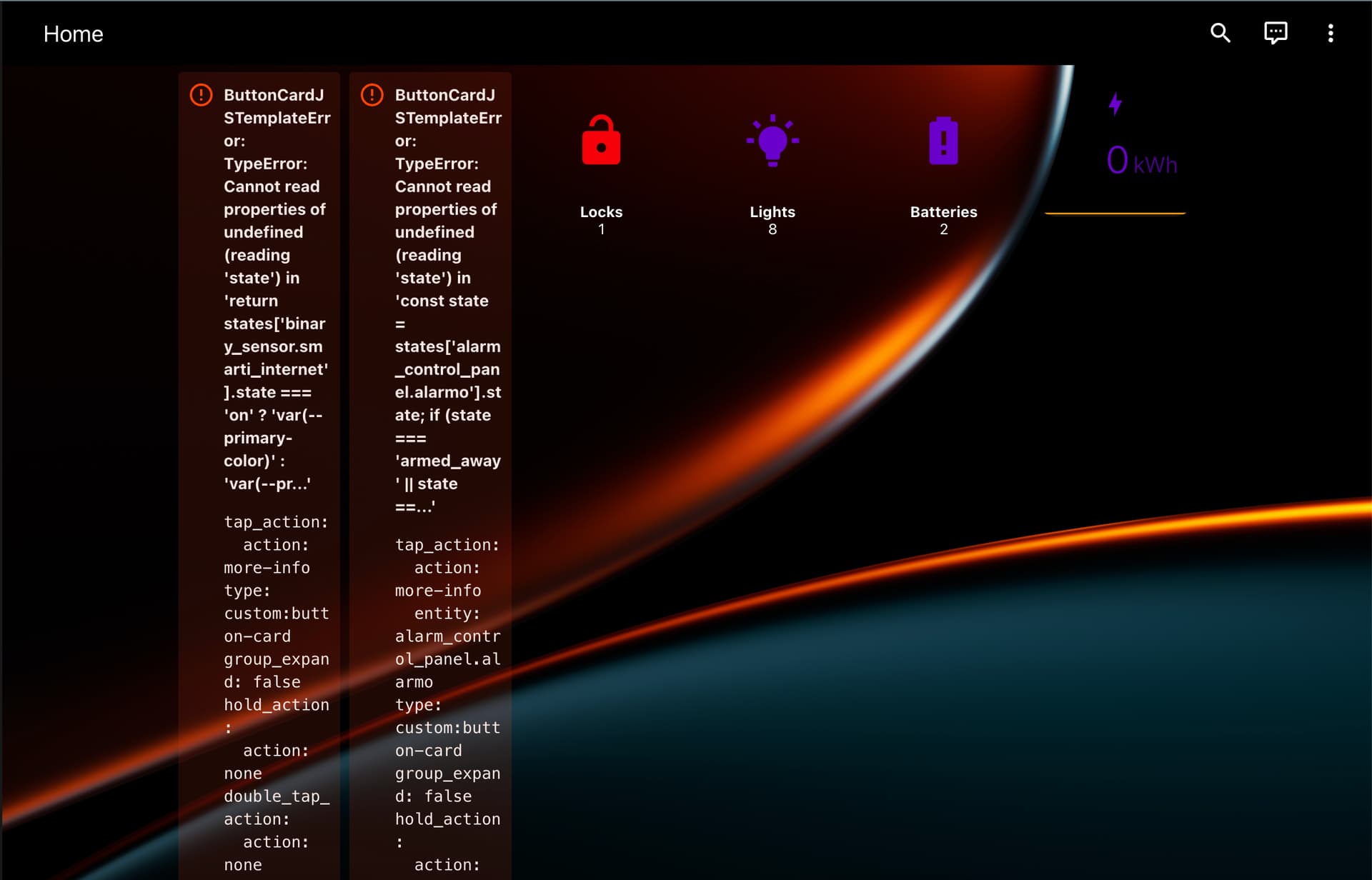
Hi! Did you set up the SMARTi internet sensor correctly and install Alarmo as per the description in the repo?
Oh I thought that by choosing automatic installation it just installed all aspects (thought it said that in the description). So even with automatic installation, you must still set up those seperately?
The automatic installation is just for the different cards. As far as I know, HA does not support automatic download and installation of integrations with configuration files.
1 Like
Thanks for explaining! Sorry, then I’d read over that part.
I thought this might be a replacement for Dwains Dashboard. But after selecting the automatic mode, even my default dashboard was converted to another language (Swedish or Danish perhaps?). I tried multiple times and didn’t have much luck and ended up removing and running a restore of home assistant, something I’ve never had to do in 7+ years.
I’d say the documentation could definitely be improved, eg selecting automated vs manual mode and why, downloading all the other components - there are some typo’s in the other modules required, etc.
Hi!
I am not sure how your default dashboard was converted to another language? Was it your whole installation that did this? Did you follow all the steps in the installation description in the repository, everything should be documented quite extensively there also including the differences between automatic/manual installation
But if you have any specific changes or things your think I should improve upon, please let me know and I will get right to it.
Hi, can i use other entities besides Alarmo? i have tried change the entities it seems not working. I use Pro version.
If you use this as your name for your alarm entity:
alarm_control_panel.alarmo
You will be able to control your alarm form the status bar but NOT from within the security page. I am currently looking at different solutions for that. But renaming your alarm control panel to just “alarmo” makes it controllable form the dashboard.
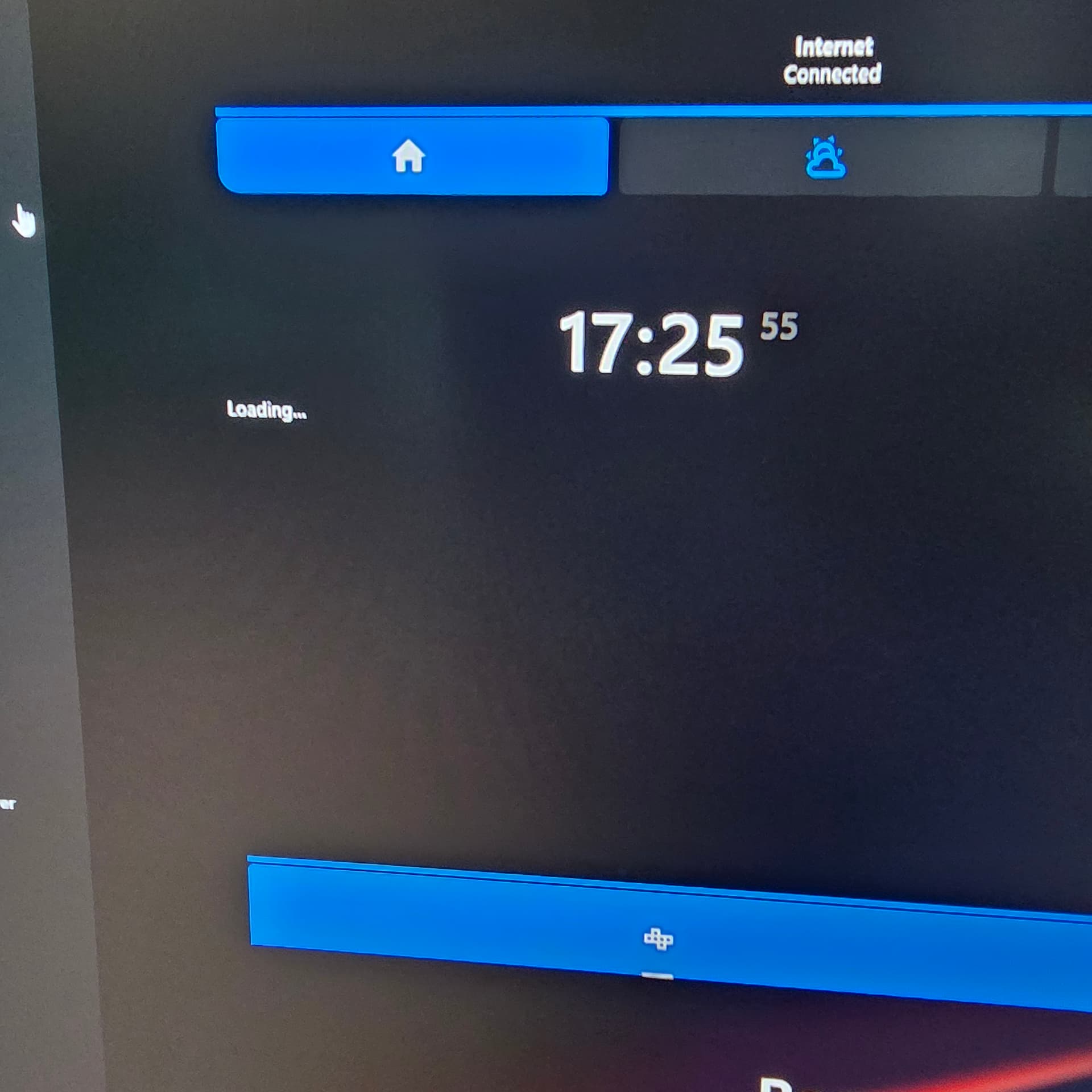
Hi! So I switched over to the new clock card from HA, and currently that does not provide a date yet. Instead of relying on custom party cards for everything I wanted to go with something standard. But I am pretty confident that the date will be available later.
The “Loading…” that you see is actually the energy-distribution card. Energy cards - Home Assistant
If you haven’t configured this in the energy panel yet, then its not showing. So head on over to the energy panel and configure it and it will show up like the image below shows:

Thanks for the very quick reply.
yes, that was it , i had switched off the energy tab due to not having any sensors i could use.
fantastic work , i will be using this dashboard a lot now and im looking forward to all the new features you may have in store
Thank you! Spread the word!
I have some sorting issues and some issues regarding hidden entities that I am currently working on. I have found a solution I just need to implement it in the coming days.
Hi, congratulations and thank you for the amazing work behind this dashboard… I have the Pro version. Aside from the already reported issue with the native Smarti battery entity that I can’t remove, and some entities showing up in the header bar even though they are disabled (but I understand you’re working on that…), I have a question. In one room, I have two camera entities — is it possible to choose which one to use as the room’s background? Thanks and keep up the great work!