the cards need a little explaining.
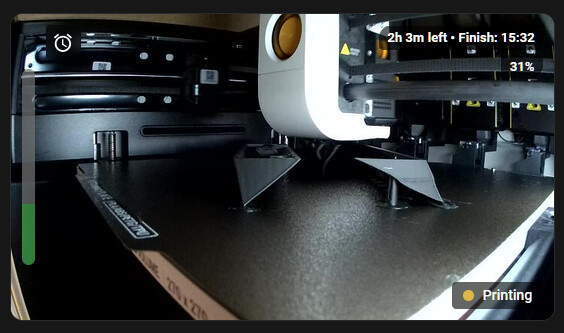
the camera card with overlays uses a % derived from total layers / layers done as the progress % was way out for me.
the vertical bar on the left is an autosizing vertical of layer slicers
type: picture-elements
camera_image: camera.snapmaker_u1
elements:
  - type: custom:button-card
    entity: sensor.u1_current_layer
    show_name: false
    show_icon: false
    show_state: false
    style:
      left: 10px
      top: 50%
      transform: translate(0, -50%)
      z-index: 2
      pointer-events: none
    styles:
      card:
        - background: transparent
        - box-shadow: none
        - border: none
        - padding: 0px
        - width: 12px
        - height: 180px
    custom_fields:
      bar: |
        [[[
          var current = parseFloat(states['sensor.u1_current_layer'].state);
          var total = parseFloat(states['sensor.u1_total_layer'].state);

          if (isNaN(total) || total <= 0) total = 10;
          if (isNaN(current) || current < 0) current = 0;
          if (current > total) current = total;

          var svgHeight = 180;
          var svgWidth = 12;

          var gap = 1.5;
          if (total > 1) {
            var blockHeight = (svgHeight - (gap * (total - 1))) / total;
            if (blockHeight < 1) {
              gap = 0.5;
              blockHeight = (svgHeight - (gap * (total - 1))) / total;
            }
            if (blockHeight < 0.5) {
              gap = 0;
              blockHeight = svgHeight / total;
            }
          } else {
            var blockHeight = svgHeight;
            var gap = 0;
          }

          var svgHtml = `<svg width="${svgWidth}" height="${svgHeight}" style="display: block;">`;

          for (var i = 0; i < total; i++) {
            var layerIndex = total - 1 - i;
            var color = (layerIndex < current) ? '#4caf50' : '#757575';
            var yPos = i * (blockHeight + gap);
            var rx = blockHeight > 2 ? 1 : 0;

            svgHtml += `<rect x="0" y="${yPos}" width="${svgWidth}" height="${blockHeight}" fill="${color}" rx="${rx}" />`;
          }

          svgHtml += '</svg>';
          return svgHtml;
        ]]]
  - type: custom:button-card
    entity: sensor.u1_print_time_left
    show_state: false
    show_icon: false
    show_title: false
    show_name: false
    style:
      right: 10px
      top: 10px
      transform: none
      z-index: 2
    styles:
      card:
        - background: transparent
        - box-shadow: none
        - border: none
        - padding: 0px
        - width: max-content
    custom_fields:
      finish_time: |
        [[[
          var hours = parseFloat(states['sensor.u1_print_time_left'].state);
          var current = parseFloat(states['sensor.u1_current_layer'].state);
          var total = parseFloat(states['sensor.u1_total_layer'].state);

          var progress = 0;
          if (!isNaN(current) && !isNaN(total) && total > 0) {
            progress = Math.round((current / total) * 100);
            progress = Math.min(100, Math.max(0, progress));
          }

          var bgStyle = 'background-color: rgba(0, 0, 0, 0.6); padding: 4px 8px; border-radius: 4px; display: inline-block; margin-bottom: 4px; color: white; font-size: 12px; font-weight: bold;';
          var percentBgStyle = 'background-color: rgba(0, 0, 0, 0.6); padding: 4px 8px; border-radius: 4px; display: inline-block; color: white; font-size: 12px; font-weight: bold;';

          if (isNaN(hours) || hours <= 0) {
            return `<div style="text-align: right;">
                      <span style="${bgStyle}">Ready</span><br>
                      <span style="${percentBgStyle}">${progress}%</span>
                    </div>`;
          }

          var totalMins = Math.round(hours * 60);
          var remHours = Math.floor(totalMins / 60);
          var remMins = totalMins % 60;
          var remainingText = remHours > 0 ? `${remHours}h ${remMins}m` : `${remMins}m`;
          var target = new Date(Date.now() + (hours * 3600000));
          var hrs = target.getHours().toString().padStart(2, '0');
          var mins = target.getMinutes().toString().padStart(2, '0');

          return `<div style="text-align: right;">
                    <span style="${bgStyle}">${remainingText} left • Finish: ${hrs}:${mins}</span><br>
                    <span style="${percentBgStyle}">${progress}%</span>
                  </div>`;
        ]]]
  - type: custom:button-card
    icon: mdi:alarm
    show_name: false
    tap_action:
      action: call-service
      service: shell_command.send_snapmaker_pulse
    styles:
      card:
        - background-color: rgba(0, 0, 0, 0.6)
        - backdrop-filter: blur(4px)
        - box-shadow: none
        - border: none
        - padding: 6px
        - border-radius: 4px
        - width: 32px
        - height: 32px
      icon:
        - color: white
        - width: 20px
        - height: 20px
    style:
      left: 32px
      top: 10px
      transform: none
      z-index: 2
  - type: custom:button-card
    entity: sensor.u1_current_print_state
    show_name: false
    show_icon: false
    show_state: false
    style:
      right: 10px
      bottom: 10px
      transform: none
      z-index: 2
    styles:
      card:
        - background-color: rgba(0, 0, 0, 0.6)
        - padding: 6px 10px
        - border-radius: 4px
        - border: none
        - box-shadow: none
        - width: max-content
        - height: max-content
    custom_fields:
      status_msg: |
        [[[
          var s = entity.state;
          var s_low = s.toLowerCase();
          var color = '#757575';
          if (s_low === 'printing') color = '#e0b43c';
          else if (s_low === 'complete') color = '#4caf50';
          else if (s_low === 'standby') color = '#5c6bc0';
          else if (s_low === 'error') color = '#e91e63';
          else if (s_low === 'unavailable') color = '#ff7043';

          return `
            <div style="display: flex; align-items: center;">
              <div style="width: 10px; height: 10px; background-color: ${color}; border-radius: 50%; margin-right: 8px; flex-shrink: 0;"></div>
              <span style="color: white; font-size: 13px; font-weight: 500; text-transform: capitalize; line-height: 1;">${s}</span>
            </div>
          `;
        ]]]
  - type: image
    image: >-
      data:image/svg+xml;utf8,<svg xmlns='http://www.w3.org/2000/svg'
      width='100' height='100'></svg>
    camera_image: camera.snapmaker_u1
    tap_action:
      action: more-info
    style:
      top: 50%
      left: 50%
      width: 100%
      height: 100%
      transform: translate(-50%, -50%)
      z-index: 1
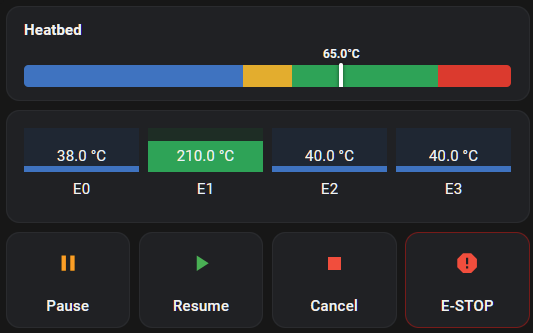
the temp and control, ive just kept simple
type: grid
square: false
columns: 1
cards:
  - type: custom:button-card
    entity: sensor.u1_bed_temperature
    show_name: true
    name: Heatbed
    show_icon: false
    show_state: false
    styles:
      card:
        - padding: 12px 16px
      grid:
        - grid-template-areas: "\"n\" \"bar\""
        - grid-row-gap: 8px
      name:
        - justify-self: start
        - font-size: 14px
        - font-weight: bold
    custom_fields:
      bar: |
        [[[
          var temp = parseFloat(entity.state);
          if (isNaN(temp)) temp = 0;
          if (temp > 100) temp = 100;
          if (temp < 0) temp = 0;

          return `
            <div style="position: relative; width: 100%; height: 36px; display: flex; align-items: center;">
              <div style="
                position: absolute;
                left: 0;
                bottom: 0;
                width: 100%;
                height: 20px;
                border-radius: 4px;
                background: linear-gradient(to right,
                  #3078c2 0%, #3078c2 45%,
                  #e7a916 45%, #e7a916 55%,
                  #31a354 55%, #31a354 85%,
                  #de2d26 85%, #de2d26 100%
                );
              "></div>

              <div style="
                position: absolute;
                left: ${temp}%;
                bottom: -2px;
                display: flex;
                flex-direction: column;
                align-items: center;
                transform: translateX(-50%);
                z-index: 2;
                transition: left 0.5s ease-out;
              ">
                <span style="
                  color: var(--primary-text-color);
                  font-size: 11px;
                  font-weight: bold;
                  margin-bottom: 2px;
                  white-space: nowrap;
                ">${entity.state}°C</span>

                <div style="
                  width: 4px;
                  height: 24px;
                  background-color: #ffffff;
                  box-shadow: 0 0 4px rgba(0,0,0,0.6);
                  border-radius: 2px;
                "></div>
              </div>
            </div>
          `;
        ]]]
  - type: custom:bar-card
    direction: up
    columns: 4
    min: 0
    max: 300
    title_position: bottom
    positions:
      name: outside
      icon: "off"
      value: inside
      indicator: "on"
    severity:
      - color: "#3078c2"
        from: 0
        to: 149
      - color: "#e7a916"
        from: 150
        to: 189
      - color: "#31a354"
        from: 190
        to: 245
      - color: "#de2d26"
        from: 246
        to: 300
    entities:
      - entity: sensor.u1_extruder_temperature
        name: E0
      - entity: sensor.u1_extruder1_temperature
        name: E1
      - entity: sensor.u1_extruder2_temperature
        name: E2
      - entity: sensor.u1_extruder3_temperature
        name: E3
  - type: grid
    square: false
    columns: 4
    cards:
      - type: custom:mushroom-template-card
        primary: Pause
        icon: mdi:pause
        icon_color: orange
        layout: vertical
        tap_action:
          action: call-service
          service: button.press
          target:
            entity_id: button.u1_pause_print
      - type: custom:mushroom-template-card
        primary: Resume
        icon: mdi:play
        icon_color: green
        layout: vertical
        tap_action:
          action: call-service
          service: button.press
          target:
            entity_id: button.u1_resume_print
      - type: custom:mushroom-template-card
        primary: Cancel
        icon: mdi:stop
        icon_color: red
        layout: vertical
        tap_action:
          action: call-service
          service: button.press
          target:
            entity_id: button.u1_cancel_print
      - type: custom:mushroom-template-card
        primary: E-STOP
        icon: mdi:alert-octagon
        icon_color: red
        layout: vertical
        tap_action:
          action: call-service
          service: button.press
          target:
            entity_id: button.u1_emergency_stop
        card_mod:
          style: |
            ha-card {
              border: 1px solid rgba(255, 0, 0, 0.4);
            }