Hi,
Thanks I followed this and it worked but the sensor values didn’t seem to update until I added an automation to update the rest sensors?
- service: homeassistant.update_entity
entity_id: sensor.bathromhumidity
Hi,
Thanks I followed this and it worked but the sensor values didn’t seem to update until I added an automation to update the rest sensors?
Great solution, thank you so much! This worked great for me.
I didn’t have to create an automation to update the sensor - the REST command above includes that with the scan_interval command, and that worked for me.
THX. This worked great!
Is it possible to view the battery status?
this worked without an issue for me, but for some reason now the humidity doesn’t load anymore? i’m also not seeing the sensors being created anymore… the temperature are working fine though…
I was able to get @agatam 's code working again by changing the Humidity sensor line in the YAML
From:
value_template: "{{ value_json.payload.capabilities | selectattr('instance', 'equalto', 'sensorHumidity') | map(attribute='state.value.currentHumidity') | first }}"
to:
value_template: "{{ value_json.payload.capabilities | selectattr('instance', 'equalto', 'sensorHumidity') | map(attribute='state.value') | first }}"
Basically, remove the “.currentHumidity” and make the map() part of the code identical to the one for Temperature.
I’m not sure why this is necessary. I’m thinking the JSON structure of the Govee API may have changed recently… when I run the query in postman manually I get a response like the following - which has the same parameters and structure for both Temperature and Humidity:
{
    "requestId": "uuid",
    "msg": "success",
    "code": 200,
    "payload": {
        "sku": "H5179",
        "device": "REMOVED",
        "capabilities": [
            {
                "type": "devices.capabilities.online",
                "instance": "online",
                "state": {
                    "value": true
                }
            },
            {
                "type": "devices.capabilities.property",
                "instance": "sensorTemperature",
                "state": {
                    "value": 37.4
                }
            },
            {
                "type": "devices.capabilities.property",
                "instance": "sensorHumidity",
                "state": {
                    "value": 34
                }
            }
        ]
    }
}
That’s great, just to say that the credit for the original code goes to @keendeli, see above, cheers
allright so this is pretty much my config and its working great 
in configuration.yaml
sensor:
  # Woonkamer Sensor
  - platform: rest
    name: "Sensor Woonkamer"
    resource: https://openapi.api.govee.com/router/api/v1/device/state
    method: POST
    headers:
      Content-Type: "application/json"
      Govee-API-Key: "key"
    payload: '{"requestId": "uuid", "payload": {"sku": "H5179", "device": "MAC"}}'
    scan_interval: 60
    value_template: "{{ value_json.payload.capabilities | selectattr('instance', 'equalto', 'online') | map(attribute='state.value') | first }}"
    json_attributes:
      - payload

  # Slaapkamer 1
  - platform: rest
    name: "Sensor Slaapkamer 1"
    resource: https://openapi.api.govee.com/router/api/v1/device/state
    method: POST
    headers:
      Content-Type: "application/json"
      Govee-API-Key: "key"
    payload: '{"requestId": "uuid", "payload": {"sku": "H5179", "device": "MAC 2"}}'
    scan_interval: 60
    value_template: "{{ value_json.payload.capabilities | selectattr('instance', 'equalto', 'online') | map(attribute='state.value') | first }}"
    json_attributes:
      - payload

  # Slaapkamer 2
  - platform: rest
    name: "Sensor Slaapkamer 2"
    resource: https://openapi.api.govee.com/router/api/v1/device/state
    method: POST
    headers:
      Content-Type: "application/json"
      Govee-API-Key: "Key"
    payload: '{"requestId": "uuid", "payload": {"sku": "H5179", "device": "MAC"}}'
    scan_interval: 60
    value_template: "{{ value_json.payload.capabilities | selectattr('instance', 'equalto', 'online') | map(attribute='state.value') | first }}"
    json_attributes:
      - payload

  # Slaapkamer 3
  - platform: rest
    name: "Sensor Slaapkamer 3"
    resource: https://openapi.api.govee.com/router/api/v1/device/state
    method: POST
    headers:
      Content-Type: "application/json"
      Govee-API-Key: "Key"
    payload: '{"requestId": "uuid", "payload": {"sku": "H5179", "device": "MAC"}}'
    scan_interval: 60
    value_template: "{{ value_json.payload.capabilities | selectattr('instance', 'equalto', 'online') | map(attribute='state.value') | first }}"
    json_attributes:
      - payload

  # Slaapkamer Beneden
  - platform: rest
    name: "Sensor Slaapkamer Beneden"
    resource: https://openapi.api.govee.com/router/api/v1/device/state
    method: POST
    headers:
      Content-Type: "application/json"
      Govee-API-Key: "Key"
    payload: '{"requestId": "uuid", "payload": {"sku": "H5179", "device": "MAC"}}'
    scan_interval: 60
    value_template: "{{ value_json.payload.capabilities | selectattr('instance', 'equalto', 'online') | map(attribute='state.value') | first }}"
    json_attributes:
      - payload
and next in configuration.yaml
# Template Sensors for Extracting Data
  - platform: template
    sensors:
      # Woonkamer
      temperatuur_woonkamer:
        friendly_name: "Temperatuur Woonkamer"
        value_template: "{{ (((states.sensor.sensor_woonkamer.attributes.payload.capabilities | selectattr('instance', 'equalto', 'sensorTemperature') | map(attribute='state.value') | first) - 32) * 5 / 9) | round(2) }}"
        unit_of_measurement: "°C"
        device_class: temperature

      luchtvochtigheid_woonkamer:
        friendly_name: "Luchtvochtigheid Woonkamer"
        value_template: "{{ states.sensor.sensor_woonkamer.attributes.payload.capabilities | selectattr('instance', 'equalto', 'sensorHumidity') | map(attribute='state.value') | first }}"
        unit_of_measurement: "% RH"
        device_class: humidity

      # Slaapkamer 1
      temperatuur_Sensor_Slaapkamer_1:
        friendly_name: "Temperatuur Sensor Slaapkamer 1"
        value_template: "{{ (((states.sensor.sensor_slaapkamer_Sensor_Slaapkamer_1.attributes.payload.capabilities | selectattr('instance', 'equalto', 'sensorTemperature') | map(attribute='state.value') | first) - 32) * 5 / 9) | round(2) }}"
        unit_of_measurement: "°C"
        device_class: temperature

      luchtvochtigheid_Sensor_Slaapkamer_1:
        friendly_name: "Luchtvochtigheid Slaapkamer 1"
        value_template: "{{ states.sensor.sensor_Sensor_Slaapkamer_1.attributes.payload.capabilities | selectattr('instance', 'equalto', 'sensorHumidity') | map(attribute='state.value') | first }}"
        unit_of_measurement: "% RH"
        device_class: humidity

      # Slaapkamer 2
      temperatuur_Sensor_Slaapkamer_2:
        friendly_name: "Temperatuur Slaapkamer 2"
        value_template: "{{ (((states.sensor.sensor_Sensor_Slaapkamer_2.attributes.payload.capabilities | selectattr('instance', 'equalto', 'sensorTemperature') | map(attribute='state.value') | first) - 32) * 5 / 9) | round(2) }}"
        unit_of_measurement: "°C"
        device_class: temperature

      luchtvochtigheid_slaapkamer_2:
        friendly_name: "Luchtvochtigheid Slaapkamer 2"
        value_template: "{{ states.sensor.sensor_slaapkamer_2.attributes.payload.capabilities | selectattr('instance', 'equalto', 'sensorHumidity') | map(attribute='state.value') | first }}"
        unit_of_measurement: "% RH"
        device_class: humidity

      # Slaapkamer 3
      temperatuur_slaapkamer_3:
        friendly_name: "Temperatuur Slaapkamer 3"
        value_template: "{{ (((states.sensor.sensor_slaapkamer_3.attributes.payload.capabilities | selectattr('instance', 'equalto', 'sensorTemperature') | map(attribute='state.value') | first) - 32) * 5 / 9) | round(2) }}"
        unit_of_measurement: "°C"
        device_class: temperature

      luchtvochtigheid_slaapkamer_3:
        friendly_name: "Luchtvochtigheid Slaapkamer 3"
        value_template: "{{ states.sensor.sensor_slaapkamer_3.attributes.payload.capabilities | selectattr('instance', 'equalto', 'sensorHumidity') | map(attribute='state.value') | first }}"
        unit_of_measurement: "% RH"
        device_class: humidity

      # Slaapkamer Beneden
      temperatuur_slaapkamer_beneden:
        friendly_name: "Temperatuur Slaapkamer Beneden"
        value_template: "{{ (((states.sensor.sensor_slaapkamer_beneden.attributes.payload.capabilities | selectattr('instance', 'equalto', 'sensorTemperature') | map(attribute='state.value') | first) - 32) * 5 / 9) | round(2) }}"
        unit_of_measurement: "°C"
        device_class: temperature

      luchtvochtigheid_slaapkamer_beneden:
        friendly_name: "Luchtvochtigheid Slaapkamer Beneden"
        value_template: "{{ states.sensor.sensor_slaapkamer_beneden.attributes.payload.capabilities | selectattr('instance', 'equalto', 'sensorHumidity') | map(attribute='state.value') | first }}"
        unit_of_measurement: "% RH"
        device_class: humidity
and for the cards:
type: vertical-stack
cards:
  - type: custom:mini-graph-card
    name: Woonkamer
    entities:
      - entity: sensor.temperatuur_woonkamer
        name: Temperatuur
      - entity: sensor.luchtvochtigheid_woonkamer
        name: Luchtvochtigheid
        y_axis: secondary
    show:
      legend: true
    line_width: 2
    hours_to_show: 24
    points_per_hour: 1
  - type: custom:mini-graph-card
    name: Slaapkamer 1
    entities:
      - entity: sensor.temperatuur_slaapkamer_1
        name: Temperatuur
      - entity: sensor.luchtvochtigheid_slaapkamer_1
        name: Luchtvochtigheid
        y_axis: secondary
    show:
      legend: true
    line_width: 2
    hours_to_show: 24
    points_per_hour: 1
  - type: custom:mini-graph-card
    name: Slaapkamer 2
    entities:
      - entity: sensor.temperatuur_slaapkamer_2
        name: Temperatuur
      - entity: sensor.luchtvochtigheid_slaapkamer_2
        name: Luchtvochtigheid
        y_axis: secondary
    show:
      legend: true
    line_width: 2
    hours_to_show: 24
    points_per_hour: 1
  - type: custom:mini-graph-card
    name: Slaapkamer 3
    entities:
      - entity: sensor.temperatuur_slaapkamer_3
        name: Temperatuur
      - entity: sensor.luchtvochtigheid_slaapkamer_3
        name: Luchtvochtigheid
        y_axis: secondary
    show:
      legend: true
    line_width: 2
    hours_to_show: 24
    points_per_hour: 1
  - type: custom:mini-graph-card
    name: Slaapkamer Beneden
    entities:
      - entity: sensor.temperatuur_slaapkamer_beneden
        name: Temperatuur
      - entity: sensor.luchtvochtigheid_slaapkamer_beneden
        name: Luchtvochtigheid
        y_axis: secondary
    show:
      legend: true
    line_width: 2
    hours_to_show: 24
    points_per_hour: 1
pretty sure someone can do a better job 
This works out pretty well for me. I have homeassisstant in docker. If I want to get updated temperature from the H5179 more frequently than every 10mins (updated to cloud) would an esp32 device with bluetooth proxy or BLE2mqtt work?
I also noticed that the latest temp data from the app is not reflected in the api call sometimes during the 10min interval update.
When I hit that API end point I get:
{“code”:200,“message”:“success”,“data”:}
Looking around, it seems that Hygrometers are not supported byt the API, so did you have to do something special to make this work? I asked for a new API key, same result.
Ha, I think it’s a different device. Sounds like the floating thermometer H5109 is one of the few devices that don’t interact with the Govee API. Bummer…
I’m trying to get H5110 Hygrometer Thermometers to work and not having a lot of luck. These are BT devices connected via a Govee Bluetooth WiFi Gateway.
I’m trying to get data out of the API before even messing with the HA side of things, and this is where the trouble is.
The devices are discovered fine when I hit the “https://openapi.api.govee.com/router/api/v1/user/devices” endpoint:
"sku": "H5110",
      "device": "MY_ID",
      "deviceName": "Smart Thermometer 1",
      "type": "devices.types.thermometer",
      "capabilities": [
        {
          "type": "devices.capabilities.property",
          "instance": "sensorTemperature"
        },
        {
          "type": "devices.capabilities.property",
          "instance": "sensorHumidity"
        }
      ]
but when I call the “https://openapi.api.govee.com/router/api/v1/device/state” endpoint with the sku and device ID I get a 500 status server error. I tried the same endpoint with a different sku and Id and it worked fine so I know my call is structured correctly.
Is it something to do with the Wifi gateway?
Hi,
i am using home assistant trough proxmox VM. Home assistant had succesfully connecten trough the govee bluetooth intergration to the
Govee Bluetooth Hygrometer Thermometer H5075 but i want it to connect to the mqtt can anyone help me pls.
I have the H5075 too and similar setup. Did you purchase a bluetooth dongle to get them detected?
Hi,
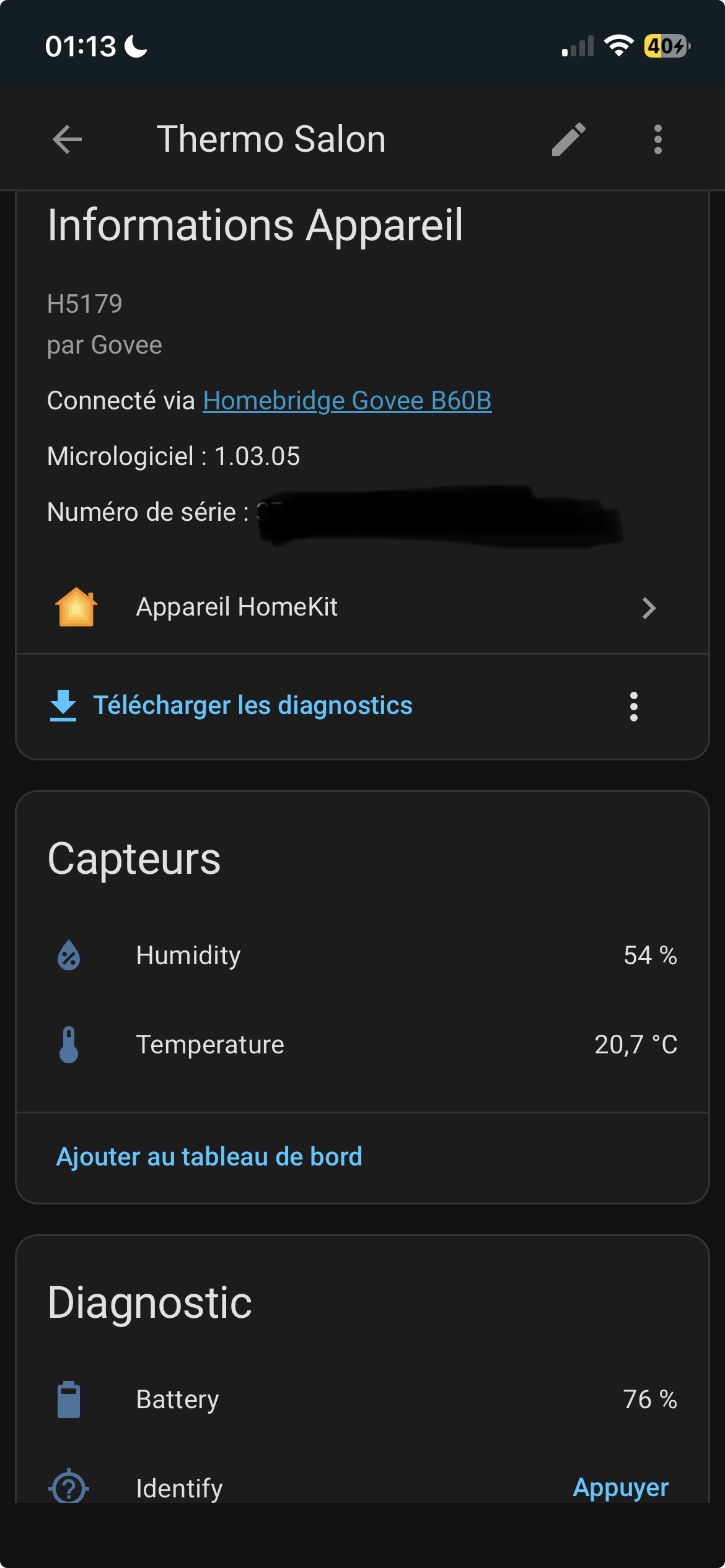
I’m a very beginner but I found by myself an easy way of adding the Govee H5179 in HA.
At first I wanted to add the Govee thermo to Apple home, so I ran Homebridge on docker on my NAS, the Govee plugin give me then the homekit pairing code.
Then the « Homebridge Govee » pop up as an homekit device on HA, just click , add the homekit pairing code and « voilà » !