Hi
First of all: I changed my setup a bit more in the direction of “managed by HA OS”. Instead of the containers for the MQTT broker and ESPHome, I now also have these running as add-ons in HA. I know, add-ons are nothing more than Docker containers, but they are managed by HA and you can easily configure and update them via the UI.
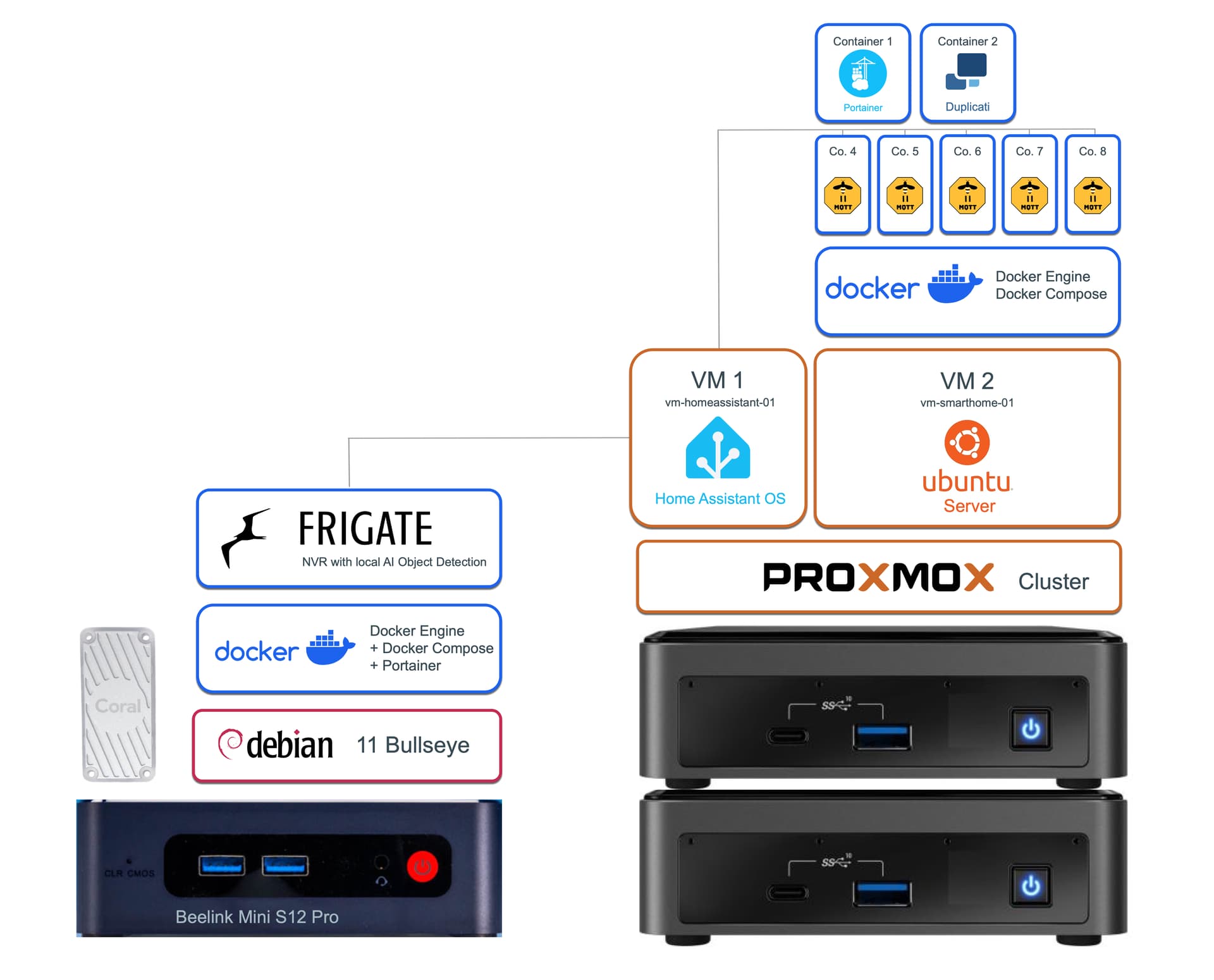
Why I set up a Docker environment instead of LXC: Because I needed a roadmap and instructions and Homeautomation Guy has done this wonderfully in his videos and blog posts, so I could follow it well. Including the configuration method Docker-Compose, update scripts and backup with Duplicati. I also have the feeling (but this is really just a feeling) that there are many more people here in the community who are familiar with Docker than with Proxmox LXC. So if there is something well documented for Z2M for LXC, why not.
So now I have the Mosquitto MQTT Broker runnung as add-on in HA. It has the standard setup. You can configure it in the HA UI:
logins: []
require_certificate: false
certfile: fullchain.pem
keyfile: privkey.pem
customize:
  active: false
  folder: mosquitto
It uses the credentials which are set up in the HA users section by default. I only changed the PW.
Then in the configuration.yaml of each Zigbee2MQTT instance I configured the MQTT section regarding to this.
Instance 1:
homeassistant: true
frontend: true
mqtt:
  base_topic: zigbee2mqtt_1
  server: mqtt://192.168.2.30
  user: mqtt
  password: xxx
  reject_unauthorized: true
serial:
  port: tcp://192.168.2.191:6638
advanced:
  network_key:
...
Instance 2
homeassistant: true
frontend: true
mqtt:
  base_topic: zigbee2mqtt_2
  server: mqtt://192.168.2.30
  user: mqtt
  password: xxx
  reject_unauthorized: true
serial:
  port: tcp://192.168.2.192:6638
advanced:
  network_key:
...
… and so on.
Make sure, that the base_topic is different in each instance
The mqtt server address is the IP of your HA machine. Make sure you enter the prefix mqtt://
user and password are the ones which are configured in HA in the Settings → Persons → User tab.
The serial port is the IP address and port of each respective Zigbee LAN coordinator.
Editing the configuration.yaml files of the Z2M instances I manage vie SSH connection from a local Visual Studio Code App. There is also a guide from Homeautomation guy available.
The UI of each Z2M instance I first added to the HA side bar. This is very easy since the HA update 2024.3 or 4 i guess. You only have to enter a new Website with the IP and port of the respective Z2M instance:

Since my HA sidebar is already so full and I only really need the Z2M UI to pair new devices, I have now moved it to my Arc browser as a tab.

Hope this helps.