tmchow
June 29, 2019, 12:59pm
1
Update: The problem was the use of hue. I switched to color and it works. See last post for final config markup and the screenshot.
I’m not able to get the Bar Chart to work within a lovelace card and looking for some help.
The following is what is shown in the dashboard, and notice there are no bars
This is the configuration I have:
cards:
  - card:
      attribute: battery_level
      columns: 1
      severity:
        - hue: '0'
          value: 50
        - hue: '40'
          value: 75
        - hue: '120'
          value: 100
      title_position: left
      type: 'custom:bar-card'
      unit_of_measurement: '%'
      width: 60%
    filter:
      include:
        - attributes:
            battery_level: <=100
    type: 'custom:auto-entities'
title: Battery Status
type: 'custom:vertical-stack-in-card'
What’s wrong with the config that the bars aren’t showing up?
tom_l
June 29, 2019, 1:08pm
2
Does severity support hue, or only color?
color string var(–primary-color) Color of the bar, can be any valid CSS color value or variable.
  severity:
  - value: 0
    color: '#bf4040'
  - value: 40
    color: '#bf9540'
  - value: 120
    color: '#40bf40'
Pretty neat use of the auto-entities card.
1 Like
Thanks for the idea with this, I’m using it now, works fine with the color: I changed values to 50, 75 and 100 though
tmchow
June 29, 2019, 4:34pm
4
Thanks all, it was indeed the use of hue. I switched to color and this was the resulting code:
cards:
  - card:
      attribute: battery_level
      columns: 1
      severity:
        - color: '#bf4040'
          value: 0
        - color: '#bf4040'
          value: 25
        - color: '#d3db39'
          value: 70
        - color: '#40bf40'
          value: 100
      title_position: left
      type: 'custom:bar-card'
      unit_of_measurement: '%'
      width: 42%
      height: 20px
    filter:
      include:
        - attributes:
            battery_level: <=100
    type: 'custom:auto-entities'
title: Battery Status
type: 'custom:vertical-stack-in-card'
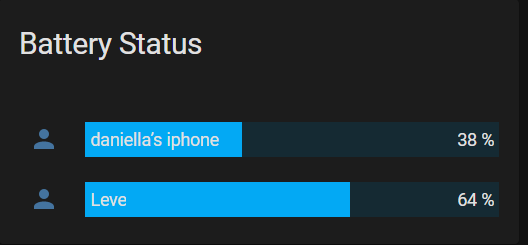
Result:
tom_l
June 30, 2019, 2:42am
5
Looks good. In future rather than editing your post title to mark it solved you can just use the icon under the post that helped.
This looks like a really useful thread but I’m still finding my way.
If I wanted to use this bar chart in my instance of HA where do I add these entries (I’m used to putting stuff in configuration.yaml) and how do I reference them in my dashboard
Many many thanks in advance for anyone who wants to help this noob
kakemanx
November 1, 2021, 8:20am
7
I’m trying your code, but i only get one value, and thats my vacuum… all buttons. motion sensors, magnet sensor etc are not listed… any tips?
Okechuku
November 24, 2022, 7:58pm
8
When i use your code, i get this (see image), not color formatted and the edges are not rounded, and only 2 items show up…