What you could do is make a selection in the config what type of tasks you want in the todo-list. So you could only put the daily and weekly tasks in the todo-list and keep the normal homework in the calender-items.
Hi, i tried your integration yesterday (beta 4), but it seems that when i try to login to somtoday and i check the headers there is no somtoday:// url at the redirect url (i checked all, with both Firefox and Chrome with netdebug). there is however an url with state and code but it starts with Somtoday
Could it be that something has changed?
Best regards, Robin
Have you logged in via the url in the popup? That worked for me
Interesting. Did you check the console in Chrome?
Also what happens if you try v 0.8.0 ?
Hi, i was trying to reproduce my steps to see what went wrong and now i see that what you meant was the page that doesnt show a page when opening the link in the integration has the location that contains somtoday://
TL;DR: read step two of the manual (and understand what it does) 
1 Like
Our school sometimes puts 1-minute (sometimes 15 minutes) events at the start of a day. For instance the optional “Flexlessen”. It looks like the day starts at 08:10 but the real lessons start at for instance 09:00. Would be great if you could filter certain keywords to exclude, or exclude 1 minute events (or exclude lessons shorter than 30 minutes) .
1 Like
Thanks for the feedback! v0.9.0-beta.7 is now available.
- Exclude names such as “Flexlessen” from the school-day calculation using exact or contains matching. Individual lessons remain visible.
- Choose which homework types go to your to-do list: lesson-linked, daily or weekly. Homework in lesson descriptions works independently.
Both options are configurable per child. Existing settings remain unchanged. Deselecting a homework type stops synchronization but keeps existing tasks.
Update through HACS and restart HA. Let me know how it works for you!
1 Like
Not my intention to hi-jack this thread, but needed a way to set the alarm clock of my daughter to 100min before the first lesson so 2 weeks ago started creating a SomToday plugin also  https://github.com/QuickSander/homeassistant-somtoday/. Fully AI-slop generated though, not hand crafted.
Thanks Sander! I did the same for my son. Using the schoolday calendar with a time offset. It works beautifully!
1 Like
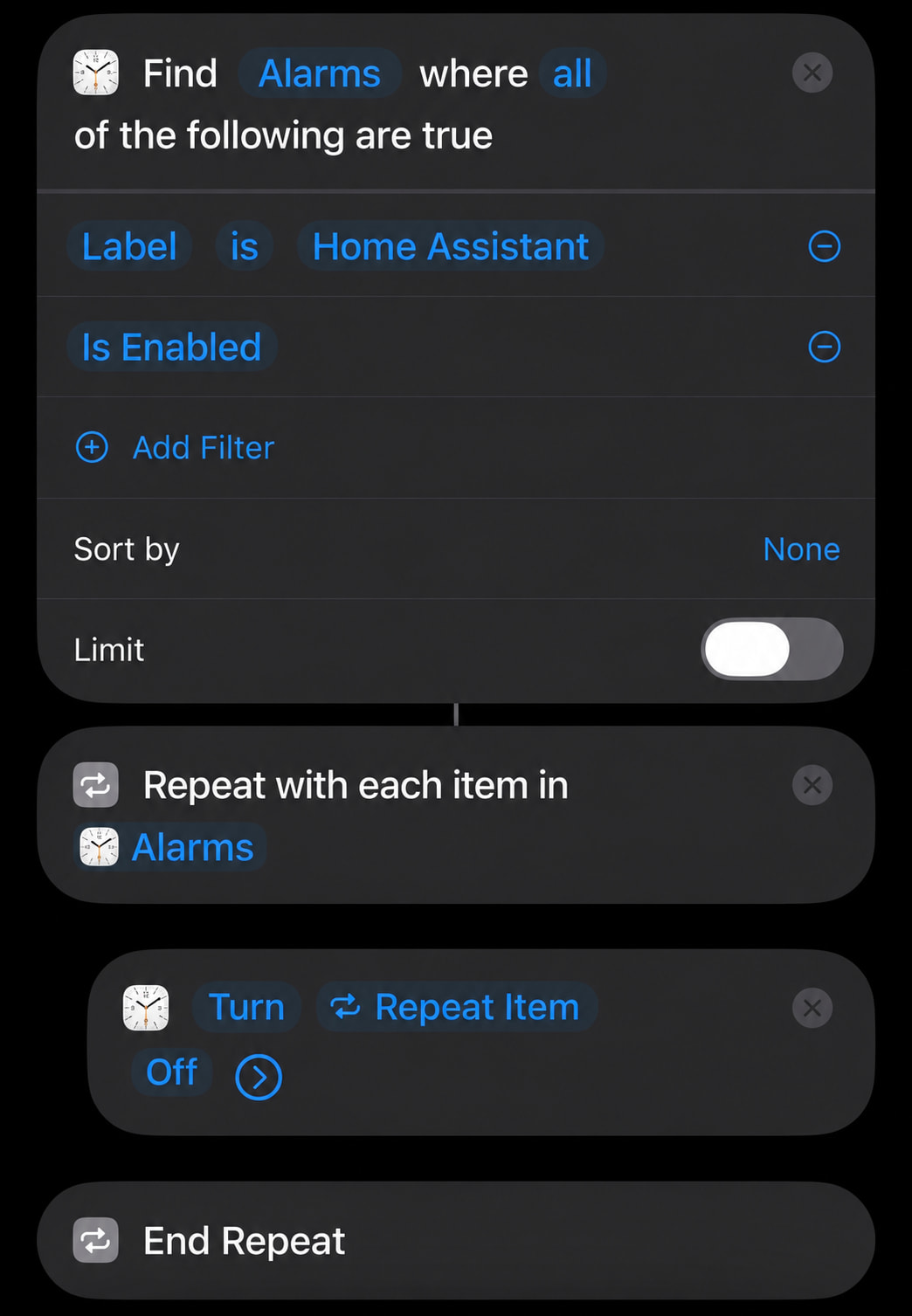
I took this a bit further today. I’ve automated the alarm on my iPhone 
It requires a shortcut and 2 automations.
The shortcut to get the next alarm time:
1 automation triggers the shortcut every time I put my phone on the charger. The other one turns off all Home Assistant alarms to make sure no alarm rings after I get up.

If you skipped the recent betas, here’s what’s now available in the stable releases:
- Homework sync to an HA to-do list per child, including due dates and completion status.
- Homework in lesson descriptions, with readable text instead of HTML.
- Separate controls for lesson-linked, daily and weekly homework.
- School-day filters to exclude activities by name without hiding individual lessons.
- Improved school-day times, calendar synchronization and diagnostics.
- New in 0.10: absence and lesson-registration sensors, covering absences, late arrivals, homework not completed, missing materials and outstanding measures where available.
A big thank you to @AlferNL for contributing and testing the absence overview! 
Update through HACS and restart HA. Enable the features you want per child in Configure. For homework, start with a separate, empty to-do list and a short export window.
Writing homework completion back to Somtoday remains experimental and off by default; account permissions may prevent it. Absence data is read-only, with a separate opt-in for school remarks.
Feedback is welcome!
1 Like
Somtoday for Home Assistant — v0.11.1
Several improvements have been added since v0.10:
- Live Activities on iPhone and Live Updates on Android 16+ show the current lesson, upcoming lesson and next classroom on your lock screen. Older Android versions receive an ongoing timetable notification.
- Clearer layout with compact subject names, subject icons and a transparent background on iPhone. Tapping the activity links to the Somtoday app.
- Per-child configuration, multiple phones and Dutch or English labels. A switch enables the daily activity, from 15 minutes before school until 10 minutes after the school day ends.
- Separate calendar exports for regular timetable lessons, timetable tests and other appointments. Study-guide tests remain a separate option, accommodating the different ways schools use Somtoday.
- Entities grouped under a device for each child, preserving existing entity IDs and automations.
- Improved token renewal to reduce unnecessary sign-in requests.
- Readable calendar descriptions: HTML is converted into plain text, preserving lists and numbering.
Please note when updating: the timetable calendar now includes only appointments in the ‘Rooster’ category. To export timetable tests or other appointments, enable the corresponding options for each child.
Update through HACS and restart Home Assistant. Configure the Live Activity for each child through the integration’s Configure menu.
1 Like