If you have assigned an entity with a high-rate of updates, that will trigger the automation on each change, so your automation can also be high-rate of executions.
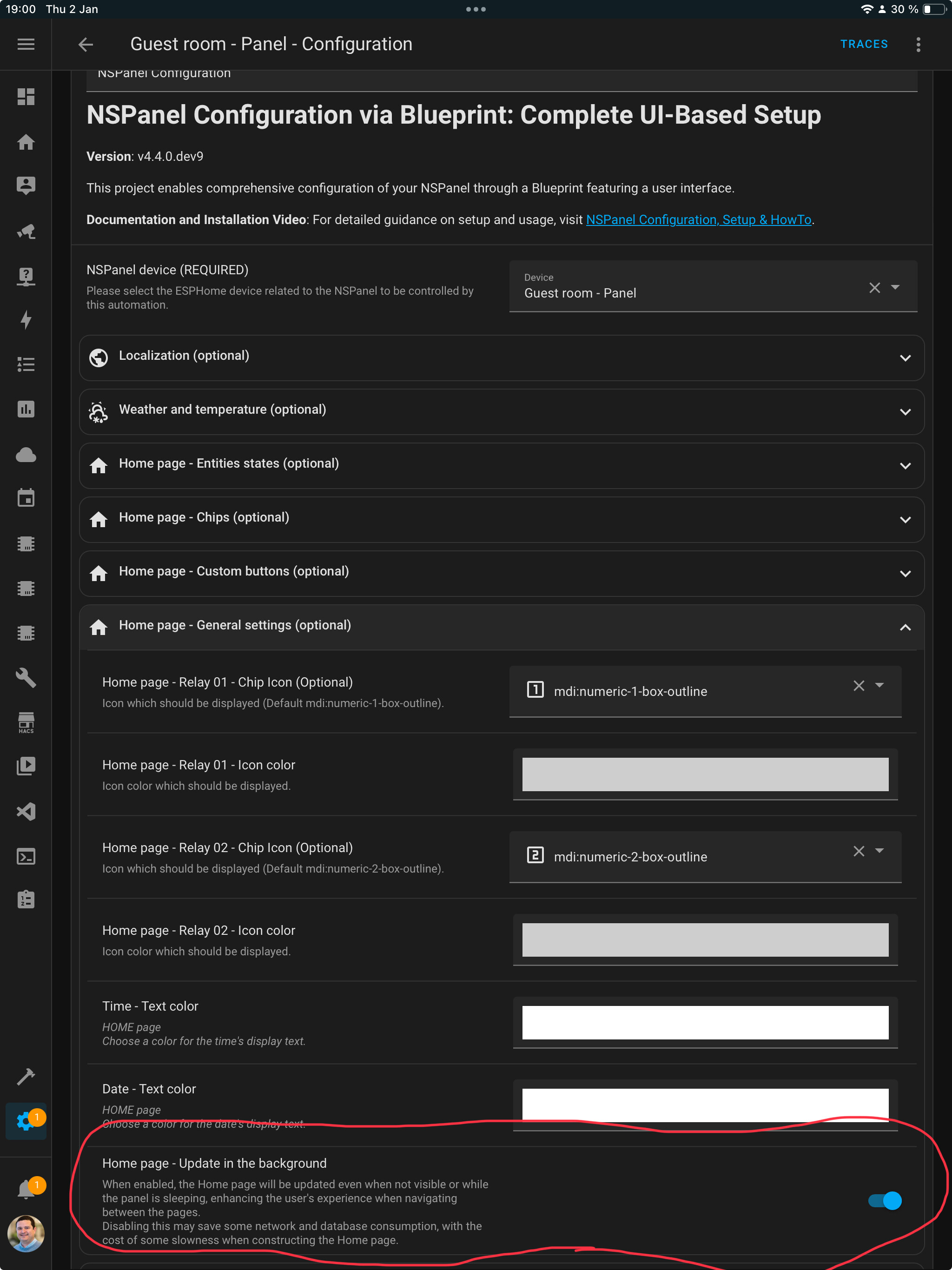
Most of the pages are updated (triggering the automation) only when visible, but the home page can be update while not visible depending on your setting under the Home page general settings:
I’ve had my NSPanel running in the hall and controlling my heating for a several years now. About 2 years ago I allowed an ESP Home update on it that messed everything up and I spent a day figuring it out and putting it right. Since then I have not allowed an update of ESPHome on my NSPanel, nor have I adjusted the Blueprint. I have updated the ‘core’ ESPHome application within HA itself though.
Today I needed to change one of the physical buttons so that it toggled my hall light, recently added to HA. And an outside temperature needed changing to a different sensor. So, I amended the automation based on the Blueprint and saved it.
Now nothing works. I’ve got some basic screen with incorrect time on it. And I don’t think it’s connecting to the WiFi. And the house is getting cold!
Is there someone out there that can tell me quickly what I need to do to get it all working again as I’ve totally forgotten how I did it in the first place.
I’m guessing I have to physically connect it to the computer USB and do some downloading, but I don’t really know more than that.
Update:- I’ve got the latest ESPHome Compiler (2024.12.2) and the latest Blueprint (v4.3.12). I tried to update Panhans Advanced Heating Control from 3.7.1 but the auto method couldn’t find the page! I’ve checked my version of the NSPanel Template in my Automations and it Validates ok. I’ve tried to install it both manually using the ESPHome Web, and directly. I have a USB to serial adapter and followed Mark Watss’ instructions. Both installation seemed to work and complete but when I power up the device I get the blue bootup screen

but it then goes into some basic Sonoff(?) flash screen
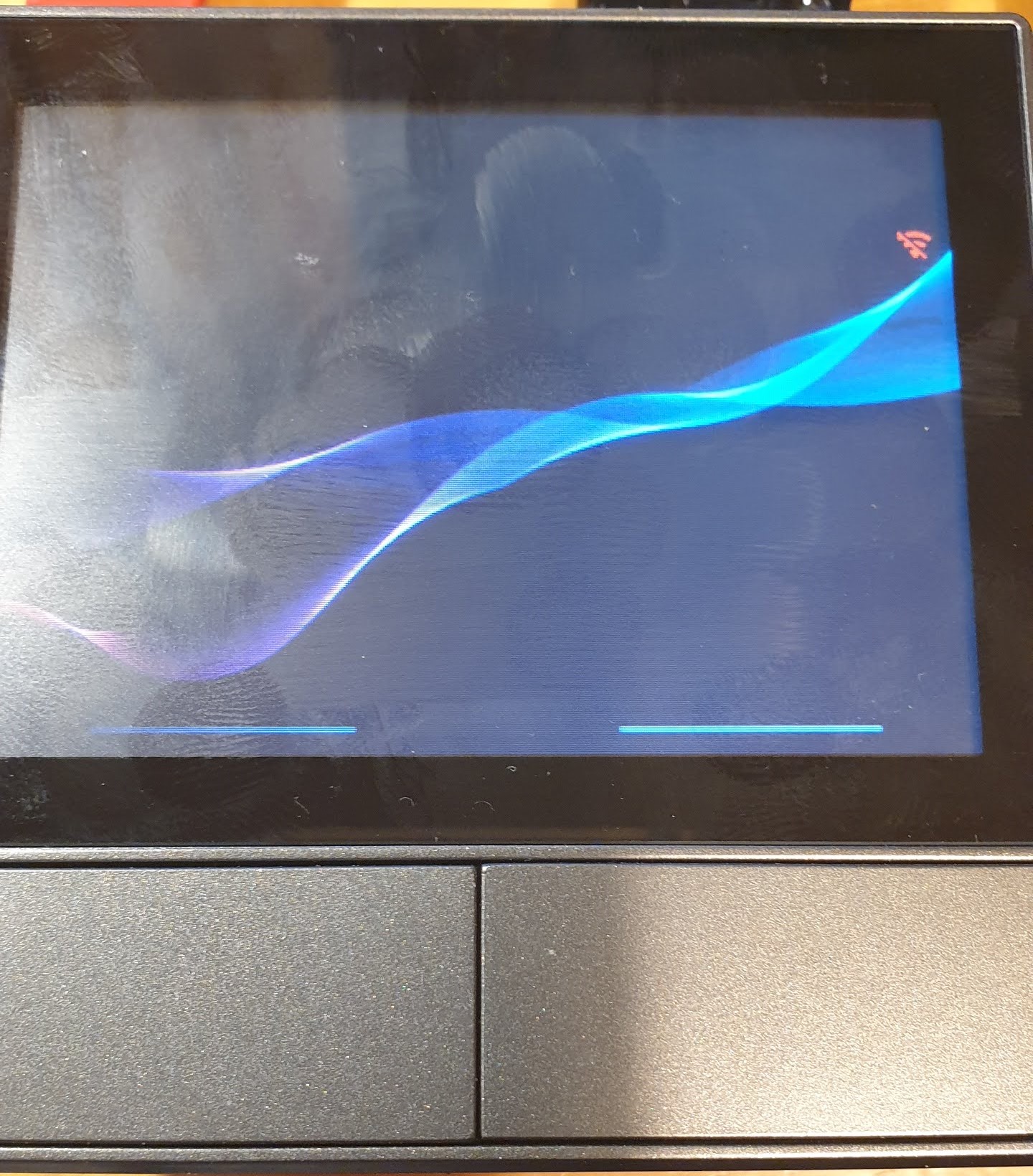
with no info on it and I cannot find the device on WiFi (I have a fixed IP address in my short ESPHome file (which I have not changed. I can also get a settings screen by long pressing the little red WiFi symbol

My ESPHome file looks like this…
substitutions:
  ###### CHANGE ME START ######
  device_name: "nsphall"
  wifi_ssid: !secret wifi_ssid
  wifi_password: !secret wifi_password

  nextion_update_url: "https://homeassistant.local:8123/local/nspanel_eu.tft"
  # nextion_update_url: "https://homeassistant.local:8123/local/nspanel_blank.tft"
  # nextion_update_url: "https://raw.githubusercontent.com/Blackymas/NSPanel_HA_Blueprint/main/nspanel_eu.tft"
  ##### addon-configuration #####
  ## addon_climate ##
  # addon_climate_heater_relay: "1" # possible values: 1/2
  heater_relay: "1"
  temp_min: "15"
  temp_max: "25"
  temp_step: "0.5"

  ##### CHANGE ME END #####

packages:
  remote_package:
    url: https://github.com/Blackymas/NSPanel_HA_Blueprint
    ref: main
    files:
      - nspanel_esphome.yaml # Core package
      # - advanced/esphome/nspanel_esphome_advanced.yaml # activate advanced (legacy) elements - can be useful for troubleshooting
      # - advanced/esphome/nspanel_esphome_addon_climate_cool.yaml # activate for local climate (cooling) control
      - nspanel_esphome_addon_climate_heat.yaml # activate for local climate (heater) control
    refresh: 1s

esp32:
  framework:
    type: esp-idf

##### My customization - Start #####
# Set IP address manually
wifi:
  networks:
    - id: !extend wifi_default
      manual_ip:
        static_ip: 192.168.0.xxx
        gateway: 192.168.0.1
        subnet: 255.255.255.0
##### My customization - End #####
I was expecting it to boot up and connect so that I could then update the TFT file through HA but I’m not getting that far.
Meanwhile I have put the old mechanical thermostat, which has not been used for 10 years, back in place.
Help still needed.
All solved now. Turned out my router was not allowing the WiFi connection until I rebooted it.
The NSPanel got connected and starting displaying some things ok (Button pages), but the main screen was missing loads.
I tried to update the TFT through the integration but that didn’t work until I read that if you have a fixed IP, like I do, you need to have the DNS defined too. So I added
dns1: 8.8.8.8
dns2: 1.1.1.1
to my ESPHome file and re-flashed it wirelessly now and the TFT upgrade was then successful.
All working now and back in place. And I’ve made notes for next time!
If I can add my 50 cents here, the problem with updating ESPHome if the fact that it forces a new download of the code, and your yaml indicates to download it from main branch (ref: main), which contains always the latest version.
But then the issue is that Home Assistant doesn’t have a similar mechanism for Blueprint, so suddenly you have a newer ESPHome code trying to communicate with an older Blueprint code (the same is valid for TFT, but that would be much easier to solve).
One way to “protect” your system from this is to specify the version on your ESPHome yaml. Like, if you wanna still update the ESPHome builder but not updating the code used for control your panel, just change the reference to the desired version, like ref: v4.3.12. This will instruct ESPHome builder to, on every update, download that specific version of code.
By using that you can have way more control, changing that version manually only when you update also the Blueprint, and allowing to freely update your firmware, always with the same code base.
Thank you, that sounds like a solution to my recent and earlier experience.
I’m not a great user (nor lover) of ESPHome, and don’t have any knowledge of its language, but I did some Googling of what you described and found very little in the ESPHome documentation, nor discussion of this problem in the community forum. So on you advice, I will change the
ref: main
in my ESPHome code to
ref: v4.3.12
and leave it that, so that in 6 months time, or whenever, when I next need to amend the display, it should all work fine. Then I can chose if I want to update everything at an even later date, should there be new features I fancy.
The Packages bit now looks like this
packages:
  remote_package:
    url: https://github.com/Blackymas/NSPanel_HA_Blueprint
    # ref: main
    # The ref: main above always get the latest ESPHome code
    # This may put it out of sync with the Blueprint version being used (currently v4.3.12)
    # The line below forces the ESPHome compiler to use that particular version of ESPHome code
    ref: v4.3.12
    # If you want newer features, update them all together (Blueprint, the ESPHome code and the TFT file)
    files:
      - nspanel_esphome.yaml # Core package
      # - advanced/esphome/nspanel_esphome_advanced.yaml # activate advanced (legacy) elements - can be useful for troubleshooting
      # - advanced/esphome/nspanel_esphome_addon_climate_cool.yaml # activate for local climate (cooling) control
      - nspanel_esphome_addon_climate_heat.yaml # activate for local climate (heater) control
    refresh: 1s
Thanks again
1 Like
That’s right!

1 Like
By the way, you can change from refresh: 1s to refresh: 1day or even refresh: never (" Likewise, you can set this setting to never and ESPHome will never update the repository, useful e.g. when ref points to a tag .") as that code on the specific version should never change and reducing refresh will reduce the load on your system. 
I don’t know where the 1s came from. Especially since the current instructions have it as 300s! Anyway, I’ve set it to never since that makes sense.
Do I need to do an install for that and the ref: v4.3.12 to have any effect?
Thanks
Nope. There’s no need to flash the device as those lines are more as instructions to your ESPHome builder and not to the device itself.
1 Like
Is it possible to block any command when a variable (Alarm is armed)?
Thank you.
I have a few NSPanels and on some of the panels show a white wifi icon and others show a yellow wifi icon.
What do the different wifi color mean?
Wifi strength.
White is good.
Yellow is bad.
Red no connection.
But without any issues. Mine are sometimes yellow and sometimes white.
1 Like
Ok. Wifi strength cannot be the problem. Just did e reboot and now the wifi signal is white. Seems an update problem
Switched one of my NSPanels from NSPanel Lovelace UI to HA Blueprints. I like the addon that can fetch temperature values from my Xiaomi BLE sensors. And still exploring what else it can do.
Figured out that to keep screen always on I need to set Timeout Sleep to 0. But I still use the Timeout Dimming to reduce the brightness unless I press the screen. Perfect. Might save a watt or two in a week.
I have this panels also in kids rooms so I wish to turn the display off over night. What would be the best way to do that? Once I have everything figured out and per room settings, I will switch other 4 NSPanels to HA Blueprint. Great project!
1 Like
Probably the best would be an automation to ser timeout sleep to some value during night and ton0 during day time.
The problem is that backlight remains on in sleep mode, which can be quite disturbing in total darkness. I bought oled tablet because backlight was too bright even at minimum on classic ips module. Perhaps this lcd totally turns off backlight on zero setting (i never tried …). It’s worthed to try minimum backlight brightness and see if it’s ok. If yes, you can lower brightness to zero at night and return to “normal” during the day.
Thank you for the tip. Will play with it but not sure for how long. Wife wants me to change it back to how it was before using NSPanel Lovelace UI. And the reason for it? Time has bigger font size woht NSPanel Lovelace UI.
I am checking if I can increase the time font anywhere but so far I can not find it.
Yeah, i wanted the same - from UI it’s only possible up to certain size. Bigger font is possible, but you must edit panel’s automation directly in yaml mode, find correct variable and enter bigger font number there, it works.
Any clue what values is that?
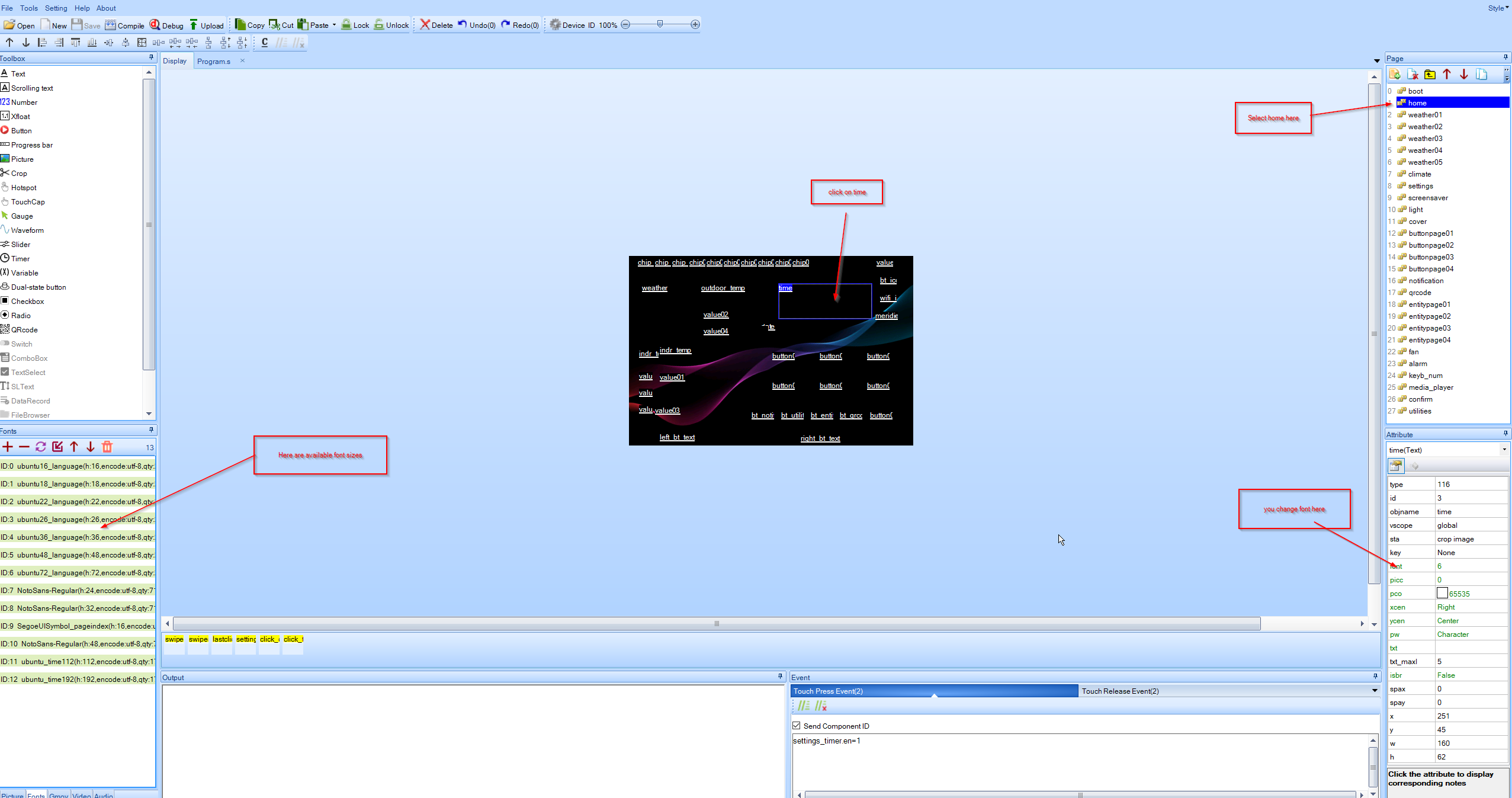
Ouch… i was a bit ahead of myself… i changed font size of something else inside automation, not clock. But for time i think that only way is edit nextion’s file with nextion editor, since time size is defined there. Of course, this requires compiling and uploading this custom file on NSPanel. Depending on new size relocation of clock position would be needed also (you only drag it to new position).
1 Like